QDA Mode
Turn Potato into a collaborative qualitative data analysis workspace. QDA Mode composes a living codebook, in-vivo coding, analyst memos, cases, and full-text search for coding interview transcripts, open-ended survey responses, and field notes.
QDA Mode turns Potato into a qualitative data analysis (QDA) workspace. Set qda_mode.enabled: true and Potato composes a living codebook, in-vivo coding, analyst memos, cases, and full-text search into one workflow for reading and coding a whole corpus. It is a free, open-source, web-based alternative to tools like NVivo, ATLAS.ti, MAXQDA, and Dedoose.
Qualitative data analysis is the practice of assigning codes to passages of unstructured text (interview transcripts, open-ended survey answers, field notes, or documents) and building those codes into themes. QDA Mode is the single switch that enables Potato's qualitative-coding features together, with defaults tuned for one analyst working across the entire corpus.
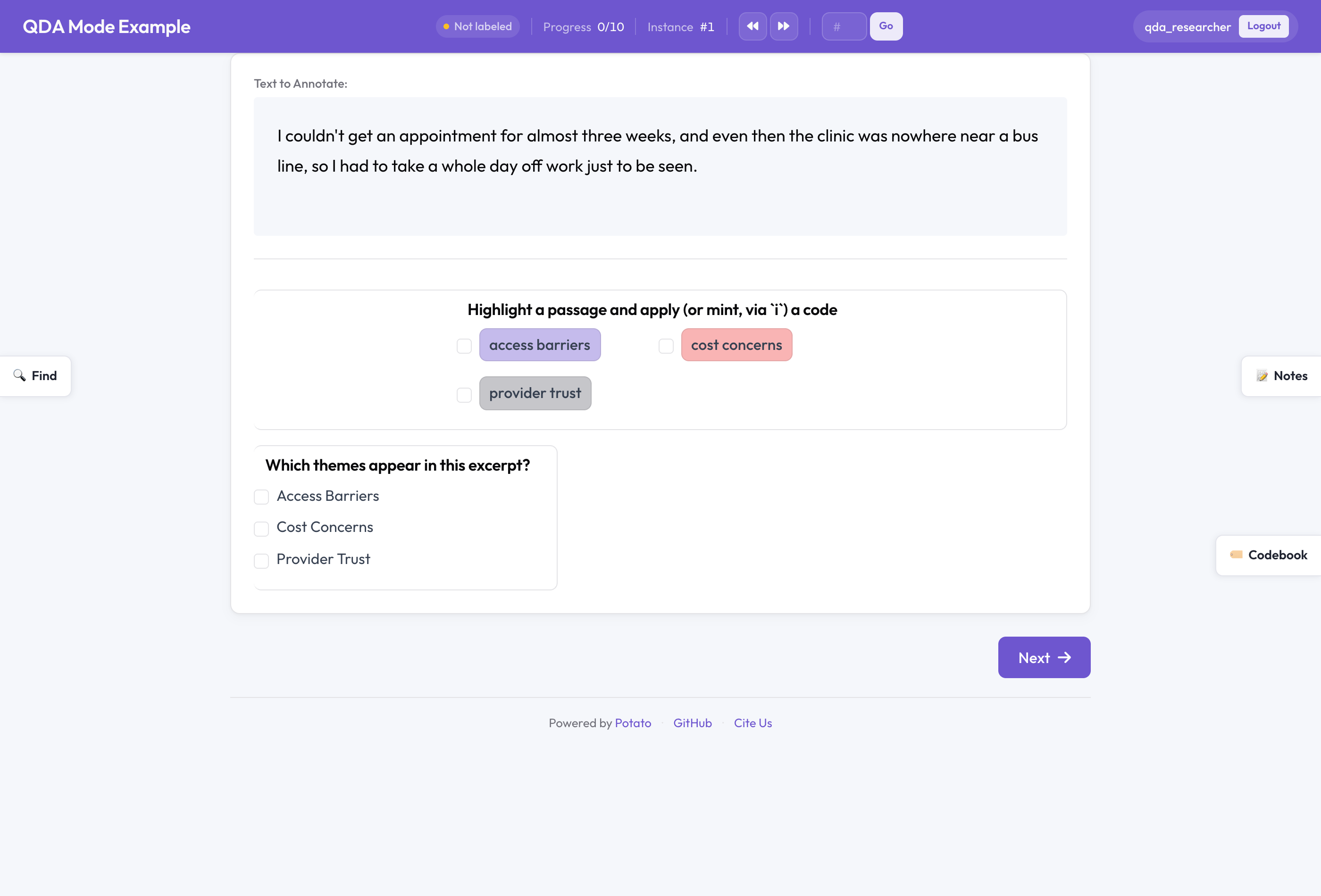 Potato in QDA Mode: a codebook-backed span scheme with the Find search panel and the Notes and Codebook sidebars
What QDA Mode changes
Enabling qda_mode assumes a single-coder posture (one analyst over the whole corpus, with no inter-annotator sampling to protect). On that basis it flips Potato's universal features to their qualitative defaults:
| Feature | Standard default | Under qda_mode.enabled: true |
|---|---|---|
| Codebook mode | fixed | open — add, rename, recolor, move, or delete codes while you code |
| Memos sidebar | off | on |
| Cases | off | on, with auto-detect |
| Annotator search-and-claim | off | available (opt in with search.annotator_claim: true) |
| In-vivo coding key | i | i (active on any span scheme marked codebook: true) |
Every default can be overridden. QDA Mode only changes the starting point. A crowdsourcing backend force-locks the codebook to fixed even under QDA Mode, so paid annotators cannot reshape the shared codebook.
Quick start
annotation_task_name: My Qualitative Study
task_dir: .
output_annotation_dir: annotation_output/
data_files:
- data/interviews.json
item_properties:
  id_key: id
  text_key: text

qda_mode:
  enabled: true            # compose codebook + memos + cases + search

codebook_invivo_key: i     # mint a code from a text selection

cases:                     # group excerpts into units of analysis
  enabled: true
  key: participant_id
  attributes: [condition]

search:                    # let the coder jump to any matching excerpt
  enabled: true
  annotator_claim: true

annotation_schemes:
- annotation_type: span    # span + codebook = in-vivo coding
  name: codes
  description: Highlight a passage and apply (or mint, via `i`) a code
  codebook: true
  labels: [access barriers, cost concerns, provider trust]
The cases, search, and memo blocks are optional, because QDA Mode already turns cases and memos on. Write them only to tune the defaults, such as choosing the cases.key or enabling annotator_claim.
Run the included example from the repository root:
python potato/flask_server.py start examples/advanced/qda-mode-example/config.yaml -p 8000The pieces
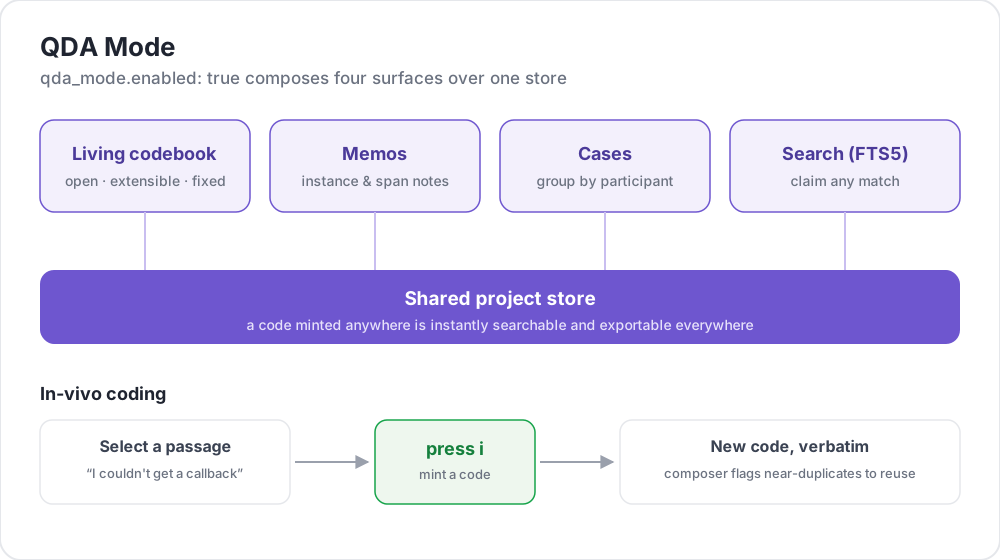 qda_mode.enabled composes four qualitative surfaces over one store
- Living codebook. The shared, mutable set of codes. Opt a scheme in with
codebook: true; under QDA Mode you can grow and reorganize the codebook as you read. - In-vivo coding. On a
spanscheme that is alsocodebook: true, select a passage and press the in-vivo key (codebook_invivo_key, defaulti) to mint a code straight from the highlighted text. The composer surfaces near-duplicate codes so you reuse instead of fragmenting. - Memos. Analytic notes attached to an instance or a specific text selection, kept private to you or shared with the team.
- Cases. Group excerpts into units of analysis (a participant, a document) and lift case-level attributes such as
condition, so the admin code crosstab can tabulate codes against participant-level variables. - Search. FTS5 full-text search over the corpus. With
annotator_claim: true, a coder can pull any match into their own queue.
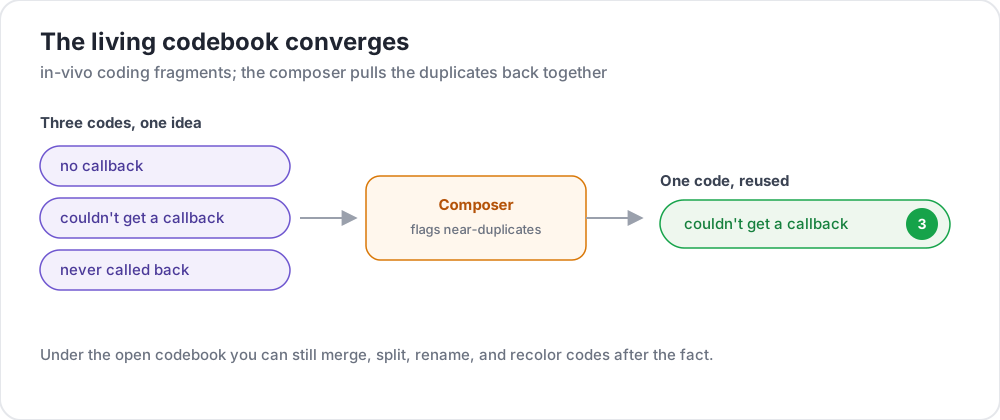 The living codebook converges as the composer flags near-duplicates
Configuration
qda_mode:
  enabled: true
  memos:
    enabled: true                 # memo defaults under QDA Mode
    show_sidebar_by_default: true
  codebook:
    enabled: true
mode: open # open | extensible | fixed| Option | Default | Description |
|---|---|---|
qda_mode.enabled | false | Master switch. Initializes QDA Mode and applies the qualitative defaults above. |
qda_mode.memos.enabled | true | Whether analyst memos are active. |
qda_mode.memos.show_sidebar_by_default | true | Whether the Notes sidebar starts open. |
qda_mode.codebook.enabled | true | Whether the codebook is active. |
qda_mode.codebook.mode | open | Annotator edit rights: open, extensible, or fixed. Equivalent to the top-level codebook_mode. |
Unknown qda_mode.* keys are preserved rather than rejected, so you can write forward-compatible YAML for features that land in later phases.
Exporting your coding
Two exporters turn coded data into qualitative-research deliverables:
codebook— one row per code, with its hierarchy, description, color, and use count.quotation_report— one row per coded span: the quote, its character offsets, the source instance, and the coder. Addinclude_memos=trueto append memo rows.
python -m potato.export -c config.yaml --format quotation_report \
  --option include_memos=true -o quotations.csv
Since Potato 2.9 a coded project can also go back to a QDA tool as REFI-QDA .qdpx, the interchange format NVivo, ATLAS.ti, MAXQDA, Quirkos and QDA Miner all read and write, and a .qdpx from any of them can be imported:
potato import -i project.qdpx -o my-study
python -m potato.export -c my-study/config.yaml -f qdpx -o ./export/
The codebook keeps its hierarchy, along with the codings and which analyst made each one. ATLAS.ti keeps only one level of subcode, so if the codebook is deeper, add --option flatten_subcodes=true to the export. Every code is re-parented to the top level and renamed Parent > Child. See Importing a Project.
The codebook, quotation_report, and inter-annotator agreement features (Cohen's and Fleiss' kappa) all shipped in the 2.5.0 qualitative-coding wave. See What's New for the release history.
Related
- Inter-annotator agreement guide — Cohen's and Fleiss' kappa for measuring coder reliability
- Export Formats — the full exporter and column reference
- Solo Mode — single-annotator, LLM-assisted labeling
For implementation details, see the source documentation.