Multimodal-Agent Evaluation
Evaluate agents that act beyond text, computer-use and GUI agents, voice assistants, video, and document agents. Potato adds purpose-built schemas for GUI trajectories with click grounding, full-duplex voice timelines, video temporal grounding with live IoU, speech-transcript error tagging, interleaved multimodal reasoning, and table-grid structure.
Agents increasingly act in modalities beyond text: they drive GUIs, watch video, and hold spoken conversations. Each modality needs a review surface a plain text widget cannot provide, a screenshot with the agent's click, a dual-track voice timeline, a video scrubber with gold intervals. Potato adds annotation schemas purpose-built for these traces, alongside its existing image, audio, and video displays.
Every schema derives its steps, turns, or segments from the trace at render time, and each ships with a runnable example under examples/agent-traces/.
GUI / computer-use trajectory (gui_trajectory)
Evaluate a computer-use, GUI, or OS agent step by step (OSWorld, NeurIPS 2024; ScreenSpot-Pro; AndroidWorld). Each step shows the screenshot the agent saw and the action it took; the annotator judges the action (correct / wrong element / wrong action / hallucinated). When a step carries click coordinates, a grounding marker on the screenshot shows whether the click landed on the right element.
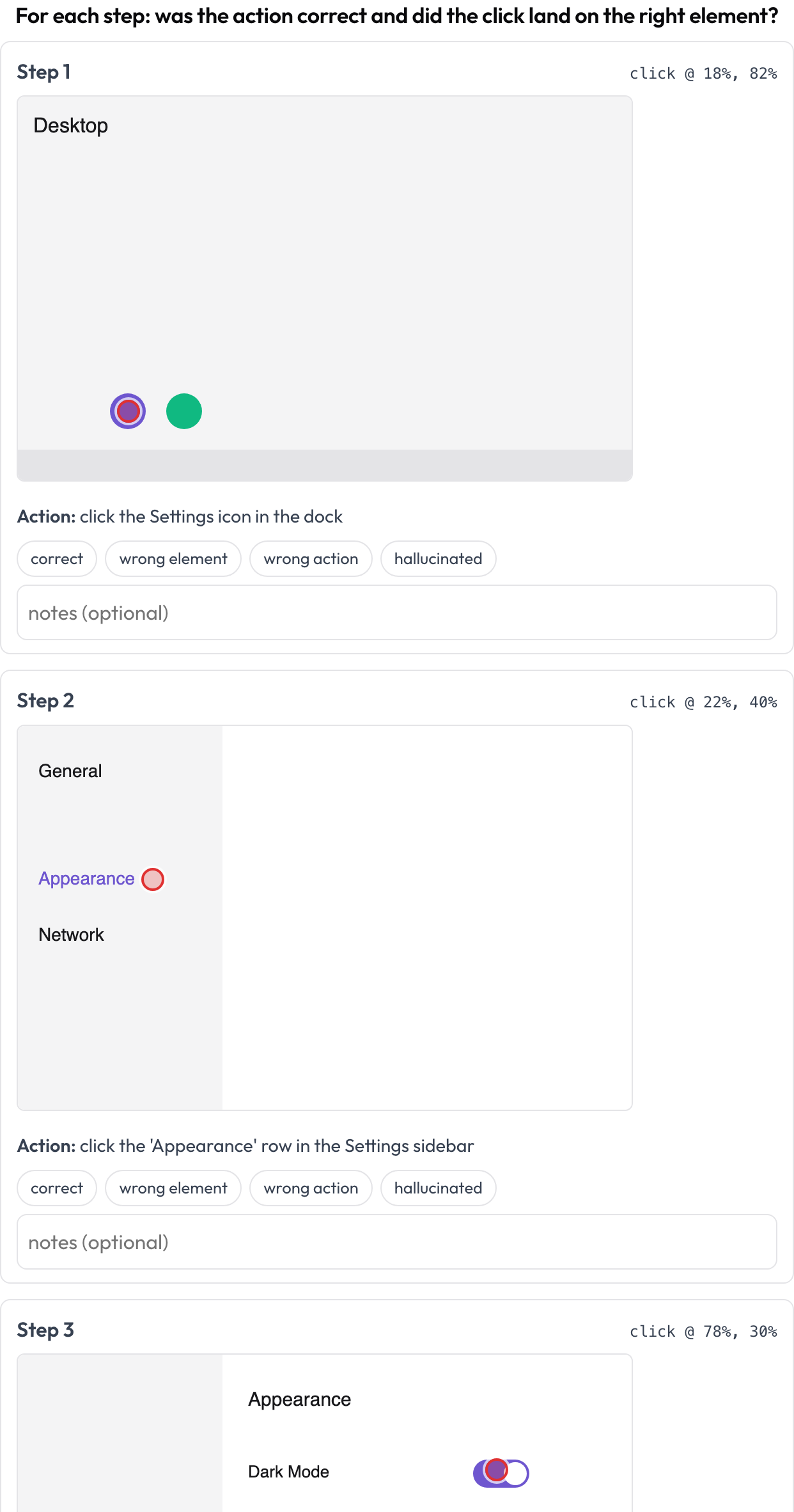 Review each computer-use step: action correctness plus click-grounding on the screenshot
annotation_schemes:
  - annotation_type: gui_trajectory
    name: gui_review
    description: "For each step: was the action correct and did the click land right?"
    steps_key: steps
    screenshot_key: screenshot   # field on each step holding an image URL / data-URI
    action_key: action           # field holding the action text
    coord_space: normalized      # normalized (0..1) | pixels — for the x/y grounding marker
    verdict_options: [correct, wrong_element, wrong_action, hallucinated]
Each step may provide screenshot, action, and optional x/y (or a nested click: {x, y}). Stored as a list of {index, step, verdict, notes}.
Voice / full-duplex interaction (voice_interaction)
Annotate a spoken human↔agent conversation for turn-taking and barge-in handling (Full-Duplex-Bench, 2025). A dual-track timeline (user lane plus agent lane) places each turn by its start and end time and highlights overlap regions where both speakers talk at once. The annotator classifies each overlap (agent should respond / should resume / backchannel / uncertain) and rates the overall turn-taking; the source audio plays inline when provided.
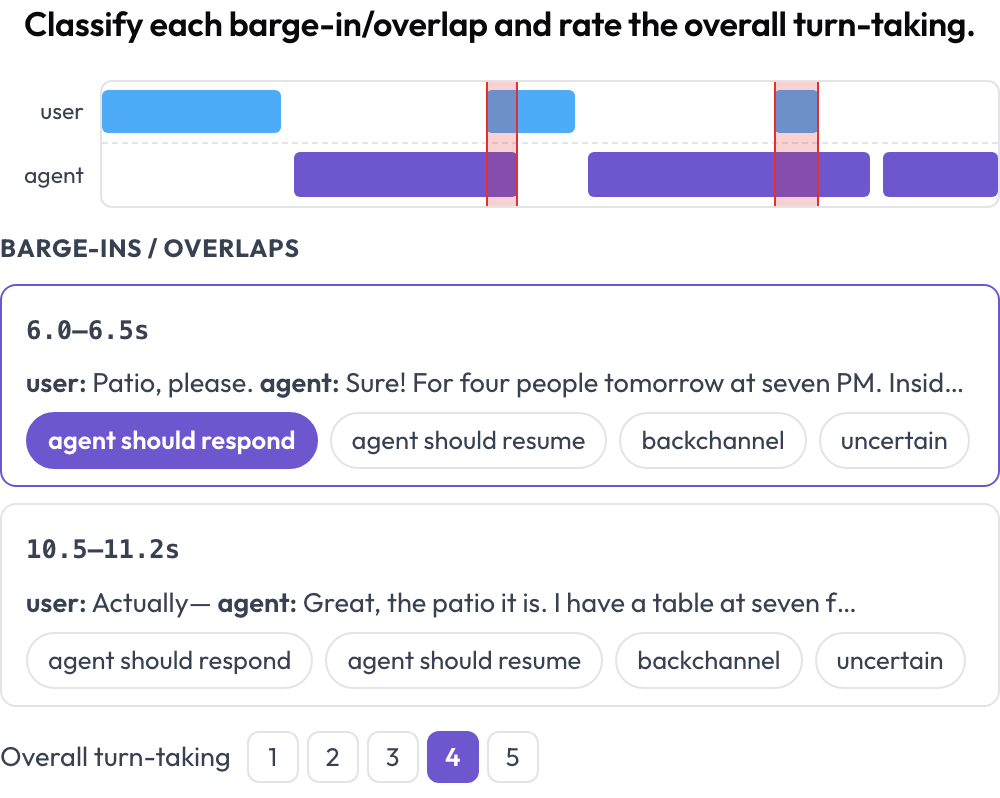 A dual-track voice timeline with barge-in detection and turn-taking scoring
annotation_schemes:
  - annotation_type: voice_interaction
    name: turn_taking
    description: "Classify each barge-in/overlap and rate the overall turn-taking."
    turns_key: turns           # list of {speaker, start, end, text} (seconds)
    speaker_key: speaker
    user_speakers: [user, human, caller]   # everything else is treated as the agent
    overlap_labels: [agent_should_respond, agent_should_resume, backchannel, uncertain]
    rating_scale: 5
    # audio_key: audio         # optional per-instance audio URL to enable the player
Overlaps between turns of different speakers are computed at render time. Stored as {"overlaps": {idx: label}, "rating": int}.
Video temporal grounding (temporal_grounding)
Mark event time intervals in a video for temporal-grounding evaluation (TimeScope, 2025; ET-Bench). For each event prompt the annotator sets the gold [start, end], by capturing the playhead or typing seconds. When the data carries a model's predicted interval, a live IoU and a two-bar mini-timeline (predicted vs. gold) update as you adjust. This is purpose-built for predicted-vs-gold localization scoring, distinct from general segment labeling.
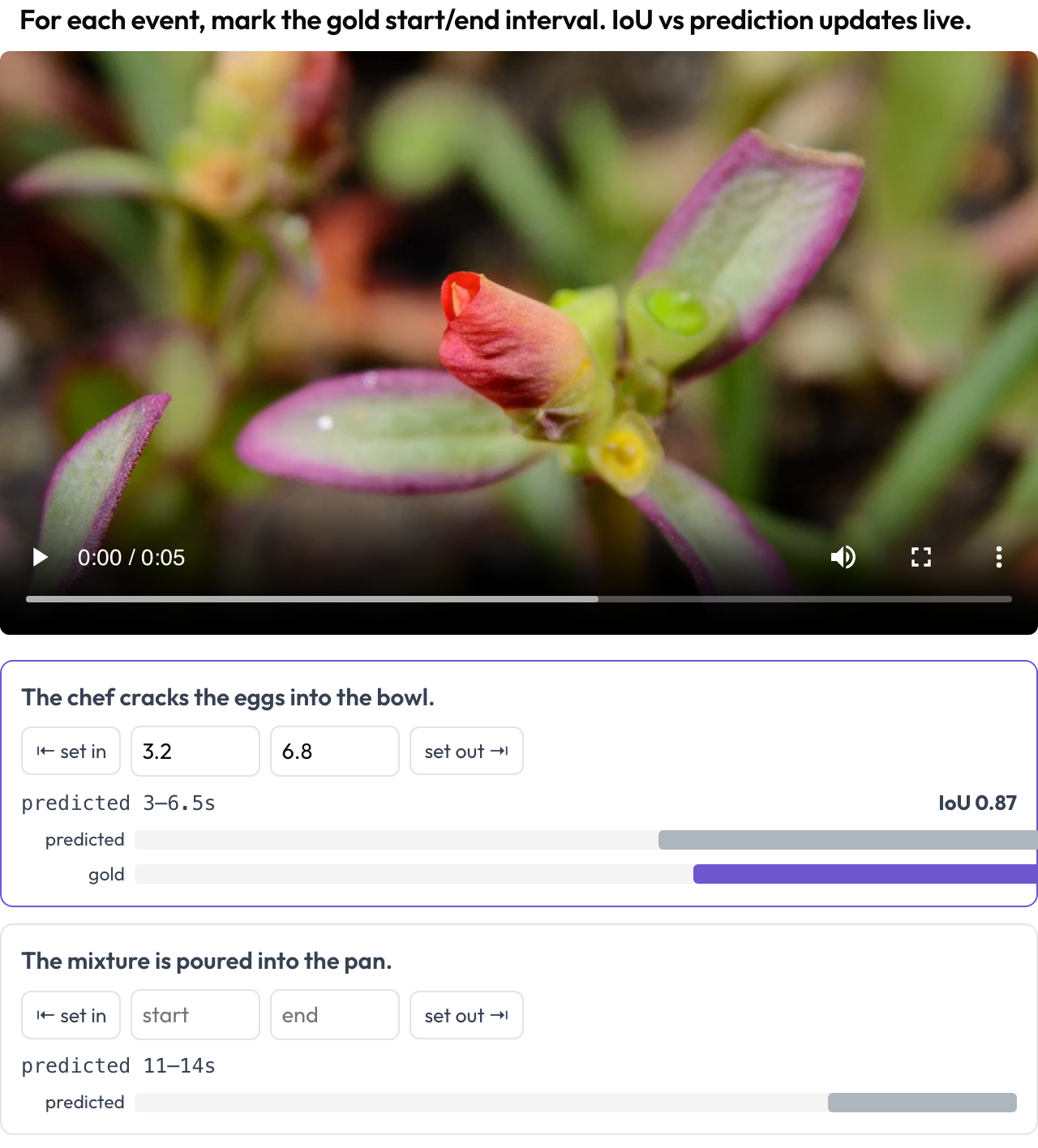 Mark gold event intervals on video with a live IoU vs. the model's prediction
annotation_schemes:
  - annotation_type: temporal_grounding
    name: grounding
    description: "Mark the gold start/end interval for each event. IoU vs prediction updates live."
    video_key: video           # per-instance video URL
    events_key: events         # list of {prompt, predicted: {start, end}} (predicted optional)
    # duration: 120            # optional fixed timeline scale (else inferred from the video)
Stored as {"events": {idx: {start, end}}}.
Aligned-transcript speech errors (speech_transcript)
Annotate a time-aligned speech transcript segment by segment for ASR/TTS and speech-quality errors (Speak & Improve, 2025). Each segment {start, end, text, speaker?} is a card showing its timestamp and text; the annotator tags errors (ASR error / TTS artifact / mispronunciation / disfluency) and can type the corrected transcript. This is the segment-level complement to the turn-taking view in voice_interaction.
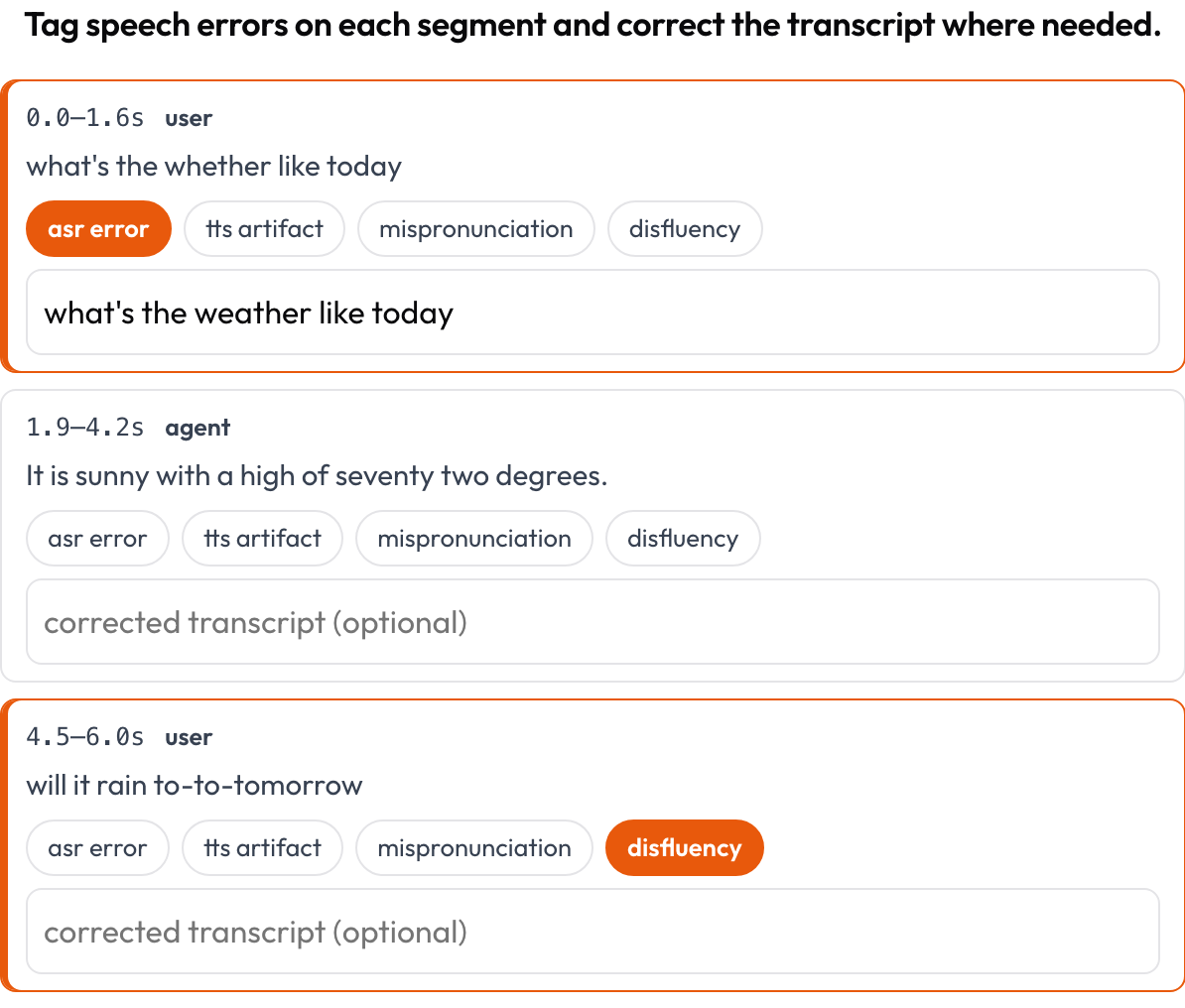 Tag ASR/TTS/pronunciation errors per segment and correct the transcript inline
annotation_schemes:
  - annotation_type: speech_transcript
    name: speech_errors
    description: "Tag speech errors on each segment and correct the transcript where needed."
    segments_key: segments       # list of {start, end, text, speaker?}
    error_types: [asr_error, tts_artifact, mispronunciation, disfluency]
    allow_correction: true
    # audio_key: audio           # optional per-item audio URL to enable the player
Stored as a list of {index, start, end, errors, correction}.
Interleaved multimodal reasoning (multimodal_reasoning)
Rate an interleaved text ↔ image ↔ tool ↔ action reasoning trace step by step (Multimodal RewardBench 2, 2025; Zebra-CoT). Each step is a typed block, rendered in-line by its type; the annotator judges each step's coherence, does the reasoning follow from the image and prior steps, or is the visual hallucinated?
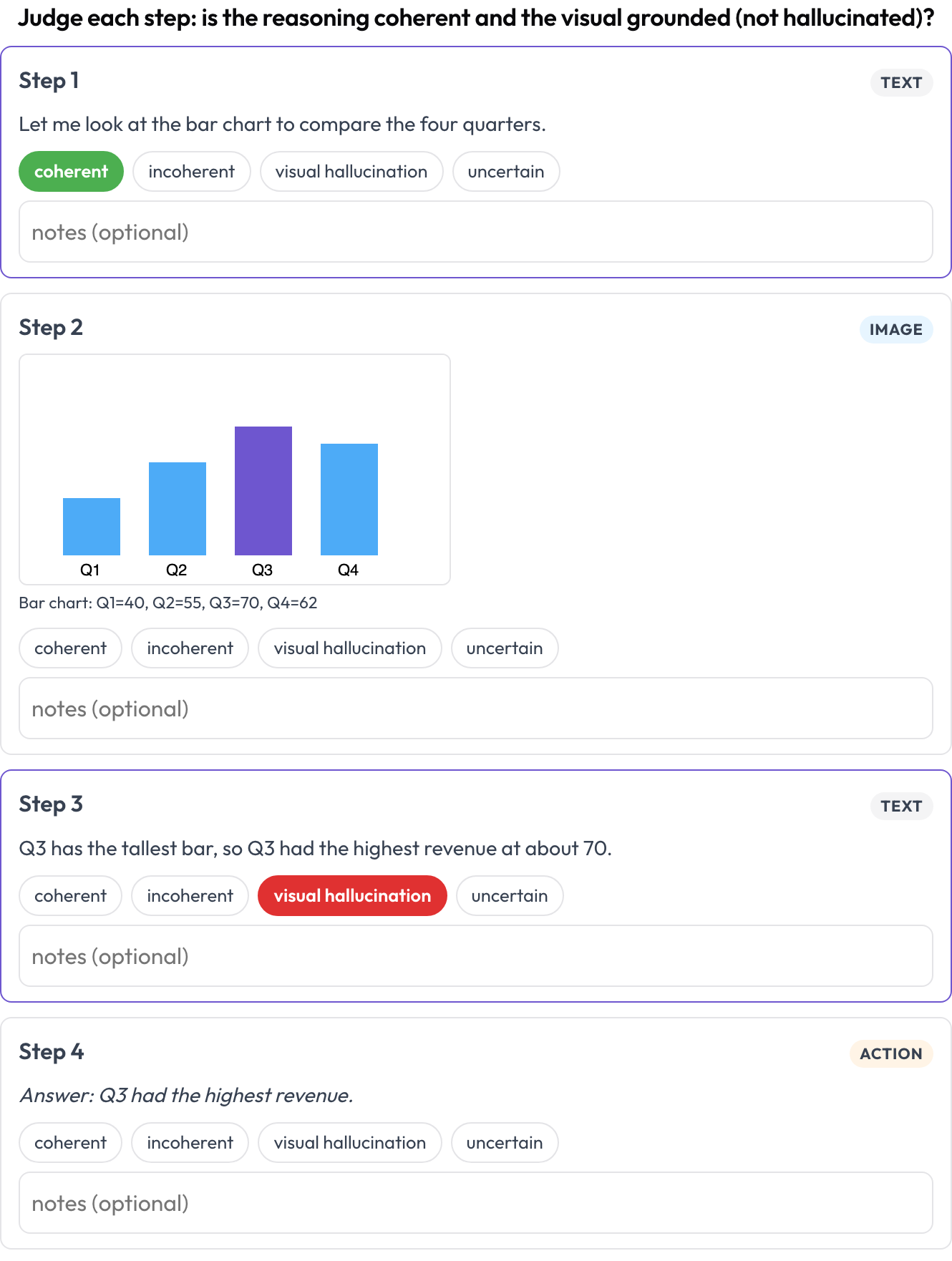 Rate each step of a text-image-tool reasoning trace for coherence and visual hallucination
annotation_schemes:
  - annotation_type: multimodal_reasoning
    name: reasoning_review
    description: "Judge each step: coherent reasoning and grounded visuals?"
    steps_key: steps
    type_key: type     # each step's 'type': text | image | tool | action (inferred if absent)
    verdict_options: [coherent, incoherent, visual_hallucination, uncertain]
Each step may carry text/content, image/image_url (+caption), or tool/args. Stored as a list of {index, step, type, verdict, notes}.
Table-grid structure (table_grid)
Annotate the cell structure of a table image, the document-specific piece that plain bounding boxes cannot capture (OmniDocBench, CVPR 2025; RealHiTBench). The annotator sets the grid dimensions and clicks cells to mark their role (data / column-header / row-header / empty). Per-page region boxes are already covered by running image annotation per page, so this schema focuses on the structure those boxes cannot express.
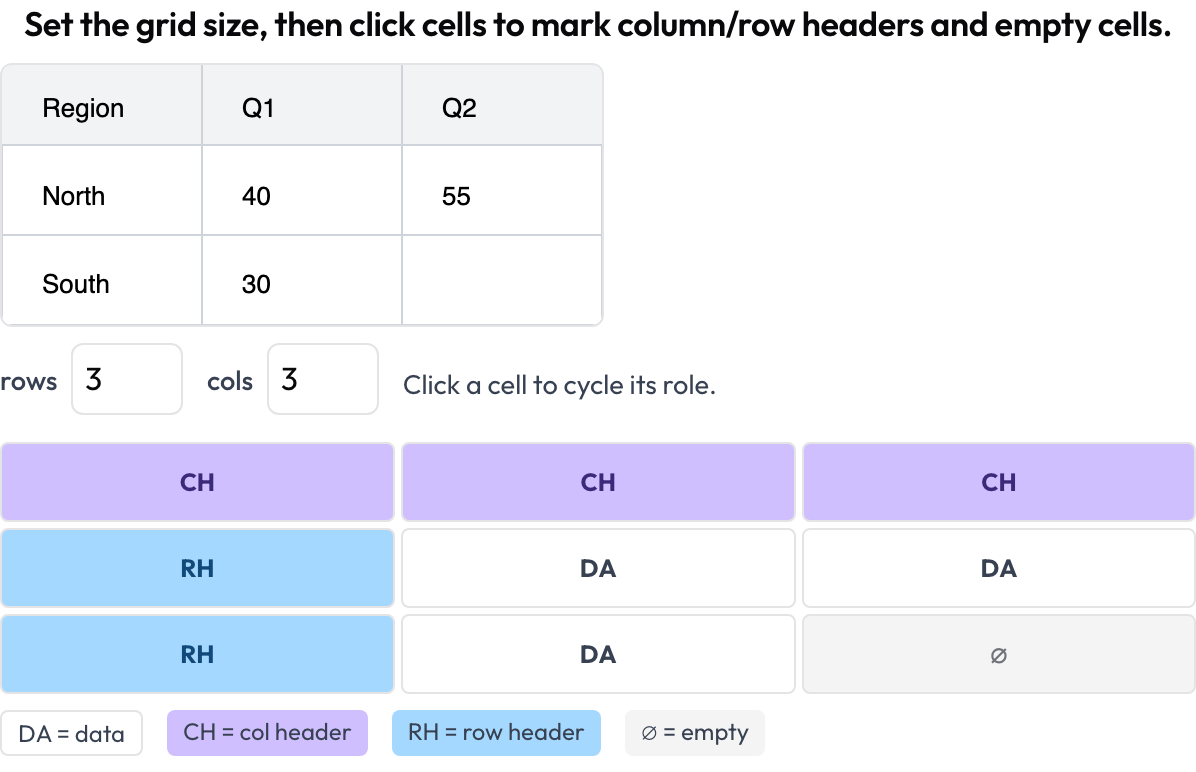 Annotate document-table cell structure: column and row headers, data, and empty cells
annotation_schemes:
  - annotation_type: table_grid
    name: structure
    description: "Set the grid size, then click cells to mark headers and empty cells."
    image_key: image           # per-instance table image URL / data-URI
    rows_key: rows             # optional initial dims from the data
    cols_key: cols
    roles: [data, col_header, row_header, empty]   # click cycles through these
Stored as {rows, cols, cells: {"r,c": role}}, keeping only non-data cells.
Related
- Multi-Agent Team Evaluation — interaction graph, handoffs, and team scorecards
- Web-Agent Evaluation — screenshot-and-action web agents
- How to Evaluate AI Agents — the levels of agent evaluation
- Agentic Annotation — trace-display configuration and ingestion
For implementation details, see the source documentation.