Quality Control
Ensure annotation quality in Potato with attention check items, gold-standard validation, configurable annotator overlap, and Krippendorff's Alpha reporting.
Potato provides quality control features to keep annotations reliable: attention checks, gold standards, pre-annotation support, and real-time agreement metrics.
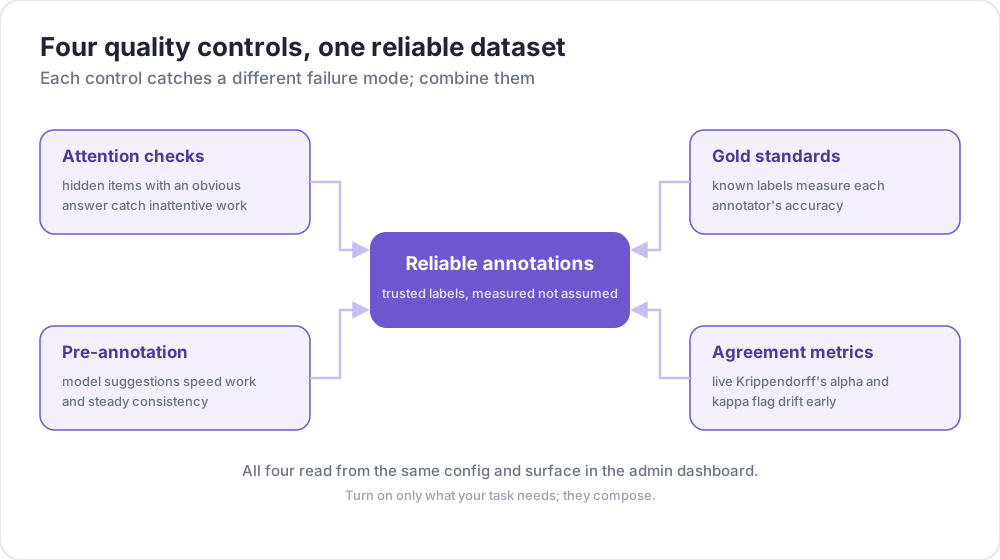 Four quality controls, one reliable dataset
Overview
Quality control in Potato consists of four key features:
- Attention Checks - Verify annotator engagement with known-answer items
- Gold Standards - Track accuracy against expert-labeled items
- Pre-annotation Support - Pre-fill forms with model predictions
- Agreement Metrics - Calculate inter-annotator agreement in real-time
Attention Checks
Attention checks are items with known correct answers that verify annotators are paying attention and not randomly clicking.
Configuration
attention_checks:
  enabled: true
  items_file: "attention_checks.json"

  # How often to inject attention checks
  frequency: 10              # Insert one every 10 items
  # OR
  probability: 0.1           # 10% chance per item

  # Optional: flag suspiciously fast responses
  min_response_time: 3.0     # Flag if answered in < 3 seconds

  # Failure handling
  failure_handling:
    warn_threshold: 2        # Show warning after 2 failures
    warn_message: "Please read items carefully before answering."
    block_threshold: 5       # Block user after 5 failures
    block_message: "You have been blocked due to too many incorrect responses."
Attention Check Items File
[
  {
    "id": "attn_001",
    "text": "Please select 'Positive' for this item to verify you are reading carefully.",
    "expected_answer": {
      "sentiment": "positive"
    }
  }
]
Gold Standards
Gold standards are expert-labeled items used to measure annotator accuracy. By default, gold standards are silent - results are recorded for admin review, but annotators don't see feedback.
Configuration
gold_standards:
  enabled: true
  items_file: "gold_standards.json"

  # How to use gold standards
  mode: "mixed"              # Options: training, mixed, separate
  frequency: 20              # Insert one every 20 items

  # Accuracy requirements
  accuracy:
    min_threshold: 0.7       # Minimum required accuracy (70%)
    evaluation_count: 10     # Evaluate after this many gold items

  # Feedback settings (disabled by default)
  feedback:
    show_correct_answer: false
    show_explanation: false

  # Auto-promotion from high-agreement items
  auto_promote:
    enabled: true
    min_annotators: 3
    agreement_threshold: 1.0   # 1.0 = unanimous
Gold Standard Items File
[
  {
    "id": "gold_001",
    "text": "The service was absolutely terrible and I will never return.",
    "gold_label": {
      "sentiment": "negative"
    },
    "explanation": "Strong negative language clearly indicates negative sentiment.",
    "difficulty": "easy"
  }
]
Auto-Promotion
Items can automatically become gold standards when multiple annotators agree:
gold_standards:
  auto_promote:
    enabled: true
    min_annotators: 3          # Wait for at least 3 annotators
    agreement_threshold: 1.0   # 100% must agree (unanimous)
Pre-annotation Support
Pre-annotation allows you to pre-fill annotation forms with model predictions, useful for active learning and correction workflows.
Configuration
pre_annotation:
  enabled: true
  field: "predictions"        # Field in data containing predictions
  allow_modification: true    # Can annotators change pre-filled values?
  show_confidence: true
  highlight_low_confidence: 0.7
Data Format
Include predictions in your data items:
{
  "id": "item_001",
  "text": "I love this product!",
  "predictions": {
    "sentiment": "positive",
    "confidence": 0.92
  }
}
Agreement Metrics
Real-time inter-annotator agreement metrics using Krippendorff's alpha are available in the admin dashboard.
Configuration
agreement_metrics:
  enabled: true
  min_overlap: 2             # Minimum annotators per item
  refresh_interval: 60       # Seconds between updates
Interpreting Krippendorff's Alpha
| Alpha Value | Interpretation |
|---|---|
| α ≥ 0.8 | Good agreement - reliable for most purposes |
| 0.67 ≤ α < 0.8 | Tentative agreement - draw tentative conclusions |
| 0.33 ≤ α < 0.67 | Low agreement - review guidelines |
| α < 0.33 | Poor agreement - significant issues |
Admin Dashboard Integration
View quality control metrics in the admin dashboard at /admin:
- Attention Checks: Overall pass/fail rates, per-annotator statistics
- Gold Standards: Per-annotator accuracy, per-item difficulty analysis
- Agreement: Per-schema Krippendorff's alpha with interpretation
- Auto-Promoted Items: List of items promoted from high agreement
API Endpoints
Quality Control Metrics
GET /admin/api/quality_controlReturns attention check and gold standard statistics.
Agreement Metrics
GET /admin/api/agreementReturns Krippendorff's alpha by schema with interpretation.
Complete Example
annotation_task_name: "Sentiment Analysis with Quality Control"
task_dir: .
output_annotation_dir: annotation_output/
data_files:
  - data/reviews.json

item_properties:
  id_key: id
  text_key: text

annotation_schemes:
  - name: sentiment
    annotation_type: radio
    labels: [positive, negative, neutral]
    description: "Select the sentiment of the text"

attention_checks:
  enabled: true
  items_file: "data/attention_checks.json"
  frequency: 15
  failure_handling:
    warn_threshold: 2        # Warn the annotator after two failures
    block_threshold: 5       # Block them after five

gold_standards:
  enabled: true
  items_file: "data/gold_standards.json"
  mode: mixed
  frequency: 25
  accuracy:
    min_threshold: 0.7       # Flag annotators scoring below 70%
    evaluation_count: 5      # Score them after five gold items

agreement_metrics:
  enabled: true
  min_overlap: 2
  refresh_interval: 60
Troubleshooting
Attention checks not appearing
- Verify
items_filepath is correct (relative to task directory) - Check that items have required fields (
id,expected_answer) - Ensure
frequencyorprobabilityis set
Agreement metrics showing "No items with N+ annotators"
- Ensure items have been annotated by multiple users
- Reduce
min_overlapif needed - Check that annotations are being saved correctly
Frequently Asked Questions
The questions below cover setting up a QA process and how gold standard items track annotator accuracy over a session.
How do you set up a QA process for annotation?
Mix items with known answers into the queue and measure agreement on items that several annotators share. In Potato, attention checks flag annotators who are not reading, gold standard items measure each annotator's accuracy against expert labels, and agreement metrics show which questions annotators disagree on. Each is its own block in the task's YAML config.
How do gold standard items catch annotator drift?
Gold items keep appearing at a set frequency, such as one every 20 items, so accuracy against expert labels is measured for as long as an annotator works rather than once in training. Potato records the answers silently by default and lists an annotator on the admin dashboard once their accuracy, over at least evaluation_count gold items, falls below accuracy.min_threshold. That accuracy is cumulative over all of an annotator's gold answers, so a decline late in a long session moves it slowly. Attention-check failures are counted rather than averaged, so a sudden run of failures reaches the warning threshold regardless of how many checks the annotator passed before.
Further Reading
- Training Phase - Annotator qualification
- Admin Dashboard - Monitoring metrics
- Task Assignment - Control annotation distribution
For implementation details, see the source documentation.