Transcript Formats
Every transcript and subtitle format Potato reads: Whisper, WhisperX, Deepgram, AssemblyAI, AWS Transcribe, SRT, WebVTT, TTML, YouTube captions, CTM, Praat TextGrid, and ELAN EAF, plus sidecar files and the normalized turn model.
Potato reads 21 transcript and subtitle inputs and turns all of them into the same turn model before anything is displayed. Whatever your ASR pipeline or captioning tool produced, you can point Potato at it without writing a conversion script. This page is the reference for what works, how each format is recognized, and what each one carries. For the walkthrough, see Annotating Whisper Transcripts and Annotating YouTube Subtitles.
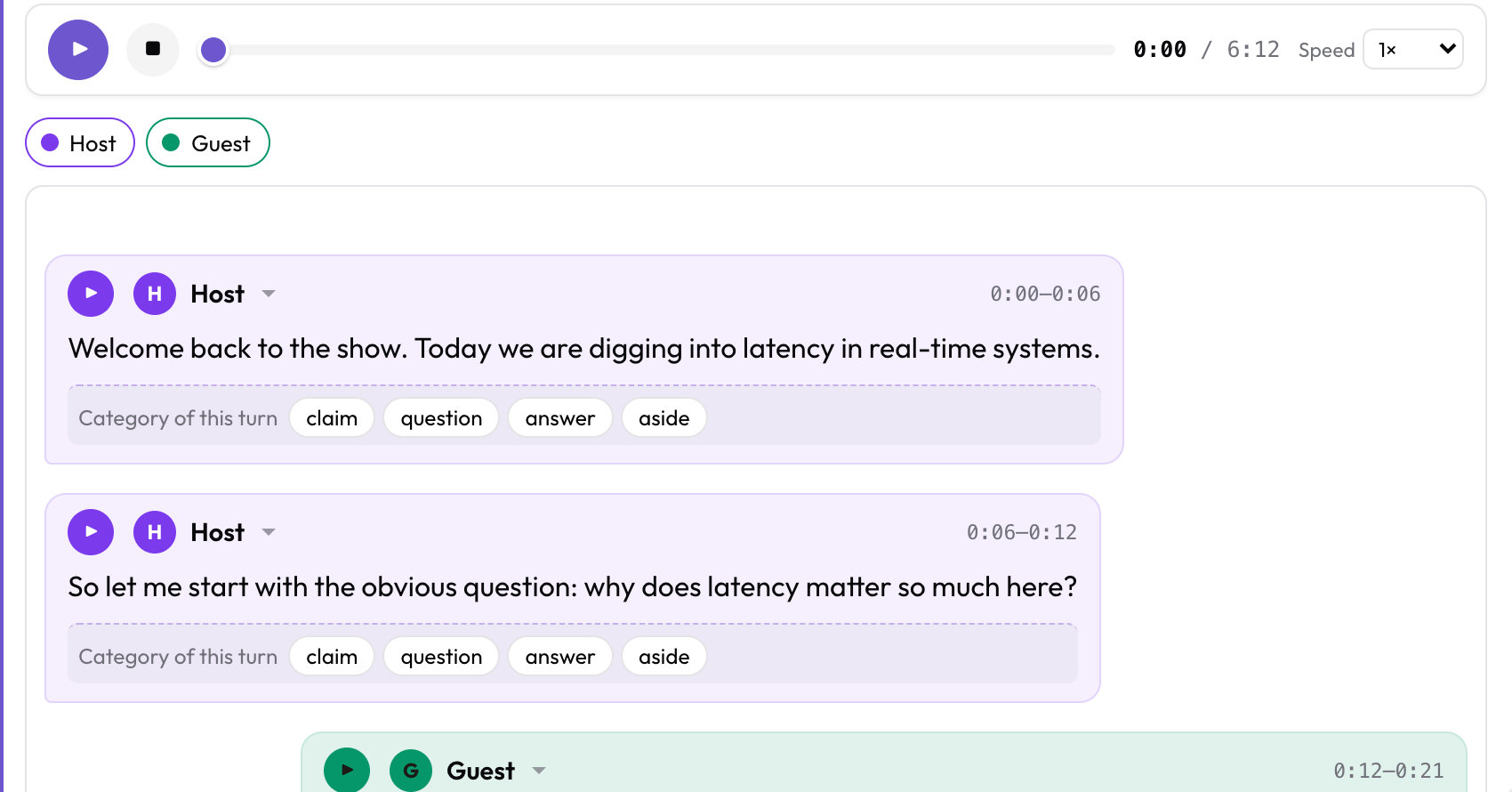 An SRT sidecar rendered as speaker bubbles, with a per-turn question attached to each
Where transcripts come from
Speech recognition and speaker diarization produce the transcript, and the parsers on this page read it. Run Whisper, WhisperX, pyannote or a cloud API, or, from version 2.9, let potato transcripts --transcribe --diarize do both on your own machine, as described in Transcribing locally. Format detection and parsing do not run a model.
Note: Think-Aloud Mode does run a local Whisper model, but for an unrelated purpose. It records annotators talking while they work. That is a capture feature, not transcript ingestion.
Detection is by content, not file extension
Potato inspects what is inside the file rather than trusting its name. A WebVTT file called captions.txt still parses as WebVTT. The practical consequence is that the same transcript works either inlined into your data file or read from a sidecar on disk, with no configuration change.
Supported formats
ASR output
| Format | Detected by | Speakers | Word timings |
|---|---|---|---|
| Whisper JSON | segments array | No | Yes, with --word_timestamps |
| WhisperX / diarized JSON | segments with speaker | Yes | Yes |
| whisper.cpp JSON | transcription array | No | No |
| Whisper TSV | start/end/text header | No | No |
| AWS Transcribe | results.items or results.audio_segments | Yes | Yes |
| Deepgram | results.channels or results.utterances | Yes, with diarize=true | Yes |
| AssemblyAI | text plus words/utterances | Yes, with speaker_labels | Yes |
| Rev.ai | monologues array | Yes | Yes |
| SPoRC | turn_text/turnText rows | Yes, inferred | No |
Subtitles and captions
| Format | Detected by | Speakers |
|---|---|---|
SubRip (.srt) | Cue arrows, ,mmm separator | From a Name: prefix |
WebVTT (.vtt) | WEBVTT header | From <v Name> tags or a Name: prefix |
SubStation Alpha (.ass, .ssa) | [Script Info] / Dialogue: | From the Name field |
| TTML / DFXP | <tt> root element | From a speaker/agent attribute |
| YouTube srv1/srv2/srv3 | <transcript><text> XML | From a Name: prefix |
| YouTube json3 | events array | None; auto-captions have no speakers |
SubRip and WebVTT cover most of what you will encounter. TTML shows up in broadcast archives and in files exported from professional captioning tools.
Alignment and linguistic annotation
| Format | Detected by | Speakers |
|---|---|---|
| NIST CTM | Whitespace columns, numeric start/duration | From the channel field |
| Praat TextGrid | File type = "ooTextFile" | One tier per speaker |
| ELAN EAF | ANNOTATION_DOCUMENT root | From PARTICIPANT, else the tier id |
Both the long and short TextGrid serializations parse. For ELAN files, Potato resolves ALIGNABLE_ANNOTATION and REF_ANNOTATION against the TIME_ORDER table and reads the media reference out of the header.
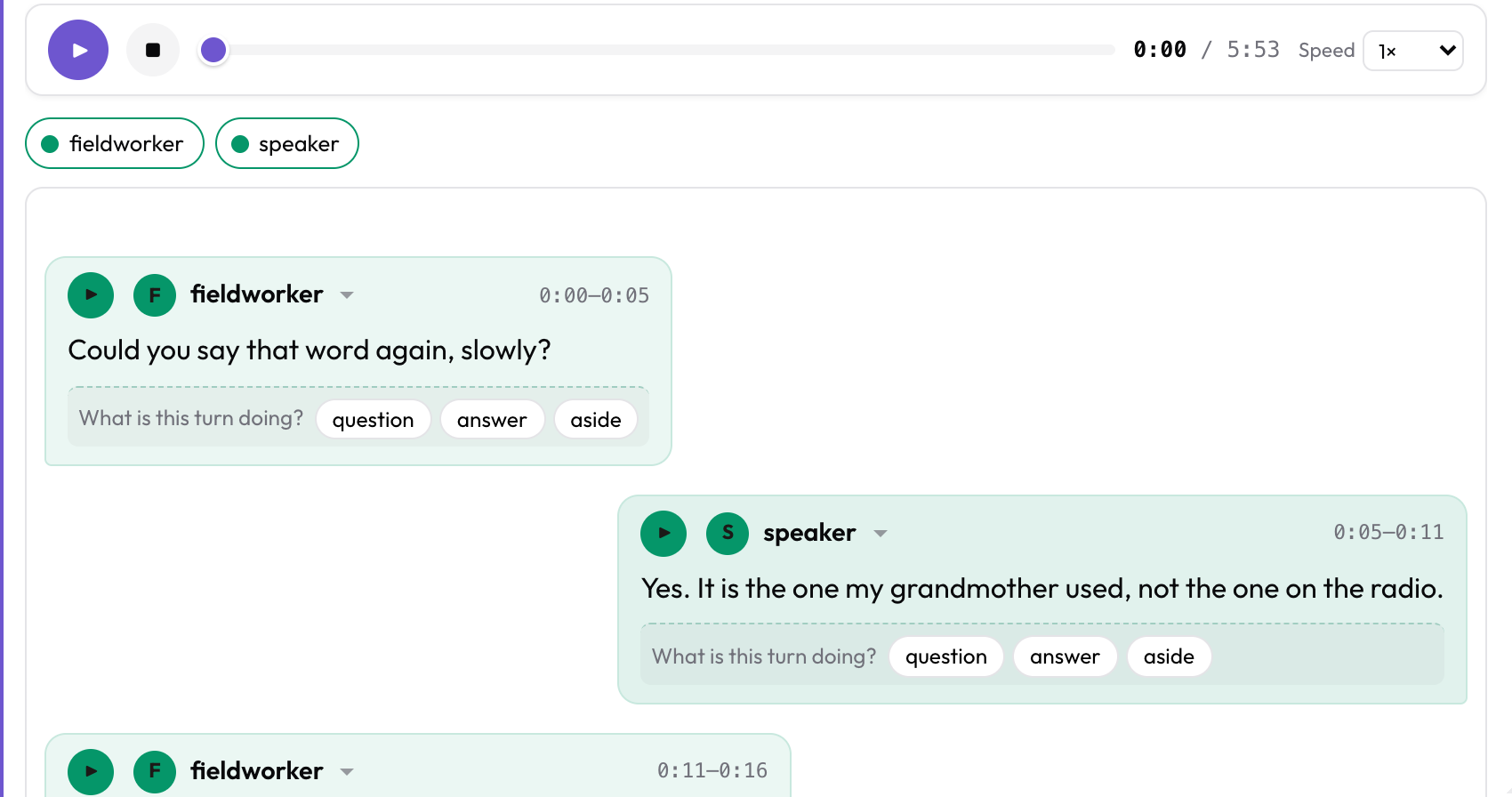 Each TextGrid tier becomes a speaker, and the empty intervals between them are skipped
Everything else
Three generic shapes round out the 21:
- A bare list of
{speaker, start, end, text}dictionaries. - An
{"audio": ..., "turns": [...]}object. - A plain paragraph with no timings at all, which renders as a single bubble.
Not supported
No parser exists for these. Convert them first.
- SAMI (
.smi), MicroDVD (.sub), SubViewer (.sbv) - Transcriber (
.trs), EXMARaLDA, CHAT/CHILDES (.cha) - Montreal Forced Aligner and Gentle native output. Export CTM or TextGrid from those instead.
- Azure Speech, Google Speech-to-Text, and Whisper API
verbose_jsoninside unusual wrappers - RTTM diarization files on their own
Word-level confidence is parsed and kept in the data model wherever the source provides it, but there is currently no interface for viewing it.
The normalized turn model
Every format above becomes this:
{
  "audio": "media/interview_01.mp3",
  "turns": [
    {
      "turn_id": "t0",
      "speaker": "host",
      "start": 0.0,
      "end": 6.5,
      "text": "Welcome back.",
      "words": [{"word": "Welcome", "start": 0.0, "end": 0.4, "confidence": 0.99}],
      "confidence": 0.97
    }
  ]
}
words and confidence appear only when the source carried them. speaker is null for undiarized turns, which render as Unassigned with a picker so annotators can fill them in.
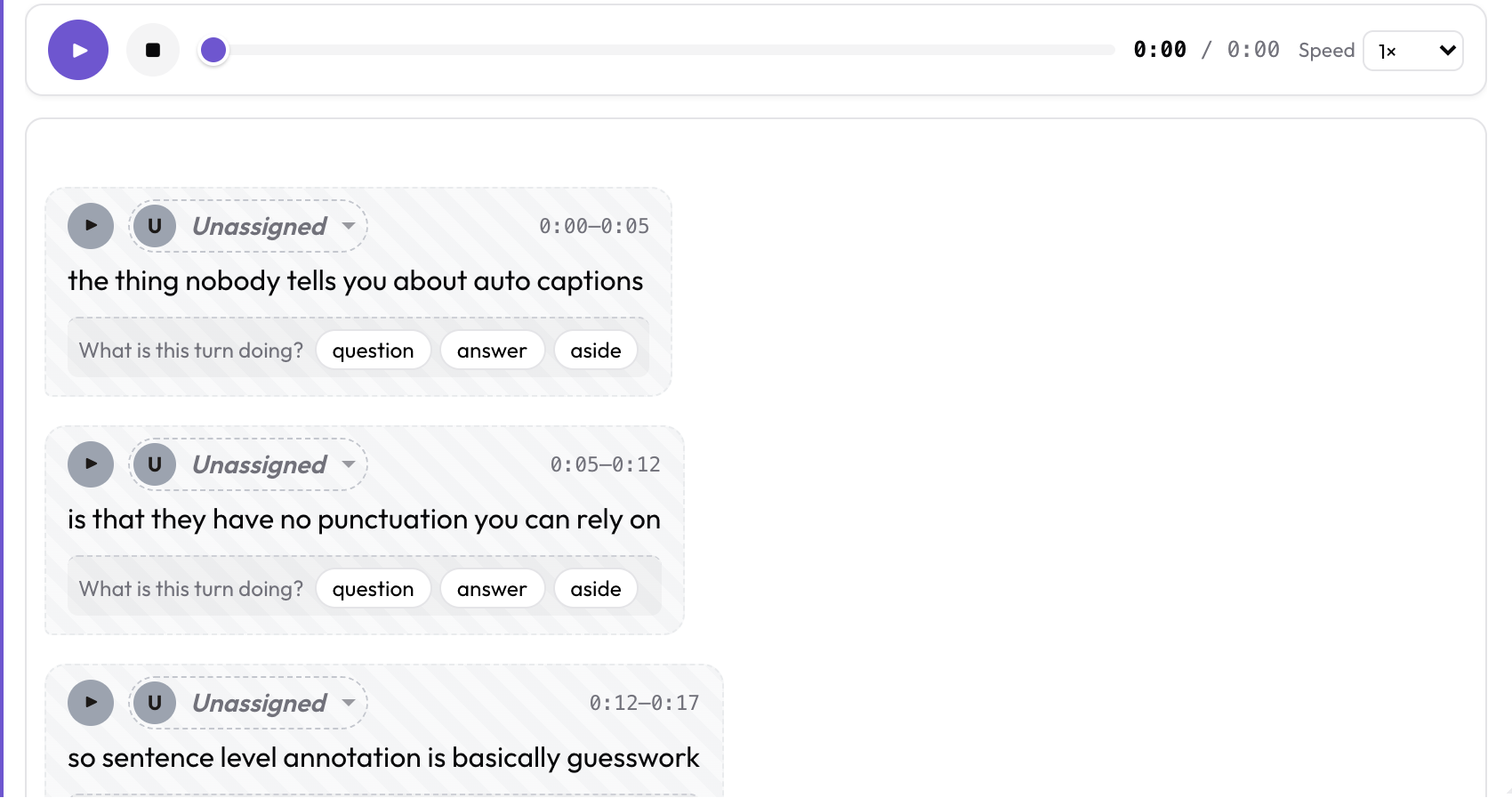 YouTube auto-captions arrive with no speakers, so every turn is Unassigned until an annotator picks one
turn_id is the persistence key for per-turn annotations and speaker assignments. It comes from an explicit turn_id or step_id string in the source when there is one, otherwise t{index}. The same file always produces the same ids, so annotations survive a reload.
Warning: Time units differ between tools. Whisper and Deepgram use float seconds; AssemblyAI, whisper.cpp offsets, and Whisper's TSV output use integer milliseconds. Potato converts at the boundary so everything downstream is in seconds. If your own preprocessing mixes the two up, timings come out 1000× wrong.
Sidecar files
A field value that is a short single-line path ending in a known transcript extension gets read from disk instead of being treated as text. So the layout your ASR tool already produced, media files next to their .srt or .json, works without a preprocessing step:
{
  "id": "int_001",
  "conversation": {
    "audio": "media/int_001.mp3",
    "transcript": "media/int_001.srt"
  }
}
Paths resolve relative to task_dir and go through the same path-security validation as every other configured path, so a data file cannot read outside the project.
Recognized extensions: .srt .vtt .webvtt .json .json3 .srv1 .srv2 .srv3 .ttml .dfxp .xml .ass .ssa .tsv .ctm .TextGrid .eaf .txt
If your data genuinely holds one-line inline transcripts that happen to look like filenames, turn the heuristic off:
display_options:
  transcript_is_path: auto   # auto (default) | true | false
Configuration
Display: audio_dialogue
The audio dialogue display renders turns as speaker bubbles synced to the audio, with a play button on each turn.
instance_display:
  fields:
    - key: conversation
      type: audio_dialogue
      label: "Transcript"
      span_target: true
      display_options:
        audio_key: audio
        turns_key: turns
        speaker_key: speaker
        text_key: text
        transcript_is_path: auto
        show_timestamps: true
        allow_speaker_assignment: auto
scroll_height: 460px| Option | Default | What it does |
|---|---|---|
audio_key | audio | Sub-key of the field value holding the audio URL or path. |
turns_key | turns | Sub-key holding the turn list. Also accepts segments. |
speaker_key / text_key | speaker / text | Per-turn keys. |
speakers | [] | Roster of {id, name, color, side}. Unlisted speakers get a deterministic color and an alternating side. |
allow_speaker_assignment | auto | auto turns on click-to-assign when there are undiarized turns or a roster to correct. true forces it on, false off. |
transcript_is_path | auto | Whether to read the field value as a sidecar path. |
show_timestamps | true | Show mm:ss–mm:ss on each turn. |
scroll_height | 480px | Height of the scrollable transcript pane. |
playback_rates | [1, 1.25, 1.5, 2] | Options in the speed selector. |
Schemes
As of 2.7.1, speech_transcript, voice_interaction, and tiered_annotation all read a transcript straight from the instance record and accept every format on this page. Before that, only the audio_dialogue display did.
annotation_schemes:
  - annotation_type: speech_transcript
    name: transcript_review
    description: "Mark transcription errors"
    segments_key: segments       # record field holding the transcript

  - annotation_type: voice_interaction
    name: barge_in
    description: "Mark overlaps and barge-in"
    turns_key: turns
Tiered annotation can pre-populate a tier from the transcript, so annotators correct an existing alignment rather than re-segmenting the speech by hand:
  - annotation_type: tiered_annotation
    name: tiers
    source_field: audio_url
    media_type: audio
    tiers:
      - name: utterance
        labels:
          - name: speech
            color: "#7c3aed"
Seeded annotations are not written until the annotator makes a real edit, so nothing gets attributed to someone who only opened the instance.
Transcribing locally
Since Potato 2.9, potato transcripts can produce the transcript itself instead of reading one. Install the extra, then point it at a folder of recordings:
pip install 'potato-annotation[transcribe]'
potato transcripts ./interviews --transcribe --diarize --num-speakers 2 -o data/interviews.json
Transcription runs faster-whisper and diarization runs sherpa-onnx, both on your own machine, with no PyTorch and no Hugging Face token. Diarized turns come back as SPEAKER_00, SPEAKER_01, the same labels WhisperX produces. Pass --num-speakers when you know the count.
Model weights download on first use, so the first run needs a network. To run air-gapped, stage them once from a connected machine: a local CTranslate2 model directory for Whisper, and POTATO_MODEL_CACHE for diarization.
Voice-activity detection runs first, so Whisper does not invent text over silence. It can also drop quiet or whispered speech without a warning. If audio you know contains speech comes back short, rerun with --asr-no-vad.
Building a data file with potato transcripts
Point the converter at a folder of ASR output and it writes an annotation-ready data file:
# Pair transcripts to media by basename
potato transcripts ./whisper_out --media-dir ./audio -o data/interviews.json

# Media served from elsewhere
potato transcripts './captions/*.vtt' \
  --media-url-prefix https://cdn.example.org/audio -o data/talks.json

# What did it detect? Writes nothing.
potato transcripts ./whisper_out --dry-run
--dry-run reports what it found without writing anything, which is the fastest way to catch a folder of the wrong Whisper output file:
Scanned 3 file(s):
  talk_01.srt          SRT                  2 turns      5.0s  2 speaker(s): Alice, Bob
  talk_02.vtt          WebVTT               1 turns      3.0s  undiarized
  talk_03.json         whisper.cpp JSON     1 turns      2.4s  undiarized

3 item(s), 4 turn(s).
1 item(s) have no media. Pass --media-dir or --media-url-prefix to enable playback.
| Option | Purpose |
|---|---|
-o, --output | Where to write. Required unless --dry-run. |
--format | json (default) or jsonl. |
--media-dir | Directory of media to pair by basename. |
--media-url-prefix | Base URL for media instead of local files. |
--field | Item field the transcript goes under. Default conversation. |
--id-prefix | String prepended to every generated id. |
--speaker-key | Source key holding the speaker label. |
-r, --recursive | Recurse into subdirectories. |
--dry-run | Report the detected format and turn count per file. |
--emit-config | Also print a matching config.yaml fragment. |
-q, --quiet | Suppress the per-file report. |
Item ids come from the filename with a trailing media extension stripped, so Whisper's interview_01.mp3.json becomes interview_01 rather than interview_01.mp3.
Exporting back out
Tiered annotations export to ELAN EAF and Praat TextGrid, so a transcript can round-trip: ingest it, annotate in Potato, export, refine in ELAN or Praat, and read the result back in.
python -m potato.export --config config.yaml --format eaf --output ./out/
python -m potato.export --config config.yaml --format textgrid --output ./out/
Both exporters work from tiered_annotation output. Other schemes export through the standard formats.
Troubleshooting
| Symptom | What happened |
|---|---|
| Everything is one big bubble | The format was not recognized and fell through to the plain-paragraph fallback. Run potato transcripts <file> --dry-run; if it reports plain text, the timings were never parsed. Usually the file is a Whisper .txt, which has no timings, rather than the .json or .srt. |
| No speakers, everything is Unassigned | The source has no speaker labels. Whisper alone does not diarize, and neither do YouTube auto-captions. Run diarization upstream or let annotators assign speakers in the interface. |
| Timings are 1000× off | Seconds and milliseconds got mixed up upstream. whisper.cpp offsets, AssemblyAI, and Whisper TSV are all milliseconds. |
| The transcript path shows up as the transcript text | The sidecar could not be read, so the path was displayed as content. Check that it resolves under task_dir. Server logs record the specific reason. |
| A one-line inline transcript is read as a filename | Set transcript_is_path: false on the display field. |
Example project
examples/audio/transcript-formats/ in the Potato repository renders six formats side by side, each loaded from a sidecar file: SubRip, WebVTT, Whisper JSON, YouTube json3, Praat TextGrid, and Deepgram. All six produce the same speaker bubbles.
python potato/flask_server.py start examples/audio/transcript-formats/config.yaml -p 8000The same task is available as a downloadable showcase design: Transcript Format Ingestion.
For implementation details, see the source documentation.
Further reading
- Annotating Whisper Transcripts, the end-to-end walkthrough
- Annotating YouTube Subtitles, for captions and caption-window caveats
- Dialogue Annotation, the speaker-bubble display
- Audio Annotation, waveform segmentation from scratch
- Designing Data Formats for Annotation