Active Learning
Reorder Potato's annotation queue by model uncertainty, with five query strategies, sklearn classifiers, cold-start handling, and model persistence across restarts.
Active learning reorders the annotation queue so annotators see the instances a model is least sure about, instead of working through the corpus in whatever order it arrived.
How It Works
- Collect an initial set of annotations
- Train a classifier on what has been labeled so far
- Score the unlabeled pool for uncertainty
- Reorder the queue to put the most uncertain instances first
- Annotate the prioritized instances
- Retrain periodically as annotations accumulate
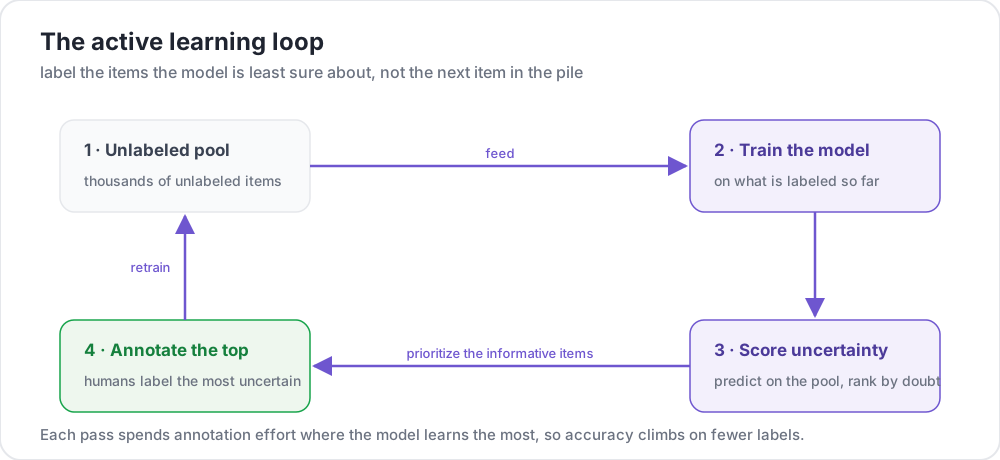 Spend annotation effort where the model learns the most
Configuration
Basic Setup
active_learning:
  enabled: true
  schema_names:
    - sentiment

  min_annotations_per_instance: 1
  min_instances_for_training: 20
  update_frequency: 50
  max_instances_to_reorder: 1000
min_instances_for_training defaults to 10 and update_frequency to 5. Both defaults are low enough to be worth raising on a real project, since retraining every five annotations spends compute on a model that has barely changed.
Full Configuration
active_learning:
  enabled: true

  schema_names:
    - sentiment

  min_annotations_per_instance: 1
  min_instances_for_training: 20
  update_frequency: 50
  max_instances_to_reorder: 1000

  # How disagreement between annotators resolves into one training label
  resolution_strategy: majority_vote

  # Fraction of the queue left in random order, so the model does not
  # only ever see what it already found interesting
  random_sample_percent: 0.2

  classifier:
    name: sklearn.linear_model.LogisticRegression
    hyperparameters:
      C: 1.0
      max_iter: 1000

  vectorizer:
    name: sklearn.feature_extraction.text.TfidfVectorizer
    hyperparameters:
      max_features: 5000
      ngram_range: [1, 2]

  query_strategy: uncertainty

  model_persistence:
    enabled: true
    save_directory: "models/"
    retention_count: 5
The nested classifier, vectorizer and model_persistence blocks are the documented form and the one potato validate --strict recognizes. Their sub-keys are name and hyperparameters for the first two, and enabled, save_directory and retention_count for the third. A block using other sub-key names is ignored without complaint, and the run silently falls back to the defaults.
Query Strategies
| Strategy | Description |
|---|---|
uncertainty | Instances where the model is least confident. The default |
diversity | Instances least similar to what has already been annotated |
badge | Batch Active learning by Diverse Gradient Embeddings |
bald | Bayesian Active Learning by Disagreement |
hybrid | A weighted combination of uncertainty and diversity |
active_learning:
  query_strategy: uncertainty
An unrecognized strategy name falls back to uncertainty with a warning rather than failing the boot, so check the log if a strategy seems to have no effect.
Tuning Hybrid and BALD
hybrid defaults to 70% uncertainty and 30% diversity:
active_learning:
  query_strategy: hybrid
  hybrid_weights:
    uncertainty: 0.7
    diversity: 0.3
bald trains a small ensemble and ranks by disagreement within it:
active_learning:
  query_strategy: bald
  bald_params:
    n_estimators: 5
    bootstrap_fraction: 0.8
Classifiers
Classifiers are named by their sklearn import path. The default is sklearn.linear_model.LogisticRegression.
| Classifier | Path | Best for | Speed |
|---|---|---|---|
| Logistic Regression | sklearn.linear_model.LogisticRegression | Most text tasks | Fast |
| Random Forest | sklearn.ensemble.RandomForestClassifier | Non-linear patterns | Medium |
| SVC | sklearn.svm.SVC | Small datasets | Slow |
| Multinomial NB | sklearn.naive_bayes.MultinomialNB | Simple text classification | Very fast |
Logistic regression, for the recommended starting point:
active_learning:
  classifier:
    name: sklearn.linear_model.LogisticRegression
    hyperparameters:
      C: 1.0
      max_iter: 1000
Random forest, when the decision is not close to linear:
active_learning:
  classifier:
    name: sklearn.ensemble.RandomForestClassifier
    hyperparameters:
      n_estimators: 100
      max_depth: 10
An SVC has to be told to produce probabilities, since the uncertainty score depends on them:
active_learning:
  classifier:
    name: sklearn.svm.SVC
    hyperparameters:
      kernel: rbf
      probability: true
Naive Bayes, when speed matters more than the last point of accuracy:
active_learning:
  classifier:
    name: sklearn.naive_bayes.MultinomialNB
    hyperparameters:
      alpha: 1.0
calibrate_probabilities is on by default, which matters because uncertainty sampling ranks by predicted probability and an uncalibrated classifier ranks confidently wrong items as though they were settled.
Vectorizers
The default is sklearn.feature_extraction.text.TfidfVectorizer.
TF-IDF, weighted features:
active_learning:
  vectorizer:
    name: sklearn.feature_extraction.text.TfidfVectorizer
    hyperparameters:
      max_features: 5000
      ngram_range: [1, 2]
      stop_words: english
Plain counts:
active_learning:
  vectorizer:
    name: sklearn.feature_extraction.text.CountVectorizer
    hyperparameters:
      max_features: 3000
      ngram_range: [1, 1]
Hashing, for a vocabulary too large to hold:
active_learning:
  vectorizer:
    name: sklearn.feature_extraction.text.HashingVectorizer
    hyperparameters:
      n_features: 10000
ngram_range is written as a YAML list and converted to the tuple sklearn expects, so [1, 2] is correct here and needs no special syntax.
Cold Start
Before any model exists there is nothing to be uncertain about, so the first batch is chosen without one:
active_learning:
  cold_start_strategy: random
  cold_start_batch_size: 20
LLM-Assisted Selection
An LLM can score instances during the cold-start period or alongside the classifier:
active_learning:
  enabled: true
  schema_names:
    - sentiment

  llm:
    enabled: true
    endpoint_type: vllm
    base_url: http://localhost:8000/v1
    model: meta-llama/Llama-3.2-3B-Instruct
    confidence_method: verbalized
confidence_method decides how the confidence score is obtained, and the choice matters because that score drives selection:
| Method | How it works | Trade-off |
|---|---|---|
verbalized | The model reports its own confidence on a 1-10 scale | Universal, but unreliable on some models |
logprobs | Computed from token log probabilities | Best calibrated, needs an endpoint that returns logprobs |
consistency | The same instance is queried several times and scored by agreement | Works anywhere, at N calls per instance |
logprobs falls back to verbalized confidence when the endpoint does not return them.
Model Persistence
Trained models can survive a restart instead of being rebuilt from scratch:
active_learning:
  model_persistence:
    enabled: true
    save_directory: "models/"
    retention_count: 5
retention_count defaults to 2 and caps how many saved models are kept.
Database-backed persistence is no longer configurable. The database_enabled and database_config keys were removed because the layer behind them was a stub that logged success and stored nothing. Run history is now always recorded and needs no configuration, and both keys are ignored if a config still carries them.
Multiple Schemes
schema_names lists the schemes whose annotations train the model. Left unset, it defaults to the project's labelable schemes:
annotation_schemes:
  - annotation_type: radio
    name: sentiment
    description: "What is the sentiment?"
    labels: [Positive, Negative, Neutral]

  - annotation_type: radio
    name: topic
    description: "What is the topic?"
    labels: [Politics, Sports, Tech, Entertainment]

active_learning:
  enabled: true
  schema_names:
    - sentiment
    - topic
Complete Configuration
annotation_task_name: "Sentiment Analysis with Active Learning"
task_dir: "."
port: 8000

data_files:
  - "data/reviews.json"

item_properties:
  id_key: id
  text_key: text

annotation_schemes:
  - annotation_type: radio
    name: sentiment
    description: "What is the sentiment?"
    labels:
      - Positive
      - Negative
      - Neutral
    sequential_key_binding: true

active_learning:
  enabled: true
  schema_names:
    - sentiment

  min_annotations_per_instance: 1
  min_instances_for_training: 30
  update_frequency: 50
  max_instances_to_reorder: 500
  random_sample_percent: 0.2

  classifier:
    name: sklearn.linear_model.LogisticRegression
    hyperparameters:
      C: 1.0
      max_iter: 1000

  vectorizer:
    name: sklearn.feature_extraction.text.TfidfVectorizer
    hyperparameters:
      max_features: 5000
      ngram_range: [1, 2]

  query_strategy: uncertainty

  model_persistence:
    enabled: true
    save_directory: "models/"
    retention_count: 5

output_annotation_dir: "output/"
export_annotation_format: jsonl

user_config:
  allow_all_users: true
Combining With AI Support
Active learning decides what to show next. AI support helps the annotator with whatever is on screen. They are independent and compose:
active_learning:
  enabled: true
  schema_names:
    - sentiment
  min_instances_for_training: 30

ai_support:
  enabled: true
  endpoint_type: openai
  ai_config:
    model: gpt-4o-mini
    api_key: ${OPENAI_API_KEY}
    max_tokens: 800
    include:
      all: true
Be careful reading the result. If the model suggests a label and the annotator accepts it, and the same family of model chose the instance, the agreement you measure at the end is partly the model agreeing with itself.
Monitoring
The admin dashboard reports model accuracy, the training cycle count, how the uncertainty is distributed, and how many instances remain. Reaching it needs the admin key or a role carrying view_admin_dashboard.
Best Practices
Collect a Baseline First
Nothing can be trained on an empty set, and a model trained on twenty annotations mostly reorders noise:
active_learning:
  min_instances_for_training: 50
Watch the Class Balance
Uncertainty sampling concentrates on the decision boundary, which skews the label distribution away from the corpus. That is fine for training a model and misleading if you report the annotated sample as a description of the data. random_sample_percent keeps part of the queue unbiased for exactly this reason.
Do Not Retrain Too Often
active_learning:
  update_frequency: 100
Keep Models Across Restarts
active_learning:
  model_persistence:
    enabled: true
    save_directory: "models/"
Troubleshooting
Training never starts
Check that annotations have reached min_instances_for_training, and that every class has at least one example. A single-class training set cannot fit a classifier.
Reordering seems to do nothing
Check the log for an unknown query_strategy, which falls back to uncertainty silently. Confirm enabled: true, and that schema_names names schemes that actually exist.
Slow with a large pool
Lower max_instances_to_reorder, raise update_frequency, or move to HashingVectorizer for a very large vocabulary.
Further Reading
- AI Support - LLM assistance during annotation
- Task Assignment - The other assignment strategies
- Admin Dashboard - Monitoring the training loop
- Diversity Ordering - Embedding-based ordering without a classifier
For implementation details, see the source documentation.