Task Assignment
Control instance distribution in Potato with random, fixed-order, least-annotated, max-diversity and active-learning strategies, plus per-annotator workload caps.
Potato provides flexible task assignment strategies to control how annotation instances are distributed to annotators.
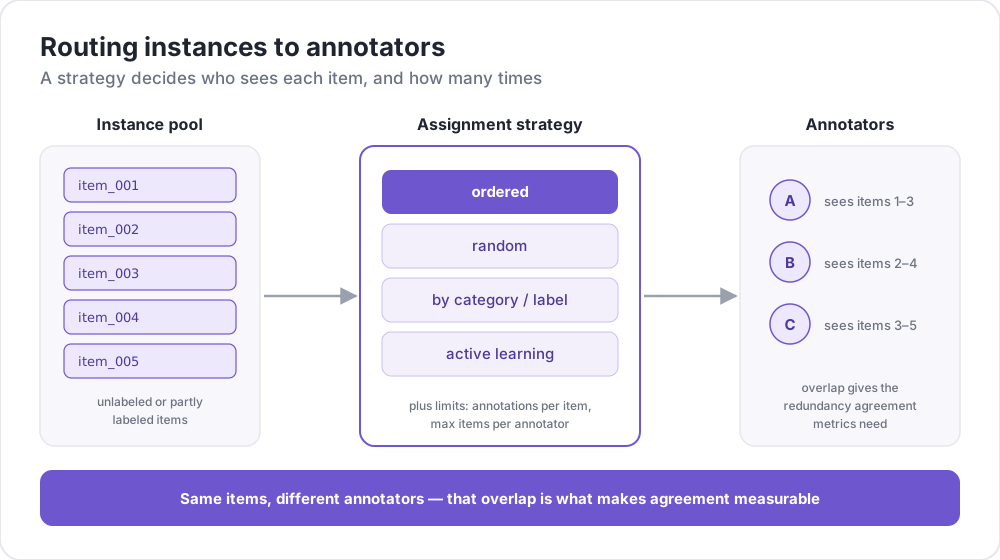 Routing instances to annotators
Overview
Task assignment controls:
- Which items each annotator sees
- How many items each annotator completes
- How many annotations each item receives
- The order in which items are presented
Key Configuration Options
| Option | Description | Default |
|---|---|---|
assignment_strategy | Strategy for assigning items | fixed_order |
max_annotations_per_user | Maximum items per annotator | unlimited |
max_annotations_per_item | Target annotations per item | 3 |
Assignment Strategies
Random Assignment
Assigns items randomly to annotators for unbiased distribution.
assignment_strategy: random
max_annotations_per_item: 3
Best for: General annotation tasks where order doesn't matter.
Fixed Order Assignment
Assigns items in the order they appear in the dataset.
assignment_strategy: fixed_order
max_annotations_per_item: 2
Best for: Tasks where annotators should see items in a specific sequence.
Least-Annotated Assignment
Prioritizes items with the fewest existing annotations for even distribution.
assignment_strategy: least_annotated
max_annotations_per_item: 5
Best for: Ensuring all items receive adequate coverage before any item gets excessive annotations.
Max-Diversity Assignment
Prioritizes items with the highest disagreement among existing annotations.
assignment_strategy: max_diversity
max_annotations_per_item: 4
Best for: Quality control and resolving ambiguous items.
Active Learning Assignment
Uses machine learning to prioritize uncertain instances.
assignment_strategy: active_learning

active_learning:
  enabled: true
  schema_names: ["sentiment"]
  min_annotations_per_instance: 2
  min_instances_for_training: 20
  update_frequency: 10
See Active Learning for full configuration.
Configuration
Modern Configuration (Recommended)
# Strategy selection
assignment_strategy: random

# Limits
max_annotations_per_user: 10    # -1 for unlimited
num_annotators_per_item: 3

# Reproducible shuffling
random_seed: 1234
random_seed is a top-level key, not a member of a nested block, and it defaults to 1234 when unset. Fix it whenever you need a run to be reproducible, since the random and diversity strategies both draw from it.
num_annotators_per_item is the canonical spelling for the per-item cap. max_annotations_per_item is a deprecated alias for the same setting, and giving both a different value is refused at load rather than silently resolved.
Legacy Configuration
The older automatic_assignment configuration is still supported:
automatic_assignment:
  on: true
  output_filename: task_assignment.json
  sampling_strategy: random    # 'random' or 'ordered'
  labels_per_instance: 3       # Annotations per item
  instance_per_annotator: 5    # Items per annotator
  test_question_per_annotator: 0
Test Questions
Insert attention check questions into the annotation queue:
Defining Test Questions
Add _testing to the instance ID in your data file:
text,id
"This is test question 1",0_testing
"Regular item",dkjfd
Or in JSON:
[
  {"id": "0_testing", "text": "This is a test question"},
  {"id": "regular_001", "text": "Normal annotation item"}
]
Configuration
automatic_assignment:
  on: true
  test_question_per_annotator: 2  # Insert 2 test questions per annotator
Example Configurations
Basic Random Assignment
annotation_task_name: "Sentiment Analysis"
assignment_strategy: random
max_annotations_per_user: 20
max_annotations_per_item: 3
Quality-Focused Assignment
annotation_task_name: "Quality Annotation"
assignment_strategy: max_diversity
max_annotations_per_item: 5
max_annotations_per_user: 50
Crowdsourcing Setup
annotation_task_name: "Crowdsourced Task"
assignment_strategy: random
max_annotations_per_user: 10
max_annotations_per_item: 3

# Crowdsourcing settings
hide_navbar: true
jumping_to_id_disabled: true

login:
  type: url_direct
  url_argument: workerId
Active Learning Setup
assignment_strategy: active_learning

active_learning:
  enabled: true
  schema_names: ["sentiment", "topic"]
  min_annotations_per_instance: 2
  min_instances_for_training: 20
  update_frequency: 10
  classifier_name: "sklearn.linear_model.LogisticRegression"
  vectorizer_name: "sklearn.feature_extraction.text.TfidfVectorizer"
Admin Dashboard Integration
Monitor and adjust assignment settings through the Admin Dashboard:
- Navigate to
/admin - Go to the Configuration tab
- Modify:
- Max Annotations per User
- Max Annotations per Item
- Assignment Strategy
Changes take effect immediately without server restart.
Further Reading
- Active Learning - ML-based assignment prioritization
- Quality Control - Attention checks and gold standards
- Category Assignment - Route items by annotator expertise
- Crowdsourcing Integration - MTurk and Prolific integration
For implementation details, see the source documentation.