Likert Scales
Configure Likert scales in Potato to measure attitudes, opinions, and quality ratings on 5, 7, or custom-point scales with labeled endpoints and required validation.
Likert scales allow annotators to rate items on a numeric scale, commonly used for sentiment intensity, agreement levels, and quality ratings.
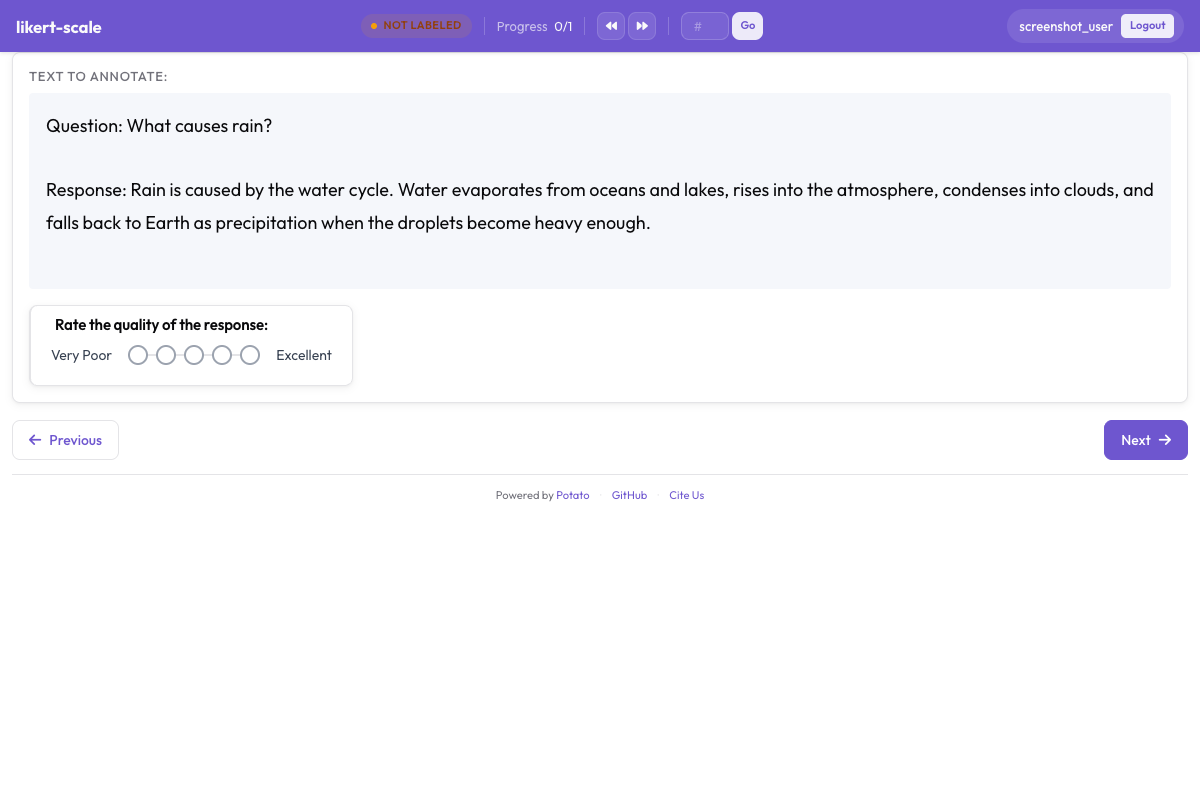 Likert scale with labeled endpoints for rating tasks in Potato
Basic Configuration
annotation_schemes:
  - annotation_type: likert
    name: agreement
    description: "How much do you agree with this statement?"
    size: 5
    min_label: "Strongly Disagree"
    max_label: "Strongly Agree"
Configuration Options
Scale Size
Define the number of points with size:
size: 5Common choices are 5, 7, and 10, which render as 1-5, 1-7, and 1-10. Odd sizes give annotators a midpoint to sit on, which is what you want when "neither" is a real answer and what you do not want when it is an escape hatch.
Endpoint Labels
Label the scale endpoints:
min_label: "Not at all"
max_label: "Extremely"
Middle Label
For odd-numbered scales, label the midpoint:
size: 5
min_label: "Strongly Disagree"
max_label: "Strongly Agree"
mid_label: "Neutral"  # Shown at position 3
All Labels
Label every point on the scale:
size: 5
labels:
  1: "Strongly Disagree"
  2: "Disagree"
  3: "Neutral"
  4: "Agree"
  5: "Strongly Agree"
Common Scale Types
Agreement Scale (5-point)
- annotation_type: likert
  name: agreement
  size: 5
  min_label: "Strongly Disagree"
  max_label: "Strongly Agree"
Frequency Scale
- annotation_type: likert
  name: frequency
  size: 5
  labels:
    1: "Never"
    2: "Rarely"
    3: "Sometimes"
    4: "Often"
    5: "Always"
Quality Scale
- annotation_type: likert
  name: quality
  size: 5
  min_label: "Very Poor"
  max_label: "Excellent"
Importance Scale
- annotation_type: likert
  name: importance
  size: 5
  min_label: "Not Important"
  max_label: "Extremely Important"
Satisfaction Scale
- annotation_type: likert
  name: satisfaction
  size: 5
  min_label: "Very Dissatisfied"
  max_label: "Very Satisfied"
Keyboard Shortcuts
Enable number key shortcuts:
- annotation_type: likert
  name: rating
  size: 5
Display Options
Horizontal Layout (Default)
- annotation_type: likert
  name: rating
  size: 5
Show Numbers
Display numeric values:
- annotation_type: likert
  name: rating
  size: 5
Multiple Likert Scales
Rate multiple aspects:
annotation_schemes:
  - annotation_type: likert
    name: clarity
    description: "How clear is this text?"
    size: 5
    min_label: "Very Unclear"
    max_label: "Very Clear"

  - annotation_type: likert
    name: relevance
    description: "How relevant is this text?"
    size: 5
    min_label: "Not Relevant"
    max_label: "Highly Relevant"

  - annotation_type: likert
    name: quality
    description: "Overall quality rating"
    size: 5
    min_label: "Poor"
    max_label: "Excellent"
Multirate (Matrix Rating)
For rating multiple items on the same scale:
- annotation_type: multirate
  name: aspect_ratings
  description: "Rate each aspect"
This displays as a matrix where each row is an item and columns are scale points.
Semantic Differential
Rate between two opposite concepts:
- annotation_type: likert
  name: tone
  size: 7
  min_label: "Formal"
  max_label: "Informal"

- annotation_type: likert
  name: sentiment
  size: 7
  min_label: "Negative"
  max_label: "Positive"
Required vs Optional
Make the rating required:
- annotation_type: likert
  name: rating
  size: 5
  label_requirement:
    required: true
Default Value
Set a pre-selected value:
- annotation_type: likert
  name: rating
  size: 5
Full Example: Survey Task
annotation_task_name: "Content Quality Survey"

annotation_schemes:
  - annotation_type: likert
    name: clarity
    description: "How clear and understandable is this content?"
    size: 5
    min_label: "Very Unclear"
    max_label: "Very Clear"

  - annotation_type: likert
    name: accuracy
    description: "How accurate is the information?"
    size: 5
    min_label: "Very Inaccurate"
    max_label: "Very Accurate"

  - annotation_type: likert
    name: usefulness
    description: "How useful would this be for the target audience?"
    size: 5
    min_label: "Not Useful"
    max_label: "Very Useful"

  - annotation_type: text
    name: feedback
    description: "Any additional feedback? (Optional)"
    label_requirement:
      required: false
Best Practices
- Use odd numbers for scales with a neutral midpoint
- Use even numbers to force a direction (no neutral option)
- 5 or 7 points work best for most applications
- Label endpoints clearly to anchor the scale
- Be consistent across your project with scale direction
- Consider keyboard shortcuts for faster annotation