Configuration Basics
Learn Potato's YAML configuration format: task settings, data file paths, annotation schemes, output formats, and the user keys every project needs.
Potato uses YAML configuration files to define annotation tasks. This guide covers the essential configuration options.
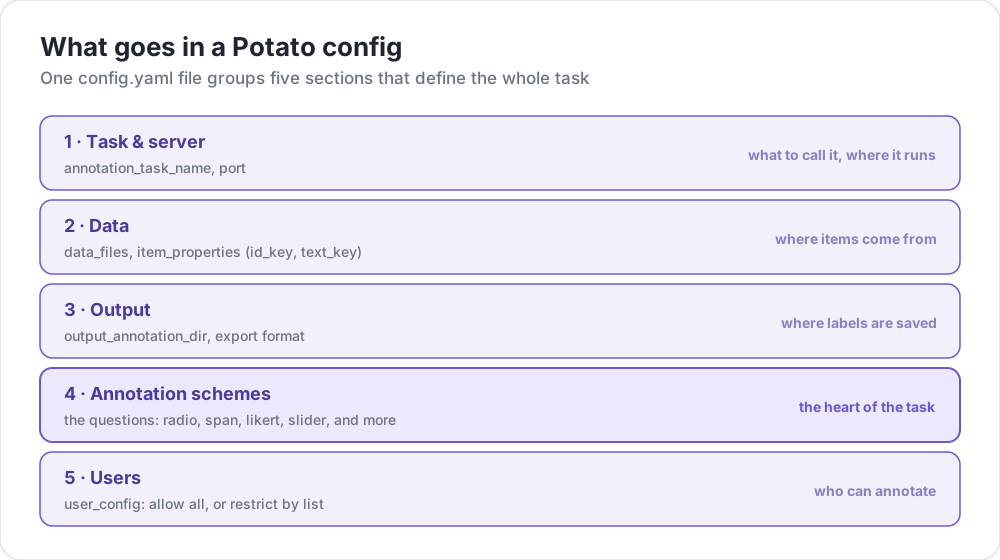 What goes in a Potato config
Configuration File Structure
A basic Potato configuration has these main sections:
# Task settings
annotation_task_name: "My Annotation Task"
port: 8000

# Data configuration
data_files:
  - data.json

item_properties:
  id_key: id
  text_key: text

# Output settings
output_annotation_dir: "annotation_output/"
export_annotation_format: "jsonl"

# Annotation schemes
annotation_schemes:
  - annotation_type: radio
    name: my_annotation
    description: "Pick the label that fits this item"
    labels:
      - Label 1
      - Label 2

# User settings
user_config:
  allow_all_users: true
Essential Settings
Task and Server Configuration
annotation_task_name: "My Task"  # Display name for your task
port: 8000                       # Port to run the server on
Data Configuration
data_files:
  - data.json           # Path to your data file(s)
  - more_data.json      # You can specify multiple files

item_properties:
  id_key: id            # Field containing unique ID
  text_key: text        # Field containing text to annotate
Supported data formats:
- JSON (
.json) - JSON Lines (
.jsonl) - CSV (
.csv) - TSV (
.tsv)
Output Configuration
output_annotation_dir: "annotation_output/"   # Directory for annotation files
export_annotation_format: "jsonl"             # Formats: jsonl, csv, tsv, parquet, and the other registered exporters
Annotations are always stored as <output_annotation_dir>/<user>/user_state.json while people work. export_annotation_format names the format the periodic auto-export writes on top of that, so leave it out when you only want the raw state files. There is no exporter called json; a config that asks for one is read as jsonl with a warning.
Annotation Schemes
Define one or more annotation schemes:
annotation_schemes:
  - annotation_type: radio      # Type of annotation
    name: sentiment             # Internal name
    description: "Select the sentiment"  # Instructions
    labels:                     # Options for annotators
      - Positive
      - Negative
      - Neutral
Available Annotation Types
| Type | Description |
|---|---|
radio | Single choice selection |
multiselect | Multiple choice selection |
likert | Rating on a scale |
text | Free text input |
number | Numeric input |
span | Text span highlighting |
slider | Continuous range selection |
multirate | Rate multiple items |
select | Dropdown single selection |
pairwise | Pairwise comparison |
bws | Best-worst scaling |
soft_label | Soft label distribution |
confidence | Annotation with confidence |
constant_sum | Constant sum allocation |
range_slider | Range slider selection |
semantic_differential | Semantic differential scale |
hierarchical_multiselect | Hierarchical multi-level selection |
card_sort | Card sorting |
rubric_eval | Rubric-based evaluation |
extractive_qa | Extractive question answering |
error_span | Error span highlighting |
triage | Triage classification |
coreference | Coreference annotation |
span_link | Span linking |
ranking | Ordering a set of items |
Potato registers 61 annotation types in total. The table above covers the ones most projects start from; see Annotation Types for the rest. Entity linking is built from span plus span_link rather than from a type of its own.
User Configuration
Allow all users
user_config:
  allow_all_users: true
Restrict to specific users
user_config:
  allow_all_users: false
  users:
    - user1@example.com
    - user2@example.com
Task Directory
The task_dir setting defines the root directory for relative paths:
task_dir: ./my-task/
data_files:
  - data/input.json    # Resolves to ./my-task/data/input.json
Full Example
Here's a complete configuration for a sentiment analysis task:
# config.yaml
annotation_task_name: "Sentiment Analysis"
port: 8000
task_dir: ./

# Data
data_files:
  - data/tweets.json

item_properties:
  id_key: id
  text_key: text

# Output
output_annotation_dir: "annotation_output/"
export_annotation_format: "jsonl"

# Annotation
annotation_schemes:
  - annotation_type: radio
    name: sentiment
    description: "What is the sentiment expressed in this tweet?"
    labels:
      - name: Positive
        key_value: "1"
      - name: Negative
        key_value: "2"
      - name: Neutral
        key_value: "3"
    sequential_key_binding: true

# Users
user_config:
  allow_all_users: true

# Assignment
per_annotator_quota:
  default: 100
num_annotators_per_item: 2
Two annotators per item is the smallest setting that yields an agreement score, so it suits a pilot where you still want to check that the label set is understood. The quota of 100 bounds one person's session; raise it once you know how long an item takes.
Next Steps
- Explore Data Formats in detail
- Learn about Annotation Schemes
- Customize the interface with UI Configuration
- Use the Preview CLI to validate your configuration