Multi-Phase Workflows
Build multi-stage annotation workflows in Potato with consent, pre-screening, instructions, training, and post-study surveys, plus conditional survey questions.
Potato runs the annotation task as one phase in a longer workflow, so consent, screening questions, instructions, training and an exit survey can sit around it without a separate survey tool.
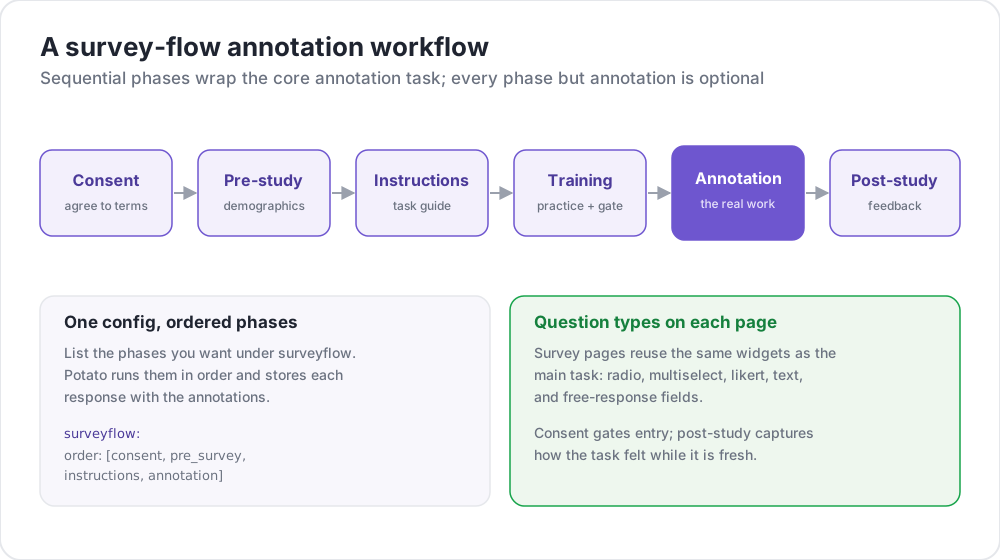 A survey-flow annotation workflow
Available Phases
| Phase | Purpose | Required |
|---|---|---|
consent | Collect informed consent | Optional |
prestudy | Pre-screening questions and demographics | Optional |
instructions | Task instructions and guidelines | Optional |
training | Qualification with feedback | Optional |
annotation | The main annotation task | Required |
poststudy | Post-study survey and feedback | Optional |
Annotators move through the enabled phases in the order you declare.
Basic Configuration
The phases block lists the order and points each phase at its file:
phases:
  order: [consent, prestudy, instructions, annotation, poststudy]

  consent:
    type: consent
    file: surveyflow/consent.json

  prestudy:
    type: prestudy
    file: surveyflow/prescreening.json

  instructions:
    type: instructions
    file: surveyflow/instructions.html

  poststudy:
    type: poststudy
    file: surveyflow/demographics.json
The annotation phase needs no file, because it uses the project's top-level annotation_schemes.
Phase Types
Each file-based phase declares a type saying which stage of the workflow it is. The valid values are consent, prestudy, instructions, training, annotation, and poststudy.
Set type explicitly. Potato infers it only when the phase name is itself one of those words, so a phase with a custom name has to declare one:
phases:
  order: [intro, consent, instructions, annotation, feedback]

  intro:
    type: prestudy          # custom name, so type is required
    file: surveyflow/intro.json

  consent:
    type: consent
    file: surveyflow/consent.json

  feedback:
    type: poststudy         # custom name, so type is required
    file: surveyflow/feedback.json
Back Navigation
The Back button is hidden when there is no previous page, which includes the first annotation instance. To let annotators move back across phase boundaries:
allow_phase_back_navigation: trueWith it off, annotators can still move backward inside a phase, such as between annotation instances.
Survey Question Format
Survey phases read a JSON array. Each question carries an id, the text shown to the annotator, a schema naming the widget, and its choices:
[
  {
    "id": "consent_1",
    "text": "I certify that I am at least 18 years of age.",
    "schema": "radio",
    "choices": ["I agree", "I disagree"],
    "label_requirement": {"right_label": ["I agree"]}
  },
  {
    "id": "consent_2",
    "text": "I have read and understood the information above.",
    "schema": "radio",
    "choices": ["Yes", "No"],
    "label_requirement": {"right_label": ["Yes"]}
  }
]
Supported Schema Types
radio for one choice, checkbox or multiselect for several, text for free text, number for numeric input, likert for a rating scale, and select for a dropdown.
Label Requirements
label_requirement decides which answers let the annotator continue:
{
  "id": "age_check",
  "text": "Are you at least 18 years old?",
  "schema": "radio",
  "choices": ["Yes", "No"],
  "label_requirement": {
    "right_label": ["Yes"],
    "required": true
  }
}
right_label lists the acceptable answers and required says whether the question must be answered at all. A consent question that nobody can fail is a consent question that records nothing, so put the acceptable answer in right_label rather than relying on the wording.
Pre-Screening Questions
Pre-screening runs before the main task, and is where eligibility and background questions belong:
phases:
  order: [prestudy, annotation]
  prestudy:
    type: prestudy
file: surveyflow/prescreening.json[
{
"id": "1",
"text": "What is your native language?",
"schema": "select",
"use_predefined_labels": "language",
"label_requirement": {"required": true}
},
{
"id": "2",
"text": "How familiar are you with this topic?",
"schema": "likert",
"choices": ["Not at all", "Slightly", "Moderately", "Very", "Extremely"],
"label_requirement": {"required": true}
}
]Post-Study Surveys
phases:
  order: [annotation, poststudy]
  poststudy:
    type: poststudy
file: surveyflow/demographics.json[
{
"id": "gender",
"text": "What gender do you most closely identify with?",
"schema": "radio",
"choices": ["Male", "Female", "Non-binary", "Prefer not to say"],
"label_requirement": {"required": true}
},
{
"id": "feedback",
"text": "Please share any feedback about this study (optional)",
"schema": "text"
}
]Built-in Label Sets
Potato ships label sets for the questions most studies repeat, so a country list does not have to be pasted into the config:
{"id": "country", "text": "Select your country", "schema": "select", "use_predefined_labels": "country"}The available sets are country, language, ethnicity, and religion.
Free Response Fields
Add an optional text box to any question with has_free_response, which is what "Other" options need to be worth offering:
{
  "id": "gender",
  "text": "What is your gender?",
  "schema": "radio",
  "choices": ["Woman", "Man", "Non-binary", "Prefer not to disclose", "Prefer to self-describe"],
  "has_free_response": {"instruction": "Please specify:"},
  "label_requirement": {"required": true}
}
Page Headers
The header on a survey page is set on the phase rather than in the question file:
phases:
  prestudy:
    type: prestudy
    file: surveyflow/consent.json
    header: "Please answer all consent questions"
Conditional Questions
Survey questions can appear based on earlier answers, so a follow-up is asked only when it applies. Because survey questions run through the same pipeline as annotation schemes, a condition references another question by its name:
[
  {
    "name": "prior_experience",
    "annotation_type": "radio",
    "description": "Have you previously worked on a text-annotation task?",
    "labels": ["Yes", "No"],
    "label_requirement": {"required": true}
  },
  {
    "name": "experience_details",
    "annotation_type": "text",
    "description": "Please briefly describe your previous annotation experience.",
    "label_requirement": {"required": true},
    "display_logic": {
      "show_when": [
        {"schema": "prior_experience", "operator": "equals", "value": "Yes"}
      ]
    }
  }
]
A hidden question is excluded from required-field validation, so it never blocks the Continue button while it is not showing.
Three behaviors are worth knowing. A condition can reference a question on any phase, so a post-study question can depend on a pre-study answer. Invalid display_logic, such as an unknown operator or a reference to a question that exists nowhere, fails at server startup rather than at runtime. And an instructions phase pointing at a raw .html file bypasses the schema pipeline, so conditions do not apply there.
With export_include_phase_data: true, Potato re-evaluates each participant's answers server-side and leaves out answers to questions they never saw. See Conditional Logic for the full operator reference.
Complete Example
annotation_task_name: "Sentiment Analysis Study"
task_dir: "."
port: 8000

data_files:
  - "data/reviews.json"

item_properties:
  id_key: id
  text_key: text

annotation_schemes:
  - annotation_type: radio
    name: sentiment
    description: "What is the sentiment of this review?"
    labels:
      - Positive
      - Negative
      - Neutral
    sequential_key_binding: true

phases:
  order: [consent, prestudy, instructions, training, annotation, poststudy]

  consent:
    type: consent
    file: phases/consent.json

  prestudy:
    type: prestudy
    file: phases/demographics.json

  instructions:
    type: instructions
    file: phases/instructions.html

  training:
    type: training
    file: phases/training_questions.json

  poststudy:
    type: poststudy
    file: phases/exit_survey.json

training:
  enabled: true
  data_file: phases/training_questions.json
  passing_criteria:
    min_correct: 3
  allow_retry: true

allow_phase_back_navigation: false

output_annotation_dir: "output/"
export_annotation_format: "jsonl"

user_config:
  allow_all_users: true
The training phase takes its settings from the top-level training block, while the phases entry only places it in the order. See Training Phase for the passing criteria and the data format.
Legacy Configuration
The older surveyflow block still works, and reads survey pages as lists of .jsonl files:
surveyflow:
  on: true
  order:
    - pre_annotation
    - post_annotation
  pre_annotation:
    - surveyflow/consent.jsonl
    - surveyflow/demographics.jsonl
  post_annotation:
    - surveyflow/exit_survey.jsonl
Migration
| Legacy | Modern |
|---|---|
surveyflow.on: true | A phases block |
surveyflow.pre_annotation | phases.consent or phases.prestudy |
surveyflow.post_annotation | phases.poststudy |
surveyflow.testing | training.data_file |
.jsonl files | .json files holding an array |
Best Practices
Keep Surveys Short
Every extra question costs completion rate, and demographic questions that nothing in the analysis uses cost it for nothing.
Test the Whole Flow
Complete the workflow yourself, in a browser with no session, before sending the link anywhere. Consent and login are the two places a broken workflow fails first and most silently.
Mark Required Fields Carefully
Required questions that could have been optional produce answers people invented to get past the page.
Crowdsourcing
Completion codes are configured with the top-level completion_code key rather than on the post-study phase:
completion_code: "POTATO2024"
auto_redirect_on_completion: true
auto_redirect_delay: 5000
See Crowdsourcing for the platform setup.
Further Reading
- Training Phase - Qualification with feedback
- Crowdsourcing - Prolific and MTurk integration
- User Management - Access lists and roles
For implementation details, see the source documentation.