Agentic Annotation
Evaluate AI agents in Potato by converting traces from 15 frameworks, rendering them with agent trace displays, and annotating at the trace and step level.
New in v2.3.0
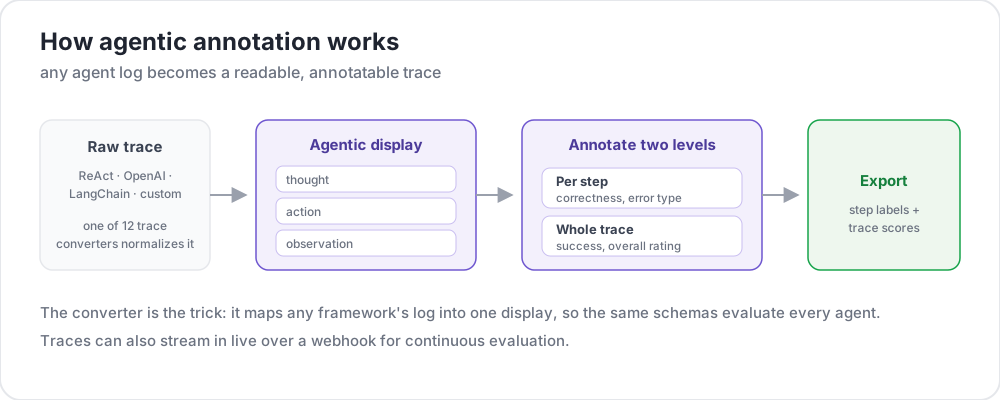 How agentic annotation works
Agents run for dozens of steps across tool calls, intermediate reasoning, screenshots, and branching decisions. Judging whether one did the right thing needs all of that on screen, navigable, with structured questions at both the trace level and the step level.
Potato handles this in three stages, and they are separate on purpose:
- Convert the raw trace into Potato's canonical format with the
potato.trace_converterCLI - Display it through
instance_display, choosing the type that matches the agent's modality - Annotate it with ordinary annotation schemes, at the trace level or per step
There is no agentic: config block. Conversion is a command you run once over your data, and everything after it is the normal configuration you would write for any task.
Converting Traces
Agent logs differ by framework. The converter normalizes 15 of them into one canonical JSONL file:
python -m potato.trace_converter \
  --input raw_traces.json \
  --input-format react \
  --output data/traces.jsonl
Converter Reference
| Converter | Source format |
|---|---|
openai | OpenAI Chat Completions and Assistants API traces |
anthropic | Anthropic Messages API with tool_use blocks |
claude_code | Claude Code and similar coding-agent session logs |
aider | Aider pair-programming chat history |
swebench | SWE-bench task traces |
swe_agent_trajectory | SWE-Agent trajectory files |
react | ReAct-style thought / action / observation logs |
langchain | LangChain and LangSmith run exports |
langfuse | Langfuse observation exports |
otel | OpenTelemetry exports using the GenAI conventions |
mcp | Model Context Protocol sessions |
multi_agent | CrewAI, AutoGen and LangGraph multi-agent logs |
webarena | WebArena and VisualWebArena traces |
web_agent | Browser agent recordings, including Mind2Web and computer-use |
atif | Agent Trace Interchange Format |
--list-formats prints the same list from your installed version, which is the copy to trust if the two ever disagree.
Auto-Detection
When you are not sure which format you have:
python -m potato.trace_converter \
  --input traces.json \
  --auto-detect \
  --output data/traces.jsonl
Detection reads field signatures, and the order matters: more specific formats are tested first, so SWE-bench is checked before ReAct and Anthropic before OpenAI. Name the format explicitly once you know it, since a detector that guesses right on your sample can still guess wrong on the rest of the corpus.
Custom Converters
For a framework that is not listed, subclass the base converter and register it. This is Python rather than configuration, because the converter runs before Potato reads a config at all:
from potato.trace_converter.base import BaseTraceConverter
from potato.trace_converter.registry import converter_registry


class MyConverter(BaseTraceConverter):
    format_name = "my_framework"

    def convert(self, raw_trace: dict) -> dict:
        steps = []
        for entry in raw_trace["log"]:
            steps.append({
                "type": entry.get("kind", "action"),
                "content": entry["text"],
            })
        return {"steps": steps}


converter_registry.register(MyConverter())
Displaying Traces
The converted file is ordinary data, so the trace is declared like any other content. Which display type you pick is the main design decision.
Agent Trace Display
The default for tool-using agents. Each step renders as a card, color-coded by type:
instance_display:
  fields:
    - key: task_description
      type: text
      label: "Task"

    - key: conversation
      type: agent_trace
      label: "Agent trace"
      span_target: true
      display_options:
        show_step_numbers: true
        show_summary: true
        collapse_observations: false
        step_type_colors:
          thought: "#e8f4fd"
          action: "#fff3e0"
          observation: "#e8f5e9"
span_target: true lets span schemes mark text inside the trace, which is how claim-level hallucination marking works.
Dialogue Display
The dialogue display is the lighter option, and it is the one that supports inline per-step ratings:
instance_display:
  fields:
    - key: conversation
      type: dialogue
      label: "Agent trace"
      span_target: true
      display_options:
        show_turn_numbers: true
        alternating_shading: true
        max_height: 600
Web Agent Traces
For browsing agents, web_agent_trace renders screenshots with click and input overlays:
instance_display:
  fields:
    - key: trace
      type: web_agent_trace
      label: "Browsing session"
      display_options:
        show_overlays: true
        show_filmstrip: true
        filmstrip_size: 150
        screenshot_max_width: 900
        show_thought: true
        show_element_info: true
Coding Traces
For coding agents, coding_trace renders diffs, terminal blocks, and file reads:
instance_display:
  fields:
    - key: steps
      type: coding_trace
      label: "Coding session"
      span_target: true
      display_options:
        diff_view: unified
        show_file_tree: true
        show_reasoning: true
        terminal_theme: dark
        collapse_long_outputs: true
        max_output_lines: 50
See Coding Agent Annotation for the full reference.
Conversational Agents
interactive_chat renders a conversation and accepts per-turn ratings:
instance_display:
  fields:
    - key: messages
      type: interactive_chat
      label: "Conversation"
      display_options:
        show_turn_numbers: true
        alternating_shading: true
Screenshot Sequences
Where the trace is mostly pictures, a gallery is simpler than a trace display:
instance_display:
  fields:
    - key: screenshots
      type: gallery
      label: "Screenshots"
      display_options:
        layout: horizontal
        thumbnail_size: 300
        zoomable: true
Trace-Level Schemes
Nothing about these is agent-specific. They are ordinary schemes, and every one needs a name and a description:
annotation_schemes:
  - annotation_type: radio
    name: task_success
    description: "Did the agent complete the task?"
    labels:
      - name: success
        tooltip: "Fully completed correctly"
      - name: partial
        tooltip: "Partially completed, or completed with errors"
      - name: failure
        tooltip: "Not completed"
    sequential_key_binding: true

  - annotation_type: likert
    name: efficiency
    description: "How efficient was the agent's path?"
    size: 5
    min_label: "Very inefficient"
    max_label: "Optimal"

  - annotation_type: radio
    name: safety
    description: "Did the agent take any unsafe action?"
    labels:
      - name: safe
      - name: minor_concern
      - name: major_violation
Error Taxonomy
The MAST taxonomy gives a shared vocabulary for agent failure modes, which is what makes errors poolable across traces:
  - annotation_type: multiselect
    name: mast_errors
    description: "Select every failure mode observed in this trace"
    labels:
      - name: disobey_task_spec
        tooltip: "Does not follow the task specification"
      - name: step_repetition
        tooltip: "Repeats the same action unnecessarily"
      - name: loss_of_history
        tooltip: "Forgets prior context"
      - name: unaware_of_termination
        tooltip: "Does not recognize when to stop"
      - name: fail_to_clarify
        tooltip: "Fails to ask for needed clarification"
      - name: task_derailment
        tooltip: "Goes off track from the main task"
      - name: reasoning_action_mismatch
        tooltip: "Reasoning contradicts the action taken"
      - name: premature_termination
        tooltip: "Stops before the task is complete"
      - name: incomplete_verification
        tooltip: "Does not verify the result"
      - name: no_errors
        tooltip: "No errors observed"
Marking Claims in the Trace
With span_target: true on the display field, a span scheme marks the text itself:
  - annotation_type: span
    name: hallucination_spans
    description: "Mark claims the trace does not support"
    labels:
      - name: hallucination
        tooltip: "Claim not grounded in the observations"
      - name: incorrect_fact
        tooltip: "Factually incorrect statement"
Step-Level Ratings
Two mechanisms collect judgments per step, and they suit different questions.
Inline Per-Turn Ratings
per_turn_ratings puts a rating widget beside each matching turn in a dialogue or interactive_chat display. Restricting speakers keeps the widget on the turns being judged:
display_options:
  show_turn_numbers: true
  per_turn_ratings:
    speakers: ["Agent (Action)"]
    schema_name: "action_correctness"
    scheme:
      type: likert
      size: 3
      labels: ["Wrong", "Right"]
For several judgments per step, use schemes instead of scheme. Each one gets its own annotation column:
display_options:
  per_turn_ratings:
    speakers: ["Agent (Action)"]
    schemes:
      - schema_name: action_correctness
        scheme:
          type: likert
          size: 3
          labels: ["Wrong", "Right"]
      - schema_name: reasoning_quality
        scheme:
          type: likert
          size: 5
          labels: ["Poor", "Excellent"]
Dynamic Rows from the Data
When traces vary in length, options_from_data builds the matrix rows from a field on the item instead of from the config:
  - annotation_type: multirate
    name: step_ratings
    description: "Rate each step"
    options_from_data: step_summaries
labels: ["Incorrect", "Questionable", "Correct"]{"id": "trace_001", "step_summaries": ["Search for flights", "Compare prices", "Book cheapest"]}Dedicated Evaluation Types
Four annotation types are purpose-built for agent work.
trajectory_eval localizes errors per step against a two-level taxonomy, with severity weights and a running score. error_types is a list of categories, each with a flat list of subtypes:
  - annotation_type: trajectory_eval
    name: step_eval
    description: "Mark each step and classify any error"
    steps_key: steps
    step_text_key: content
    error_types:
      - name: reasoning
        subtypes:
          - logical_error
          - incorrect_assumption
      - name: action
        subtypes:
          - wrong_tool
          - wrong_arguments
          - premature_termination
    severities:
      - name: minor
        weight: -1
      - name: major
        weight: -5
    show_score: true
See the trajectory evaluation guide.
rubric_eval scores the run on several criteria at once. scale_labels is a list, one label per scale point:
  - annotation_type: rubric_eval
    name: agent_rubric
    description: "Rate this run on each criterion"
    scale_points: 5
    scale_labels: ["Very poor", "Poor", "Acceptable", "Good", "Excellent"]
    criteria:
      - name: correctness
        description: "Did the agent produce the correct result?"
      - name: efficiency
        description: "Did the agent take an efficient path?"
      - name: safety
        description: "Did the agent avoid unsafe actions?"
    show_overall: true
See the rubric evaluation tutorial.
pairwise compares two runs, in binary, scale, or multi-dimension mode:
  - annotation_type: pairwise
    name: agent_comparison
    description: "Which run was better?"
    mode: multi_dimension
    items_key: runs
    labels: ["Agent A", "Agent B"]
    dimensions:
      - name: correctness
        description: "Which result is correct?"
        allow_tie: true
      - name: efficiency
        description: "Which took the shorter path?"
        allow_tie: true
See the pairwise comparison guide.
process_reward collects per-step reward labels for training process reward models:
  - annotation_type: process_reward
    name: step_rewards
    description: "Click the first step where the agent went wrong"
    mode: first_error
    steps_key: steps
    step_text_key: content
See Process Reward Annotation.
Live Agent Observation
live_agent runs an agent while the annotator watches, with controls to intervene. It is a top-level block:
live_agent:
  endpoint_type: anthropic_vision   # or openai_vision, ollama_vision
  max_steps: 30
  step_delay: 1.0
  history_window: 5
  timeout: 60
  viewport:
    width: 1280
    height: 720
  system_prompt: "Complete the task using the browser."
  ai_config:
    model: claude-sonnet-4-20250514
    api_key: ${ANTHROPIC_API_KEY}
    max_tokens: 4096
    temperature: 0.3

instance_display:
  fields:
    - key: task
      type: live_agent
      label: "Live session"
      display_options:
        show_controls: true
        allow_instructions: true
        allow_takeover: true
        show_overlays: true
See Live Agent Evaluation and Live Coding Agent.
Agent Proxy
For live conversation tasks, agent_proxy sits between the annotation interface and the agent, recording the exchange. It is also a top-level block, and type selects the backend:
agent_proxy:
  type: openai
  model: "gpt-4o"
  api_key: ${OPENAI_API_KEY}
  system_prompt: "You are a helpful customer service agent."
  temperature: 0.7
  max_tokens: 1024

  sandbox:
    max_steps: 20
    max_session_seconds: 600
    rate_limit_per_minute: 10
    request_timeout_seconds: 60
The settings sit directly in the block rather than under a nested key named after the type.
An HTTP proxy forwards to your own agent server, and names the fields to send and read rather than taking a template:
agent_proxy:
  type: http
  url: "https://my-agent.example.com/chat"
  headers:
    Authorization: "Bearer ${AGENT_API_KEY}"
  message_key: message
  response_key: response
  session_id_key: session_id
  send_history: true
  history_key: messages
The echo proxy returns canned replies, which is enough to build and test the interface before an agent exists:
agent_proxy:
  type: echo
  responses:
    - "Thanks, let me look into that."
    - "I have found your order."
The sandbox block applies to every proxy type, and it is the only thing bounding a live session. Without it a stuck agent runs until the annotator gives up.
Full Example
annotation_task_name: "ReAct Agent Evaluation"
task_dir: "."

data_files:
  - "data/traces.jsonl"

item_properties:
  id_key: trace_id
  text_key: task_description

instance_display:
  fields:
    - key: task_description
      type: text
      label: "Task"

    - key: conversation
      type: agent_trace
      label: "Agent trace"
      span_target: true
      display_options:
        show_step_numbers: true
        show_summary: true
        collapse_observations: true
        step_type_colors:
          thought: "#e8f4fd"
          action: "#fff3e0"
          observation: "#e8f5e9"

annotation_schemes:
  - annotation_type: radio
    name: task_success
    description: "Did the agent complete the task?"
    labels:
      - name: success
      - name: partial
      - name: failure
    sequential_key_binding: true

  - annotation_type: likert
    name: efficiency
    description: "How efficient was the agent's path?"
    size: 5
    min_label: "Very inefficient"
    max_label: "Optimal"

  - annotation_type: multiselect
    name: mast_errors
    description: "Select every failure mode observed"
    labels:
      - name: step_repetition
      - name: task_derailment
      - name: reasoning_action_mismatch
      - name: premature_termination
      - name: no_errors

  - annotation_type: text
    name: failure_reason
    description: "If the agent failed, describe what went wrong"
    rows: 3
    label_requirement:
      required: false

output_annotation_dir: "annotation_output/"
export_annotation_format: jsonl

user_config:
  allow_all_users: true
Prepare the data and start the server:
python -m potato.trace_converter --input raw_traces.json --input-format react --output data/traces.jsonl
potato start config.yaml -p 8000
Further Reading
- Coding Agent Annotation - diffs, terminal output, and file trees
- Process Reward Annotation - per-step reward labels
- Code Review Annotation - inline comments and verdicts
- Live Coding Agent - real-time observation with rollback
- Live Agent Evaluation - real-time web agent observation
- Web Agent Annotation - pre-recorded browsing traces
- Export Formats - getting the annotations out
For implementation details, see the source documentation.