Constant Sum
Configure constant sum annotation in Potato for fixed-budget point allocation across categories using number inputs or sliders.
The constant sum annotation schema lets annotators distribute a fixed number of points across multiple categories. Where soft labels use linked sliders, constant sum offers direct number inputs as well, and suits tasks where annotators make explicit trade-offs within a fixed budget.
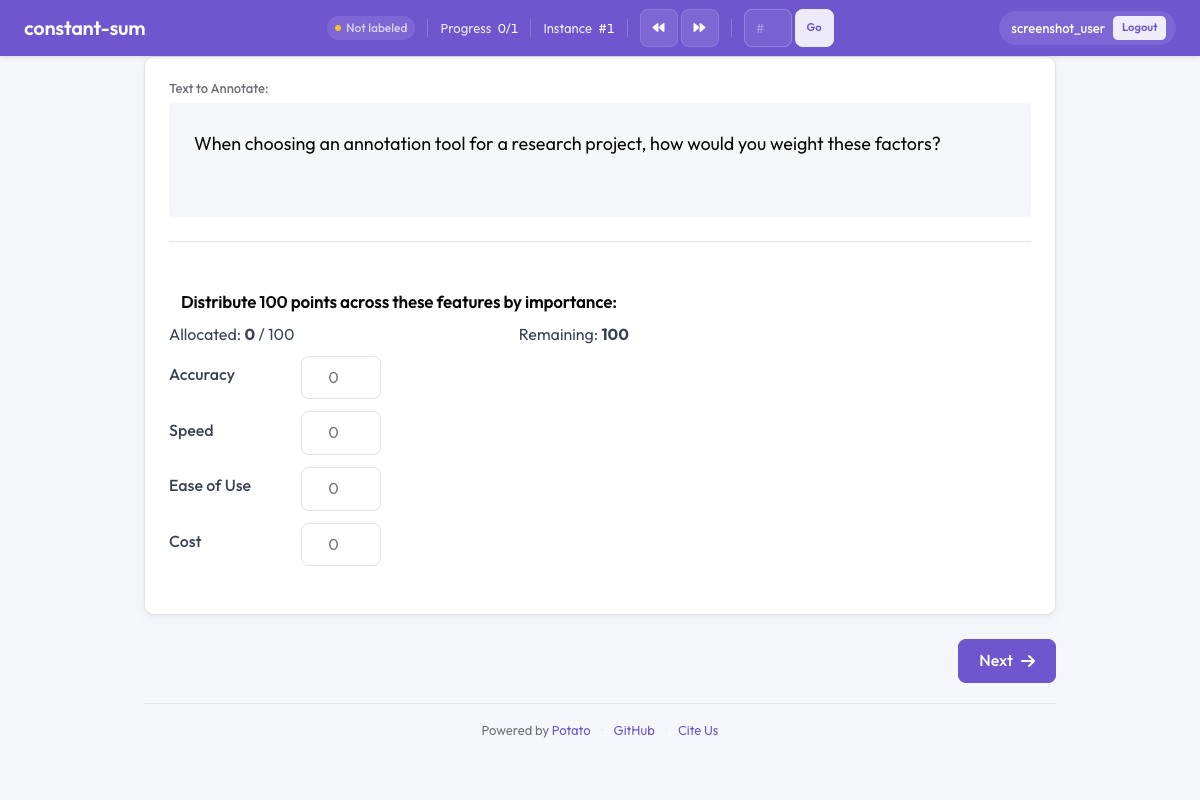 Constant sum in Potato
Overview
Constant sum tasks are common in survey research and preference elicitation. Annotators are given a fixed pool of points (e.g., 100) and must allocate them across items to express relative importance, preference, or proportion. The interface enforces that allocations always sum to the configured total.
Quick Start
A total of 100 reads as percentages, so annotators can state a split without doing arithmetic:
annotation_schemes:
  - annotation_type: constant_sum
    name: feature_importance
    description: Distribute 100 points across features based on their importance.
    labels: ["Accuracy", "Speed", "Ease of Use", "Cost"]
    total_points: 100
Configuration Options
| Field | Type | Default | Description |
|---|---|---|---|
annotation_type | string | Required | Must be "constant_sum" |
name | string | Required | Unique identifier for this schema |
description | string | Required | Instructions displayed to annotators |
labels | array | Required | List of items to allocate points across (minimum 2) |
total_points | integer | 100 | The fixed total that allocations must sum to |
min_per_item | integer | 0 | Minimum points each item must receive |
input_type | string | "number" | Input method: "number" for text fields or "slider" for slider controls |
label_requirement.required | boolean | false | Whether the annotation must be completed before moving on |
Examples
Feature Prioritization
Number fields record the value the annotator meant rather than the one they could land on with a drag, which matters when the allocation is the measurement:
annotation_schemes:
  - annotation_type: constant_sum
    name: feature_priority
    description: Allocate 100 points to indicate which features matter most to you.
    labels: ["Performance", "Reliability", "Usability", "Security"]
    total_points: 100
    input_type: number
Budget Allocation
A floor of 50 out of 1000 keeps every area funded, which is the right constraint when the question is how to divide a budget rather than whether an area deserves one. Sliders suit the task because a budget split is a judgment about proportions:
annotation_schemes:
  - annotation_type: constant_sum
    name: budget_allocation
    description: How would you distribute a $1000 budget across these areas?
    labels: ["Marketing", "Engineering", "Design", "Research"]
    total_points: 1000
    input_type: slider
    min_per_item: 50
Time Distribution
Setting total_points to 24 makes each point an hour, so annotators allocate in the unit the question asks about instead of converting from percentages:
annotation_schemes:
  - annotation_type: constant_sum
    name: time_spent
    description: Distribute 24 points (hours) across daily activities.
    labels: ["Work", "Sleep", "Exercise", "Leisure", "Commute", "Other"]
    total_points: 24
    min_per_item: 0
Simple Comparison with Sliders
With two items and 10 points, one slider settles the comparison and the second value follows from it, which makes this the fastest form of the task:
annotation_schemes:
  - annotation_type: constant_sum
    name: text_comparison
    description: Distribute 10 points between the two texts based on quality.
    labels: ["Text A", "Text B"]
    total_points: 10
    input_type: slider
Output Format
{
  "feature_importance": {
    "labels": {
      "Accuracy": 40,
      "Speed": 25,
      "Ease of Use": 20,
      "Cost": 15
    }
  }
}
Values always sum to the configured total_points.
Best Practices
- Choose an intuitive total - 100 works well for percentages; smaller totals (10, 20) are easier for quick tasks
- Use number inputs for precision - when exact values matter, number fields are more accurate than sliders
- Use sliders for speed - slider inputs are faster for approximate allocations
- Limit the number of items - more than 7-8 items makes point allocation cognitively demanding
- Consider minimum allocations - use
min_per_itemwhen every category should receive at least some points - Provide clear context - explain what the points represent (importance, time, money, etc.)
Further Reading
- Soft Label - Probability distribution with linked sliders
- Best-Worst Scaling - Relative preference annotation
- Likert Scales - Ordinal rating scales
For implementation details, see the source documentation.