Span Annotation
Highlight and label text spans in Potato for named entity recognition, with per-label colors, keyboard shortcuts, tooltips, and discontinuous spans.
Span annotation lets annotators select and label portions of text, which is how named entity recognition (NER), part-of-speech tagging, and text highlighting tasks are built in Potato. A label is written either as a plain string or as an object carrying its own color, key_value, and tooltip. Potato reads those three as properties of each label, so a scheme-level colors, key_values, or tooltips map has no effect on a span scheme.
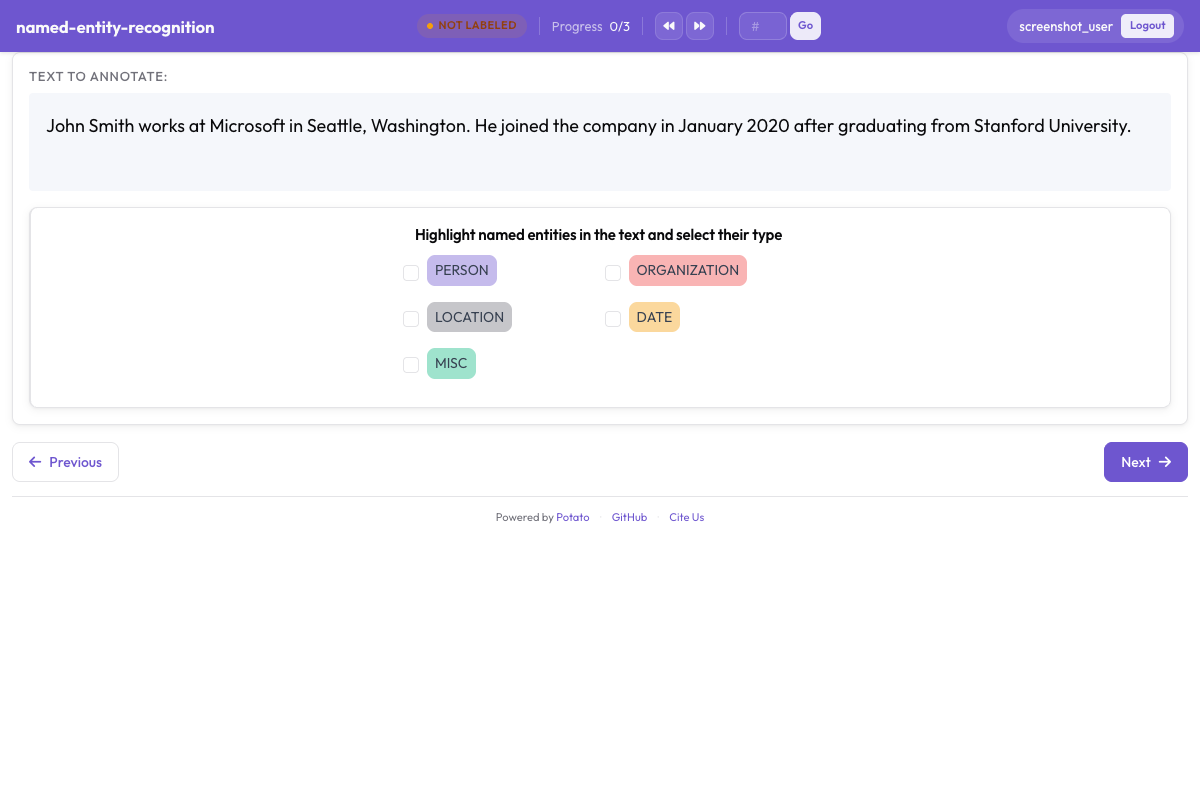 Span annotation with color-coded entity labels in Potato
Basic Configuration
annotation_schemes:
  - annotation_type: span
    name: entities
    description: "Highlight named entities in the text"
    labels:
      - PERSON
      - ORGANIZATION
      - LOCATION
description is required on every scheme and renders above the label buttons as the prompt the annotator reads, so it should state the labeling decision rather than repeat the scheme name. Labels written as plain strings take their colors from Potato's palette in the order they are listed.
Configuration Options
Entity Labels
The label set is the main design decision on a span task, because recall, agreement, and every later measurement are defined against it. Keep it small enough that annotators can hold it in memory without consulting the guidelines on each span, which in practice means four to eight types for most NER work. Add the labels to the scheme above:
labels:
  - PERSON
  - ORGANIZATION
  - LOCATION
  - DATE
  - EVENT
Colors
Potato assigns each label a palette color in list order, so colors are worth writing out only when a particular pairing matters, such as two types that often appear in the same sentence and should not be easy to confuse at a glance. A color belongs to the label:
annotation_schemes:
  - annotation_type: span
    name: entities
    description: "Highlight named entities in the text"
    labels:
      - name: PERSON
        color: "#3b82f6"
      - name: ORGANIZATION
        color: "#10b981"
      - name: LOCATION
        color: "#f59e0b"
      - DATE
Values are hex (#3b82f6) or rgb(255, 0, 0). A label left as a plain string, such as DATE above, keeps the next palette color, so a scheme can name colors for the labels that need them and leave the rest alone.
Colors for several schemes can also be set in one place, under ui.label_colors, keyed by scheme name and then by label:
ui:
  label_colors:
    entities:
      PERSON: "#3b82f6"
      ORGANIZATION: "#10b981"
A colors: map written on the scheme itself is not a key Potato reads. A scheme carrying one renders with palette colors, as though the block were not there.
Keyboard Shortcuts
Shortcuts are worth enabling on any span task with more than two labels, because an annotator who moves the mouse to a button for every span works at a fraction of the speed of one who keeps both hands on the text. Setting sequential_key_binding: true gives the labels keys in the order they are listed:
- annotation_type: span
  name: entities
  description: "Highlight named entities in the text"
  labels:
    - PERSON
    - ORGANIZATION
    - LOCATION
    - DATE
  sequential_key_binding: true
When a task has several schemes on the page, Potato allocates each one keys from a separate pool, taking the number row first, then the top letter row, then the home row, so shortcuts from different schemes never collide.
To pin a label to a particular key instead of to its position in the list, give the label a key_value. The allocator honors an explicit key_value before it assigns anything automatically, and mnemonic keys survive a later reordering of the label list in a way that positional ones do not:
- annotation_type: span
  name: entities
  description: "Highlight named entities in the text"
  labels:
    - name: PERSON
      key_value: "p"
    - name: ORGANIZATION
      key_value: "o"
    - LOCATION
  sequential_key_binding: true
A scheme-level key_values: map is not read, and neither is a mapping written as the value of sequential_key_binding, which Potato treats only as a flag.
Tooltips
A tooltip is where the boundary cases of a label belong, so an annotator can check what counts as an ORGANIZATION without leaving the task. Tooltips are properties of each label:
- annotation_type: span
  name: entities
  description: "Highlight named entities in the text"
  labels:
    - name: PERSON
      tooltip: "Names of people, characters, or personas"
    - name: ORGANIZATION
      tooltip: "Companies, agencies, institutions"
    - name: LOCATION
      tooltip_file: "config/tooltips/location.html"
tooltip takes plain text and tooltip_file takes a path to an HTML file, which is the better choice when the guidance needs examples, bold text, or a list. A scheme-level tooltips: map is read only by hierarchical_multiselect and does nothing on a span scheme.
Overlapping Spans
Allow Overlapping
Spans are allowed to overlap and no setting turns the behavior on. Overlap is what you want when one stretch of text carries two labels at once, as in "Dr. Smith", which is both a PERSON and a ROLE. Since version 2.9.0 a selection that starts at the end of an existing span or ends at the start of one is also accepted, so partly overlapping spans can be created; earlier versions refused that selection.
Disable Overlapping (Default)
The span schema has no key that forbids overlap, so a task where spans should never overlap has to say so in its annotation guidelines. When the distinction matters for the export rather than for the annotator, two span schemes keep the label sets apart, since each scheme stores its spans under its own name:
annotation_schemes:
  - annotation_type: span
    name: entities
    description: "Label named entities"
    labels:
      - PERSON
      - ORGANIZATION

  - annotation_type: span
    name: roles
    description: "Label professional roles"
    labels:
      - ROLE
Span Selection Modes
Potato stores every span as character offsets into the item text, and no configuration key switches selection between word and character granularity. The two modes below describe what an annotator can do, not settings you turn on.
Word-Level Selection
Dragging across whole words is what most NER work looks like in practice, and the result is stored as the character offsets of the first and last character selected. Nothing in the config enforces word boundaries, so if whole-word spans matter for your data, put the requirement in the guidelines and check it against the export rather than expecting the interface to refuse a partial word.
Character-Level Selection
Selecting part of a word is available at all times and needs no configuration, which is what morphological and sub-token tasks rely on. Potato collapses runs of spaces and tabs before rendering so that the offsets it stores match what the browser measures, and that matters when your text carries meaningful indentation. Declare instance_display when horizontal whitespace has to survive exactly.
Pre-Annotated Spans
Seeding a task with model output turns labeling into correction, which is the faster workflow whenever a model is already right on most of the corpus. Potato reads seed annotations from a field on each item, named by pre_annotation.field:
pre_annotation:
  enabled: true
  field: "predictions"
  allow_modification: true
  show_confidence: true
  highlight_low_confidence: 0.7
allow_modification: true is what makes the task a correction rather than a review, since without it annotators cannot change what the model proposed. highlight_low_confidence: 0.7 marks the items the model was least sure about, so attention goes to the spans most likely to be wrong.
The field holds one entry per scheme name, and a span scheme takes a list of offsets:
{
  "id": "item_002",
  "text": "Apple announced new iPhone in California.",
  "predictions": {
    "entities": [
      {"start": 0, "end": 5, "label": "ORG", "confidence": 0.85},
      {"start": 27, "end": 37, "label": "LOC", "confidence": 0.91}
    ]
  }
}
Pre-annotations are a starting point rather than an annotation, so an item that nobody opens exports empty even though it arrived with predictions attached.
Common NER Configurations
Standard NER (4 Types)
The four-type set follows the CoNLL-2003 convention, which is the right choice when your results have to be comparable with published NER numbers:
- annotation_type: span
  name: ner
  description: "Label named entities"
  labels:
    - PER    # Person
    - ORG    # Organization
    - LOC    # Location
    - MISC   # Miscellaneous
  sequential_key_binding: true
Extended NER (OntoNotes Style)
Eighteen types buy finer distinctions at a real cost in agreement, since the boundaries between NORP, ORG, and GPE are where annotators disagree most. Use the extended set when downstream work needs the distinctions, and budget for longer training:
- annotation_type: span
  name: ner_extended
  description: "Label named entities using the OntoNotes type set"
  labels:
    - PERSON
    - NORP        # Nationalities, religious/political groups
    - FAC         # Facilities
    - ORG
    - GPE         # Geopolitical entities
    - LOC
    - PRODUCT
    - EVENT
    - WORK_OF_ART
    - LAW
    - LANGUAGE
    - DATE
    - TIME
    - PERCENT
    - MONEY
    - QUANTITY
    - ORDINAL
    - CARDINAL
Biomedical NER
Biomedical spans are long and often nested, so tooltips carrying a worked example per type repay the effort more here than on a general-domain task:
- annotation_type: span
  name: bio_ner
  description: "Label biomedical entities"
  labels:
    - GENE
    - PROTEIN
    - DISEASE
    - DRUG
    - SPECIES
Social Media NER
Social media text brings entity types that the newswire sets have no slot for, and CREATIVE_WORK and GROUP are the two that most often end up misfiled as ORG without their own label:
- annotation_type: span
  name: social_ner
  description: "Label named entities in social media text"
  labels:
    - PERSON
    - ORGANIZATION
    - LOCATION
    - PRODUCT
    - CREATIVE_WORK
    - GROUP
Span with Attributes
A second scheme alongside the span scheme collects a judgment about the item as a whole. Potato stores the two separately, so the radio answer applies to the document rather than to any one span:
annotation_schemes:
  - annotation_type: span
    name: entities
    description: "Highlight named entities"
    labels:
      - PERSON
      - ORGANIZATION

  - annotation_type: radio
    name: entity_type
    description: "What type of entity is this?"
    labels:
      - Named
      - Nominal
      - Pronominal
Multiple Span Schemes
Two span schemes are the way to annotate different aspects of the same text without forcing annotators to hold one combined label set in mind. Each scheme gets its own row of buttons, its own key pool, and its own field in the export:
annotation_schemes:
  # Named entities
  - annotation_type: span
    name: entities
    description: "Label named entities"
    labels:
      - PERSON
      - ORGANIZATION
      - LOCATION

  # Sentiment expressions
  - annotation_type: span
    name: sentiment_spans
    description: "Highlight sentiment expressions"
    labels:
      - POSITIVE
      - NEGATIVE
Multi-Field Span Annotation
New in v2.1.0
Span annotation can target a specific text field in multi-field data through the target_field option, which is what you need when an item holds a source document and a summary and a span belongs to one of them.
Configuration
Each scheme names the field it annotates, so the two label sets stay attached to the right text:
annotation_schemes:
  - annotation_type: span
    name: source_entities
    description: "Label entities in the source text"
    target_field: source_text
    labels:
      - PERSON
      - ORGANIZATION

  - annotation_type: span
    name: summary_entities
    description: "Label entities in the summary"
    target_field: summary
    labels:
      - PERSON
      - ORGANIZATION
Multi-Field Data Format
Your data should include the separate text fields:
{
  "id": "doc1",
  "source_text": "John Smith works at Microsoft in Seattle.",
  "summary": "Smith is employed by Microsoft."
}
Output Format
When using target_field, annotations are keyed by field:
{
  "id": "doc1",
  "source_entities": {
    "source_text": [
      {"start": 0, "end": 10, "text": "John Smith", "label": "PERSON"},
      {"start": 20, "end": 29, "text": "Microsoft", "label": "ORGANIZATION"}
    ]
  },
  "summary_entities": {
    "summary": [
      {"start": 0, "end": 5, "text": "Smith", "label": "PERSON"},
      {"start": 22, "end": 31, "text": "Microsoft", "label": "ORGANIZATION"}
    ]
  }
}
For a complete working example, see project-hub/simple_examples/simple-multi-span/ in the Potato repository.
Display Options
Show Label in Span
Potato prints the label inside each highlighted span by default. On a dense document with many short spans the label text crowds the sentence, and show_span_labels: false keeps the text readable while the highlight color still carries the label:
- annotation_type: span
  name: entities
  description: "Highlight named entities in the text"
  labels:
    - PERSON
    - ORGANIZATION
  show_span_labels: false
Underline Style
The span schema has no key for highlight style, and spans always render as a colored background. Underline and bracket rendering are options on the coreference type, through visual_display.highlight_mode, so a task that needs either should use Coreference Chains.
Output Format
Span annotations are saved with character offsets:
{
  "id": "doc1",
  "entities": [
    {
      "start": 0,
      "end": 10,
      "text": "John Smith",
      "label": "PERSON"
    },
    {
      "start": 20,
      "end": 29,
      "text": "Microsoft",
      "label": "ORGANIZATION"
    }
  ]
}
Full Example: NER Task
item_properties names the fields Potato reads for the item id and its text, and a config without it will not start. The five entity types get keys from the number row through sequential_key_binding, and the trailing radio scheme records a difficulty judgment that is useful later for explaining where agreement fell:
annotation_task_name: "Named Entity Recognition"

data_files:
  - data/documents.json

item_properties:
  id_key: id
  text_key: text

annotation_schemes:
  - annotation_type: span
    name: entities
    description: "Highlight and label all named entities"
    labels:
      - PERSON
      - ORGANIZATION
      - LOCATION
      - DATE
      - MONEY
    sequential_key_binding: true
    allow_discontinuous: false

  - annotation_type: radio
    name: difficulty
    description: "How difficult was this document to annotate?"
    labels:
      - Easy
      - Medium
      - Hard

output_annotation_dir: annotation_output
export_annotation_format: jsonl
Discontinuous Spans
New in v2.2.0
allow_discontinuous: true lets an annotator select several non-adjacent stretches of text and record them as one span, which is what split antecedents and discontinuous constituents need. Discontinuity is a different thing from overlap, and the key has no effect on whether two spans may cover the same characters:
- annotation_type: span
  name: entities
  description: "Highlight named entities in the text"
  labels:
    - PERSON
    - ORGANIZATION
  allow_discontinuous: true
With the option on, an annotator holds Ctrl on Windows and Linux, or Cmd on a Mac, while selecting further text to add it to the current span. The output carries a start and end pair for each segment.
Entity Linking Integration
New in v2.2.0
Span annotations can be linked to external knowledge bases (Wikidata, UMLS, or custom REST APIs) by adding an entity_linking block to the span scheme. Linking is worth the extra step per span when two entities share a surface form and the label alone cannot tell them apart:
- annotation_type: span
  name: entities
  description: "Highlight and link named entities"
  labels:
    - PERSON
    - ORGANIZATION
    - LOCATION
  entity_linking:
    enabled: true
    knowledge_bases:
      - name: wikidata
        type: wikidata
        language: en
    auto_search: true
    required: false
auto_search: true runs the search as soon as a span is created, which saves a click on tasks where most spans get linked. required: true refuses to save a span without a link, so leave it off unless every entity in your data is expected to be in the knowledge base. When entity linking is enabled, a link icon appears on each span's control bar, and clicking it opens a search modal. See the Entity Linking documentation for full details.
Best Practices
- Write colors on the labels that need them and let the palette handle the rest
- Put boundary cases in
tooltiportooltip_file, one per label, rather than in the scheme description - Turn on
sequential_key_bindingfor any scheme with more than two labels, and addkey_valuewhere a mnemonic key helps - Decide the overlap policy in the guidelines, since the schema does not enforce one
- Seed with
pre_annotationfor correction workflows, and keepallow_modification: true - Keep the label set small and split unrelated aspects into separate span schemes
Further Reading
- Entity Linking - Link spans to knowledge bases
- Coreference Chains - Group coreferring mentions
- Event Annotation - N-ary event structures with span arguments
- Span Linking - Create relationships between spans
- Instance Display - Multi-field content display with span targets
- UI Configuration - Customize span colors
- Productivity Features - Keyboard shortcuts
For implementation details, see the source documentation.