Data Formats
Input formats for Potato: text, JSON, JSONL, CSV, images, audio, and video. Output to CoNLL, HuggingFace Datasets, COCO, YOLO, Parquet, and more.
Potato reads annotation input from JSON, JSON Lines, CSV, and TSV files. This guide explains how to structure that data, which fields Potato needs from each record, and where the annotations land.
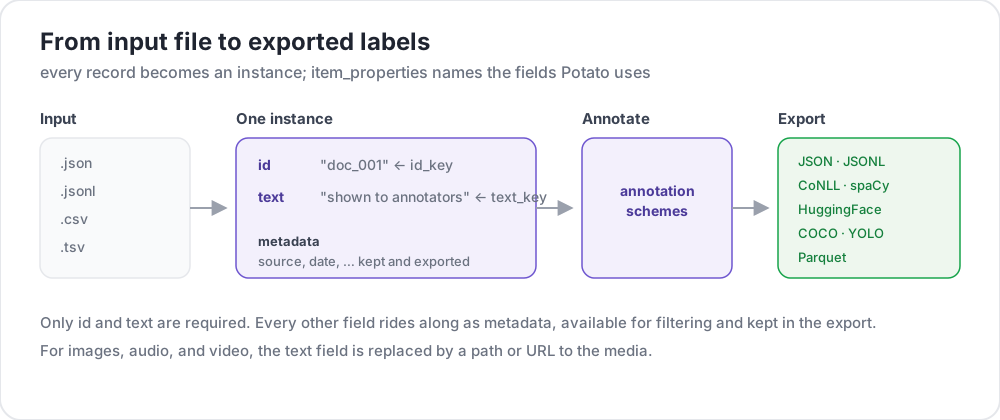 From input file to exported labels
Supported Formats
| Format | Extension | Description |
|---|---|---|
| JSON | .json | Array of objects |
| JSON Lines | .jsonl | One JSON object per line |
| CSV | .csv | Comma-separated values |
| TSV | .tsv | Tab-separated values |
JSON Format
The most common format. Your data should be an array of objects:
[
  {
    "id": "doc_001",
    "text": "This is the first document to annotate.",
    "source": "twitter",
    "date": "2024-01-15"
  },
  {
    "id": "doc_002",
    "text": "This is the second document.",
    "source": "reddit",
    "date": "2024-01-16"
  }
]
JSON Lines Format
Each line is a separate JSON object. Useful for large datasets:
{"id": "doc_001", "text": "First document"}
{"id": "doc_002", "text": "Second document"}
{"id": "doc_003", "text": "Third document"}
CSV/TSV Format
Tabular data with headers:
id,text,source
doc_001,"This is the first document",twitter
doc_002,"This is the second document",reddit
Configuration
Basic Setup
Configure data files and field mappings in your YAML:
data_files:
  - "data/documents.json"

item_properties:
  id_key: id      # Field name for unique ID
  text_key: text  # Field name for content to annotate
Multiple Data Files
Combine multiple data sources:
data_files:
  - "data/batch_1.json"
  - "data/batch_2.json"
  - "data/batch_3.jsonl"
Files are processed in order and combined.
Data Types
Plain Text
Simple text content:
{
  "id": "1",
  "text": "The product arrived quickly and works great!"
}
Media Files
Reference images, videos, or audio:
{
  "id": "1",
  "image_path": "images/photo_001.jpg"
}item_properties:
id_key: id
image_key: image_pathDialogue/Lists
A text field holding a JSON list is laid out one item per line, because vertical reading suits a dialogue. Set list_as_text.horizontal to put the items side by side for a pairwise comparison:
{
  "id": "1",
  "text": ["Option A", "Option B", "Option C"]
}
Text Pairs
A text field holding a JSON object is rendered by whichever display type the config declares (conversation_tree, web_agent_trace and similar). With no display type declared it falls back to formatted JSON, so declare one for a comparison task:
{
  "id": "pair_001",
  "text": {
    "A": "Response from Model A",
    "B": "Response from Model B"
  }
}
HTML Files
Keep the .html files in a folder under task_dir and point at them from the ordinary text field, since Potato has no separate HTML item property. The bundled examples/advanced/html-annotation task embeds each one:
{
  "id": "1",
  "text": "<embed width=\"1020\" height=\"440\" src=\"data/html_data/1.html\" type=\"text/html\">"
}
Contextual Annotation
Include context alongside the main text:
{
  "id": "1",
  "text": "This is great!",
  "context": "Previous message: How do you like the new feature?"
}
Fields other than the id and the text reach the page through kwargs, which names the extra keys to carry over from each item:
item_properties:
  id_key: id
  text_key: text
  kwargs:
    - context
Display Configuration
List Display Options
Control how a list-valued field is laid out. The key takes three sub-keys, and list_as_text: true turns it on with the defaults:
list_as_text:
  # Prefix each item so an annotator can refer to one by name.
  text_list_prefix_type: alphabet   # alphabet, number, bullet, or none

  # Side-by-side suits a pairwise comparison. The default is vertical.
  horizontal: true

  # Shade alternate turns, which keeps a long dialogue readable.
  alternating_shading: true
HTML Content
Markup in a text field renders without any config key. Potato sanitizes rather than escapes it, so tags on an allowlist (<b>, <i>, <span> and similar) become formatting, while <script> and anything off the list is escaped and inert. Span highlights are injected into the item as markup, which is why escaping the whole field is not an option.
{
  "id": "1",
  "text": "<p>This is <strong>formatted</strong> text.</p>"
}
Output Configuration
Output Directory
Specify where annotations are saved:
output_annotation_dir: "output/"Output Format
Annotations are always kept as per-user user_state.json files. export_annotation_format additionally writes a periodic flat export into <output_annotation_dir>/exports/<format>/, which is the form worth analyzing. No exporter is named json:
export_annotation_format: "jsonl" # or csv, tsv, parquet, coco, conll_2003, ...Run python -m potato.export --list-formats for the full registry.
Output Structure
Each user_state.json holds that annotator's labels keyed by instance, with spans recorded separately:
{
  "user_id": "annotator_1",
  "instance_id_to_label_to_value": {
    "doc_001": {
      "sentiment": {"labels": {"positive": true}}
    }
  },
  "instance_id_to_span_to_value": {
    "doc_001": {
      "ner": [
        {"start": 0, "end": 5, "label": "PERSON", "text": "Alice"}
      ]
    }
  }
}
Special Data Types
Best-Worst Scaling
For ranking tasks, use comma-separated items:
{
  "id": "1",
  "text": "Item A,Item B,Item C,Item D"
}
Custom Arguments
Include extra fields for display or filtering:
{
  "id": "1",
  "text": "Document content",
  "category": "news",
  "priority": "high",
  "custom_field": "any value"
}
Database Backend
For large datasets, use MySQL:
database:
  type: mysql
  host: localhost
  port: 3306
  database: potato_db
  username: ${DB_USER}
  password: ${DB_PASSWORD}
Potato automatically creates required tables on first startup.
Data Validation
Potato validates your data on startup:
- Missing ID field - All items need unique identifiers
- Missing text field - Items need content to annotate
- Duplicate IDs - All IDs must be unique
- File not found - Verify data file paths
Complete Example
annotation_task_name: "Document Classification"
task_dir: "."
port: 8000

# Data configuration
data_files:
  - "data/documents.json"

item_properties:
  id_key: id
  text_key: text

# Display settings
list_as_text:
  text_list_prefix_type: number
  horizontal: false

# Output
output_annotation_dir: "output/"
export_annotation_format: "jsonl"

# Annotation scheme
annotation_schemes:
  - annotation_type: radio
    name: category
    description: "Select the document category"
    labels:
      - News
      - Opinion
      - Tutorial
      - Other

user_config:
  allow_all_users: true
  users: []
Best Practices
1. Use Meaningful IDs
Makes tracking and debugging easier:
{"id": "twitter_2024_001", "text": "..."}2. Keep Text Concise
Long texts slow down annotation. Consider:
- Truncating to key portions
- Providing summaries
- Using scroll containers
3. Include Metadata
Helps with filtering and analysis:
{
  "id": "1",
  "text": "Content",
  "source": "twitter",
  "date": "2024-01-15",
  "language": "en"
}
4. Validate Before Loading
Check your data offline:
import json

with open('data.json') as f:
    data = json.load(f)

# Check for required fields
for item in data:
    assert 'id' in item, f"Missing id: {item}"
    assert 'text' in item, f"Missing text: {item}"

# Check for duplicates
ids = [item['id'] for item in data]
assert len(ids) == len(set(ids)), "Duplicate IDs found"

print(f"Validated {len(data)} items")
5. Backup Original Data
Keep raw data separate from annotations for reproducibility.
6. Use JSON Lines for Large Files
More memory-efficient than JSON arrays:
# Convert JSON array to JSON Lines
cat data.json | jq -c '.[]' > data.jsonl
Further Reading
- Data Directory Loading - Load from directories with live watching
- Dialogue Annotation - Multi-item data display
- Export Formats - Output format options
For implementation details, see the source documentation.