Instance Display
Configure the instance_display block to control how text, images, audio, and video content appears alongside annotation controls in your Potato task.
New in v2.1.0
Instance display separates what content to show annotators from what annotations to collect, so any combination of content types (images, videos, audio, text) can sit alongside any annotation schemes (radio buttons, checkboxes, spans, and the rest).
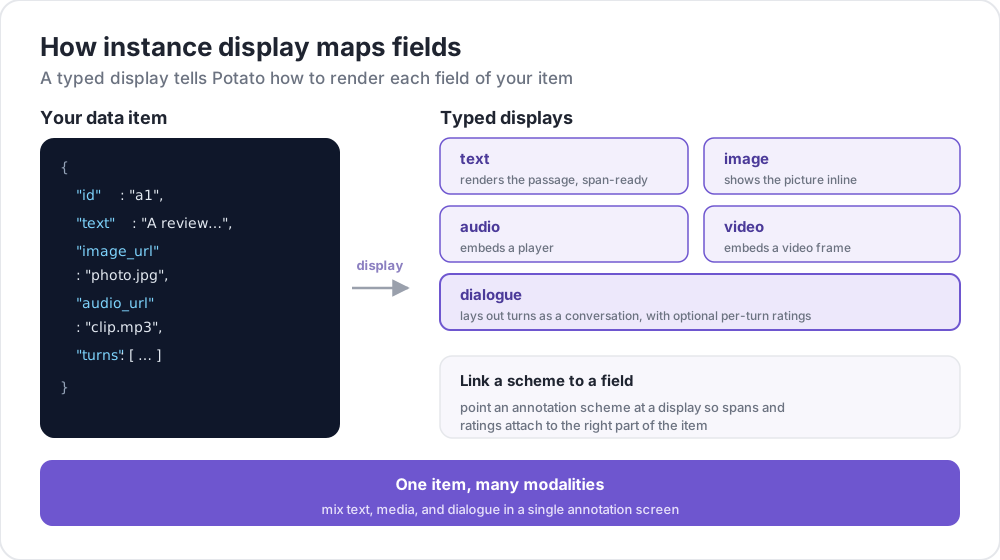 How instance display maps fields
Why Use Instance Display?
To show an image and classify it with radio buttons, declare the image under instance_display and the question under annotation_schemes. The image_annotation schema is for drawing on an image, not for displaying one, and the older workaround of adding one with min_annotations: 0 declared a drawing task nobody was meant to do.
Here is that deprecated workaround:
annotation_schemes:
  - annotation_type: image_annotation
    name: image_display
    description: "Unused, present only to display the image"
    min_annotations: 0
    tools: [bbox]
    labels: [unused]
  - annotation_type: radio
    name: category
    description: "What category is this?"
    labels: [A, B, C]
Declaring the image as content leaves the scheme list to describe the actual question:
instance_display:
  fields:
    - key: image_url
      type: image

annotation_schemes:
  - annotation_type: radio
    name: category
    description: "What category is this?"
    labels: [A, B, C]
Basic Configuration
Add an instance_display section to your YAML configuration:
instance_display:
  fields:
    - key: "image_url"           # Field name in your data JSON
      type: "image"              # Content type
      label: "Image to classify" # Optional header
      display_options:
        max_width: 600
        zoomable: true

  layout:
    direction: "vertical"        # vertical or horizontal
    gap: "20px"
Each field names a key in your data file and the display type Potato should render it with. An option name the display does not recognize is a configuration error rather than a silently ignored key, and the message names the nearest real option.
Supported Display Types
Potato ships 24 display types. The "Span Target" column says whether the type can carry span annotations through the span_target flag described below.
| Type | Description | Span Target |
|---|---|---|
text | Plain text content | Yes |
html | Sanitized HTML content | No |
image | Image display with zoom | No |
video | Video player | No |
audio | Audio player | No |
audio_dialogue | Diarized transcript synced to audio, with per-turn playback | Yes |
gallery | Scrollable image gallery with captions | No |
depth_map | Depth map with near/far window, colormap, and a metre readout | No |
dialogue | Conversation turns | Yes |
conversation_tree | Conversation tree with collapsible branching nodes | No |
multi_agent_discussion | Multi-agent discussion with agent legend and filtering | Yes |
interactive_chat | Interactive agent chat with post-interaction trace | Yes |
pairwise | Side-by-side comparison | No |
code | Syntax-highlighted source code | Yes |
spreadsheet | Tabular data (Excel/CSV), annotated by row or cell | No |
document | Rich documents (Word, Markdown, HTML) | Yes |
pdf | PDF documents with page controls | No |
agent_trace | Agent trace as vertical step cards | No |
coding_trace | Coding agent trace with diffs, terminal blocks, file tree | Yes |
eval_trace | One trace in three panes: reasoning, function calls, final answer | Yes |
cot_trace | Long chain-of-thought trace with a sticky progress rail | No |
web_agent_trace | Web agent trace with screenshots and click overlays | No |
live_agent | Live AI agent viewer with real-time screenshots | No |
live_coding_agent | Live coding agent viewer with real-time streaming | No |
spreadsheet and pdf are marked No because they do not accept the span_target flag. Both still support annotation anchored their own way, by row or cell for spreadsheets and through the PDF.js text layer for PDFs.
Options every display type takes
Three options belong to the resizable container Potato wraps around each field rather than to any one renderer, so they work on every display type:
| Option | Default | Description |
|---|---|---|
resizable | true | Wrap the field in a container the annotator can drag to resize |
max_height | 500 | How tall the field may grow before it scrolls inside itself |
min_height | 100 | How short it may be dragged |
Lengths accept a number or a CSS length, so 400, "400px" and "50vh" all work, and a bare number means pixels. Setting resizable: false suits a short field, where a drag handle around a one-line label reads as a mistake.
Display Type Options
Text Display
- key: "text"
  type: "text"
  label: "Document"
  display_options:
    collapsible: false           # Make content collapsible
    collapsed_by_default: false  # Start collapsed (needs collapsible)
    max_height: 400              # Max height in pixels before scrolling
    preserve_whitespace: true    # Preserve line breaks and spacing
collapsed_by_default keeps a long case file out of the way until the annotator asks for it, rather than pushing the questions down the page on every item.
Image Display
- key: "image_url"
  type: "image"
  label: "Image"
  display_options:
    max_width: 800            # Max width (number or CSS string)
    max_height: 600           # Max height
    zoomable: true            # Enable zoom controls
    alt_text: "Description"   # Alt text for accessibility
    object_fit: "contain"     # CSS object-fit property
Video Display
- key: "video_url"
  type: "video"
  label: "Video"
  display_options:
    max_width: 800
    max_height: 450
    controls: true            # Show video controls
    autoplay: false           # Auto-play on load
    loop: false               # Loop playback
    muted: false              # Start muted
Audio Display
- key: "audio_url"
  type: "audio"
  label: "Audio"
  display_options:
    controls: true            # Show audio controls
    autoplay: false
    loop: false
    show_waveform: false      # Show waveform visualization
Dialogue Display
- key: "conversation"
  type: "dialogue"
  label: "Conversation"
  display_options:
    alternating_shading: true    # Alternate background colors
    speaker_extraction: true     # Extract "Speaker:" from text
    show_turn_numbers: false     # Show turn numbers
    max_height: 600              # Cap the height and scroll inside it
A long conversation otherwise pushes the annotation form off the bottom of the page, so max_height scrolls the container rather than clipping it.
Data format for dialogue (each line in JSONL file):
{"id": "conv_001", "conversation": ["Speaker A: Hello there!", "Speaker B: Hi, how are you?"]}Or with structured data:
{"id": "conv_001", "conversation": [{"speaker": "Alice", "text": "Hello there!"}, {"speaker": "Bob", "text": "Hi, how are you?"}]}Pairwise Display
- key: "comparison"
  type: "pairwise"
  label: "Compare Options"
  display_options:
    cell_width: "auto"          # "auto" splits the row evenly
    show_labels: true           # Show A/B labels
    labels: ["Option A", "Option B"]
    vertical_on_mobile: true    # Stack vertically on mobile
Layout Options
Control how multiple fields are arranged:
instance_display:
  layout:
    direction: horizontal  # horizontal or vertical
    gap: 24px              # Space between fields
A horizontal direction suits two fields the annotator compares against each other, such as a source and its summary. Stacked fields suit material read in order.
Span Annotation Support
Nine display types can be targets for span annotation: text, dialogue, audio_dialogue, code, document, coding_trace, eval_trace, interactive_chat and multi_agent_discussion. Mark a field as a span target:
instance_display:
  fields:
    - key: "document"
      type: "text"
      span_target: true  # Enable span annotation on this field

annotation_schemes:
  - annotation_type: span
    name: entities
    description: "Highlight named entities"
    labels: [PERSON, LOCATION, ORG]
Setting span_target on a type that does not support it is a configuration error, and the message lists the types that do.
Multiple Span Targets
You can have multiple text fields that support span annotation:
instance_display:
  fields:
    - key: "source_text"
      type: "text"
      label: "Source Document"
      span_target: true

    - key: "summary"
      type: "text"
      label: "Summary"
      span_target: true

annotation_schemes:
  - annotation_type: span
    name: factual_errors
    description: "Mark claims in the summary that the source does not support"
    labels: [contradiction, unsupported, fabrication]
When multiple span targets are used, annotations are stored with field association:
{
  "factual_errors": {
    "source_text": [],
    "summary": [
      {"start": 45, "end": 67, "label": "unsupported"}
    ]
  }
}
Offsets are recorded per field, so a span in the summary cannot be confused with one at the same character position in the source.
Linking Annotation Schemas to Display Fields
For media annotation schemas (image_annotation, video_annotation, audio_annotation), link them to display fields using source_field:
instance_display:
  fields:
    - key: "image_url"
      type: "image"

annotation_schemes:
  - annotation_type: image_annotation
    name: objects
    description: "Draw a box around each object"
    source_field: "image_url"  # Links to display field
    tools: [bbox]
    labels: [person, car]
Name the field when the item carries more than one image, or when the scheme should draw on a field other than the one it would otherwise find. With a single image field, image_annotation picks it up on its own.
Per-Turn Dialogue Ratings
Add inline rating widgets to individual dialogue turns:
instance_display:
  fields:
    - key: conversation
      type: dialogue
      label: "Conversation"
      display_options:
        show_turn_numbers: true
        per_turn_ratings:
          speakers: ["Agent"]          # Only show ratings for these speakers
          schema_name: "turn_quality"  # Name for the stored annotation data
          scheme:
            type: likert
            size: 5
            labels: ["Poor", "Excellent"]
Restricting speakers to one side keeps the rating on the turns being evaluated, which is what you want when the other side is a fixed user script. Rating circles appear inline below each matching turn, fill up to the selected value, and are stored as a single JSON object keyed by turn index:
{
  "turn_quality": "{\"0\": 4, \"2\": 5, \"4\": 3}"
}
Example: Image Classification
annotation_task_name: "Image Classification"

data_files:
  - data/images.json

item_properties:
  id_key: id
  text_key: image_url

task_dir: .
output_annotation_dir: annotation_output

instance_display:
  fields:
    - key: image_url
      type: image
      label: "Image to Classify"
      display_options:
        max_width: 600
        zoomable: true

    - key: context
      type: text
      label: "Additional Context"
      display_options:
        collapsible: true

annotation_schemes:
  - annotation_type: radio
    name: category
    description: "What category best describes this image?"
    labels:
      - nature
      - urban
      - people
      - objects

user_config:
  allow_all_users: true
The context field is collapsible because it is supporting material. Keeping it closed by default puts the image and the question on one screen.
Sample data file (data/images.json) in JSONL format:
{"id": "img_001", "image_url": "https://example.com/image1.jpg", "context": "Taken in summer 2023"}
{"id": "img_002", "image_url": "https://example.com/image2.jpg", "context": "Winter landscape"}
Example: Multi-Modal Annotation
Video alongside a transcript with span annotation:
annotation_task_name: "Video Analysis"

data_files:
  - data/videos.json

item_properties:
  id_key: id
  text_key: transcript

task_dir: .
output_annotation_dir: annotation_output

instance_display:
  layout:
    direction: horizontal
    gap: 24px

  fields:
    - key: video_url
      type: video
      label: "Video"
      display_options:
        max_width: "45%"

    - key: transcript
      type: text
      label: "Transcript"
      span_target: true

annotation_schemes:
  - annotation_type: radio
    name: sentiment
    description: "What is the overall sentiment of this clip?"
    labels: [positive, neutral, negative]

  - annotation_type: span
    name: highlights
    description: "Highlight the passages that support your rating"
    labels:
      - key_point
      - question
      - supporting_evidence
The horizontal layout puts the video beside the transcript so the annotator can mark a passage without scrolling away from the footage it describes.
Backwards Compatibility
- Existing configs without
instance_displaycontinue to work unchanged - The
text_keyfromitem_propertiesis still used as fallback - Legacy media detection via annotation schemes still works
- A deprecation warning appears in the logs when using the old display-only pattern
Migration from Display-Only Patterns
If you were using annotation schemas only to display content:
Before (deprecated):
annotation_schemes:
  - annotation_type: image_annotation
    name: image_display
    description: "Unused, present only to display the image"
    min_annotations: 0
    tools: [bbox]
    labels: [unused]
After (recommended):
instance_display:
  fields:
    - key: image_url
      type: image
Further Reading
- Data Formats - Supported input data formats
- UI Configuration - Interface customization
- Layout Customization - Custom HTML templates
- Image Annotation - Image annotation tools
For implementation details, see the source documentation.