Training Phase
Qualify annotators in Potato with practice items, known correct answers, immediate feedback, and passing criteria that decide who reaches the real task.
Potato includes an optional training phase that runs before the main task. Annotators answer practice questions with known correct answers and get feedback on each one, so a misunderstanding of the guidelines surfaces before it is spread across a corpus.
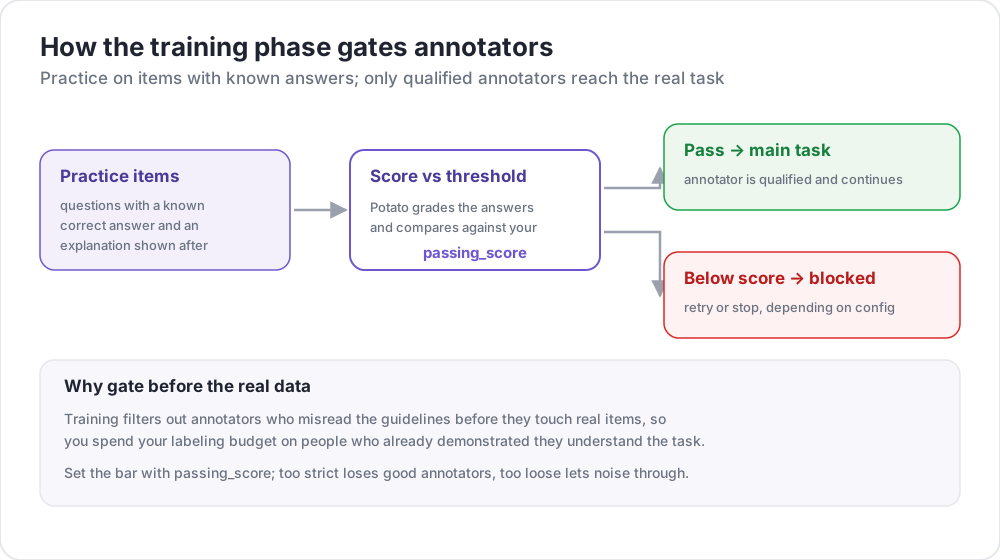 How the training phase gates annotators
Use Cases
- Check that annotators understand the task
- Filter out annotators who cannot reach your accuracy bar
- Give guided practice before real annotations
- Teach the guidelines through worked examples
How It Works
- Annotators answer a set of training questions
- Feedback appears immediately after each answer
- Progress is measured against the passing criteria
- Only annotators who pass continue to the main task
Configuration
Training takes two blocks that do different jobs. The top-level training block configures the phase, and phases decides where it sits in the workflow. Configuring one without the other is the usual reason a training phase never appears.
The Training Block
training:
  enabled: true
  data_file: "data/training_data.json"
  annotation_schemes: ["sentiment"]
  passing_criteria:
    min_correct: 3
    require_all_correct: false
  allow_retry: true
  failure_action: "repeat_training"
Configuration Options
| Option | Type | Default | Description |
|---|---|---|---|
enabled | boolean | false | Whether the training phase runs |
data_file | string | - | Path to the training data, required when enabled |
annotation_schemes | list | all schemes | Which schemes to train on |
passing_criteria.min_correct | integer | 3 | Correct answers needed to pass |
passing_criteria.require_all_correct | boolean | false | Whether every question must be right |
passing_criteria.max_mistakes | integer | -1 | Total mistakes before failure, -1 for unlimited |
passing_criteria.max_mistakes_per_question | integer | -1 | Mistakes on one question before failure |
allow_retry | boolean | true | Whether an incorrect answer can be retried |
failure_action | string | move_to_done | move_to_done or repeat_training |
annotation_schemes names schemes rather than a single one, so a task with several questions can train on all of them or on just the one that causes trouble.
Adding the Phase to the Workflow
phases lists the workflow order and points each phase at its file. The training entry carries a type and a file, and the settings above stay in the training block:
phases:
  order: [consent, instructions, training, annotation]

  consent:
    type: consent
    file: surveyflow/consent.json

  instructions:
    type: instructions
    file: surveyflow/instructions.html

  training:
    type: training
    file: data/training_data.json
The annotation phase needs no file, since it uses the project's annotation_schemes. See Multi-Phase Workflows for the other phases.
Passing Criteria
The criteria combine, so a run can require a floor on correct answers while also cutting off anyone who keeps missing the same question.
Minimum Correct
passing_criteria:
  min_correct: 3
Require All Correct
passing_criteria:
  require_all_correct: true
Maximum Mistakes
passing_criteria:
  max_mistakes: 5
The annotator fails after five wrong answers in total.
Maximum Mistakes Per Question
passing_criteria:
  max_mistakes_per_question: 2
The annotator fails after two wrong answers on any single question, which catches someone stuck on one distinction rather than weak across the board.
Combined Criteria
passing_criteria:
  min_correct: 3
  max_mistakes: 5
  max_mistakes_per_question: 2
Training Data Format
Training data is a JSON file with a training_instances list. Each instance carries the text, the correct answer for each scheme, and an optional explanation shown when the answer is wrong:
{
  "training_instances": [
    {
      "id": "train_1",
      "text": "I absolutely love this product! Best purchase ever!",
      "correct_answers": {
        "sentiment": "Positive"
      },
      "explanation": "Strong positive language: 'love' and 'best purchase'."
    },
    {
      "id": "train_2",
      "text": "This is the worst service I've ever experienced.",
      "correct_answers": {
        "sentiment": "Negative"
      },
      "explanation": "'Worst' and the complaint itself indicate negative sentiment."
    },
    {
      "id": "train_3",
      "text": "The package arrived on time.",
      "correct_answers": {
        "sentiment": "Neutral"
      },
      "explanation": "A factual statement with no evaluation attached."
    }
  ]
}
Training Instance Fields
| Field | Type | Required | Description |
|---|---|---|---|
id | string | Yes | Unique identifier for the instance |
text | string | Yes | The text to annotate |
correct_answers | object | Yes | Scheme name mapped to the correct value |
explanation | string | No | Shown when the answer is wrong |
Correct Answers Format
correct_answers matches the shape each scheme produces:
{
  "sentiment": "Positive",
  "topic": ["emotion", "personal"],
  "rating": 4,
  "notes": "example response"
}
Multiple Schemes
With several schemes, give each one its answer, and an explanation per scheme where the reasoning differs:
{
  "id": "train_4",
  "text": "Apple announced new iPhone features yesterday.",
  "correct_answers": {
    "sentiment": "Neutral",
    "topic": "Technology"
  },
  "explanation": "A factual news statement about a technology product."
}
User Experience
Training Flow
- The annotator sees an indicator that they are in the training phase
- The question appears with the same annotation form as the real task
- They submit an answer
- Feedback appears immediately, with the explanation when the answer was wrong and a retry option if
allow_retryis on
Feedback Display
After a wrong answer, the annotator sees the explanation from the training data and their progress against the passing criteria. Writing explanations that teach the rule, rather than restating the answer, is what makes the phase worth running.
Admin Monitoring
Training statistics appear in the admin dashboard for each annotator, covering whether they passed, how many answers were correct, total attempts, pass rate, and which question they are on.
The same data is available through the admin API:
GET /admin/api/annotators
GET /admin/user_state/{user_id}
Example: Sentiment Analysis Training
annotation_task_name: "Sentiment Analysis"
task_dir: "."
port: 8000

data_files:
  - "data/reviews.json"

item_properties:
  id_key: id
  text_key: text

annotation_schemes:
  - annotation_type: radio
    name: sentiment
    description: "What is the sentiment of this review?"
    labels:
      - Positive
      - Negative
      - Neutral
    sequential_key_binding: true

training:
  enabled: true
  data_file: "data/training_data.json"
  annotation_schemes: ["sentiment"]
  passing_criteria:
    min_correct: 3
    require_all_correct: false
  allow_retry: true
  failure_action: "repeat_training"

phases:
  order: [training, annotation]
  training:
    type: training
    file: "data/training_data.json"

output_annotation_dir: "output/"
export_annotation_format: "jsonl"

user_config:
  allow_all_users: true
Example: NER Training
Span schemes train the same way. The correct answer is the list of spans, given as character offsets:
annotation_schemes:
  - annotation_type: span
    name: entities
    description: "Highlight named entities"
    labels:
      - Person
      - Organization
      - Location
      - Date

training:
  enabled: true
  data_file: "data/ner_training.json"
  annotation_schemes: ["entities"]
  passing_criteria:
    min_correct: 2
allow_retry: true{
"training_instances": [
{
"id": "train_1",
"text": "Tim Cook announced that Apple will open a new store in New York on March 15.",
"correct_answers": {
"entities": [
{"start": 0, "end": 8, "label": "Person"},
{"start": 24, "end": 29, "label": "Organization"},
{"start": 54, "end": 62, "label": "Location"},
{"start": 66, "end": 74, "label": "Date"}
]
},
"explanation": "Tim Cook is a Person, Apple an Organization, New York a Location, March 15 a Date."
}
]
}Best Practices
Start Simple
Open with unambiguous examples before introducing edge cases. An annotator who fails on question one learns that the task is confusing rather than that they made a mistake.
Cover Every Label
Include at least one example of each value a scheme can take. A label that never appears in training is the one annotators get wrong at scale.
Write Explanations That Teach
An explanation should give the rule, not repeat the answer:
{
  "explanation": "The review mentions a problem, but the reviewer is satisfied with how it was resolved, so the overall judgment is Positive rather than Negative."
}
Set Reachable Criteria
Strict, and likely to lose annotators who would have been fine:
passing_criteria:
  require_all_correct: true
Leaves room to learn from the feedback:
passing_criteria:
  min_correct: 3
  max_mistakes_per_question: 2
Include Edge Cases
Add the examples that caused disagreement in your pilot, since those are the decisions the guidelines have to settle:
{
  "id": "train_5",
  "text": "Not bad at all, I guess it could be worse.",
  "correct_answers": {"sentiment": "Neutral"},
  "explanation": "Despite 'not bad' and 'worse', this is a lukewarm assessment rather than praise or complaint."
}
Performance Considerations
Training data is loaded once at server startup and training state is held in memory with the rest of the user state, so the phase adds no database requirement and no measurable cost to the main task.
Further Reading
- Quality Control - Attention checks and gold standards
- Category Assignment - Route items by annotator expertise
- Multi-Phase Workflows - The other workflow phases
- User Management - Access lists, roles, and quotas
For implementation details, see the source documentation.