Pairwise Comparison
Configure side-by-side comparisons in Potato for preference learning, A/B testing, and output quality assessment with randomized presentation order.
Pairwise comparison allows annotators to compare two items side by side and indicate their preference. It supports two modes:
- Binary Mode (default): Click on the preferred tile (A or B), with optional tie button
- Scale Mode: Use a slider to rate how much one option is preferred over the other
Common use cases include comparing model outputs, preference learning for RLHF, quality comparison of translations or summaries, and A/B testing.
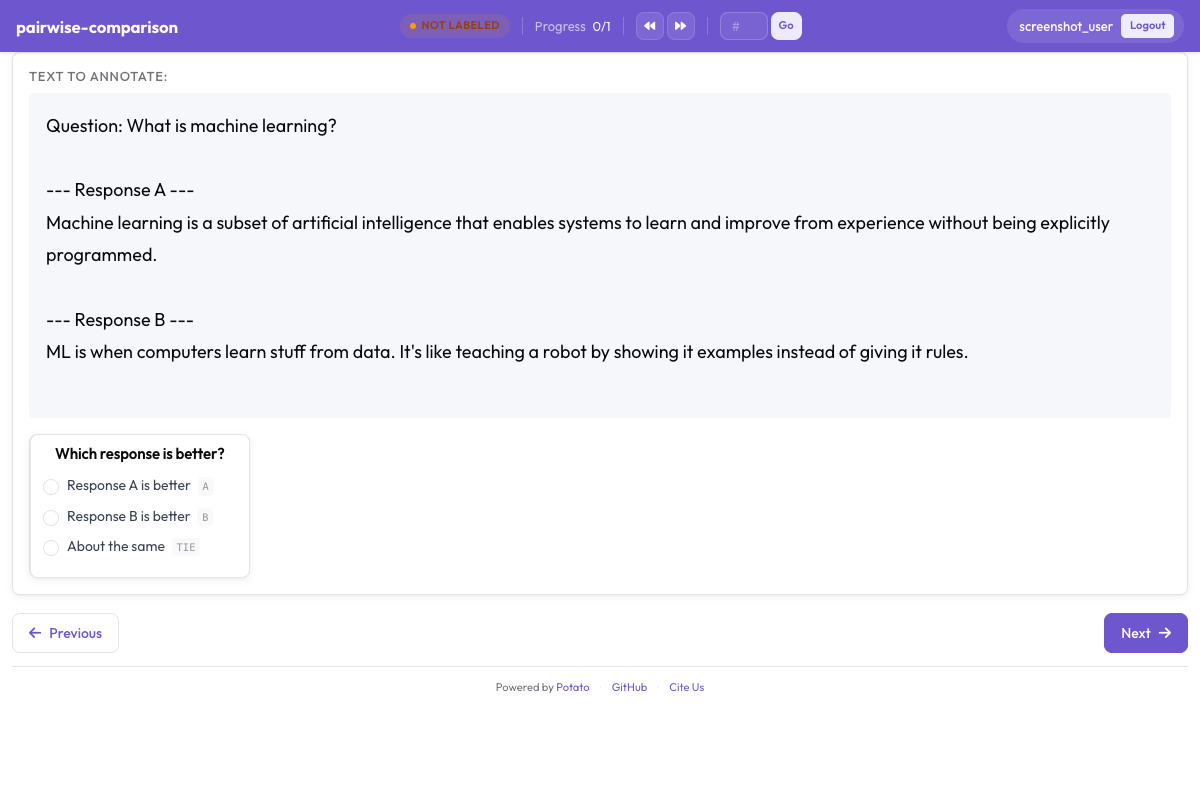 Side-by-side pairwise comparison for preference annotation in Potato
Binary Mode
Binary mode displays two clickable tiles. Annotators click on their preferred option.
annotation_schemes:
  - annotation_type: pairwise
    name: preference
    description: "Which response is better?"
    mode: binary

    # Data source - key in instance data containing items to compare
    items_key: "responses"

    # Display options
    show_labels: true
    labels:
      - "Response A"
      - "Response B"

    # Tie option
    allow_tie: true
    tie_label: "No preference"

    # Keyboard shortcuts
    sequential_key_binding: true

    # Validation
    label_requirement:
      required: true
Scale Mode
Scale mode displays a slider between two items, allowing annotators to indicate the degree of preference.
annotation_schemes:
  - annotation_type: pairwise
    name: preference_scale
    description: "Rate how much better A is than B"
    mode: scale

    items_key: "responses"

    labels:
      - "Response A"
      - "Response B"

    # Scale configuration
    scale:
      min: -3           # Negative = prefer left item (A)
      max: 3            # Positive = prefer right item (B)
      step: 1
      default: 0

      # Endpoint labels
      labels:
        min: "A is much better"
        max: "B is much better"
        center: "Equal"

    label_requirement:
      required: true
Data Format
The schema expects instance data with a list of items to compare:
{"id": "1", "responses": ["Response A text", "Response B text"]}
{"id": "2", "responses": ["First option here", "Second option here"]}
The items_key configuration specifies which field contains the items to compare. The field should contain a list with at least 2 items.
Keyboard Shortcuts
In binary mode with sequential_key_binding: true:
| Key | Action |
|---|---|
1 | Select option A |
2 | Select option B |
0 | Select tie/no preference (if allow_tie: true) |
Scale mode uses slider interaction.
Output Format
Binary Mode
{
  "preference": {
    "selection": "A"
  }
}
With tie:
{
  "preference": {
    "selection": "tie"
  }
}
Scale Mode
Negative values indicate preference for A, positive for B, zero for equal:
{
  "preference_scale": {
    "scale_value": "-2"
  }
}
Examples
Basic Binary Comparison
annotation_schemes:
  - annotation_type: pairwise
    name: quality
    description: "Which text is higher quality?"
    labels: ["Text A", "Text B"]
    allow_tie: true
Multi-Aspect Comparison
Compare on multiple dimensions:
annotation_schemes:
  - annotation_type: pairwise
    name: fluency
    description: "Which response is more fluent?"
    labels: ["Response A", "Response B"]

  - annotation_type: pairwise
    name: relevance
    description: "Which response is more relevant?"
    labels: ["Response A", "Response B"]

  - annotation_type: pairwise
    name: overall
    description: "Which response is better overall?"
    labels: ["Response A", "Response B"]
    allow_tie: true
Preference Scale with Custom Range
annotation_schemes:
  - annotation_type: pairwise
    name: sentiment_comparison
    description: "Compare the sentiment of these two statements"
    mode: scale
    labels: ["Statement A", "Statement B"]
    scale:
      min: -5
      max: 5
      step: 1
      labels:
        min: "A is much more positive"
        max: "B is much more positive"
        center: "Equal sentiment"
RLHF Preference Collection
annotation_schemes:
  - annotation_type: pairwise
    name: overall
    description: "Overall, which response is better?"
    labels: ["Response A", "Response B"]
    allow_tie: true
    sequential_key_binding: true

  - annotation_type: multiselect
    name: criteria
    description: "What factors influenced your decision?"
    labels:
      - Accuracy
      - Helpfulness
      - Clarity
      - Safety
      - Completeness

  - annotation_type: text
    name: notes
    description: "Additional notes (optional)"
    rows: 4
    label_requirement:
      required: false
Styling
The pairwise annotation uses CSS variables from the theme system. Add custom CSS for tile customization:
/* Make tiles taller */
.pairwise-tile {
  min-height: 200px;
}

/* Change selected tile highlight */
.pairwise-tile.selected {
  border-color: #10b981;
  background-color: rgba(16, 185, 129, 0.1);
}
Best Practices
- Use clear, distinct labels - annotators should instantly understand options
- Consider tie options carefully - sometimes forcing a choice is appropriate
- Use keyboard shortcuts - speeds up annotation significantly
- Add justification fields - helps understand reasoning and improves data quality
- Test with your data - ensure display works well with your content length
Further Reading
- Conversation Trees - For complex branching comparisons
- Productivity Features - Keyboard shortcuts
For implementation details, see the source documentation.