Extractive QA
Build SQuAD-style question answering interfaces in Potato for span-based answer extraction, reading comprehension tasks, and passage highlighting annotation.
The extractive QA annotation schema provides a question answering interface where annotators highlight answer spans directly in a text passage. Use it for reading comprehension dataset creation, SQuAD-style QA annotation, fact verification, and any task where answers are extracted verbatim from source text.
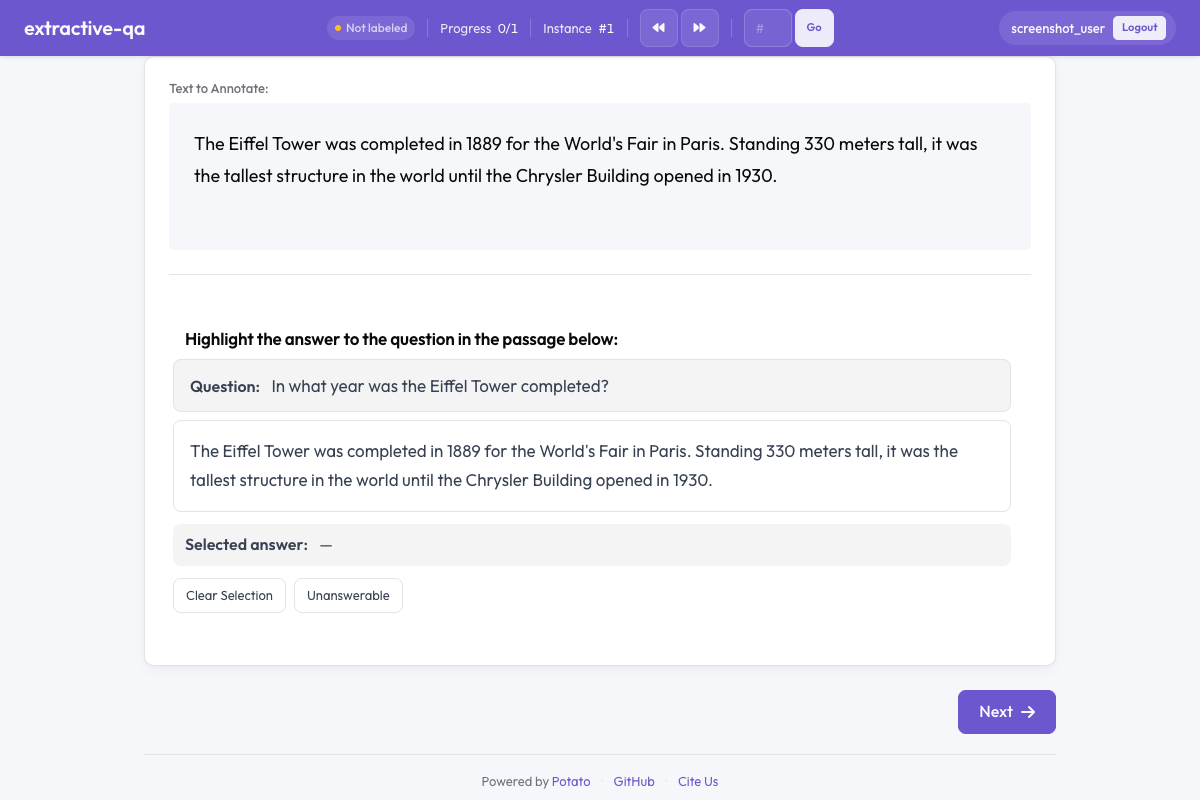 Extractive QA in Potato
Overview
The extractive QA schema presents:
- A question displayed prominently above the passage
- A text passage where annotators select answer spans by highlighting
- Color-coded highlights marking selected answer text
- An unanswerable option for questions that cannot be answered from the passage
Quick Start
question_field and passage_field name the keys Potato reads from each data item, so they have to match your data file. Leaving passage_field unset falls back to the item's default text field:
annotation_schemes:
  - annotation_type: extractive_qa
    name: answer_span
    description: Highlight the answer to the question in the passage below.
    question_field: question
    passage_field: passage
    allow_unanswerable: true
Configuration Options
| Field | Type | Default | Description |
|---|---|---|---|
annotation_type | string | Required | Must be "extractive_qa" |
name | string | Required | Unique identifier for this schema |
description | string | Required | Instructions displayed to annotators |
question_field | string | "question" | Field in the data JSON containing the question text |
passage_field | string | "" | Field in the data JSON containing the passage text (empty string uses the default text field) |
allow_unanswerable | boolean | true | Show a button for marking questions as unanswerable |
highlight_color | string | "#FFEB3B" | CSS color for the answer highlight |
Examples
SQuAD-Style QA
SQuAD contains questions with no answer in the passage, so keeping allow_unanswerable on is what stops annotators inventing a span for them:
annotation_schemes:
  - annotation_type: extractive_qa
    name: squad_answer
    description: >
      Select the shortest span in the passage that answers the question.
      If the question cannot be answered from the passage, mark it as unanswerable.
    question_field: question
    passage_field: context
    allow_unanswerable: true
    highlight_color: "#FFEB3B"
With sample data:
{
  "id": "q001",
  "question": "When was the university founded?",
  "context": "The University of Michigan was founded in 1817 in Detroit and moved to Ann Arbor in 1837. It is one of the oldest public universities in the United States."
}
Fact Verification
The claim takes the question slot here, so question_field points at it. A green highlight suits evidence marking, where the span supports a claim rather than answering a question:
annotation_schemes:
  - annotation_type: extractive_qa
    name: evidence_span
    description: >
      Highlight the evidence in the passage that supports or refutes the claim.
      Mark as unanswerable if the passage contains no relevant evidence.
    question_field: claim
    passage_field: document
    allow_unanswerable: true
    highlight_color: "#81C784"
Answer Extraction Without Unanswerable
Turning allow_unanswerable off removes the escape route, which is correct only when every passage is known to contain an answer. On data where it does not hold, annotators guess instead:
annotation_schemes:
  - annotation_type: extractive_qa
    name: definition_extraction
    description: >
      Highlight the definition of the term in the passage.
      Every passage contains a definition, so select the most precise span.
    question_field: term
    passage_field: text
    allow_unanswerable: false
    highlight_color: "#64B5F6"
Output Format
{
  "answer_span": {
    "labels": {
      "answer_text": "1817",
      "start": 42,
      "end": 46,
      "unanswerable": false
    }
  }
}
start and end are character offsets into the passage text.
When the annotator marks a question as unanswerable, the text is empty and both offsets are -1:
{
  "answer_span": {
    "labels": {
      "answer_text": "",
      "start": -1,
      "end": -1,
      "unanswerable": true
    }
  }
}
Best Practices
- Instruct annotators to select minimal spans - the shortest text that fully answers the question produces cleaner training data
- Use allow_unanswerable for realistic tasks - real-world QA often includes unanswerable questions; disabling this option forces annotators to guess
- Choose readable highlight colors - ensure the highlight color has sufficient contrast with the text for easy reading
- Keep passages at a reasonable length - 100-500 words per passage works well; very long passages make span selection tedious
- Provide clear question formatting - ensure questions are well-formed and unambiguous to reduce annotator confusion
Further Reading
- Span Annotation - General span labeling
- Text & Number Input - Free-text answer entry
- AI Support - AI-assisted annotation hints
For implementation details, see the source documentation.