Card Sort
Build drag-and-drop card sorting interfaces in Potato for grouping, categorization, and information architecture tasks with closed or open sorting modes.
The card sort annotation schema provides a drag-and-drop interface for grouping items into categories. Use it for information architecture research, content categorization, and any task where annotators organize items into meaningful groups.
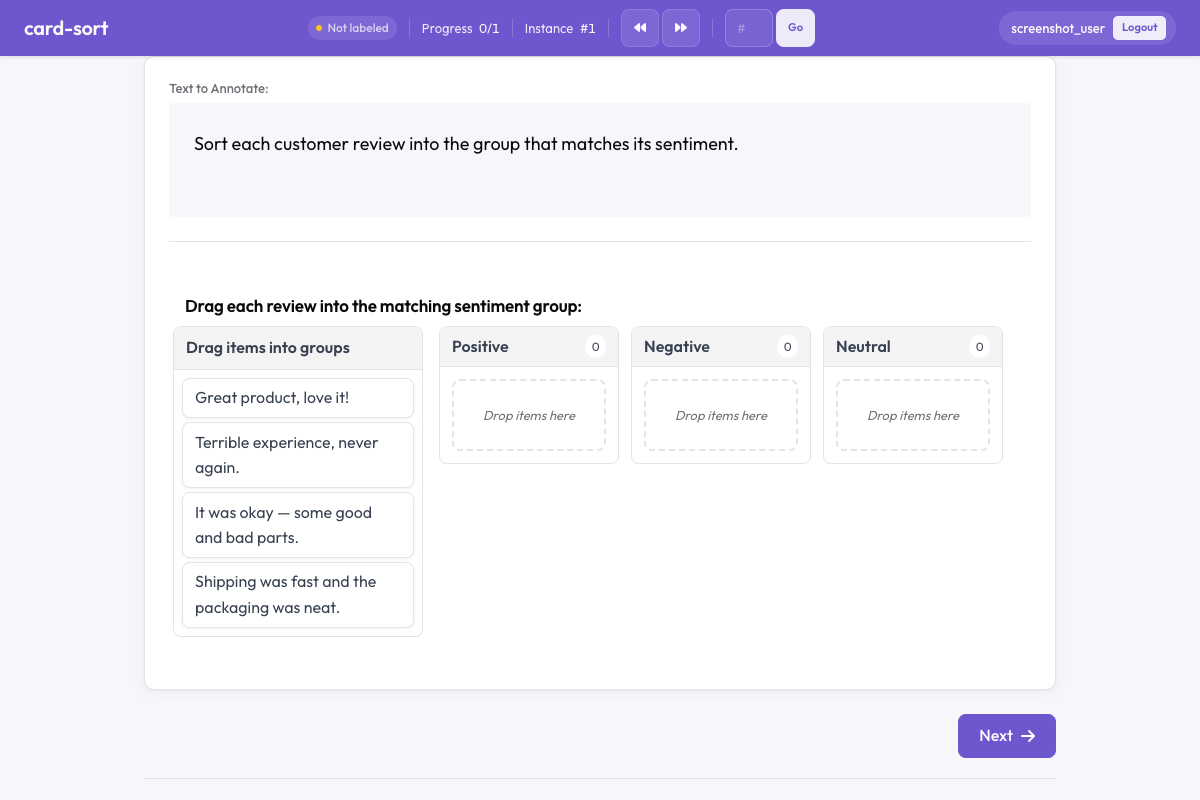 Card sort in Potato
Overview
The card sort schema supports two modes:
- Closed sort - Annotators drag cards into predefined groups
- Open sort - Annotators create their own groups and name them
Cards are draggable elements that annotators arrange by dropping them into group containers. The choice of mode decides whether you get comparable categories across annotators or a record of how each annotator carves up the material.
Quick Start
A closed sort needs its groups named up front, since those are the containers the annotator drops onto:
annotation_schemes:
  - annotation_type: card_sort
    name: content_grouping
    description: Drag each card into the most appropriate group.
    mode: closed
    groups:
      - Positive
      - Negative
      - Neutral
Configuration Options
| Field | Type | Default | Description |
|---|---|---|---|
annotation_type | string | Required | Must be "card_sort" |
name | string | Required | Unique identifier for this schema |
description | string | Required | Instructions displayed to annotators |
mode | string | "closed" | "closed" (predefined groups) or "open" (annotator-created groups) |
groups | array | [] | Group names for closed sort mode; an empty list leaves the annotator nothing to drop onto |
items_field | string | "items" | Field in the data JSON containing the list of card items |
allow_empty_groups | boolean | true | Whether groups can remain empty on submission |
allow_multiple | boolean | false | Whether a card can be placed in multiple groups |
Examples
Sentiment Sorting (Closed)
Leaving allow_empty_groups on lets an annotator finish a batch in which one category never came up, which is the honest outcome when the groups cover more ground than a single batch does:
annotation_schemes:
  - annotation_type: card_sort
    name: sentiment_sort
    description: Sort each comment into the appropriate sentiment category.
    mode: closed
    groups:
      - Positive
      - Negative
      - Mixed
      - Off-topic
    allow_empty_groups: true
With sample data:
{
  "id": "batch_001",
  "items": [
    "Great product, love it!",
    "Terrible experience, never again.",
    "It was okay, some good and bad parts.",
    "Anyone know the weather today?"
  ]
}
Open Card Sort for Information Architecture
Open sorts produce annotator-named groups, so the analysis is about how people carve up the material rather than how well they match your categories. Requiring non-empty groups here stops a participant leaving a container they created and abandoned:
annotation_schemes:
  - annotation_type: card_sort
    name: ia_sort
    description: >
      Group these menu items into categories that make sense to you.
      Name each group with a descriptive label.
    mode: open
    items_field: "menu_items"
    allow_empty_groups: false
items_field names the key Potato reads the cards from, so it has to match the field in your data file.
Multi-Label Grouping
Setting allow_multiple lets one statement belong to several themes, which suits material where categories overlap. It also means the counts per group no longer sum to the number of cards:
annotation_schemes:
  - annotation_type: card_sort
    name: theme_sort
    description: >
      Sort each statement into relevant themes.
      A statement can belong to multiple themes.
    mode: closed
    groups:
      - Economy
      - Healthcare
      - Education
      - Environment
      - Security
    allow_multiple: true
Output Format
{
  "content_grouping": {
    "groups": {
      "Positive": ["Great product, love it!"],
      "Negative": ["Terrible experience, never again."],
      "Mixed": ["It was okay, some good and bad parts."],
      "Off-topic": ["Anyone know the weather today?"]
    }
  }
}
Each group maps to the list of card texts dropped into it. For open sort, group names are annotator-defined strings.
Best Practices
- Use closed sort for consistent results - predefined groups ensure comparable annotations across annotators
- Use open sort for exploratory research - when you want to discover how people naturally group items
- Keep card text short - long text on cards makes dragging awkward; use concise labels or excerpts
- Limit the number of cards - 15-30 cards per task is ideal; more than 40 becomes tedious
- Provide clear group labels - for closed sort, use unambiguous group names to reduce confusion
Further Reading
- Radio & Multiselect - Standard label selection
- Best-Worst Scaling - Comparative annotation
- Productivity Features - Keyboard shortcuts and efficiency
For implementation details, see the source documentation.