Soft Label
Configure soft label annotation in Potato for probability distribution allocation across categories using sliders that must sum to a fixed total.
The soft label annotation schema allows annotators to assign probability distributions across multiple categories rather than making a single hard classification decision. Annotators use sliders to distribute a fixed total (e.g., 100 points) across labels, capturing the degree of uncertainty or overlap between categories.
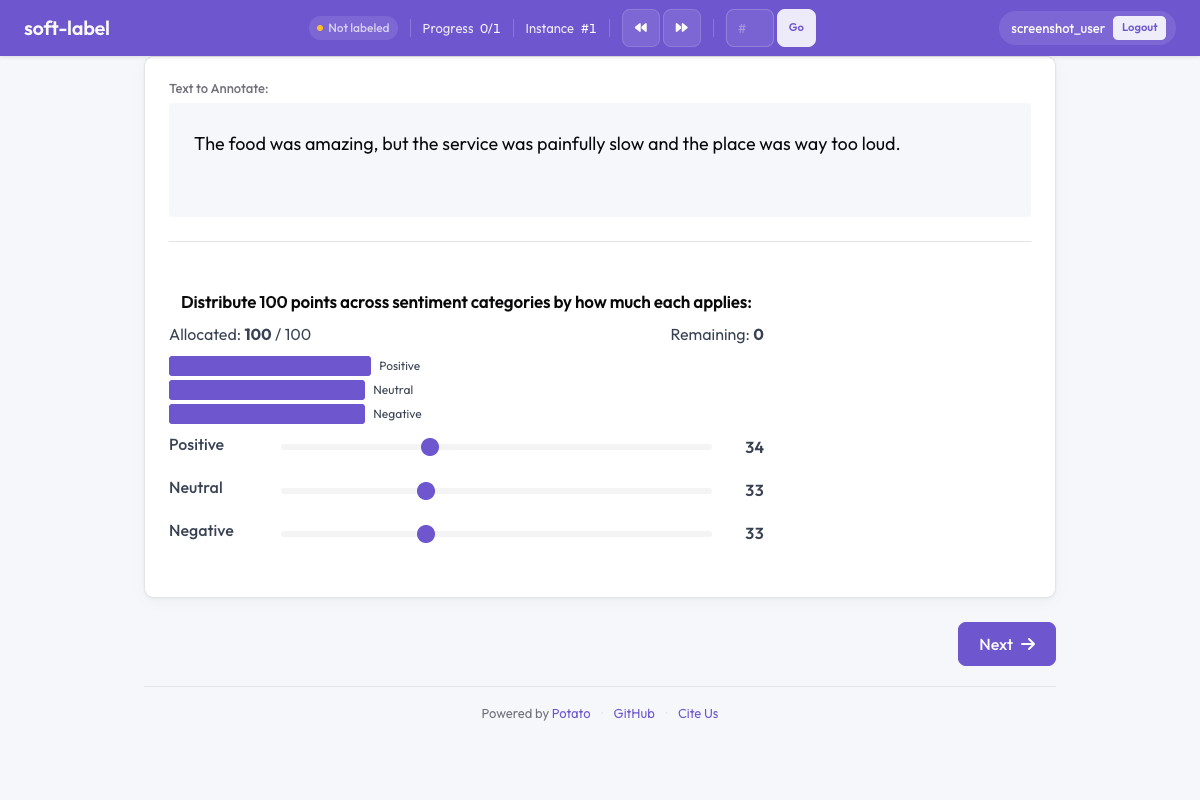 Soft labels in Potato
Overview
Soft labeling suits items that belong partly to several categories, where a single forced choice discards what the annotator saw. The sliders are linked so they always sum to the configured total, moving one adjusts the others, and an optional distribution chart shows the current allocation. Every slider starts at an even split of the total, so an annotator who submits without moving anything records a flat distribution rather than an empty one.
Quick Start
A total of 100 lets annotators think in percentages, which is the allocation most people can do without arithmetic:
annotation_schemes:
  - annotation_type: soft_label
    name: sentiment_distribution
    description: Distribute 100 points across sentiment categories based on how much each applies.
    labels: ["Positive", "Neutral", "Negative"]
    total: 100
Configuration Options
| Field | Type | Default | Description |
|---|---|---|---|
annotation_type | string | Required | Must be "soft_label" |
name | string | Required | Unique identifier for this schema |
description | string | Required | Instructions displayed to annotators |
labels | array | Required | List of category labels (minimum 2) |
total | integer | 100 | The fixed sum that all sliders must add up to |
min_per_label | integer | 0 | Minimum value each label must receive |
show_distribution_chart | boolean | true | Display a pie or bar chart showing the current distribution |
label_requirement.required | boolean | false | Whether the annotation must be completed before moving on |
Examples
Sentiment Distribution
Three categories are few enough that the chart reads at a glance, which is where the visual feedback pays for the space it takes:
annotation_schemes:
  - annotation_type: soft_label
    name: sentiment_distribution
    description: How much does each sentiment apply to this text?
    labels: ["Positive", "Neutral", "Negative"]
    total: 100
    show_distribution_chart: true
Emotion Intensity
Six emotions is near the practical ceiling for linked sliders, since each adjustment redistributes across the rest. Leaving min_per_label at 0 lets an annotator zero out the emotions that are absent, which is the common case in a single utterance:
annotation_schemes:
  - annotation_type: soft_label
    name: emotion_mix
    description: Distribute points to reflect the mix of emotions in this utterance.
    labels: ["Joy", "Sadness", "Anger", "Fear", "Surprise", "Disgust"]
    total: 100
    min_per_label: 0
    show_distribution_chart: true
Topic Relevance
Relevance across topics is rarely exclusive, so a distribution records what a single topic label would throw away:
annotation_schemes:
  - annotation_type: soft_label
    name: topic_relevance
    description: How relevant is this document to each topic?
    labels: ["Politics", "Sports", "Technology", "Entertainment"]
    total: 100
Forced Minimum Allocation
A min_per_label of 5 guarantees every genre some weight, which suits material where no category is ever truly absent. It biases the result wherever a label genuinely does not apply, so use it only when the floor is defensible:
annotation_schemes:
  - annotation_type: soft_label
    name: genre_mix
    description: Allocate points across genres. Each genre must receive at least 5 points.
    labels: ["Rock", "Pop", "Jazz", "Classical", "Electronic"]
    total: 100
    min_per_label: 5
Output Format
{
  "sentiment_distribution": {
    "labels": {
      "Positive": 45,
      "Neutral": 30,
      "Negative": 25
    }
  }
}
Values always sum to the configured total.
Best Practices
- Use when categories overlap - soft labels are ideal when items genuinely belong to multiple categories to varying degrees
- Keep the label count manageable - more than 6-7 labels makes the slider interface unwieldy
- Set a meaningful total - 100 is intuitive as percentages, but smaller totals work for simpler tasks
- Use min_per_label sparingly - forcing minimum allocations can bias results when a label truly does not apply
- Enable the distribution chart - visual feedback helps annotators see their allocation at a glance
Further Reading
- Likert Scales - Ordinal rating scales
- Slider - Single continuous value annotation
- Quality Control - Attention checks and gold standards
For implementation details, see the source documentation.