Triage
Build a rapid accept/reject/skip triage interface in Potato for fast data screening, quality filtering, and corpus cleaning — with keyboard shortcuts for speed.
The triage annotation schema provides a Prodigy-style binary accept/reject/skip interface for rapid data curation. Use it to filter large datasets, run data quality checks, or handle any task that needs quick binary decisions.
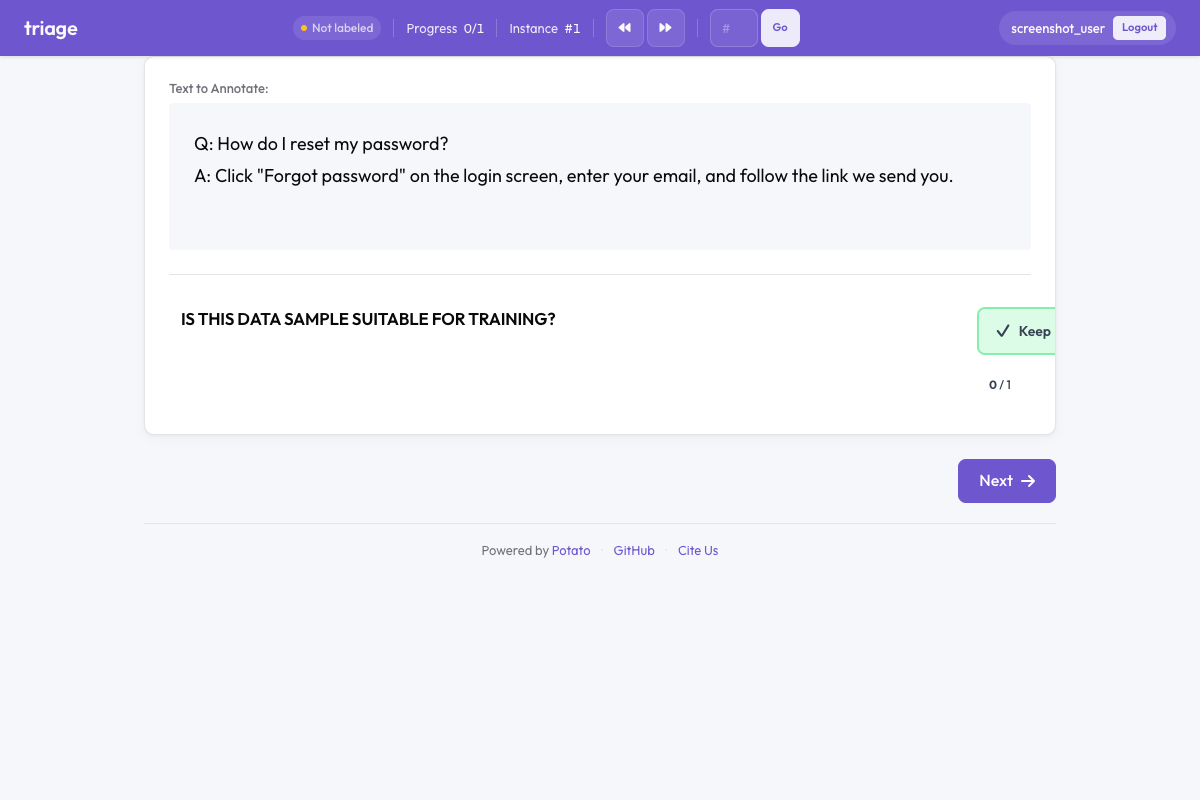 Triage in Potato
Overview
The triage schema presents three large, visually distinct buttons:
- Keep (green) - Accept the item for inclusion
- Discard (red) - Reject the item
- Unsure (gray) - Skip when uncertain
With auto-advance enabled (default), annotators can process hundreds of items per hour using just keyboard shortcuts.
Quick Start
annotation_schemes:
  - annotation_type: triage
    name: data_quality
    description: Is this data sample suitable for training?
    auto_advance: true
    show_progress: true
Configuration Options
| Field | Type | Default | Description |
|---|---|---|---|
annotation_type | string | Required | Must be "triage" |
name | string | Required | Unique identifier for this schema |
description | string | Required | Instructions displayed to annotators |
accept_label | string | "Keep" | Text label for the accept button |
reject_label | string | "Discard" | Text label for the reject button |
skip_label | string | "Unsure" | Text label for the skip button |
auto_advance | boolean | true | Automatically move to next item after selection |
show_progress | boolean | true | Display progress bar in the triage widget |
accept_key | string | "1" | Keyboard shortcut for accept |
reject_key | string | "2" | Keyboard shortcut for reject |
skip_key | string | "3" | Keyboard shortcut for skip |
Examples
Data Quality Filtering
annotation_schemes:
  - annotation_type: triage
    name: quality_filter
    description: Is this text high quality and suitable for training?
    auto_advance: true
Content Moderation
annotation_schemes:
  - annotation_type: triage
    name: content_moderation
    description: Does this content violate community guidelines?
    accept_label: "Safe"
    reject_label: "Violates"
    skip_label: "Review Later"
    auto_advance: true
Relevance Filtering
annotation_schemes:
  - annotation_type: triage
    name: relevance
    description: Is this document relevant to the query?
    accept_label: "Relevant"
    reject_label: "Not Relevant"
    skip_label: "Partially Relevant"
Combined with Other Schemas
Triage can be combined with other annotation types for both filtering and detailed annotation:
annotation_schemes:
  - annotation_type: triage
    name: include_item
    description: Should this item be included in the dataset?
    auto_advance: false  # Don't auto-advance when combined

  - annotation_type: radio
    name: category
    description: What category does this belong to?
    labels: ["News", "Opinion", "Review", "Other"]
Keyboard Shortcuts
| Key | Action |
|---|---|
1 | Keep (Accept) |
2 | Discard (Reject) |
3 | Unsure (Skip) |
The keys 1, 2, 3 are adjacent on the keyboard, allowing fast annotation without looking at the keyboard.
Output Format
{
  "data_quality": {
    "labels": {
      "decision": "accept"
    }
  }
}
Possible values: "accept", "reject", "skip".
Best Practices
- Use auto-advance for high-throughput tasks - significantly improves throughput for simple decisions
- Disable auto-advance for complex decisions - when annotators need time to think or make additional annotations
- Provide clear descriptions - make triage criteria unambiguous for consistent annotations
- Use meaningful labels - customize labels to match your specific use case
- Combine with attention checks - for crowdsourcing, insert known items to verify quality
Further Reading
- AI Support - AI-assisted annotation hints
- Quality Control - Attention checks and gold standards
- Productivity Features - Keyboard shortcuts
For implementation details, see the source documentation.