タスク割り当て
アノテーションインスタンスのアノテーターへの配分方法を制御する。
Potatoは、アノテーションインスタンスをアノテーターにどのように配分するかを制御する柔軟なタスク割り当て戦略を提供します。
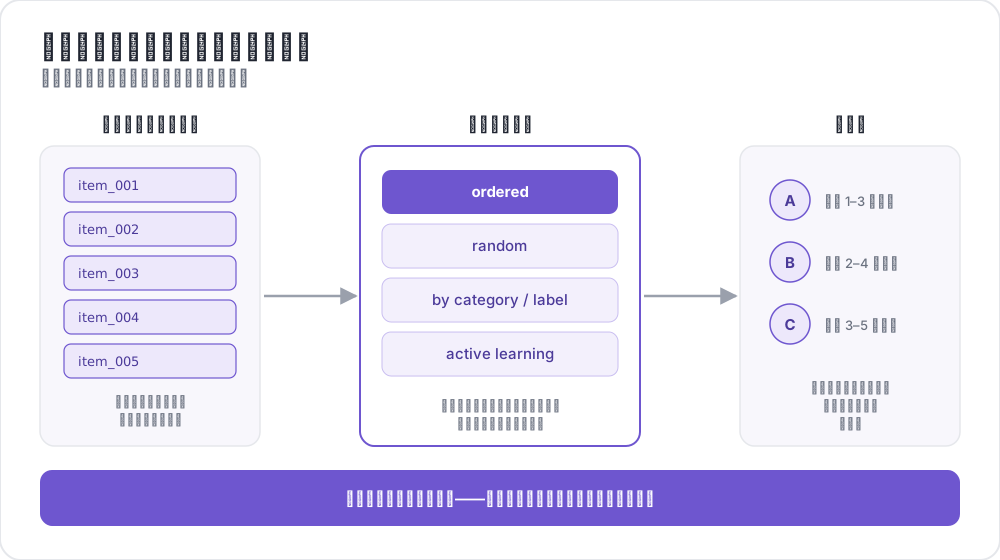 インスタンスを注釈者に振り分ける
概要
タスク割り当ては以下を制御します:
- 各アノテーターが見るアイテム
- 各アノテーターが完了するアイテム数
- 各アイテムが受け取るアノテーション数
- アイテムが提示される順序
主要な設定オプション
| オプション | 説明 | デフォルト |
|---|---|---|
assignment_strategy | アイテム割り当て戦略 | random |
max_annotations_per_user | アノテーターあたりの最大アイテム数 | 無制限 |
max_annotations_per_item | アイテムあたりの目標アノテーション数 | 3 |
割り当て戦略
ランダム割り当て
アイテムをアノテーターにランダムに割り当て、偏りのない配分を保証します。
yaml
assignment_strategy: random
max_annotations_per_item: 3最適な用途:順序が重要でない一般的なアノテーションタスク。
固定順序割り当て
データセットに表示される順序でアイテムを割り当てます。
yaml
assignment_strategy: fixed_order
max_annotations_per_item: 2最適な用途:アノテーターが特定の順序でアイテムを見る必要があるタスク。
最少アノテーション優先割り当て
既存のアノテーション数が最も少ないアイテムを優先し、均等な配分を保証します。
yaml
assignment_strategy: least_annotated
max_annotations_per_item: 5最適な用途:いずれかのアイテムに過剰なアノテーションが集まる前に、すべてのアイテムが適切なカバレッジを受けることを保証する。
最大多様性割り当て
既存のアノテーション間で最も不一致が大きいアイテムを優先します。
yaml
assignment_strategy: max_diversity
max_annotations_per_item: 4最適な用途:品質管理と曖昧なアイテムの解決。
能動学習割り当て
機械学習を使用して不確実なインスタンスを優先します。
yaml
assignment_strategy: active_learning

active_learning:
  enabled: true
  schema_names: ["sentiment"]
  min_annotations_per_instance: 2
  min_instances_for_training: 20
update_frequency: 10完全な設定については能動学習を参照してください。
設定
モダンな設定(推奨)
yaml
# Strategy selection
assignment_strategy: random

# Limits
max_annotations_per_user: 10    # -1 for unlimited
max_annotations_per_item: 3     # -1 for unlimited

# Optional: nested configuration
assignment:
  strategy: random
  max_annotations_per_item: 3
  random_seed: 1234
レガシー設定
古いautomatic_assignment設定も引き続きサポートされています:
yaml
automatic_assignment:
  on: true
  output_filename: task_assignment.json
  sampling_strategy: random    # 'random' or 'ordered'
  labels_per_instance: 3       # Annotations per item
  instance_per_annotator: 5    # Items per annotator
  test_question_per_annotator: 0
テスト問題
アノテーションキューに注意チェック問題を挿入します:
テスト問題の定義
データファイルのインスタンスIDに_testingを追加します:
csv
text,id
"This is test question 1",0_testing
"Regular item",dkjfd
またはJSONで:
json
[
  {"id": "0_testing", "text": "This is a test question"},
  {"id": "regular_001", "text": "Normal annotation item"}
]
設定
yaml
automatic_assignment:
  on: true
  test_question_per_annotator: 2  # Insert 2 test questions per annotator
設定例
基本的なランダム割り当て
yaml
annotation_task_name: "Sentiment Analysis"
assignment_strategy: random
max_annotations_per_user: 20
max_annotations_per_item: 3
品質重視の割り当て
yaml
annotation_task_name: "Quality Annotation"
assignment_strategy: max_diversity
max_annotations_per_item: 5
max_annotations_per_user: 50
クラウドソーシング設定
yaml
annotation_task_name: "Crowdsourced Task"
assignment_strategy: random
max_annotations_per_user: 10
max_annotations_per_item: 3

# Crowdsourcing settings
hide_navbar: true
jumping_to_id_disabled: true

login:
  type: url_direct
  url_argument: workerId
能動学習設定
yaml
assignment_strategy: active_learning

active_learning:
  enabled: true
  schema_names: ["sentiment", "topic"]
  min_annotations_per_instance: 2
  min_instances_for_training: 20
  update_frequency: 10
  classifier_name: "sklearn.linear_model.LogisticRegression"
  vectorizer_name: "sklearn.feature_extraction.text.TfidfVectorizer"
管理者ダッシュボードとの統合
管理者ダッシュボードで割り当て設定を監視・調整できます:
/adminにアクセスする- 設定タブに移動する
- 以下を変更する:
- ユーザーあたりの最大アノテーション数
- アイテムあたりの最大アノテーション数
- 割り当て戦略
変更はサーバー再起動なしで即座に有効になります。
関連情報
- 能動学習 - MLベースの割り当て優先順位付け
- 品質管理 - 注意チェックとゴールドスタンダード
- カテゴリ割り当て - アノテーターの専門性によるアイテムのルーティング
- クラウドソーシング統合 - MTurkとProlificの統合
実装の詳細については、ソースドキュメントを参照してください。