コンスタントサム
Potatoでコンスタントサム(一定和)アノテーションを設定し、数値入力またはスライダーで、決まった持ち点をカテゴリ間に配分する方法を解説します。
コンスタントサムのアノテーションスキーマでは、アノテーターが決まった点数を複数のカテゴリに配分します。連動したスライダーを使うソフトラベルとは異なり、コンスタントサムは数値の直接入力とスライダーの両方に対応しており、決まった持ち点の中でトレードオフを明示的に判断してもらうタスクを想定しています。
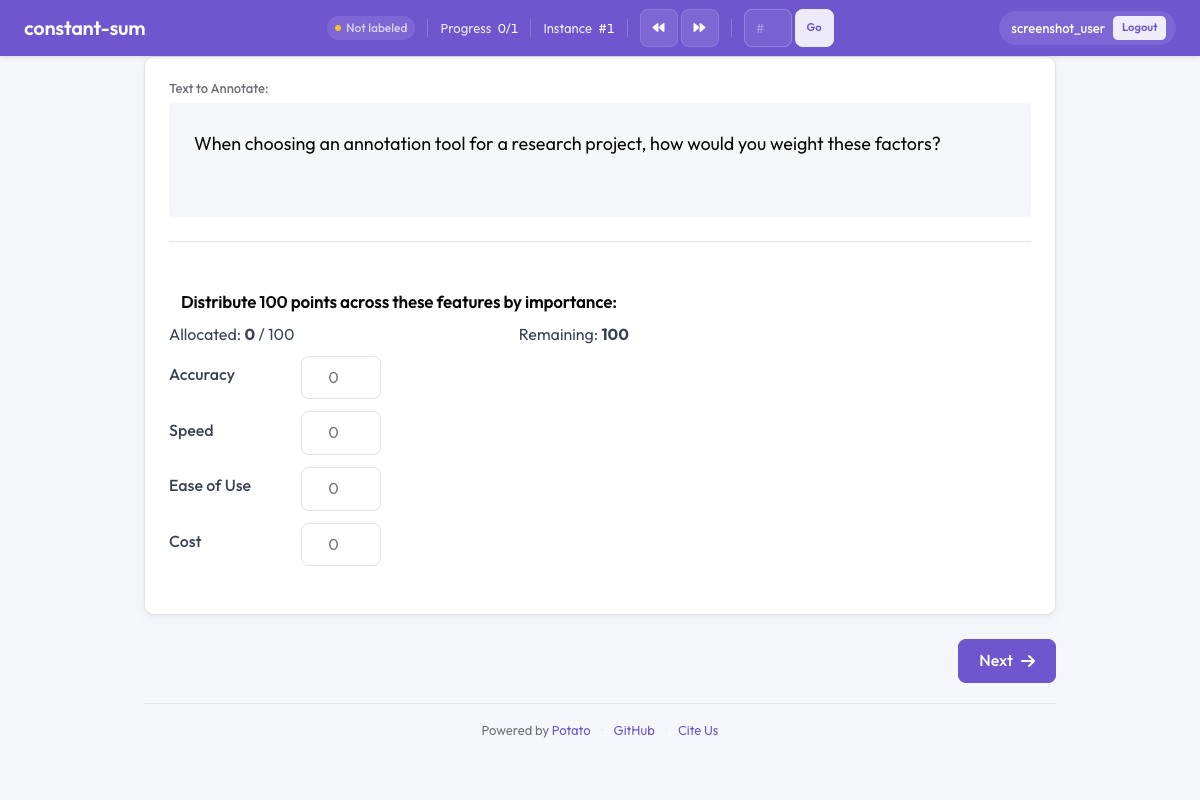 Constant sum in Potato
概要
コンスタントサムのタスクは、調査研究や選好の引き出しでよく使われます。アノテーターは決まった持ち点(たとえば100点)を渡され、相対的な重要度・選好・比率を表すようにアイテム間へ配分します。インターフェースは、配分の合計が設定した総点数と常に一致するよう制約をかけます。
クイックスタート
yaml
annotation_schemes:
  - annotation_type: constant_sum
    name: feature_importance
    description: Distribute 100 points across features based on their importance.
    labels: ["Accuracy", "Speed", "Ease of Use", "Cost"]
    total_points: 100
設定オプション
| フィールド | 型 | デフォルト | 説明 |
|---|---|---|---|
annotation_type | string | 必須 | "constant_sum"を指定します |
name | string | 必須 | このスキーマの一意な識別子 |
description | string | 必須 | アノテーターに表示される指示文 |
labels | array | 必須 | 点数を配分する対象アイテムのリスト(最低2件) |
total_points | integer | 100 | 配分の合計が一致すべき総点数 |
min_per_item | integer | 0 | 各アイテムに最低限割り当てる点数 |
input_type | string | "number" | 入力方法:テキストフィールドなら"number"、スライダーなら"slider" |
label_requirement.required | boolean | false | 次に進む前にアノテーションを完了させる必要があるか |
例
機能の優先度付け
yaml
annotation_schemes:
  - annotation_type: constant_sum
    name: feature_priority
    description: Allocate 100 points to indicate which features matter most to you.
    labels: ["Performance", "Reliability", "Usability", "Security"]
    total_points: 100
    input_type: number
予算の配分
yaml
annotation_schemes:
  - annotation_type: constant_sum
    name: budget_allocation
    description: How would you distribute a $1000 budget across these areas?
    labels: ["Marketing", "Engineering", "Design", "Research"]
    total_points: 1000
    input_type: slider
    min_per_item: 50
時間の配分
yaml
annotation_schemes:
  - annotation_type: constant_sum
    name: time_spent
    description: Distribute 24 points (hours) across daily activities.
    labels: ["Work", "Sleep", "Exercise", "Leisure", "Commute", "Other"]
    total_points: 24
    min_per_item: 0
スライダーによる単純な比較
yaml
annotation_schemes:
  - annotation_type: constant_sum
    name: text_comparison
    description: Distribute 10 points between the two texts based on quality.
    labels: ["Text A", "Text B"]
    total_points: 10
    input_type: slider
出力形式
json
{
  "feature_importance": {
    "labels": {
      "Accuracy": 40,
      "Speed": 25,
      "Ease of Use": 20,
      "Cost": 15
    }
  }
}値の合計は常に、設定したtotal_pointsと一致します。
ベストプラクティス
- 直感的な総点数を選ぶ - パーセンテージなら100が扱いやすく、短時間で終わらせたいタスクなら10や20のような小さい総点数が向いています
- 精度が必要なら数値入力 - 正確な値が重要な場面では、スライダーより数値フィールドのほうが確実です
- 速さが必要ならスライダー - おおまかな配分ならスライダーのほうが速く済みます
- アイテム数を絞る - 7〜8件を超えると、点数の配分は認知的な負担が大きくなります
- 最低配分を検討する - すべてのカテゴリに最低限の点数を割り当てたい場合は
min_per_itemを使ってください - 文脈を明確に示す - 点数が何を表すのか(重要度、時間、金額など)を説明してください
参考資料
- ソフトラベル - 連動スライダーによる確率分布
- Best-Worst Scaling - 相対的な選好のアノテーション
- Likertスケール - 順序尺度による評価
実装の詳細については、ソースドキュメントを参照してください。