トレーニングフェーズ
メインタスクの前に練習問題でアノテーターをトレーニングし資格認定する。
Potato 2.0には、メインのアノテーションタスクを開始する前にアノテーターを資格認定するためのオプションのトレーニングフェーズが含まれています。アノテーターは既知の正解を持つ練習問題に回答し、パフォーマンスについてフィードバックを受け取ります。
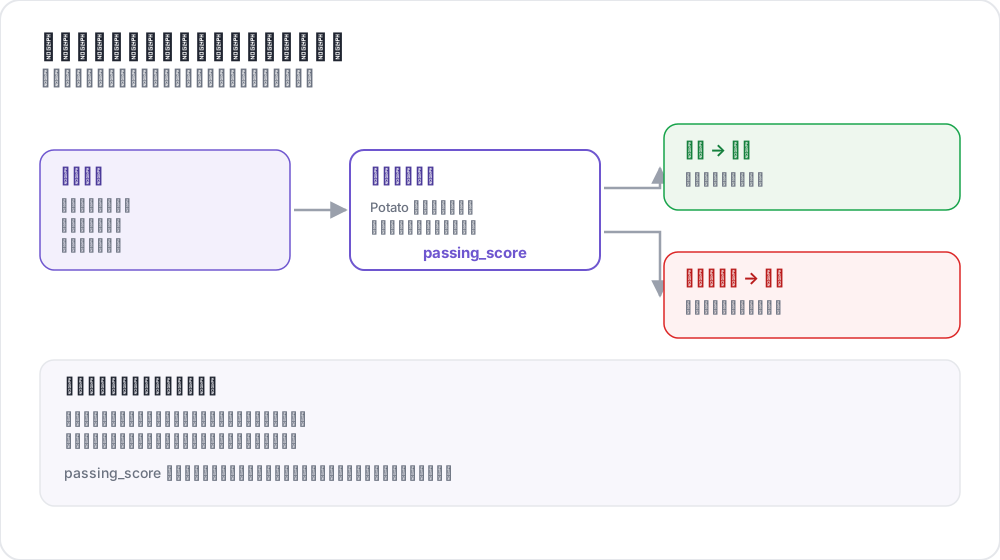 トレーニングが注釈者をどう選別するか
使用場面
- アノテーターがタスクを理解していることを確認する
- 低品質のアノテーターをフィルタリングする
- 実際のアノテーション前にガイド付き練習を提供する
- 基準品質メトリクスを収集する
- 例を通じてアノテーションガイドラインを教える
仕組み
- アノテーターがトレーニング問題のセットを完了する
- 各回答について即座にフィードバックを受ける
- 合格基準に対して進捗が追跡される
- 合格したアノテーターのみがメインタスクに進める
設定
基本設定
yaml
training:
  enabled: true
  data_file: "data/training_data.json"
  annotation_schemes: ["sentiment"]
  passing_criteria:
    min_correct: 3
    require_all_correct: false
  allow_retry: true
  failure_action: "repeat_training"
完全な設定
yaml
phases:
  order: [consent, instructions, training, annotation]

  consent:
    type: consent
    file: surveyflow/consent.json

  instructions:
    type: instructions
    file: surveyflow/instructions.html

  training:
    type: training
    file: data/training_data.json
合格基準
トレーニングフェーズの合格にはさまざまな基準を設定できます:
最低正解数
yaml
passing_criteria:
  min_correct: 3
アノテーターは10問中少なくとも8問正解する必要があります。
全問正解必須
yaml
passing_criteria:
  require_all_correct: true
アノテーターはすべての問題に正解する必要があります。
最大ミス数
yaml
passing_criteria:
  max_mistakes: 5
アノテーターは合計3回のミスで不合格になります。
問題あたりの最大ミス数
yaml
passing_criteria:
  max_mistakes_per_question: 2
アノテーターは1つの問題で2回ミスすると不合格になります。
複合基準
yaml
passing_criteria:
  min_correct: 3
  max_mistakes: 5
  max_mistakes_per_question: 2
8問正解し、かつ1つの問題で3回以上ミスしないことが必要です。
トレーニングデータ形式
トレーニングデータには正解とオプションの説明を含める必要があります:
json
[
  {
    "id": "train_1",
    "text": "I absolutely love this product! Best purchase ever!",
    "correct_answers": {
      "sentiment": "Positive"
    },
    "explanation": "This text expresses strong positive sentiment with words like 'love' and 'best'."
  },
  {
    "id": "train_2",
    "text": "This is the worst service I've ever experienced.",
    "correct_answers": {
      "sentiment": "Negative"
    },
    "explanation": "The words 'worst' and the overall complaint indicate negative sentiment."
  },
  {
    "id": "train_3",
    "text": "The package arrived on time.",
    "correct_answers": {
      "sentiment": "Neutral"
    },
    "explanation": "This is a factual statement without emotional indicators."
  }
]
複数スキーマのトレーニング
複数のアノテーションスキームを持つタスクの場合:
json
{
  "id": "train_1",
  "text": "Apple announced new iPhone features yesterday.",
  "correct_answers": {
    "sentiment": "Neutral",
    "topic": "Technology"
  },
  "explanation": {
    "sentiment": "This is a factual news statement.",
    "topic": "The text discusses Apple and iPhone, which are tech topics."
  }
}
ユーザー体験
トレーニングフロー
- ユーザーに「トレーニングフェーズ」インジケーターが表示される
- 問題がアノテーションフォームとともに表示される
- ユーザーが回答を送信する
- 即座にフィードバックが表示される:
- 正解:緑のチェックマーク、次へ進む
- 不正解:赤のバツ印、説明が表示、リトライオプション
フィードバック表示
アノテーターが不正解の場合:
- 正解がハイライトされる
- 提供された説明が表示される
- リトライボタンが表示される(リトライが有効な場合)
- 合格基準に対する進捗が表示される
管理者モニタリング
管理者ダッシュボードでトレーニングのパフォーマンスを追跡できます:
- 完了率
- 平均正解数
- 合格/不合格率
- トレーニングに費やした時間
- 問題ごとの正解率
/admin APIエンドポイントからアクセスできます:
text
GET /api/admin/training/stats
GET /api/admin/training/user/{user_id}
例:感情分析トレーニング
yaml
annotation_task_name: "Sentiment Analysis"
task_dir: "."
port: 8000

data_files:
  - "data/reviews.json"

item_properties:
  id_key: id
  text_key: text

annotation_schemes:
  - annotation_type: radio
    name: sentiment
    description: "What is the sentiment of this review?"
    labels:
      - Positive
      - Negative
      - Neutral
    sequential_key_binding: true

training:
  enabled: true
  data_file: "data/training_data.json"
  annotation_schemes: ["sentiment"]
  passing_criteria:
    min_correct: 3
    require_all_correct: false
  allow_retry: true
  failure_action: "repeat_training"

phases:
  order: [training, annotation]
  training:
    type: training
    file: "data/training_data.json"

output_annotation_dir: "output/"
export_annotation_format: "jsonl"

user_config:
  allow_all_users: true
例:NERトレーニング
yaml
annotation_schemes:
  - annotation_type: span
    name: entities
    description: "Highlight named entities"
    labels:
      - Person
      - Organization
      - Location
      - Date

training:
  enabled: true
  data_file: "data/ner_training.json"
  annotation_schemes: ["entities"]
  passing_criteria:
    min_correct: 2
  allow_retry: true
スパンアノテーションのトレーニングデータ:
json
{
  "id": "train_1",
  "text": "Tim Cook announced that Apple will open a new store in New York on March 15.",
  "correct_answers": {
    "entities": [
      {"start": 0, "end": 8, "label": "Person"},
      {"start": 24, "end": 29, "label": "Organization"},
      {"start": 54, "end": 62, "label": "Location"},
      {"start": 66, "end": 74, "label": "Date"}
    ]
  },
  "explanation": "Tim Cook is a Person, Apple is an Organization, New York is a Location, and March 15 is a Date."
}
ベストプラクティス
1. シンプルから始める
エッジケースを導入する前に、わかりやすい例から始めましょう:
json
[
  {"text": "I love this!", "correct_answers": {"sentiment": "Positive"}},
  {"text": "I hate this!", "correct_answers": {"sentiment": "Negative"}},
  {"text": "It arrived yesterday.", "correct_answers": {"sentiment": "Neutral"}}
]
2. すべてのラベルをカバー
トレーニングにすべての可能なラベルの例を含めましょう:
json
[
  {"correct_answers": {"sentiment": "Positive"}},
  {"correct_answers": {"sentiment": "Negative"}},
  {"correct_answers": {"sentiment": "Neutral"}}
]
3. 明確な説明を書く
説明はアノテーションガイドラインを教えるものであるべきです:
json
{
  "explanation": "While this text mentions a problem, the overall tone is constructive and the reviewer expresses satisfaction with the resolution. This makes it Positive rather than Negative."
}
4. 合理的な基準を設定
不必要に完璧を求めないでください:
yaml
passing_criteria:
  require_all_correct: true
5. エッジケースを含める
アノテーターを準備するためにトリッキーな例を追加しましょう:
json
{
  "text": "Not bad at all, I guess it could be worse.",
  "correct_answers": {"sentiment": "Neutral"},
  "explanation": "Despite negative words like 'not bad' and 'worse', this is actually a lukewarm endorsement - neutral rather than positive or negative."
}
ワークフローとの統合
トレーニングはマルチフェーズワークフローと統合されます:
yaml
passing_criteria:
  min_correct: 3
  max_mistakes_per_question: 2
パフォーマンスに関する考慮事項
- トレーニングデータは起動時に読み込まれる
- 進捗はセッションごとにメモリに保存される
- メインアノテーションへのパフォーマンス影響は最小限
- 複雑なトレーニングは複数フェーズに分割することを検討する
関連情報
- 品質管理 - 注意チェックとゴールドスタンダード
- カテゴリ割り当て - アノテーターの専門性によるアイテムのルーティング
- マルチフェーズワークフロー - 複雑なアノテーションワークフロー
実装の詳細については、ソースドキュメントを参照してください。