階層型マルチセレクト
Potatoで展開可能なツリー形式の分類体系セレクターを構築します。階層的な分類、トピックのタグ付け、多階層のカテゴリアノテーションに使えます。
階層型マルチセレクトのアノテーションスキーマは、入れ子になった分類体系からカテゴリを選ぶための、展開可能なツリーインターフェースを提供します。トピック分類、商品カテゴリの割り当てなど、ラベルが階層構造をなす多階層のタグ付けタスクに適しています。
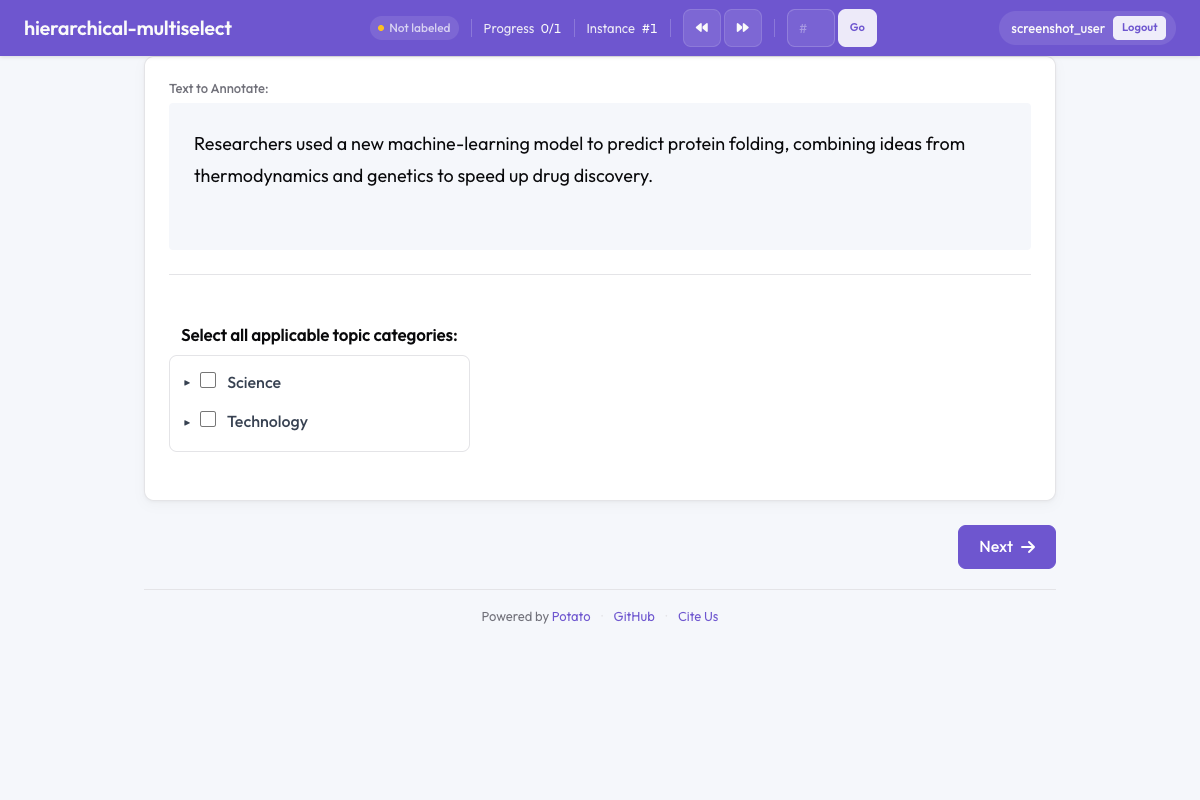 Hierarchical multiselect in Potato
概要
階層型マルチセレクトスキーマは、開閉できるツリービューを表示します。
- 親ノードを展開すると子カテゴリが現れます
- リーフノードは個別に選択できます
- 自動選択(任意)で、選択がツリーの上下に伝播します
- 検索を使うと、大きな分類体系でも目的のカテゴリをすぐに見つけられます
クイックスタート
yaml
annotation_schemes:
  - annotation_type: hierarchical_multiselect
    name: topic_tags
    description: Select all applicable topic categories.
    taxonomy:
      Science:
        Physics:
          - Quantum Mechanics
          - Thermodynamics
        Biology:
          - Genetics
          - Ecology
      Technology:
        - Software
        - Hardware
設定オプション
| フィールド | 型 | デフォルト | 説明 |
|---|---|---|---|
annotation_type | string | 必須 | "hierarchical_multiselect"を指定します |
name | string | 必須 | このスキーマの一意な識別子 |
description | string | 必須 | アノテーターに表示される指示文 |
taxonomy | object | 必須 | カテゴリの階層を定義する入れ子のオブジェクト |
auto_select_children | boolean | false | 親が選択されたとき、その子をすべて自動的に選択するか |
auto_select_parent | boolean | false | 子がすべて選択されたとき、親を自動的に選択するか |
show_search | boolean | false | 分類体系のツリーを絞り込む検索ボックスを表示するか |
max_selections | integer/null | null | 選択できるカテゴリの上限数(nullで無制限) |
expand_depth | integer | 1 | 初期状態で展開しておくツリーの階層数 |
label_requirement.required | boolean | false | 送信前に1つ以上の選択を必須にするか |
例
トピック分類
yaml
annotation_schemes:
  - annotation_type: hierarchical_multiselect
    name: topic_classification
    description: Select all topics that apply to this document.
    show_search: true
    max_selections: 5
    taxonomy:
      Politics:
        Domestic:
          - Elections
          - Legislation
          - Policy
        International:
          - Diplomacy
          - Trade
          - Conflict
      Sports:
        - Football
        - Basketball
        - Tennis
      Entertainment:
        Film:
          - Reviews
          - Industry News
        Music:
          - Reviews
          - Concerts
自動選択を使った商品カテゴリの割り当て
yaml
annotation_schemes:
  - annotation_type: hierarchical_multiselect
    name: product_category
    description: Categorize this product listing.
    auto_select_children: true
    auto_select_parent: true
    taxonomy:
      Electronics:
        Computers:
          - Laptops
          - Desktops
          - Tablets
        Audio:
          - Headphones
          - Speakers
      Clothing:
        Men:
          - Shirts
          - Pants
        Women:
          - Dresses
          - Tops
医療コーディング
yaml
annotation_schemes:
  - annotation_type: hierarchical_multiselect
    name: diagnosis_codes
    description: Select all applicable diagnosis categories.
    show_search: true
    taxonomy:
      Cardiovascular:
        Hypertension:
          - Primary
          - Secondary
        Arrhythmia:
          - Atrial Fibrillation
          - Ventricular Tachycardia
      Respiratory:
        Obstructive:
          - Asthma
          - COPD
        Infectious:
          - Pneumonia
          - Bronchitis
出力形式
json
{
  "topic_tags": {
    "labels": ["Science > Physics > Quantum Mechanics", "Technology > Software"]
  }
}
選択されたカテゴリは、ルートからリーフまでの完全なパス文字列として保存されます。
ベストプラクティス
- 分類体系を扱いやすい規模に保つ - 入れ子は4階層までに抑えてください。深いツリーは辿りづらくなります
- 大きな分類体系では検索を有効にする - カテゴリが30を超えたら、
show_search: trueで使い勝手が大きく改善します - 自動選択は慎重に使う - 親カテゴリが子すべてを含意する場合には便利ですが、そうでない場合は混乱のもとになります
- 展開する階層数を適切に設定する - 全体の構造が見えるだけの階層を開きつつ、情報量が多すぎないところで止めてください
- 必要なら選択数を制限する -
max_selectionsを使うと、タグの付けすぎを防げます
参考資料
- ラジオ & マルチセレクト - 階層のないラベル選択
- セレクトドロップダウン - 単一選択のドロップダウン
- 品質管理 - 注意チェックとゴールドスタンダード
実装の詳細については、ソースドキュメントを参照してください。