カードソート
Potatoでドラッグ&ドロップのカードソートインターフェースを構築します。クローズドソートとオープンソートの2モードに対応し、グルーピング、分類、情報アーキテクチャのタスクに使えます。
カードソートのアノテーションスキーマは、アイテムをカテゴリにグルーピングするためのドラッグ&ドロップインターフェースを提供します。情報アーキテクチャの調査、コンテンツの分類、そしてアノテーターがアイテムを意味のあるまとまりに整理する必要があるタスク全般に適しています。
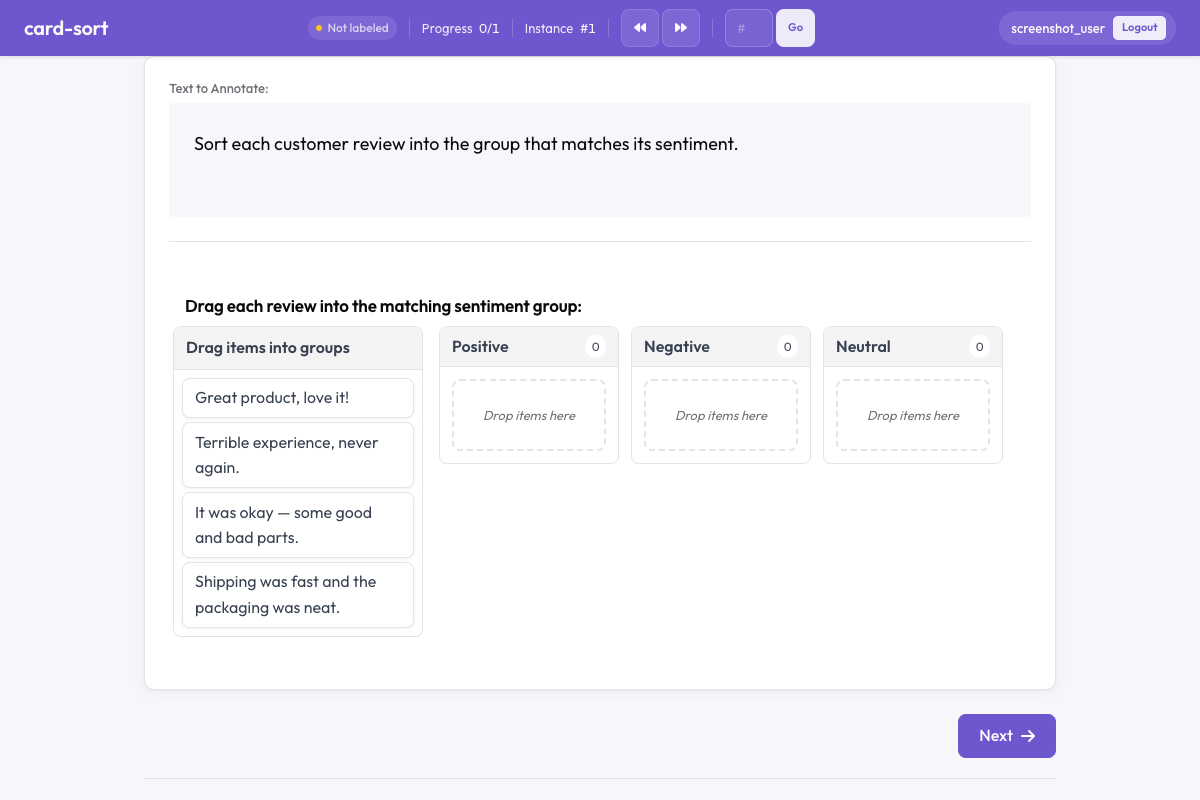 Card sort in Potato
概要
カードソートスキーマは2つのモードに対応しています。
- クローズドソート - アノテーターがあらかじめ定義されたグループにカードをドラッグします
- オープンソート - アノテーターが自分でグループを作成し、名前を付けます
カードはドラッグ可能な要素で、アノテーターはこれをグループのコンテナにドロップして配置します。
クイックスタート
yaml
annotation_schemes:
  - annotation_type: card_sort
    name: content_grouping
    description: Drag each card into the most appropriate group.
    mode: closed
    groups:
      - Positive
      - Negative
      - Neutral
設定オプション
| フィールド | 型 | デフォルト | 説明 |
|---|---|---|---|
annotation_type | string | 必須 | "card_sort"を指定します |
name | string | 必須 | このスキーマの一意な識別子 |
description | string | 必須 | アノテーターに表示される指示文 |
mode | string | 必須 | "closed"(定義済みグループ)または"open"(アノテーターが作成するグループ) |
groups | array | 必須(closed時) | クローズドソートで使うグループ名のリスト |
items_field | string | "items" | カードとなるアイテムのリストが入っているデータJSONのフィールド |
allow_empty_groups | boolean | true | 送信時にグループが空のままでもよいか |
allow_multiple | boolean | false | 1枚のカードを複数のグループに置けるか |
例
感情によるソート(クローズド)
yaml
annotation_schemes:
  - annotation_type: card_sort
    name: sentiment_sort
    description: Sort each comment into the appropriate sentiment category.
    mode: closed
    groups:
      - Positive
      - Negative
      - Mixed
      - Off-topic
    allow_empty_groups: true
サンプルデータ:
json
{
  "id": "batch_001",
  "items": [
    "Great product, love it!",
    "Terrible experience, never again.",
    "It was okay, some good and bad parts.",
    "Anyone know the weather today?"
  ]
}
情報アーキテクチャのためのオープンカードソート
yaml
annotation_schemes:
  - annotation_type: card_sort
    name: ia_sort
    description: >
      Group these menu items into categories that make sense to you.
      Name each group with a descriptive label.
    mode: open
    items_field: "menu_items"
    allow_empty_groups: false
複数ラベルのグルーピング
yaml
annotation_schemes:
  - annotation_type: card_sort
    name: theme_sort
    description: >
      Sort each statement into relevant themes.
      A statement can belong to multiple themes.
    mode: closed
    groups:
      - Economy
      - Healthcare
      - Education
      - Environment
      - Security
    allow_multiple: true
出力形式
json
{
  "content_grouping": {
    "groups": {
      "Positive": ["Great product, love it!"],
      "Negative": ["Terrible experience, never again."],
      "Mixed": ["It was okay, some good and bad parts."],
      "Off-topic": ["Anyone know the weather today?"]
    }
  }
}
オープンソートの場合、グループ名はアノテーターが定義した文字列になります。
ベストプラクティス
- 一貫した結果が必要ならクローズドソート - 定義済みグループにすることで、アノテーター間で比較可能なアノテーションが得られます
- 探索的な調査ならオープンソート - 人が自然にどうグルーピングするかを知りたい場合に使います
- カードのテキストは短く - 長い文章はドラッグしづらくなります。簡潔なラベルや抜粋を使ってください
- カード枚数を絞る - 1タスクあたり15〜30枚が適切です。40枚を超えると負担が大きくなります
- グループのラベルを明確に - クローズドソートでは、曖昧さのないグループ名にして迷いを減らしてください
参考資料
- ラジオ & マルチセレクト - 標準的なラベル選択
- Best-Worst Scaling - 比較によるアノテーション
- 生産性機能 - キーボードショートカットと効率化
実装の詳細については、ソースドキュメントを参照してください。