確信度アノテーション
PotatoでLikertスケールやスライダーを使い、他のアノテーションと対にした確信度評価を追加して、アノテーターの確からしさを記録します。
確信度アノテーションのスキーマでは、アノテーターが自分の付けた別のアノテーションについて、どれくらい自信があるかを評価します。確信度の尺度(Likertまたはスライダー)を対象のアノテーションスキーマと結び付けることで、アノテーターが何を選んだかだけでなく、その判断にどの程度確信があったかまで測れます。
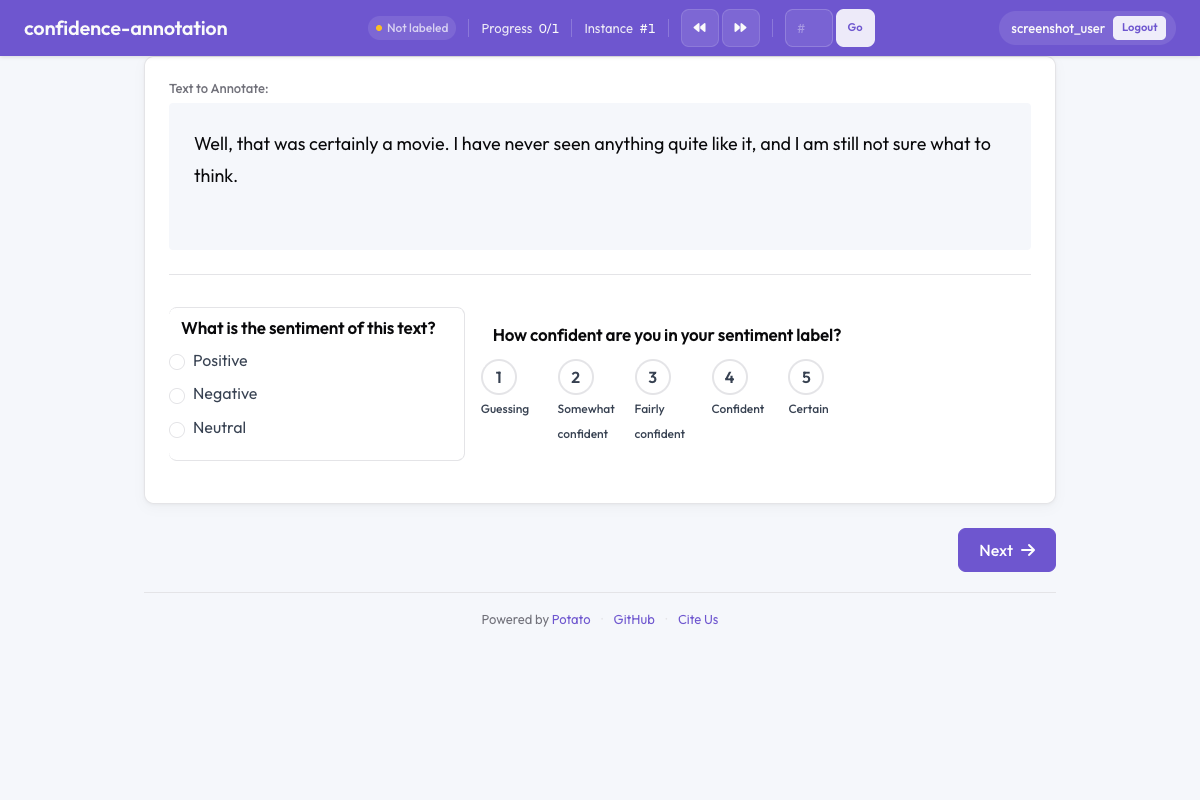 Confidence annotation in Potato
概要
確信度のアノテーションは、アノテーション品質の分析、曖昧なアイテムの特定、集約時のラベルの重み付けに欠かせません。設定すると、対象のアノテーションの横に確信度評価のウィジェットが表示され、その判断にどれだけ自信があるかを回答してもらえます。
クイックスタート
yaml
annotation_schemes:
  - annotation_type: radio
    name: sentiment
    description: What is the sentiment of this text?
    labels: ["Positive", "Negative", "Neutral"]

  - annotation_type: confidence
    name: sentiment_confidence
    description: How confident are you in your sentiment label?
    target_schema: sentiment
    scale_type: likert
    scale_points: 5
設定オプション
| フィールド | 型 | デフォルト | 説明 |
|---|---|---|---|
annotation_type | string | 必須 | "confidence"を指定します |
name | string | 必須 | このスキーマの一意な識別子 |
description | string | 必須 | アノテーターに表示される指示文 |
target_schema | string | 任意 | この確信度評価の対象となるアノテーションスキーマの名前 |
scale_type | string | "likert" | 尺度の種類:離散的な段階なら"likert"、連続値なら"slider" |
scale_points | integer | 5 | Likertスケールの段階数(スライダーでは無視されます) |
labels | array | 任意 | 各段階に付けるラベル(例:["Not confident", "Very confident"]) |
slider_min | integer | — | スライダーの最小値(scale_typeが"slider"のときのみ使われます) |
slider_max | integer | — | スライダーの最大値(scale_typeが"slider"のときのみ使われます) |
label_requirement.required | boolean | false | 次に進む前に確信度の入力を必須にするか |
例
Likertによる確信度スケール
yaml
annotation_schemes:
  - annotation_type: radio
    name: toxicity
    description: Is this comment toxic?
    labels: ["Toxic", "Not Toxic"]

  - annotation_type: confidence
    name: toxicity_confidence
    description: How confident are you in your toxicity judgment?
    target_schema: toxicity
    scale_type: likert
    scale_points: 5
    labels: ["Not at all confident", "Slightly confident", "Moderately confident", "Very confident", "Extremely confident"]
スライダーによる確信度スケール
yaml
annotation_schemes:
  - annotation_type: radio
    name: stance
    description: What stance does the author take?
    labels: ["Support", "Oppose", "Neutral"]

  - annotation_type: confidence
    name: stance_confidence
    description: Rate your confidence from 0 (guessing) to 100 (certain).
    target_schema: stance
    scale_type: slider
確信度の入力を必須にする
yaml
annotation_schemes:
  - annotation_type: multiselect
    name: topics
    description: Select all topics that apply.
    labels: ["Politics", "Economy", "Health", "Education"]

  - annotation_type: confidence
    name: topics_confidence
    description: How confident are you in your topic selections?
    target_schema: topics
    scale_type: likert
    scale_points: 3
    labels: ["Low", "Medium", "High"]
単独での確信度(対象なし)
確信度のアノテーションは、対象スキーマを指定せず、一般的な自己評価としても使えます。
yaml
annotation_schemes:
  - annotation_type: confidence
    name: task_familiarity
    description: How familiar are you with this topic area?
    scale_type: likert
    scale_points: 5
    labels: ["Not familiar", "Slightly familiar", "Somewhat familiar", "Very familiar", "Expert"]
出力形式
json
{
  "toxicity_confidence": {
    "labels": {
      "confidence": 4
    }
  }
}Likertスケールの場合、値は1からscale_pointsまでになります。スライダーの場合はslider_minからslider_maxまでです。
ベストプラクティス
- 必ず対象スキーマと組み合わせる - 確信度は特定のアノテーション判断と結び付いているときに最も役立ちます
- 手軽さを重視するならLikert - 離散的な尺度のほうが、アノテーターは速く簡単に回答できます
- 細かく測りたいならスライダー - 後段の分析で精密な確信度の値が必要な場合に使います
- 確信度を必須にする - 任意にすると飛ばされがちで、データの利用価値が下がります
- 確信度の傾向を分析する - 確信度の低いアイテムは、判定の見直しや追加アノテーションの候補になります
参考資料
- Likertスケール - 順序尺度による評価
- スライダー - 連続値のアノテーション
- 品質管理 - 注意チェックとゴールドスタンダード
実装の詳細については、ソースドキュメントを参照してください。