クイックスタート
5分以内にPotatoを動かせます。pipでインストールし、YAMLの設定を書いてサーバーを起動すれば、コードを書かずに最初のデータセットをアノテーションできます。
このガイドでは、新規インストールからデータのアノテーションまでを5分以内で進めます。ここではタスクを自分で書く方法を説明します。もう一つの始め方は、研究の内容をコーディングエージェントに説明し、potato-skill に設計と構築を任せる方法で、コーディングエージェントでクイックスタートで扱っています。
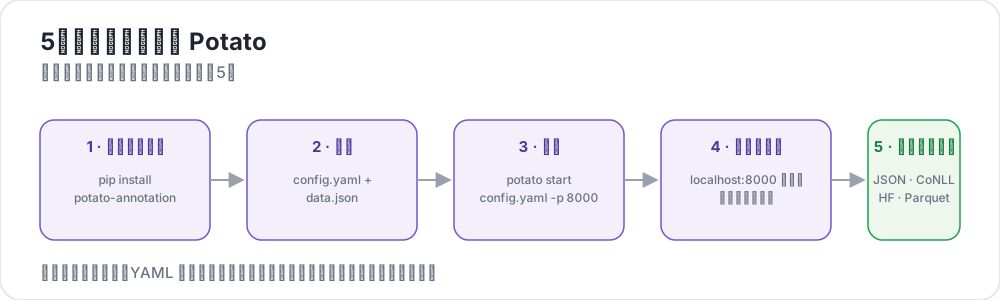 Potatoの5つのステップ
前提条件
- Python 3.9以上
pipパッケージマネージャー- ターミナル
インストール
システムのPythonと衝突しないよう、Potatoは仮想環境にインストールすることをおすすめします。
python -m venv potato-env
source potato-env/bin/activate   # Windows: potato-env\Scripts\activate
pip install potato-annotation
インストールを確認します。
python -c "import potato; print(potato.__version__)"2.12.1と表示されるはずです。バージョン2.9からはpotato --versionも同じ番号を表示し、チェックアウトから実行している場合はコミットも付け加えます。
最初のプロジェクトを作成する
1. プロジェクトディレクトリを作成する
mkdir my-annotation-task
cd my-annotation-task
2. データファイルを作成する
dataフォルダを作成し、その中にdata.jsonというファイルを作成します。
mkdir data[
{"id": "1", "text": "I love this product! It's amazing."},
{"id": "2", "text": "This is the worst experience ever."},
{"id": "3", "text": "It's okay, nothing special."}
]Potatoはdata_filesとして.jsonl(1行に1つのJSONオブジェクト)、.csv、.tsvも受け付けます。対応する拡張子のファイルを指定すれば、Potatoはその拡張子から読み込み方法を選びます。
3. 設定ファイルを作成する
プロジェクトディレクトリにconfig.yamlというファイルを作成します。
パスのサンドボックス: 設定内の相対パス(
data_filesやoutput_annotation_dirなど)はすべてtask_dirを基準に解決され、その内側に収まっている必要があります。task_dirの外側に解決されるパスは、パストラバーサルを防ぐために拒否されます。
annotation_task_name: "Sentiment Analysis"

# All relative paths below are resolved against task_dir.
task_dir: "."

# Data configuration
data_files:
  - "data/data.json"

# Tell Potato which fields in each record to use.
# id_key = unique identifier; text_key = the text shown to annotators.
item_properties:
  id_key: id
  text_key: text

# Where per-user annotation state is stored (relative to task_dir).
output_annotation_dir: "annotation_output/"

# Also write a periodic flat export, because the per-user state files are
# awkward to analyze. No exporter is named "json", so use "jsonl".
export_annotation_format: "jsonl"

# Annotation scheme
annotation_schemes:
  - annotation_type: radio
    name: sentiment
    description: "What is the sentiment of this text?"   # required for radio schemes
    labels:
      - Positive
      - Negative
      - Neutral

# Skip password authentication so anyone can log in with just a username.
require_password: falseヒント: プレビューCLIを使うと、サーバー全体を起動せずに設定を検証できます。アノテーションを始める前にタイプミスを見つける最も速い方法です。
4. サーバーを起動する
potato start config.yaml -p 8000同じ操作の長い形式です。
python -m potato start config.yaml -p 8000ポート8000がすでに使われている場合は、-p 8001で別のポートを選んでください。サーバーを停止するには、ターミナルでCtrl+Cを押します。
初回をより速く: 試している間は、
--debug --debug-phase=annotationを付けるとログインページと同意ページを省略できます:potato start config.yaml --debug --debug-phase=annotation。このとき、すべての訪問者が1つの共有debug_userとしてサインインするため、自分のマシンでだけ使ってください。
5. ブラウザを開く
http://localhost:8000を開きます。usernameフィールドが1つだけのログイン画面が表示されます。何か入力して(aliceなど)Continueをクリックすれば、アノテーションを始められます。
ラベルを選択してNextをクリックするたびに、アノテーションは自動的に保存されます。別の「保存」ボタンはありません。
アノテーションの保存先
Potatoはアノテーションの進行に合わせて、ユーザーごとの状態を書き込みます。
my-annotation-task/
├── config.yaml
├── data/
│   └── data.json
└── annotation_output/              # created automatically
    └── alice/
        └── user_state.json         # one folder per username
user_state.jsonには、そのユーザーのアノテーション状態がすべて格納されます。すべてのアノテーターの結果をまとめた1つのフラットなファイルを作るには、PotatoのエクスポートCLIを実行します。使い方はエクスポートのドキュメントで説明しています。python -m potato.export --list-formatsを実行すると、登録されているすべての形式を確認できます。
初回実行時によくある問題
Address already in use。ポート8000が使用中です。-p 8001(または空いている任意のポート)を使ってください。KeyError: 'description'。radio(または類似の)スキームに必須のdescriptionフィールドがありません。すべてのスキームにこのフィールドが必要です。Path ... is outside the task directory。data_filesまたはoutput_annotation_dirのパスがtask_dirの外に出ています。すべてをプロジェクトフォルダ内に置くか、それらを含む絶対パスをtask_dirに設定してください。- ログインページにパスワード欄が表示される。
require_password: falseを書き忘れているか、キャッシュされたブラウザタブを見ています。サーバーを再起動し、ページを強制再読み込みしてください。
よくある質問
以下の質問では、Potatoのインストール、Dockerでの実行、アノテーターに見せる前の設定の確認を扱います。
Potatoはどうやってインストールしますか?
PyPIからpip install potato-annotationでインストールします。Python 3.9以上が必要です。仮想環境にインストールするとPotatoの依存パッケージをシステムのPythonから切り離せます。potato --versionはバージョン番号を表示し、インストールできたことを確認できます。
PotatoはDockerで実行できますか?
できます。Potatoはビルド済みのイメージghcr.io/davidjurgens/potatoをGitHub Container Registryで公開しています。プロジェクトフォルダはコンテナ内の/appにマウントされ、サーバーはコンテナ内のポート7860で待ち受けるため、1つのイメージですべてのタスクを動かせます。POTATO_SECRET_KEYを設定すると、再起動後もアノテーターのセッションが維持されます。完全なdocker runコマンドはPotatoのサーバーデプロイに載っています。
アノテーターに見せる前にPotatoの設定を確認するには?
potato validate config.yaml --strictを実行します。このコマンドはサーバーの起動時と同じ方法で設定を検査し、未知のキーなどの警告を失敗として扱います。続いてpotato preview config.yamlを使うと、設定で宣言されている内容が表示され、インターフェースがブラウザに描画されるので、誰かがログインする前に、アノテーターが見るとおりにタスクを確認できます。
次のステップ
- 設定の基本でより多くのオプションを学ぶ
- potato-skill を使い、次のタスクの設計と構築をコーディングエージェントに任せる
- さまざまなアノテーションタイプを探索する
- チーム向けにユーザー管理を設定する
- AIサポートやアクティブラーニングなど、v2の新機能を確認する
ツールとユーティリティ
基本に慣れたら、以下の便利なツールを試してください。
- プレビューCLI - サーバーを起動せずに設定を検証
- デバッグガイド - デバッグフラグとトラブルシューティングのヒント
- ユーザーシミュレーター - シミュレートされたアノテーターでテスト