スパンアノテーション
Potatoで固有表現認識のためにテキストスパンをハイライトしてラベル付けします。ラベルごとのカラー、キーボードショートカット、ツールチップ、不連続スパンに対応しています。
スパンアノテーションでは、アノテーターがテキストの一部を選択してラベルを付けます。Potatoでは固有表現認識(NER)、品詞タグ付け、テキストハイライトのタスクをこの仕組みで構築します。ラベルは単純な文字列として書くか、独自のcolor、key_value、tooltipを持つオブジェクトとして書きます。Potatoはこの3つを各ラベルのプロパティとして読み取るため、スキームレベルのcolors、key_values、tooltipsマップはスパンスキームでは効果がありません。
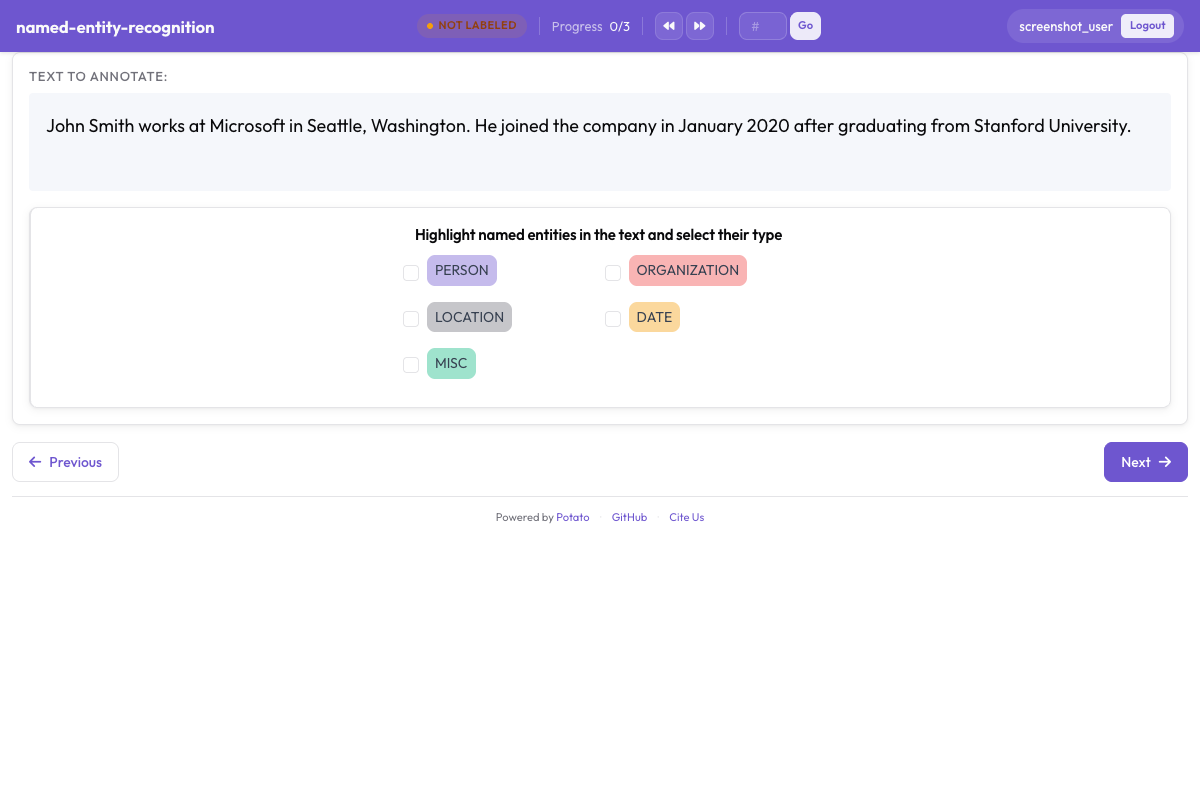 Potatoでカラー分けされたエンティティラベルを使うスパンアノテーション
基本設定
annotation_schemes:
  - annotation_type: span
    name: entities
    description: "Highlight named entities in the text"
    labels:
      - PERSON
      - ORGANIZATION
- LOCATIONdescriptionはすべてのスキームで必須で、ラベルボタンの上にアノテーターが読む指示文として表示されます。そのため、スキーム名を繰り返すのではなく、ラベル付けの判断内容を書くべきです。単純な文字列として書いたラベルには、列挙した順にPotatoのパレットからカラーが割り当てられます。
設定オプション
エンティティラベル
ラベルセットはスパンタスクにおける主要な設計上の判断です。再現率、一致度、そして後のあらゆる測定がこのセットを基準に定義されるからです。アノテーターがスパンごとにガイドラインを確認しなくても覚えていられる程度に小さく保ってください。実際には、ほとんどのNER作業で4〜8種類ということになります。上のスキームにラベルを追加します:
labels:
  - PERSON
  - ORGANIZATION
  - LOCATION
  - DATE
  - EVENT
ラベルカラー
Potatoはリストの順に各ラベルへパレットのカラーを割り当てます。そのため、カラーを書き出す価値があるのは特定の組み合わせが重要な場合に限られます。たとえば、同じ文によく一緒に現れ、一目で混同されては困る2つのタイプなどです。カラーはラベルに属します:
annotation_schemes:
  - annotation_type: span
    name: entities
    description: "Highlight named entities in the text"
    labels:
      - name: PERSON
        color: "#3b82f6"
      - name: ORGANIZATION
        color: "#10b981"
      - name: LOCATION
        color: "#f59e0b"
- DATE値は16進数(#3b82f6)またはrgb(255, 0, 0)です。上のDATEのように単純な文字列のままにしたラベルはパレットの次のカラーを受け取ります。そのため、スキームではカラーが必要なラベルだけに指定し、残りはそのままにしておけます。
複数のスキームのカラーは、ui.label_colorsの下で、スキーム名、次にラベルをキーとして1か所でまとめて設定することもできます:
ui:
  label_colors:
    entities:
      PERSON: "#3b82f6"
ORGANIZATION: "#10b981"スキーム自体に書いたcolors:マップは、Potatoが読み取るキーではありません。このマップを持つスキームは、そのブロックが存在しないかのようにパレットのカラーで描画されます。
キーボードショートカット
ラベルが3つ以上あるスパンタスクでは、ショートカットを有効にする価値があります。スパンごとにマウスをボタンまで動かすアノテーターは、両手をテキストに置いたままのアノテーターに比べて、ごく一部の速度でしか作業できないからです。sequential_key_binding: trueを設定すると、ラベルに列挙した順でキーが割り当てられます:
- annotation_type: span
  name: entities
  description: "Highlight named entities in the text"
  labels:
    - PERSON
    - ORGANIZATION
    - LOCATION
    - DATE
  sequential_key_binding: true
1つのタスクでページに複数のスキームがある場合、Potatoは各スキームに別々のプールからキーを割り当てます。最初に数字の行、次に上段の文字の行、次にホーム行の順で使うため、異なるスキームのショートカットが衝突することはありません。
ラベルをリスト内の位置ではなく特定のキーに固定するには、そのラベルにkey_valueを指定します。アロケーターは自動割り当てを行う前に明示的なkey_valueを優先します。また、覚えやすいキーは後でラベルリストの順序を変えても維持されますが、位置に基づくキーは維持されません:
- annotation_type: span
  name: entities
  description: "Highlight named entities in the text"
  labels:
    - name: PERSON
      key_value: "p"
    - name: ORGANIZATION
      key_value: "o"
    - LOCATION
sequential_key_binding: trueスキームレベルのkey_values:マップは読み取られません。sequential_key_bindingの値として書いたマッピングも同様で、Potatoはこのキーを単なるフラグとして扱います。
ツールチップ
ラベルの境界事例はツールチップに書くのが適切です。そうすれば、アノテーターはタスクを離れずに何がORGANIZATIONに該当するかを確認できます。ツールチップは各ラベルのプロパティです:
- annotation_type: span
  name: entities
  description: "Highlight named entities in the text"
  labels:
    - name: PERSON
      tooltip: "Names of people, characters, or personas"
    - name: ORGANIZATION
      tooltip: "Companies, agencies, institutions"
    - name: LOCATION
tooltip_file: "config/tooltips/location.html"tooltipはプレーンテキストを、tooltip_fileはHTMLファイルへのパスを受け取ります。ガイダンスに例、太字、リストが必要な場合は後者のほうが適しています。スキームレベルのtooltips:マップを読み取るのはhierarchical_multiselectだけで、スパンスキームでは何の効果もありません。
重複スパン
重複を許可
スパンは重複が許可されており、この動作を有効にする設定はありません。重複が必要になるのは、テキストの同じ範囲が同時に2つのラベルを持つ場合です。たとえば「Dr. Smith」はPERSONでもありROLEでもあります。バージョン2.9.0以降は、既存のスパンの終わりから始まる選択や、既存のスパンの始まりで終わる選択も受け付けるため、部分的に重なるスパンを作成できます。それより前のバージョンではこうした選択は拒否されていました。
重複を無効化(デフォルト)
スパンスキーマには重複を禁止するキーがありません。そのため、スパンが決して重複してはならないタスクでは、そのことをアノテーションガイドラインに明記する必要があります。この区別がアノテーターではなくエクスポートにとって重要な場合は、2つのスパンスキームでラベルセットを分けておけます。各スキームは自身の名前の下にスパンを保存するためです:
annotation_schemes:
  - annotation_type: span
    name: entities
    description: "Label named entities"
    labels:
      - PERSON
      - ORGANIZATION

  - annotation_type: span
    name: roles
    description: "Label professional roles"
    labels:
      - ROLE
スパン選択モード
Potatoはすべてのスパンをアイテムテキスト内の文字オフセットとして保存します。選択を単語単位と文字単位で切り替える設定キーはありません。以下の2つのモードは、アノテーターができることを説明したもので、有効にする設定ではありません。
単語レベル選択
実際のNER作業のほとんどは単語全体をドラッグする形で行われ、その結果は選択した最初と最後の文字のオフセットとして保存されます。設定には単語境界を強制するものが何もありません。そのため、データにとって単語全体のスパンが重要な場合は、その要件をガイドラインに書き、インターフェースが部分的な単語を拒否することを期待するのではなく、エクスポートで確認してください。
文字レベル選択
単語の一部の選択は常に可能で、設定は不要です。形態論的なタスクやサブトークンのタスクはこれに依存しています。Potatoは描画前に連続するスペースやタブをまとめ、保存するオフセットがブラウザの計測と一致するようにします。これはテキストに意味のあるインデントが含まれる場合に影響します。水平方向の空白を正確に保持する必要がある場合は、instance_displayを宣言してください。
事前アノテーションされたスパン
モデルの出力でタスクを初期化すると、ラベル付けは修正作業に変わります。モデルがすでにコーパスの大部分で正しい場合は、こちらのほうが速いワークフローです。Potatoは初期アノテーションを各アイテムのフィールドから読み取ります。そのフィールド名はpre_annotation.fieldで指定します:
pre_annotation:
  enabled: true
  field: "predictions"
  allow_modification: true
  show_confidence: true
  highlight_low_confidence: 0.7
allow_modification: trueがタスクをレビューではなく修正にします。これがないと、アノテーターはモデルの提案を変更できません。highlight_low_confidence: 0.7はモデルの確信度が最も低かったアイテムに印を付け、誤りの可能性が最も高いスパンに注意が向くようにします。
このフィールドにはスキーム名ごとに1つのエントリが入り、スパンスキームはオフセットのリストを受け取ります:
{
  "id": "item_002",
  "text": "Apple announced new iPhone in California.",
  "predictions": {
    "entities": [
      {"start": 0, "end": 5, "label": "ORG", "confidence": 0.85},
      {"start": 27, "end": 37, "label": "LOC", "confidence": 0.91}
    ]
  }
}
事前アノテーションは出発点であってアノテーションではありません。そのため、誰も開かなかったアイテムは、予測が付いた状態で届いていても空のままエクスポートされます。
一般的なNER設定
標準NER(4タイプ)
4タイプのセットはCoNLL-2003の慣例に従っており、結果を公開済みのNERの数値と比較できる必要がある場合に適した選択です:
- annotation_type: span
  name: ner
  description: "Label named entities"
  labels:
    - PER    # Person
    - ORG    # Organization
    - LOC    # Location
    - MISC   # Miscellaneous
  sequential_key_binding: true
拡張NER(OntoNotesスタイル)
18タイプはより細かな区別をもたらしますが、一致度に実際のコストがかかります。NORP、ORG、GPEの境界はアノテーター間で最も意見が分かれるところだからです。下流の作業にこうした区別が必要な場合に拡張セットを使い、より長いトレーニング期間を見込んでください:
- annotation_type: span
  name: ner_extended
  description: "Label named entities using the OntoNotes type set"
  labels:
    - PERSON
    - NORP        # Nationalities, religious/political groups
    - FAC         # Facilities
    - ORG
    - GPE         # Geopolitical entities
    - LOC
    - PRODUCT
    - EVENT
    - WORK_OF_ART
    - LAW
    - LANGUAGE
    - DATE
    - TIME
    - PERCENT
    - MONEY
    - QUANTITY
    - ORDINAL
    - CARDINAL
生物医学NER
生物医学のスパンは長く、入れ子になることも多いため、タイプごとに具体例を載せたツールチップは、一般ドメインのタスクよりもここで大きな効果を発揮します:
- annotation_type: span
  name: bio_ner
  description: "Label biomedical entities"
  labels:
    - GENE
    - PROTEIN
    - DISEASE
    - DRUG
    - SPECIES
ソーシャルメディアNER
ソーシャルメディアのテキストには、ニュース記事向けのセットには対応する枠のないエンティティタイプが現れます。CREATIVE_WORKとGROUPは、専用のラベルがないと最も頻繁にORGとして誤って分類される2つのタイプです:
- annotation_type: span
  name: social_ner
  description: "Label named entities in social media text"
  labels:
    - PERSON
    - ORGANIZATION
    - LOCATION
    - PRODUCT
    - CREATIVE_WORK
    - GROUP
属性付きスパン
スパンスキームと並べて置いた2つ目のスキームは、アイテム全体についての判断を収集します。Potatoは両者を別々に保存するため、ラジオの回答は個々のスパンではなく文書全体に適用されます:
annotation_schemes:
  - annotation_type: span
    name: entities
    description: "Highlight named entities"
    labels:
      - PERSON
      - ORGANIZATION

  - annotation_type: radio
    name: entity_type
    description: "What type of entity is this?"
    labels:
      - Named
      - Nominal
      - Pronominal
複数のスパンスキーム
同じテキストの異なる側面をアノテーションするには、2つのスパンスキームを使います。こうすればアノテーターは1つにまとめたラベルセットを覚えておく必要がありません。各スキームには専用のボタン行、専用のキープール、エクスポート内の専用フィールドが割り当てられます:
annotation_schemes:
  # Named entities
  - annotation_type: span
    name: entities
    description: "Label named entities"
    labels:
      - PERSON
      - ORGANIZATION
      - LOCATION

  # Sentiment expressions
  - annotation_type: span
    name: sentiment_spans
    description: "Highlight sentiment expressions"
    labels:
      - POSITIVE
      - NEGATIVE
マルチフィールドスパンアノテーション
v2.1.0の新機能
スパンアノテーションはtarget_fieldオプションを使って、マルチフィールドデータの特定のテキストフィールドを対象にできます。これが必要になるのは、アイテムが原文書と要約を持ち、スパンがそのどちらかに属する場合です。
設定
各スキームがアノテーション対象のフィールド名を指定するため、2つのラベルセットは正しいテキストに結び付いたままになります:
annotation_schemes:
  - annotation_type: span
    name: source_entities
    description: "Label entities in the source text"
    target_field: source_text
    labels:
      - PERSON
      - ORGANIZATION

  - annotation_type: span
    name: summary_entities
    description: "Label entities in the summary"
    target_field: summary
    labels:
      - PERSON
      - ORGANIZATION
マルチフィールドデータ形式
データに個別のテキストフィールドを含める必要があります:
{
  "id": "doc1",
  "source_text": "John Smith works at Microsoft in Seattle.",
  "summary": "Smith is employed by Microsoft."
}
出力形式
target_fieldを使用する場合、アノテーションはフィールドごとにキー付けされます:
{
  "id": "doc1",
  "source_entities": {
    "source_text": [
      {"start": 0, "end": 10, "text": "John Smith", "label": "PERSON"},
      {"start": 20, "end": 29, "text": "Microsoft", "label": "ORGANIZATION"}
    ]
  },
  "summary_entities": {
    "summary": [
      {"start": 0, "end": 5, "text": "Smith", "label": "PERSON"},
      {"start": 22, "end": 31, "text": "Microsoft", "label": "ORGANIZATION"}
    ]
  }
}完全な動作例は、Potatoリポジトリのproject-hub/simple_examples/simple-multi-span/を参照してください。
表示オプション
スパン内にラベルを表示
Potatoはデフォルトで、ハイライトされた各スパンの中にラベルを表示します。短いスパンが多い密な文書ではラベルのテキストが文を圧迫します。show_span_labels: falseを使えば、ハイライトのカラーでラベルを伝えつつテキストを読みやすく保てます:
- annotation_type: span
  name: entities
  description: "Highlight named entities in the text"
  labels:
    - PERSON
    - ORGANIZATION
  show_span_labels: false
アンダーラインスタイル
スパンスキーマにはハイライトのスタイルを指定するキーがなく、スパンは常に色付きの背景として描画されます。アンダーラインや括弧による表示は共参照タイプのオプションで、visual_display.highlight_modeで指定します。どちらかが必要なタスクでは共参照チェーンを使ってください。
出力形式
スパンアノテーションは文字オフセットで保存されます:
{
  "id": "doc1",
  "entities": [
    {
      "start": 0,
      "end": 10,
      "text": "John Smith",
      "label": "PERSON"
    },
    {
      "start": 20,
      "end": 29,
      "text": "Microsoft",
      "label": "ORGANIZATION"
    }
  ]
}
完全な例:NERタスク
item_propertiesはPotatoがアイテムのIDとテキストとして読み取るフィールドを指定します。これがない設定は起動しません。5つのエンティティタイプにはsequential_key_bindingにより数字の行からキーが割り当てられます。末尾のラジオスキームは難易度の判断を記録し、後で一致度がどこで下がったかを説明するのに役立ちます:
annotation_task_name: "Named Entity Recognition"

data_files:
  - data/documents.json

item_properties:
  id_key: id
  text_key: text

annotation_schemes:
  - annotation_type: span
    name: entities
    description: "Highlight and label all named entities"
    labels:
      - PERSON
      - ORGANIZATION
      - LOCATION
      - DATE
      - MONEY
    sequential_key_binding: true
    allow_discontinuous: false

  - annotation_type: radio
    name: difficulty
    description: "How difficult was this document to annotate?"
    labels:
      - Easy
      - Medium
      - Hard

output_annotation_dir: annotation_output
export_annotation_format: jsonl
不連続スパン
v2.2.0の新機能
allow_discontinuous: trueを使うと、アノテーターはテキストの離れた複数の範囲を選択し、1つのスパンとして記録できます。分割された先行詞や不連続構成素にはこれが必要です。不連続性は重複とは別のもので、このキーは2つのスパンが同じ文字を覆えるかどうかには影響しません:
- annotation_type: span
  name: entities
  description: "Highlight named entities in the text"
  labels:
    - PERSON
    - ORGANIZATION
  allow_discontinuous: true
このオプションを有効にすると、アノテーターはWindowsとLinuxではCtrl、MacではCmdを押しながらさらにテキストを選択し、現在のスパンに追加します。出力にはセグメントごとにstartとendのペアが含まれます。
エンティティリンキング統合
v2.2.0の新機能
スパンスキームにentity_linkingブロックを追加すると、スパンアノテーションを外部知識ベース(Wikidata、UMLS、またはカスタムREST API)にリンクできます。2つのエンティティが同じ表層形を持ち、ラベルだけでは区別できない場合には、スパンごとにリンクの手間をかける価値があります:
- annotation_type: span
  name: entities
  description: "Highlight and link named entities"
  labels:
    - PERSON
    - ORGANIZATION
    - LOCATION
  entity_linking:
    enabled: true
    knowledge_bases:
      - name: wikidata
        type: wikidata
        language: en
    auto_search: true
    required: false
auto_search: trueはスパンが作成されるとすぐに検索を実行し、ほとんどのスパンをリンクするタスクではクリックを1回省けます。required: trueはリンクのないスパンの保存を拒否します。データ内のすべてのエンティティが知識ベースに存在すると見込める場合を除き、オフにしておいてください。エンティティリンキングが有効な場合、各スパンのコントロールバーにリンクアイコンが表示され、クリックすると検索モーダルが開きます。詳細はエンティティリンキングのドキュメントを参照してください。
ベストプラクティス
- カラーは必要なラベルにだけ書き、残りはパレットに任せる
- 境界事例は
tooltipまたはtooltip_fileに書く。ラベルごとに1つとし、スキームのdescriptionには書かない - ラベルが3つ以上あるスキームでは
sequential_key_bindingを有効にし、覚えやすいキーが役立つ場合はkey_valueを追加する - 重複の方針はガイドラインで決める。スキーマは方針を強制しないため
- 修正ワークフローでは
pre_annotationで初期化し、allow_modification: trueを維持する - ラベルセットは小さく保ち、無関係な側面は別々のスパンスキームに分ける
関連資料
- エンティティリンキング - スパンの知識ベースへのリンク
- 共参照チェーン - 共参照メンションのグループ化
- イベントアノテーション - スパン引数を持つN項イベント構造
- スパンリンキング - スパン間の関係の作成
- インスタンス表示 - スパンターゲット付きマルチフィールドコンテンツ表示
- UI設定 - スパンカラーのカスタマイズ
- 生産性機能 - キーボードショートカット
実装の詳細については、ソースドキュメントを参照してください。