品質管理
注意チェック、ゴールドスタンダード、アノテーター間一致度メトリクス。
Potatoは高品質なアノテーションを確保するための包括的な品質管理機能を提供します。注意チェック、ゴールドスタンダード、事前アノテーションサポート、リアルタイム一致度メトリクスが含まれます。
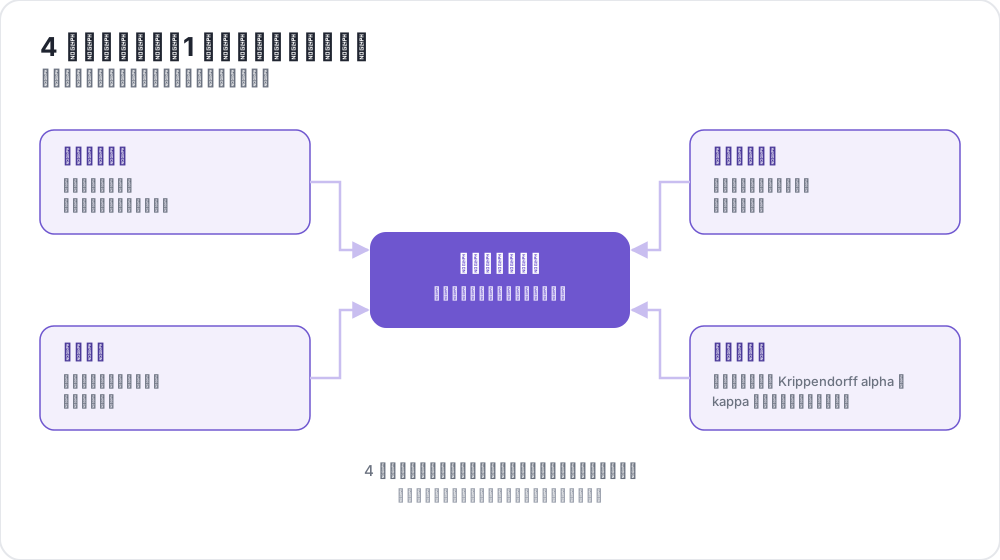 4 つの品質管理、1 つの信頼できるデータ
概要
Potatoの品質管理は4つの主要機能で構成されています:
- 注意チェック - 既知の正解アイテムでアノテーターの集中度を検証
- ゴールドスタンダード - 専門家がラベル付けしたアイテムに対する精度を追跡
- 事前アノテーションサポート - モデル予測でフォームを事前入力
- 一致度メトリクス - リアルタイムでアノテーター間一致度を計算
注意チェック
注意チェックは、アノテーターが注意を払っていてランダムにクリックしていないことを確認する、既知の正解を持つアイテムです。
設定
attention_checks:
  enabled: true
  items_file: "attention_checks.json"

  # How often to inject attention checks
  frequency: 10              # Insert one every 10 items
  # OR
  probability: 0.1           # 10% chance per item

  # Optional: flag suspiciously fast responses
  min_response_time: 3.0     # Flag if answered in < 3 seconds

  # Failure handling
  failure_handling:
    warn_threshold: 2        # Show warning after 2 failures
    warn_message: "Please read items carefully before answering."
    block_threshold: 5       # Block user after 5 failures
    block_message: "You have been blocked due to too many incorrect responses."
注意チェックアイテムファイル
[
  {
    "id": "attn_001",
    "text": "Please select 'Positive' for this item to verify you are reading carefully.",
    "expected_answer": {
      "sentiment": "positive"
    }
  }
]
ゴールドスタンダード
ゴールドスタンダードは、アノテーターの精度を測定するために使用される専門家がラベル付けしたアイテムです。デフォルトでは、ゴールドスタンダードはサイレントです - 結果は管理者レビュー用に記録されますが、アノテーターにはフィードバックが表示されません。
設定
gold_standards:
  enabled: true
  items_file: "gold_standards.json"

  # How to use gold standards
  mode: "mixed"              # Options: training, mixed, separate
  frequency: 20              # Insert one every 20 items

  # Accuracy requirements
  accuracy:
    min_threshold: 0.7       # Minimum required accuracy (70%)
    evaluation_count: 10     # Evaluate after this many gold items

  # Feedback settings (disabled by default)
  feedback:
    show_correct_answer: false
    show_explanation: false

  # Auto-promotion from high-agreement items
  auto_promote:
    enabled: true
    min_annotators: 3
    agreement_threshold: 1.0   # 1.0 = unanimous
ゴールドスタンダードアイテムファイル
[
  {
    "id": "gold_001",
    "text": "The service was absolutely terrible and I will never return.",
    "gold_label": {
      "sentiment": "negative"
    },
    "explanation": "Strong negative language clearly indicates negative sentiment.",
    "difficulty": "easy"
  }
]
自動昇格
複数のアノテーターが一致すると、アイテムは自動的にゴールドスタンダードになれます:
gold_standards:
  auto_promote:
    enabled: true
    min_annotators: 3          # Wait for at least 3 annotators
    agreement_threshold: 1.0   # 100% must agree (unanimous)
事前アノテーションサポート
事前アノテーションは、モデル予測でアノテーションフォームを事前入力することを可能にし、能動学習や修正ワークフローに有用です。
設定
pre_annotation:
  enabled: true
  field: "predictions"        # Field in data containing predictions
  allow_modification: true    # Can annotators change pre-filled values?
  show_confidence: true
  highlight_low_confidence: 0.7
データ形式
データアイテムに予測を含めます:
{
  "id": "item_001",
  "text": "I love this product!",
  "predictions": {
    "sentiment": "positive",
    "confidence": 0.92
  }
}
一致度メトリクス
Krippendorffのアルファを使用したリアルタイムのアノテーター間一致度メトリクスが管理者ダッシュボードで利用可能です。
設定
agreement_metrics:
  enabled: true
  min_overlap: 2             # Minimum annotators per item
  refresh_interval: 60       # Seconds between updates
Krippendorffのアルファの解釈
| アルファ値 | 解釈 |
|---|---|
| α ≥ 0.8 | 良好な一致 - ほとんどの目的で信頼可能 |
| 0.67 ≤ α ≤ 0.8 | 暫定的な一致 - 暫定的な結論を引き出す |
| 0.33 ≤ α ≤ 0.67 | 低い一致 - ガイドラインの見直しが必要 |
| α ≤ 0.33 | 不良な一致 - 重大な問題あり |
管理者ダッシュボードとの統合
/adminの管理者ダッシュボードで品質管理メトリクスを確認できます:
- 注意チェック:全体の合格/不合格率、アノテーターごとの統計
- ゴールドスタンダード:アノテーターごとの精度、アイテムごとの難易度分析
- 一致度:スキーマごとのKrippendorffのアルファと解釈
- 自動昇格アイテム:高一致度から昇格したアイテムの一覧
APIエンドポイント
品質管理メトリクス
GET /admin/api/quality_control注意チェックとゴールドスタンダードの統計を返します。
一致度メトリクス
GET /admin/api/agreementスキーマごとのKrippendorffのアルファと解釈を返します。
完全な例
annotation_task_name: "Sentiment Analysis with Quality Control"

annotation_schemes:
  - name: sentiment
    annotation_type: radio
    labels: [positive, negative, neutral]
    description: "Select the sentiment of the text"

attention_checks:
  enabled: true
  items_file: "data/attention_checks.json"
  frequency: 15
  failure_handling:

gold_standards:
  enabled: true
  items_file: "data/gold_standards.json"
  mode: mixed
  frequency: 25
  accuracy:

agreement_metrics:
  enabled: true
  min_overlap: 2
  refresh_interval: 60
トラブルシューティング
注意チェックが表示されない
items_fileのパスが正しいことを確認する(タスクディレクトリからの相対パス)- アイテムに必須フィールド(
id、expected_answer)があることを確認する frequencyまたはprobabilityが設定されていることを確認する
一致度メトリクスに「N人以上のアノテーターのアイテムがありません」と表示される
- アイテムが複数のユーザーによってアノテーションされていることを確認する
- 必要に応じて
min_overlapを下げる - アノテーションが正しく保存されていることを確認する
よくある質問
以下の質問では、品質管理(QA)プロセスの組み方と、ゴールドスタンダードがセッションを通じてアノテーターの精度をどう追跡するかを扱います。
アノテーションの品質管理プロセスはどう組めばよいですか?
正解が既知のアイテムをキューに混ぜ、複数のアノテーターが共通して担当するアイテムで一致度を測定します。Potatoでは、注意チェックが読まずに回答しているアノテーターを検出し、ゴールドスタンダードが各アノテーターの精度を専門家のラベルと照らして測定し、一致度メトリクスがどの設問でアノテーターの判断が分かれているかを示します。それぞれがタスクのYAML設定の独立したブロックです。
ゴールドスタンダードはアノテーターの精度の低下をどう検出しますか?
ゴールドスタンダードは、たとえば20アイテムごとに1つといった一定の頻度で出題され続けるため、専門家のラベルに対する精度はトレーニング時に一度だけではなく、アノテーターが作業している間ずっと測定されます。Potatoはデフォルトで回答をサイレントに記録し、少なくともevaluation_count個のゴールドスタンダードでの精度がaccuracy.min_thresholdを下回ると、そのアノテーターを管理者ダッシュボードに表示します。この精度はアノテーターのすべてのゴールドスタンダードへの回答にわたる累積値なので、長いセッションの終盤に起きた低下はゆっくりとしか反映されません。一方、注意チェックの失敗は平均されず回数として数えられるため、失敗が急に続けば、アノテーターがそれ以前にいくつのチェックに合格していたかに関係なく警告のしきい値に達します。
関連情報
- トレーニングフェーズ - アノテーター資格認定
- 管理者ダッシュボード - メトリクスの監視
- タスク割り当て - アノテーション配分の制御
実装の詳細については、ソースドキュメントを参照してください。