マルチフェーズワークフロー
同意、事前スクリーニング、指示、トレーニング、事後調査を組み合わせた多段階のアノテーションワークフローをPotatoで構築します。条件付きの調査質問も使えます。
Potatoはアノテーションタスクを、より長いワークフローの中の1つのフェーズとして実行します。そのため同意、スクリーニング質問、指示、トレーニング、事後アンケートを、別の調査ツールを使わずにタスクの前後に配置できます。
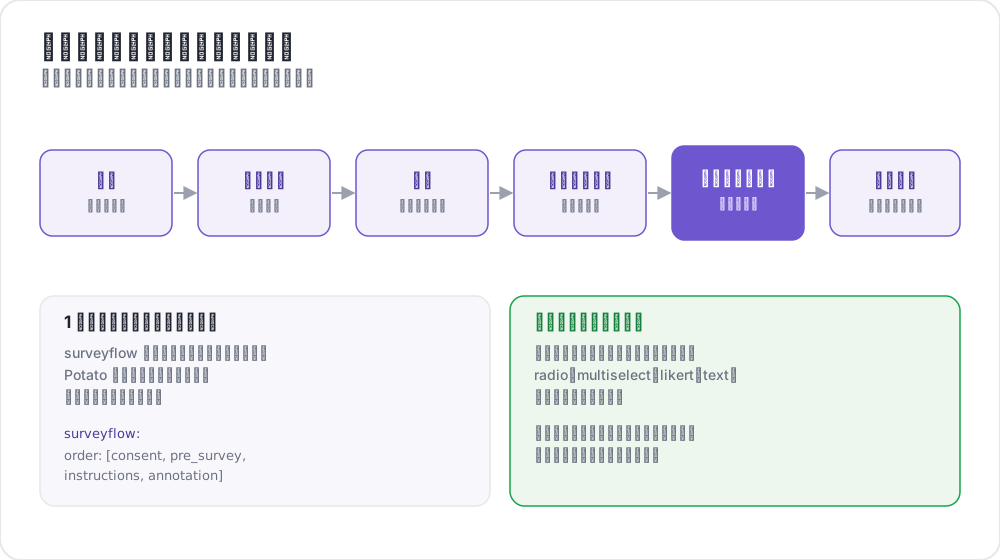 サーベイフローによるアノテーションワークフロー
利用可能なフェーズ
| フェーズ | 目的 | 必須 |
|---|---|---|
consent | インフォームドコンセントの取得 | 任意 |
prestudy | 事前スクリーニング質問と人口統計情報 | 任意 |
instructions | タスクの指示とガイドライン | 任意 |
training | フィードバック付きの資格認定 | 任意 |
annotation | メインのアノテーションタスク | 必須 |
poststudy | 事後調査とフィードバック | 任意 |
注釈者は、有効にしたフェーズを宣言した順序で進みます。
基本設定
phasesブロックは順序を並べ、各フェーズがどのファイルを使うかを指定します。
phases:
  order: [consent, prestudy, instructions, annotation, poststudy]

  consent:
    type: consent
    file: surveyflow/consent.json

  prestudy:
    type: prestudy
    file: surveyflow/prescreening.json

  instructions:
    type: instructions
    file: surveyflow/instructions.html

  poststudy:
    type: poststudy
file: surveyflow/demographics.jsonannotationフェーズにはfileが不要です。プロジェクトのトップレベルのannotation_schemesを使うためです。
フェーズタイプ
ファイルを使う各フェーズは、ワークフローのどの段階にあたるかを示すtypeを宣言します。有効な値はconsent、prestudy、instructions、training、annotation、poststudyです。
typeは明示的に設定してください。Potatoがこれを推定するのはフェーズ名自体がこれらの語のいずれかである場合だけなので、独自の名前を付けたフェーズでは宣言が必要です。
phases:
  order: [intro, consent, instructions, annotation, feedback]

  intro:
    type: prestudy          # custom name, so type is required
    file: surveyflow/intro.json

  consent:
    type: consent
    file: surveyflow/consent.json

  feedback:
    type: poststudy         # custom name, so type is required
    file: surveyflow/feedback.json
戻る操作
前のページがない場合、Backボタンは表示されません。最初のアノテーションインスタンスもこれに含まれます。注釈者がフェーズの境界を越えて戻れるようにするには、次のように設定します。
allow_phase_back_navigation: trueこの設定がオフでも、注釈者はフェーズ内であれば戻ることができます。たとえばアノテーションインスタンス間の移動です。
調査質問の形式
調査フェーズはJSON配列を読み込みます。各質問はid、注釈者に表示されるtext、ウィジェットを指定するschema、そしてchoicesを持ちます。
[
  {
    "id": "consent_1",
    "text": "I certify that I am at least 18 years of age.",
    "schema": "radio",
    "choices": ["I agree", "I disagree"],
    "label_requirement": {"right_label": ["I agree"]}
  },
  {
    "id": "consent_2",
    "text": "I have read and understood the information above.",
    "schema": "radio",
    "choices": ["Yes", "No"],
    "label_requirement": {"right_label": ["Yes"]}
  }
]
サポートされるスキーマタイプ
単一選択にはradio、複数選択にはcheckboxまたはmultiselect、自由記述にはtext、数値入力にはnumber、評価尺度にはlikert、ドロップダウンにはselectを使います。
ラベル要件
label_requirementは、どの回答なら注釈者が先に進めるかを決めます。
{
  "id": "age_check",
  "text": "Are you at least 18 years old?",
  "schema": "radio",
  "choices": ["Yes", "No"],
  "label_requirement": {
    "right_label": ["Yes"],
    "required": true
  }
}right_labelは受け入れる回答を列挙し、requiredはその質問への回答が必須かどうかを示します。誰も不合格にならない同意質問は何も記録しない同意質問です。そのため文面に頼らず、受け入れる回答をright_labelに入れてください。
事前スクリーニング質問
事前スクリーニングはメインタスクの前に実行され、参加資格や背景に関する質問はここに置きます。
phases:
  order: [prestudy, annotation]
  prestudy:
    type: prestudy
file: surveyflow/prescreening.json[
{
"id": "1",
"text": "What is your native language?",
"schema": "select",
"use_predefined_labels": "language",
"label_requirement": {"required": true}
},
{
"id": "2",
"text": "How familiar are you with this topic?",
"schema": "likert",
"choices": ["Not at all", "Slightly", "Moderately", "Very", "Extremely"],
"label_requirement": {"required": true}
}
]事後調査
phases:
  order: [annotation, poststudy]
  poststudy:
    type: poststudy
file: surveyflow/demographics.json[
{
"id": "gender",
"text": "What gender do you most closely identify with?",
"schema": "radio",
"choices": ["Male", "Female", "Non-binary", "Prefer not to say"],
"label_requirement": {"required": true}
},
{
"id": "feedback",
"text": "Please share any feedback about this study (optional)",
"schema": "text"
}
]組み込みラベルセット
Potatoには、多くの研究で繰り返し使われる質問のためのラベルセットが同梱されています。そのため国のリストを設定に貼り付ける必要はありません。
{"id": "country", "text": "Select your country", "schema": "select", "use_predefined_labels": "country"}利用できるセットはcountry、language、ethnicity、religionです。
自由回答フィールド
has_free_responseを使うと、任意の質問に省略可能なテキストボックスを追加できます。「Other」の選択肢を用意する意味があるのは、これがあるときです。
{
  "id": "gender",
  "text": "What is your gender?",
  "schema": "radio",
  "choices": ["Woman", "Man", "Non-binary", "Prefer not to disclose", "Prefer to self-describe"],
  "has_free_response": {"instruction": "Please specify:"},
  "label_requirement": {"required": true}
}
ページヘッダー
調査ページのヘッダーは、質問ファイルではなくフェーズ側で設定します。
phases:
  prestudy:
    type: prestudy
    file: surveyflow/consent.json
    header: "Please answer all consent questions"
条件付き質問
調査質問は前の回答に応じて表示できるので、追加の質問を該当する場合にだけ尋ねられます。調査質問はアノテーションスキームと同じパイプラインを通るため、条件は別の質問をそのnameで参照します。
[
  {
    "name": "prior_experience",
    "annotation_type": "radio",
    "description": "Have you previously worked on a text-annotation task?",
    "labels": ["Yes", "No"],
    "label_requirement": {"required": true}
  },
  {
    "name": "experience_details",
    "annotation_type": "text",
    "description": "Please briefly describe your previous annotation experience.",
    "label_requirement": {"required": true},
    "display_logic": {
      "show_when": [
        {"schema": "prior_experience", "operator": "equals", "value": "Yes"}
      ]
    }
  }
]
非表示の質問は必須項目の検証から除外されます。そのため表示されていない間、Continueボタンをブロックすることはありません。
知っておくべき挙動が3つあります。条件はどのフェーズの質問でも参照できるので、事後調査の質問を事前調査の回答に依存させることができます。未知の演算子や、どこにも存在しない質問への参照など、無効なdisplay_logicは実行時ではなくサーバー起動時にエラーになります。また、生の.htmlファイルを指すinstructionsフェーズはスキーマのパイプラインを通らないので、そこでは条件は適用されません。
export_include_phase_data: trueを設定すると、Potatoは各参加者の回答をサーバー側で再評価し、その参加者に表示されなかった質問への回答を除外します。演算子の完全なリファレンスは条件付きロジックを参照してください。
完全な例
annotation_task_name: "Sentiment Analysis Study"
task_dir: "."
port: 8000

data_files:
  - "data/reviews.json"

item_properties:
  id_key: id
  text_key: text

annotation_schemes:
  - annotation_type: radio
    name: sentiment
    description: "What is the sentiment of this review?"
    labels:
      - Positive
      - Negative
      - Neutral
    sequential_key_binding: true

phases:
  order: [consent, prestudy, instructions, training, annotation, poststudy]

  consent:
    type: consent
    file: phases/consent.json

  prestudy:
    type: prestudy
    file: phases/demographics.json

  instructions:
    type: instructions
    file: phases/instructions.html

  training:
    type: training
    file: phases/training_questions.json

  poststudy:
    type: poststudy
    file: phases/exit_survey.json

training:
  enabled: true
  data_file: phases/training_questions.json
  passing_criteria:
    min_correct: 3
  allow_retry: true

allow_phase_back_navigation: false

output_annotation_dir: "output/"
export_annotation_format: "jsonl"

user_config:
allow_all_users: trueトレーニングフェーズの設定はトップレベルのtrainingブロックから読み込まれ、phasesのエントリーは順序の中での位置を決めるだけです。合格基準とデータ形式についてはトレーニングフェーズを参照してください。
レガシー設定
以前のsurveyflowブロックも引き続き動作し、調査ページを.jsonlファイルのリストとして読み込みます。
surveyflow:
  on: true
  order:
    - pre_annotation
    - post_annotation
  pre_annotation:
    - surveyflow/consent.jsonl
    - surveyflow/demographics.jsonl
  post_annotation:
    - surveyflow/exit_survey.jsonl
移行
| レガシー | 現行 |
|---|---|
surveyflow.on: true | phasesブロック |
surveyflow.pre_annotation | phases.consentまたはphases.prestudy |
surveyflow.post_annotation | phases.poststudy |
surveyflow.testing | training.data_file |
.jsonlファイル | 配列を含む.jsonファイル |
ベストプラクティス
調査は短くする
質問が1つ増えるごとに完了率が下がります。分析で使わない人口統計の質問は、何も得られないまま完了率だけを下げます。
フロー全体をテストする
リンクをどこかに送る前に、セッションのないブラウザでワークフローを自分で最後まで完了してください。同意とログインは、壊れたワークフローが最初に、そして最も気づかれにくい形で失敗する2か所です。
必須項目は慎重に指定する
任意でよかった質問を必須にすると、ページを先に進むためにでっち上げた回答が集まります。
クラウドソーシング
完了コードは事後調査フェーズではなく、トップレベルのcompletion_codeキーで設定します。
completion_code: "POTATO2024"
auto_redirect_on_completion: true
auto_redirect_delay: 5000プラットフォームの設定についてはクラウドソーシングを参照してください。
参考資料
- トレーニングフェーズ - フィードバック付きの資格認定
- クラウドソーシング - Prolific、SONAなどのパネル
- ユーザー管理 - アクセスリストとロール
- 実験フロー - 条件の割り当て、スクリーンアウト、カウンターバランスされたページ
- アンケートのインポート - Qualtrics、REDCap、XLSForm などのツールから質問票を取り込む
実装の詳細については、ソースドキュメントを参照してください。