抽出型QA
スパン単位の解答抽出、読解タスク、パッセージのハイライトによるアノテーションのために、SQuAD形式の質問応答インターフェースをPotatoで構築します。
抽出型QAのアノテーションスキーマは、アノテーターがテキストのパッセージ内で解答のスパンを直接ハイライトする質問応答インターフェースを提供します。このスキーマは、読解データセットの作成、SQuAD形式のQAアノテーション、事実検証など、原文からそのまま解答を抽出するタスクに向いています。
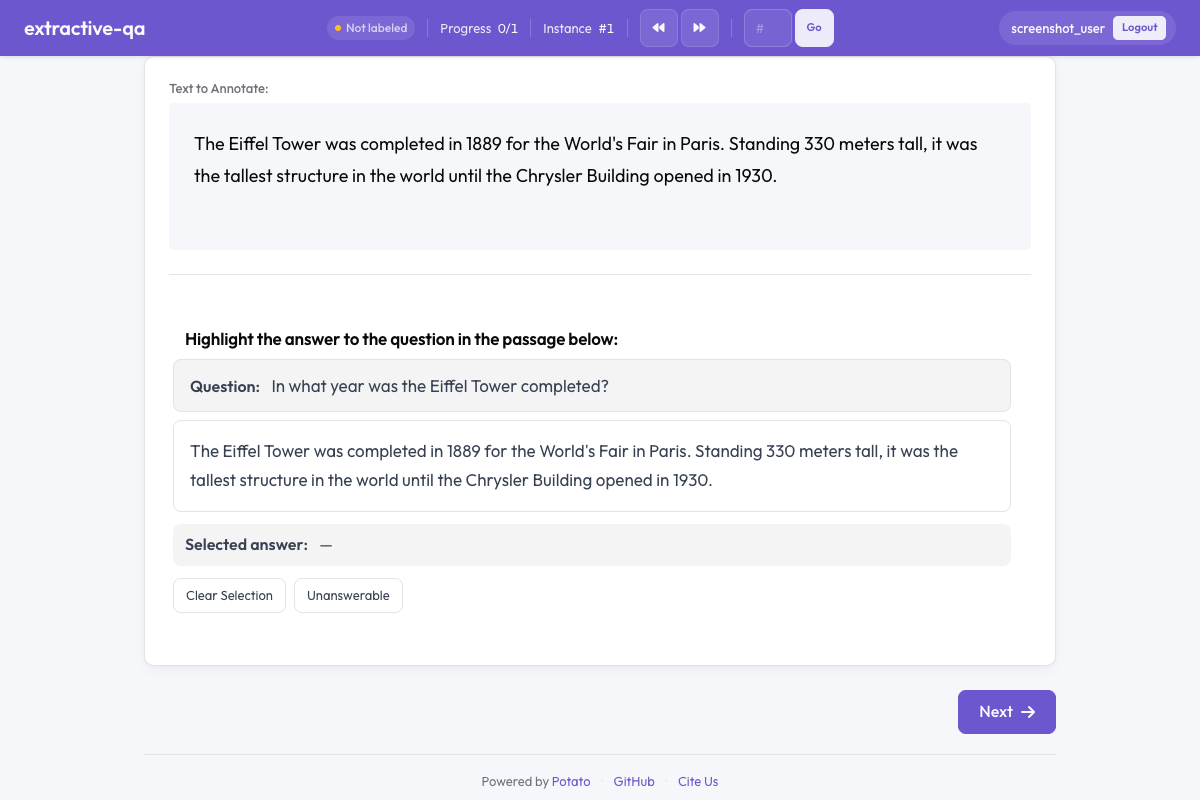 Potatoの抽出型QA
概要
抽出型QAのスキーマが表示するもの:
- 質問:パッセージの上に目立つ形で表示されます
- テキストのパッセージ:アノテーターがハイライトして解答スパンを選択します
- 色分けされたハイライト:選択した解答テキストを示します
- 解答不能の選択肢:パッセージからは答えられない質問のためのものです
クイックスタート
yaml
annotation_schemes:
  - annotation_type: extractive_qa
    name: answer_span
    description: Highlight the answer to the question in the passage below.
    question_field: question
    passage_field: passage
    allow_unanswerable: true
設定オプション
| フィールド | 型 | 既定値 | 説明 |
|---|---|---|---|
annotation_type | string | 必須 | "extractive_qa"である必要があります |
name | string | 必須 | このスキーマの一意な識別子 |
description | string | 必須 | アノテーターに表示される指示 |
question_field | string | "question" | データJSONのうち質問文が入っているフィールド |
passage_field | string | "" | データJSONのうちパッセージ本文が入っているフィールド(空文字列の場合は既定のテキストフィールドを使用) |
allow_unanswerable | boolean | true | 質問を解答不能としてマークするチェックボックスを表示する |
highlight_color | string | "#FFEB3B" | 解答のハイライトに使うCSSの色 |
例
SQuAD形式のQA
yaml
annotation_schemes:
  - annotation_type: extractive_qa
    name: squad_answer
    description: >
      Select the shortest span in the passage that answers the question.
      If the question cannot be answered from the passage, mark it as unanswerable.
    question_field: question
    passage_field: context
    allow_unanswerable: true
    highlight_color: "#FFEB3B"
サンプルデータの例:
json
{
  "id": "q001",
  "question": "When was the university founded?",
  "context": "The University of Michigan was founded in 1817 in Detroit and moved to Ann Arbor in 1837. It is one of the oldest public universities in the United States."
}
事実検証
yaml
annotation_schemes:
  - annotation_type: extractive_qa
    name: evidence_span
    description: >
      Highlight the evidence in the passage that supports or refutes the claim.
      Mark as unanswerable if the passage contains no relevant evidence.
    question_field: claim
    passage_field: document
    allow_unanswerable: true
    highlight_color: "#81C784"
解答不能の選択肢を使わない解答抽出
yaml
annotation_schemes:
  - annotation_type: extractive_qa
    name: definition_extraction
    description: >
      Highlight the definition of the term in the passage.
      Every passage contains a definition — select the most precise span.
    question_field: term
    passage_field: text
    allow_unanswerable: false
    highlight_color: "#64B5F6"
出力形式
json
{
  "answer_span": {
    "labels": {
      "answer_start": 45,
      "answer_end": 49,
      "answer_text": "1817",
      "unanswerable": false
    }
  }
}
アノテーターが質問を解答不能としてマークした場合:
json
{
  "answer_span": {
    "labels": {
      "unanswerable": true
    }
  }
}
運用上のポイント
- 最小限のスパンを選ぶよう指示する - 質問に十分答えられる最短のテキストのほうが、訓練データがきれいになります
- 現実的なタスクではallow_unanswerableを使う - 実際のQAには答えられない質問が含まれます。この選択肢を無効にすると、アノテーターは推測を強いられます
- 読みやすいハイライト色を選ぶ - ハイライトの色は、文字と十分なコントラストがあり読みやすいものにしてください
- パッセージの長さを適度に保つ - 1パッセージあたり100〜500語程度が扱いやすく、極端に長いとスパンの選択が煩雑になります
- 質問の書き方を整える - 質問が明快で曖昧さのない形になっていれば、アノテーターの迷いが減ります
参考資料
- スパンアノテーション - 汎用のスパンラベリング
- テキストと数値の入力 - 自由記述での解答入力
- AIサポート - AIによるアノテーションのヒント
実装の詳細については、ソースドキュメントを参照してください。