テキスト・数値入力
アノテーション用の自由形式テキストおよび数値入力。
テキストと数値入力により、アノテーターは自由形式の応答を提供できます。修正、説明、カウント、測定などに便利です。
テキスト入力
基本的なテキストフィールド
単一行テキスト入力:
yaml
annotation_schemes:
  - annotation_type: text
    name: correction
    description: "Provide a corrected version of the text"
テキストエリア(複数行)
長い応答用:
yaml
- annotation_type: text
  name: explanation
  description: "Explain your reasoning"
  multiline: true
  rows: 4
  cols: 60
  allow_paste: false
プレースホルダーテキスト
入力例でアノテーターをガイド:
yaml
- annotation_type: text
  name: summary
  description: "Write a one-sentence summary"
  placeholder: "Enter your summary here..."
文字数制限
応答の長さを制限:
yaml
- annotation_type: text
  name: title
  description: "Suggest a title"
  min_chars: 15
  show_char_count: true
必須テキスト
フィールドを必須にする:
yaml
- annotation_type: text
  name: justification
  description: "Why did you choose this label?"
  label_requirement:
    required: true
数値入力
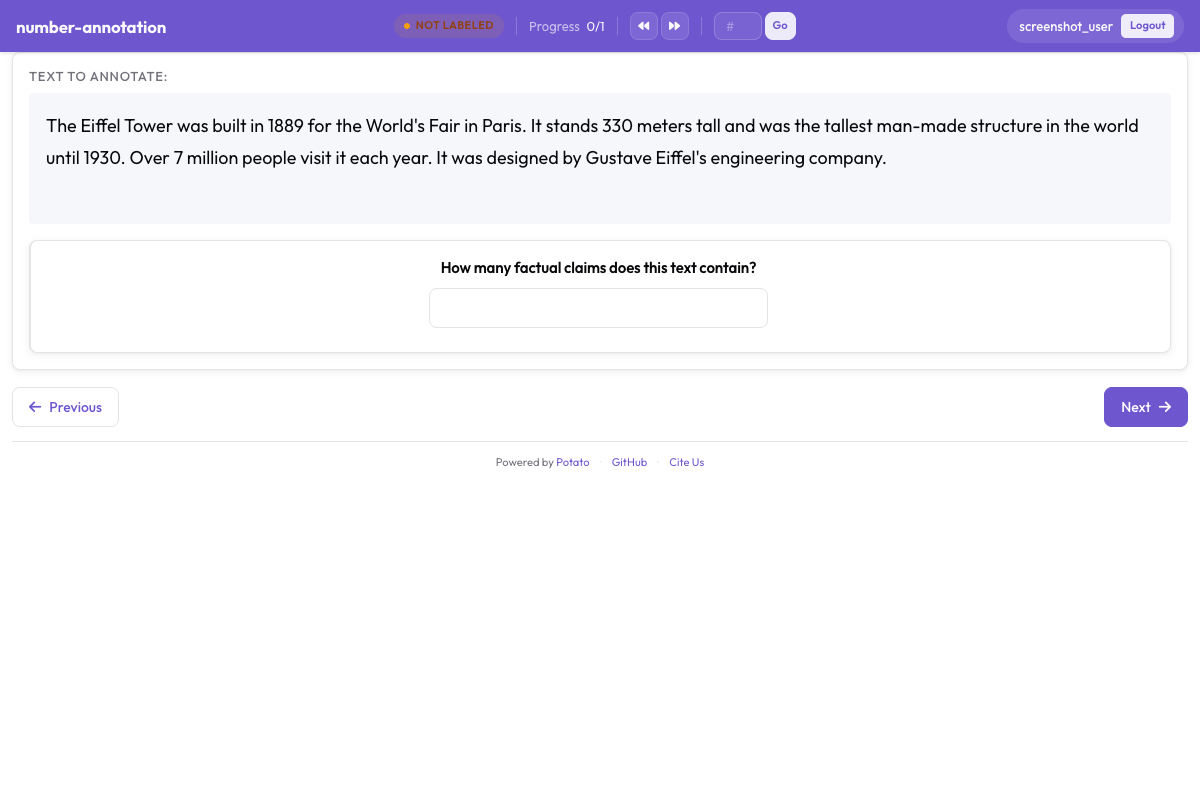 最小値と最大値の制約を持つ数値入力欄
基本的な数値フィールド
yaml
annotation_schemes:
  - annotation_type: number
    name: count
    description: "How many entities are mentioned?"
範囲制限
最小値と最大値を設定:
yaml
- annotation_type: number
  name: rating
  description: "Rate from 1 to 10"
  min: 1
  max: 10
ステップサイズ
増分精度を制御:
yaml
- annotation_type: number
  name: percentage
  description: "What percentage is relevant?"
  min: 0
  max: 100
  step: 5  # Increments of 5
小数
浮動小数点値を許可:
yaml
- annotation_type: number
  name: score
  description: "Confidence score"
  min: 0.0
  max: 1.0
  step: 0.1
デフォルト値
デフォルトを事前入力:
yaml
- annotation_type: number
  name: count
  description: "Number of errors"
  min: 0
  tooltip: "Count each distinct error once, even where it repeats."
スライダー入力
数値入力の視覚的な代替:
yaml
- annotation_type: slider
  name: confidence
  description: "How confident are you?"
  min_value: 0
  max_value: 100
  starting_value: 50
  step: 1
スライダー両端のキャプション
トラックの両端には min_value と max_value が表示され、show_labels: false で非表示にできます。スライダーは labels リストを受け付けません。追加すると質問がラジオボタンのレイアウトに切り替わり、スライダーは表示されなくなるため、両端の文言は description に書いてください:
yaml
- annotation_type: slider
  name: agreement
  description: "How much do you agree? (0 = strongly disagree, 100 = strongly agree)"
  min_value: 0
  max_value: 100
  starting_value: 50
  show_labels: true
スライダー表示オプション
現在の値を表示:
yaml
- annotation_type: slider
  name: rating
  description: "Rate the overall quality"
  min_value: 0
  max_value: 100
  starting_value: 50
  step: 5
  maxTick: 10
一般的なユースケース
テキスト修正タスク
yaml
annotation_schemes:
  - annotation_type: radio
    name: has_error
    description: "Does this text contain errors?"
    labels:
      - "Yes"
      - "No"

  - annotation_type: text
    name: corrected_text
    description: "Provide the corrected version"
    rows: 4
翻訳品質
yaml
annotation_schemes:
  - annotation_type: slider
    name: adequacy
    description: "How much meaning is preserved?"
    min_value: 0
    max_value: 100
    starting_value: 50

  - annotation_type: slider
    name: fluency
    description: "How natural does it sound?"
    min_value: 0
    max_value: 100
    starting_value: 50

  - annotation_type: text
    name: improved_translation
    description: "Suggest a better translation (optional)"
    rows: 4
    label_requirement:
      required: false
エンティティカウント
yaml
annotation_schemes:
  - annotation_type: number
    name: person_count
    description: "How many people are mentioned?"
    min: 0
    max: 50

  - annotation_type: number
    name: org_count
    description: "How many organizations are mentioned?"
    min: 0
    max: 50

  - annotation_type: number
    name: location_count
    description: "How many locations are mentioned?"
    min: 0
    max: 50
フィードバック収集
yaml
annotation_schemes:
  - annotation_type: likert
    name: difficulty
    description: "How difficult was this task?"
    size: 5
    min_label: "Very Easy"
    max_label: "Very Hard"

  - annotation_type: text
    name: feedback
    description: "Any additional feedback?"
    rows: 4
    label_requirement:
      required: false
    placeholder: "Share your thoughts..."
根拠付き品質評価
yaml
annotation_schemes:
  - annotation_type: radio
    name: quality
    description: "Rate the quality"
    labels:
      - Excellent
      - Good
      - Fair
      - Poor

  - annotation_type: text
    name: justification
    description: "Explain your rating"
    rows: 4
    label_requirement:
      required: true
バリデーション
テキストバリデーション
yaml
- annotation_type: text
  name: email
  description: "Enter contact email"
数値バリデーション
数値はmin/maxに対して自動的にバリデーションされます:
yaml
- annotation_type: number
  name: year
  description: "Enter the year"
  min: 1900
  max: 2024
キーボードナビゲーション
テキストと数値フィールドは標準のキーボードナビゲーションをサポート:
Tabでフィールド間を移動Enterで送信(単一行テキストの場合)- 矢印キーで数値の増減
出力形式
テキストと数値のアノテーションは直接保存されます:
json
{
  "id": "doc1",
  "correction": "The corrected text goes here.",
  "count": 5,
  "confidence": 85
}
完全な例:ドキュメントレビュー
yaml
annotation_task_name: "Document Review"

annotation_schemes:
  # Quality rating
  - annotation_type: likert
    name: quality
    description: "Overall document quality"
    size: 5
    min_label: "Poor"
    max_label: "Excellent"

  # Error count
  - annotation_type: number
    name: error_count
    description: "Number of errors found"
    min: 0
    max: 100

  # Confidence slider
  - annotation_type: slider
    name: confidence
    description: "How confident are you in this assessment?"
    min_value: 0
    max_value: 100
    starting_value: 50

  # Detailed feedback
  - annotation_type: text
    name: errors_found
    description: "List the errors you found"
    rows: 4
    placeholder: "Describe each error..."

  # Summary
  - annotation_type: text
    name: summary
    description: "Brief summary of the document"
    placeholder: "Summarize in one sentence..."
ベストプラクティス
- 適切な入力タイプを使用 - 連続値にはスライダー、正確なカウントには数値
- 適切な制約を設定 - min/max値で無効なデータを防止
- プレースホルダーを提供 - 期待される形式についてアノテーターをガイド
- 任意フィールドを明確に -
required: falseを使用し、説明に明記 - 条件付き表示を使用 - 必要な場合のみテキストフィールドを表示
- バリデーションを検討 - メールアドレスやIDなどの構造化入力にはパターンを使用