アノテーションスキーム
radio、multiselect、span、likert、slider、text など76種類のタイプでアノテーションスキームをYAMLに定義します。ラベル、質問、必須フィールドの設定方法を説明します。
アノテーションスキームは、アノテーターが行うラベリングタスクを定義します。Potatoは76種類のアノテーションタイプをサポートしており、これらを組み合わせて複雑なアノテーションタスクを作成できます。
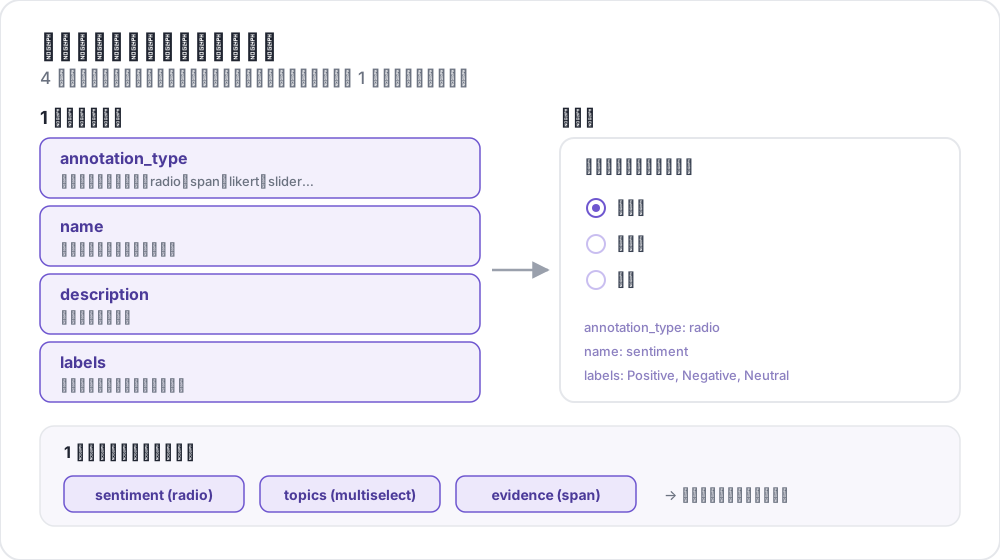 アノテーションスキームの構造
基本構造
各スキームはannotation_schemes配列で定義します:
annotation_schemes:
  - annotation_type: radio
    name: sentiment
    description: "What is the sentiment?"
    labels:
      - Positive
      - Negative
      - Neutral
必須フィールド
すべてのスキームは次の3つのフィールドを持ちます。タイプごとに固有の必須フィールドがこれに加わり、下の各タイプの説明に記載しています。
| フィールド | 説明 |
|---|---|
annotation_type | アノテーションのタイプ(radio、multiselect、likert、span、text、number、slider、multirate、select、pairwise、bws、soft_label、confidence、constant_sum、range_slider、semantic_differential、hierarchical_multiselect、card_sort、rubric_eval、extractive_qa、error_span、triage、coreference、span_link など) |
name | 内部識別子(スペースなし、出力で使用) |
description | アノテーターに表示される指示 |
サポートされるアノテーションタイプ
1. Radio(単一選択)
リストからちょうど1つのオプションを選択します:
- annotation_type: radio
  name: sentiment
  description: "What is the sentiment of this text?"
  labels:
    - Positive
    - Negative
    - Neutral

  # Assigns keys 1, 2, 3... in the order the labels are listed
  sequential_key_binding: true

  # Horizontal layout instead of vertical
horizontal: true連番バインディングは数字キー1-9を先頭から9個のラベルに割り当てるため、ラベルリストの順序を変えるとキーの割り当ても変わります。順序を変えても変わらないバインディングにするには、各ラベルに個別のキーを指定してください(キーボードショートカットを参照)。
2. リッカートスケール
両端にラベルが付いた評価スケール:
- annotation_type: likert
  name: agreement
  description: "How much do you agree with this statement?"
  size: 5  # Number of scale points
  min_label: "Strongly Disagree"
  max_label: "Strongly Agree"

  # Show the numeric value of the selected point
displaying_score: truesizeと両端のラベルはどちらも必須です。5段階にするとアノテーターは中立の中間点を選べます。偶数の段階数にすると、どちらかの方向を選ぶことになります。
3. Multiselect(複数選択)
リストから複数のオプションを選択します:
- annotation_type: multiselect
  name: topics
  description: "Select all relevant topics"
  labels:
    - Politics
    - Technology
    - Sports
    - Entertainment
    - Science

  # Require at least one box before the annotator can move on
  label_requirement:
    required: true

  # Allow free text response
has_free_response: truehas_free_responseは「other」のテキストボックスを追加します。ラベルセットをまだ改訂している段階では有効にしておく価値があります。集まった記入内容が、欠けているカテゴリを教えてくれるからです。
4. スパンアノテーション
テキストの一部をハイライトしてラベルを付けます:
- annotation_type: span
  name: entities
  description: "Highlight named entities in the text"
  labels:
    - PERSON
    - ORGANIZATION
    - LOCATION
    - DATE

  # Show the label name on each highlighted span
  show_span_labels: true

  # Ctrl/Cmd+click to add non-contiguous ranges to one annotation
  allow_discontinuous: false

  # Keyboard shortcuts for labels
sequential_key_binding: trueallow_discontinuousは、分割先行詞のように離れた複数の範囲からなるスパンを扱うためのもので、互いに重なり合うスパンのためのものではありません。ラベル付けする現象が実際に途中で途切れる場合を除き、無効のままにしてください。Ctrl/Cmdクリックの操作は誤って行いやすいためです。
5. スライダー
連続的な数値範囲:
- annotation_type: slider
  name: confidence
  description: "How confident are you in your answer? (0 = not at all, 100 = completely)"
  min_value: 0
  max_value: 100
  starting_value: 50
  step: 1

  # Shows min_value and max_value at the ends of the track
show_labels: truemin_value、max_value、starting_valueの3つはすべて必須です。スライダーはlabelsリストを受け付けません。リストを追加すると質問がradioレイアウトに切り替わり、スライダーは表示されなくなります。スケールの両端を説明する文言はdescriptionに書いてください。初期値は、アノテーターが操作する前にハンドルが置かれる位置です。中間点にしておけば、どちらかの端へのアンカリングを避けられます。
6. テキスト入力
自由形式のテキスト回答:
- annotation_type: text
  name: explanation
  description: "Explain your reasoning"

  # Multi-line input
  rows: 4

  # Require a minimum length and show a running count
  min_chars: 20
  show_char_count: true

  # Placeholder text
  placeholder: "Enter your explanation here..."

  # Disable paste (for transcription tasks)
  allow_paste: false
allow_paste: falseは、書き起こしや自由再生のタスクで重要です。こうしたタスクでは、貼り付けられた回答はアノテーター自身が作ったものではなく、元の資料からコピーされたものだからです。
7. 数値入力
制約付きの数値入力:
- annotation_type: number
  name: count
  description: "How many entities are mentioned?"
  min: 0
  max: 100
  step: 1
8. Multirate(マトリックス評価)
同じスケールで複数の項目を評価します:
- annotation_type: multirate
  name: quality_aspects
  description: "Rate each aspect of the response"

  # Rows: the items being rated
  options:
    - Accuracy
    - Fluency
    - Relevance

  # Columns: the shared rating scale
  labels:
    - Poor
    - Fair
    - Good
    - Very Good
    - Excellent

  # Randomize row order per annotator
  option_randomization: true

  # Layout options
  arrangement: "vertical"
  display_config:
num_columns: 2マトリックスには行と列の両方が必要なため、optionsとlabelsはどちらも必須です。行の順序をランダム化すると、順序効果がたまたまリストの先頭にある観点に集中せず、項目全体に分散されます。
共通オプション
キーボードショートカット
キーバインドでアノテーションを高速化します:
# Automatic sequential binding: digits 1, 2, 3... in label order
sequential_key_binding: trueラベルリストを変更しても動かないバインディングにするには、ラベルをオブジェクトで指定し、それぞれにkey_valueを与えます:
labels:
  - name: Positive
    key_value: "1"
  - name: Negative
    key_value: "2"
  - name: Neutral
    key_value: "3"
ツールチップ
個々のラベルにホバーヒントを表示します。ツールチップはスキームではなくラベルに付くため、labelsの中で設定します:
labels:
  - name: Positive
    tooltip: "Expresses happiness, approval, or satisfaction"
  - name: Negative
    tooltip: "Expresses sadness, anger, or disappointment"
  - name: Neutral
tooltip: "No clear emotional content"書式付きのガイダンスを表示するには、代わりにtooltip_fileでHTMLファイルを指定します:
labels:
  - name: Economic
    tooltip_file: "config/tooltips/economic.html"
ラベルカラー
視覚的に区別するためのカスタムカラーで、プロジェクト全体に対してuiの下で一度だけ定義します:
ui:
  label_colors:
    entities:
      PERSON: "#3b82f6"
      LOCATION: "#10b981"
      ORGANIZATION: "#f59e0b"
色はスキーム名、次にラベルをキーとして指定します。個々のラベルに、ツールチップと並べて色を設定することもできます:
labels:
  - name: positive
    color: "#22C55E"
    tooltip: "Positive sentiment"
必須フィールド
送信前にスキームへの回答を必須にします:
- annotation_type: radio
  name: sentiment
  description: "What is the sentiment?"
  label_requirement:
    required: true
  labels:
    - Positive
- Negative何らかの回答ではなく特定のオプションを必須にするには、required_labelでそのオプションを指定します。単一のラベルでもリストでも指定できます。
複数スキーム
インスタンスごとに複数のアノテーションタイプを組み合わせます:
annotation_schemes:
  # Primary classification
  - annotation_type: radio
    name: sentiment
    description: "Overall sentiment"
    labels:
      - Positive
      - Negative
      - Neutral
    label_requirement:
      required: true
    sequential_key_binding: true

  # Confidence rating
  - annotation_type: likert
    name: confidence
    description: "How confident are you?"
    size: 5
    min_label: "Guessing"
    max_label: "Certain"

  # Topic tags
  - annotation_type: multiselect
    name: topics
    description: "Select all relevant topics"
    labels:
      - Politics
      - Technology
      - Sports
      - Entertainment
    has_free_response: true

  # Notes
  - annotation_type: text
    name: notes
    description: "Any additional observations"
    rows: 4
    label_requirement:
      required: false
この例で必須なのはsentimentのラベルだけです。確信度の評価とメモを任意にしておくと、必須項目は研究が依存する1つのフィールドに限られ、分析上の重みを持たない入力欄のためにアノテーターが先に進めなくなることを防げます。
高度な機能
ペアワイズ比較
2つのアイテムを比較します。アイテムはインスタンス自体から取得され、items_keyでそのフィールドを指定します:
- annotation_type: pairwise
  name: preference
  description: "Which response is better?"
  mode: binary
  items_key: "responses"   # Field holding a list of 2+ items

  # Labels for the two sides
  show_labels: true
  labels:
    - "Response A"
    - "Response B"

  # Tie option (opt-in)
  allow_tie: true
  tie_label: "No preference"
ペアはデータファイルから供給されるため、各行には2つ以上のアイテムのリストが含まれます:
{"id": "1", "responses": ["First response text", "Second response text"]}本当に同等なペアがよく出てくる場合は、引き分けボタンを追加する価値があります。ボタンがないとアノテーターは引き分けを恣意的にどちらかに決め、そのノイズが不一致として現れるからです。
ベスト・ワーストスケーリング
タプルの中から最良と最悪を選んでアイテムを順位付けします。タプルはスキームからではなくトップレベルのbws_configブロックによって作成されます。これがないbwsスキームは、空のアイテムリストに対して質問を表示します:
bws_config:
  tuple_size: 4              # Items per tuple
  min_item_appearances: 8    # Minimum appearances per item across tuples
  seed: 42
  scoring:
    method: counting         # counting | bradley_terry | plackett_luce

annotation_schemes:
  - annotation_type: bws
    name: ranking
    description: "Sentiment Intensity"
    best_description: "Which sentence expresses the MOST positive sentiment?"
    worst_description: "Which sentence expresses the LEAST positive sentiment?"
    tuple_size: 4
sequential_key_binding: trueデータファイルの各行が1つのアイテムであり、Potatoはこのプールからタプルをサンプリングします。min_item_appearancesを大きくすると各アイテムのスコアの精度が上がりますが、その分比較の回数が増えます。
ドロップダウン選択
省スペースの単一選択:
- annotation_type: select
  name: category
  description: "Select a category"
  labels:
    - Category A
    - Category B
    - Category C
    - Category D
    - Category E

  # Vary the option order between annotators
  randomize_order: true
ドロップダウンは開くまでオプションを表示しないため、radioボタンではテキストが画面外に押し出されてしまうような長いラベルセットに向いています。短いセットでは、2回ではなく1回のクリックで済むradioボタンのほうが速く回答できます。
データ形式リファレンス
入力
アノテーションスキームはデータ形式と連携します:
{
  "id": "doc_1",
  "text": "This is the text to annotate."
}
出力
アノテーションはスキーム名をキーとして保存されます:
{
  "id": "doc_1",
  "annotations": {
    "sentiment": "Positive",
    "confidence": 4,
    "topics": ["Technology", "Science"],
    "entities": [
      {"start": 0, "end": 4, "label": "ORGANIZATION", "text": "This"}
    ],
    "notes": "Clear positive sentiment about technology."
  }
}
ベストプラクティス
1. 明確なラベル
曖昧さがなく、互いに区別できるラベルを使用します:
次のラベルは、1つの次元上の異なる点を表しています:
labels:
  - Strongly Positive
  - Somewhat Positive
  - Neutral
  - Somewhat Negative
  - Strongly Negative
次のラベルはそうなっていません。「OK」「Fine」「Acceptable」の間に2人のアノテーターが同じ線を引くことはなく、その結果生じる不一致はデータではなくラベルセットに起因するものです:
labels:
  - Good
  - OK
  - Fine
  - Acceptable
2. 有用なツールチップ
ニュアンスのあるラベルにはツールチップを追加します:
labels:
  - name: Sarcasm
    tooltip: "The text says the opposite of what it means"
  - name: Irony
    tooltip: "A mismatch between expectation and reality"
3. キーボードショートカット
大量のタスクではショートカットを有効にします:
sequential_key_binding: true4. 論理的な順序
ラベルは一貫した順序で並べます:
- 最もよく使うものを先頭に
- アルファベット順
- 強度順(低から高)
5. オプションを絞る
選択肢が多すぎるとアノテーションが遅くなります:
- Radio:2-7個のオプション
- Multiselect:5-15個のオプション
- Likert:5-7段階
6. 事前にテストする
公開前に自分でいくつかの例をアノテーションし、次の問題を見つけます:
- 曖昧なラベル
- 欠けているカテゴリ
- 分かりにくい指示