設定の基本
Potato設定ファイルの基礎を学びましょう。
PotatoはYAML設定ファイルを使用してアノテーションタスクを定義します。このガイドでは、基本的な設定オプションについて説明します。
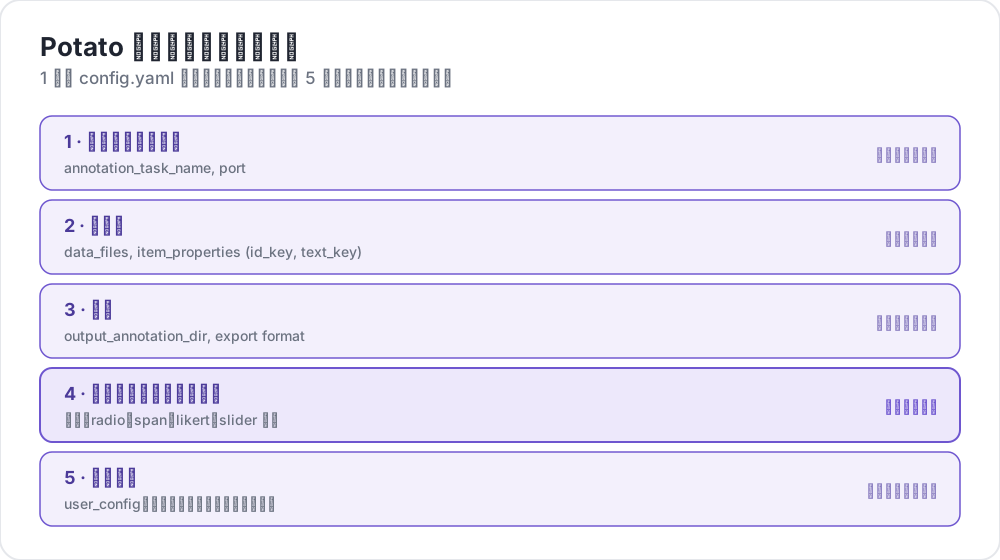 Potato の設定に含まれるもの
設定ファイルの構成
基本的なPotato設定には以下の主要セクションがあります:
yaml
# Task settings
annotation_task_name: "My Annotation Task"
port: 8000

# Data configuration
data_files:
  - data.json

item_properties:
  id_key: id
  text_key: text

# Output settings
output_annotation_dir: "annotation_output/"
export_annotation_format: "jsonl"

# Annotation schemes
annotation_schemes:
  - annotation_type: radio
    name: my_annotation
    description: "Pick the label that fits this item"
    labels:
      - Label 1
      - Label 2

# User settings
user_config:
  allow_all_users: true
基本設定
タスクとサーバーの設定
yaml
annotation_task_name: "My Task"  # Display name for your task
port: 8000                       # Port to run the server on
データの設定
yaml
data_files:
  - data.json           # Path to your data file(s)
  - more_data.json      # You can specify multiple files

item_properties:
  id_key: id            # Field containing unique ID
  text_key: text        # Field containing text to annotate
サポートされているデータ形式:
- JSON (
.json) - JSON Lines (
.jsonl) - CSV (
.csv) - TSV (
.tsv)
出力の設定
yaml
output_annotation_dir: "annotation_output/"   # Directory for annotation files
export_annotation_format: "jsonl"             # Formats: jsonl, csv, tsv, parquet, and the other registered exporters
アノテーションスキーム
1つ以上のアノテーションスキームを定義します:
yaml
annotation_schemes:
  - annotation_type: radio      # Type of annotation
    name: sentiment             # Internal name
    description: "Select the sentiment"  # Instructions
    labels:                     # Options for annotators
      - Positive
      - Negative
      - Neutral
利用可能なアノテーションタイプ
| タイプ | 説明 |
|---|---|
radio | 単一選択 |
multiselect | 複数選択 |
likert | スケールでの評価 |
text | 自由テキスト入力 |
number | 数値入力 |
span | テキストスパンのハイライト |
slider | 連続範囲選択 |
multirate | 複数項目の評価 |
ユーザー設定
すべてのユーザーを許可
yaml
user_config:
  allow_all_users: true
特定のユーザーに制限
yaml
user_config:
  allow_all_users: false
  users:
    - user1@example.com
    - user2@example.com
タスクディレクトリ
task_dir設定は相対パスのルートディレクトリを定義します:
yaml
task_dir: ./my-task/
data_files:
  - data/input.json    # Resolves to ./my-task/data/input.json
完全な例
感情分析タスクの完全な設定例:
yaml
# config.yaml
annotation_task_name: "Sentiment Analysis"
port: 8000
task_dir: ./

# Data
data_files:
  - data/tweets.json

item_properties:
  id_key: id
  text_key: text

# Output
output_annotation_dir: "annotation_output/"
export_annotation_format: "jsonl"

# Annotation
annotation_schemes:
  - annotation_type: radio
    name: sentiment
    description: "What is the sentiment expressed in this tweet?"
    labels:
      - name: Positive
        key_value: "1"
      - name: Negative
        key_value: "2"
      - name: Neutral
        key_value: "3"
    sequential_key_binding: true

# Users
user_config:
  allow_all_users: true

# Assignment
per_annotator_quota:
  default: 100
num_annotators_per_item: 2
次のステップ
- データ形式の詳細を探る
- アノテーションスキームについて学ぶ
- UI設定でインターフェースをカスタマイズする
- プレビューCLIで設定を検証する