マルチモーダルエージェント評価
テキストを超えて行動するエージェント、つまりコンピュータ操作・GUI エージェント、音声アシスタント、動画エージェント、文書エージェントを評価します。Potato は、クリックグラウンディング付きの GUI 軌跡、全二重音声タイムライン、ライブ IoU 付きの動画時間グラウンディング、音声トランスクリプトのエラータグ付け、インターリーブされたマルチモーダル推論、表グリッド構造のための専用スキーマを追加します。
エージェントはますますテキストを超えたモダリティで行動するようになっています。GUI を操作し、動画を視聴し、音声での会話を交わします。各モダリティには、プレーンなテキストウィジェットでは提供できないレビュー面が必要です。エージェントのクリック付きのスクリーンショット、デュアルトラックの音声タイムライン、ゴールド区間付きの動画スクラバーなどです。 Potato は、既存の画像・音声・動画の表示に加えて、これらのトレース向けに専用設計されたアノテーションスキーマを追加します。
各スキーマはレンダリング時にトレースからステップ・ターン・セグメントを導出し、それぞれ examples/agent-traces/ 以下に実行可能な例を同梱しています。
GUI/コンピュータ操作軌跡 (gui_trajectory)
コンピュータ操作、GUI、または OS エージェントをステップごとに評価します(OSWorld, NeurIPS 2024; ScreenSpot-Pro; AndroidWorld)。各ステップは、エージェントが見たスクリーンショットと、それがとったアクションを表示します。アノテーターはアクションを判断します(正しい/誤った要素/誤ったアクション/幻覚)。ステップがクリック座標を持つ場合、スクリーンショット上のグラウンディングマーカーが、クリックが正しい要素に着地したかどうかを示します。
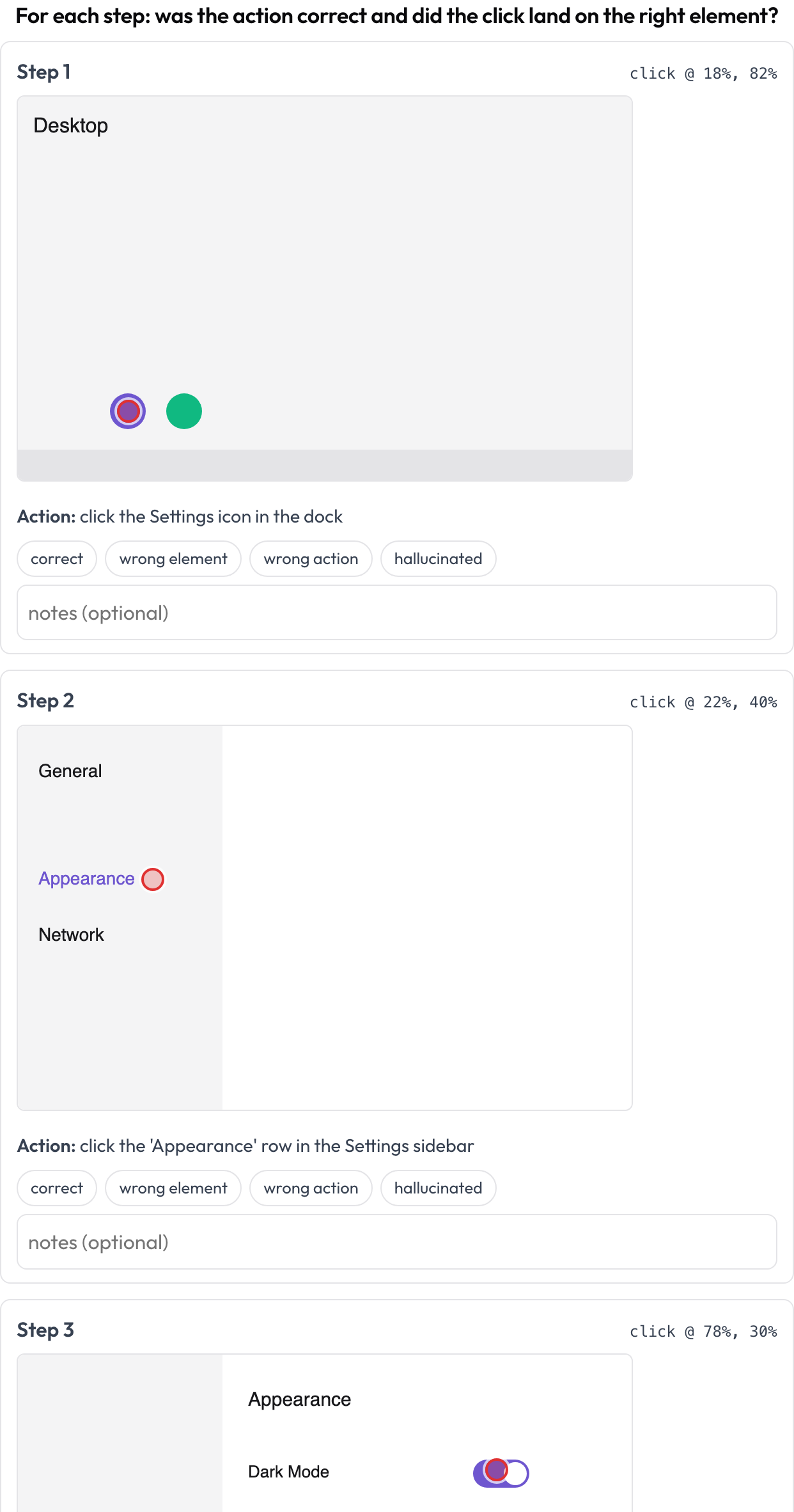 各コンピュータ操作ステップをレビューする。アクションの正しさに加えてスクリーンショット上のクリックグラウンディング
annotation_schemes:
  - annotation_type: gui_trajectory
    name: gui_review
    description: "For each step: was the action correct and did the click land right?"
    steps_key: steps
    screenshot_key: screenshot   # field on each step holding an image URL / data-URI
    action_key: action           # field holding the action text
    coord_space: normalized      # normalized (0..1) | pixels — for the x/y grounding marker
    verdict_options: [correct, wrong_element, wrong_action, hallucinated]
各ステップは screenshot、action、そして任意の x/y(またはネストされた click: {x, y})を提供できます。{index, step, verdict, notes} のリストとして保存されます。
音声/全二重インタラクション (voice_interaction)
人間↔エージェントの音声会話を、ターンの取り合いとバージイン(割り込み)処理についてアノテーションします(Full-Duplex-Bench, 2025)。デュアルトラックタイムライン(ユーザーレーンとエージェントレーン)が各ターンを開始時刻と終了時刻で配置し、両話者が同時に話すオーバーラップ領域をハイライトします。アノテーターは各オーバーラップを分類し(エージェントは応答すべき/再開すべき/バックチャネル/不確実)、全体的なターンの取り合いを評価します。ソース音声が提供されている場合はインラインで再生されます。
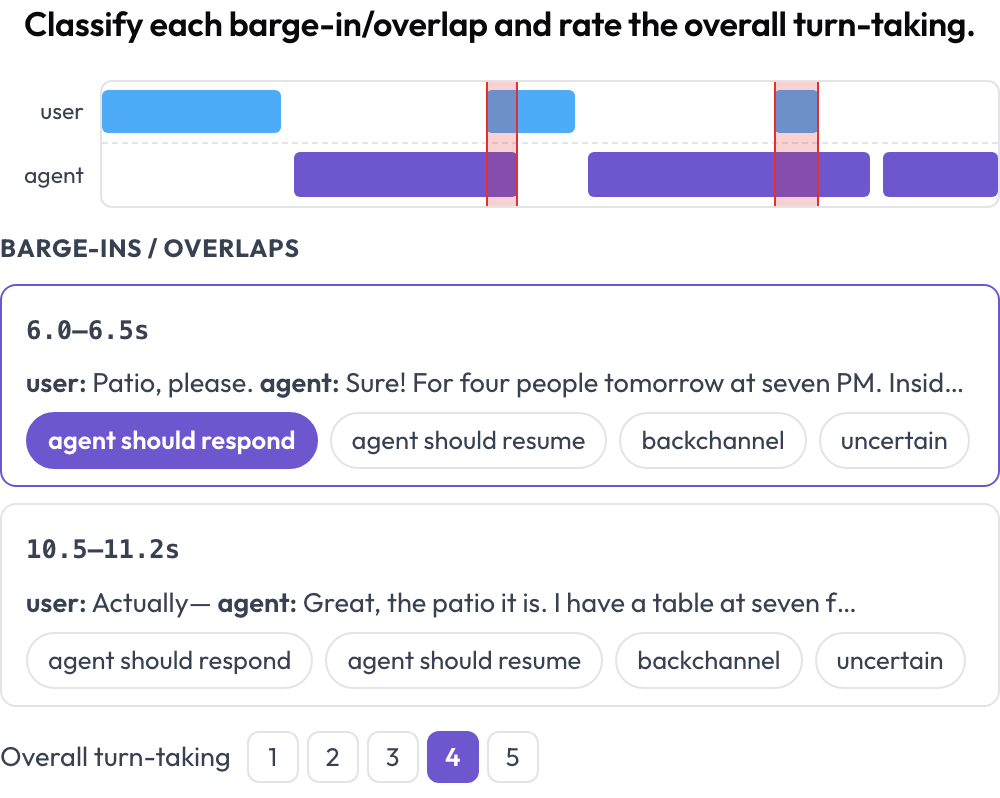 バージイン検出とターン取り合いの採点を備えたデュアルトラック音声タイムライン
annotation_schemes:
  - annotation_type: voice_interaction
    name: turn_taking
    description: "Classify each barge-in/overlap and rate the overall turn-taking."
    turns_key: turns           # list of {speaker, start, end, text} (seconds)
    speaker_key: speaker
    user_speakers: [user, human, caller]   # everything else is treated as the agent
    overlap_labels: [agent_should_respond, agent_should_resume, backchannel, uncertain]
    rating_scale: 5
# audio_key: audio # optional per-instance audio URL to enable the player異なる話者のターン間のオーバーラップはレンダリング時に計算されます。{"overlaps": {idx: label}, "rating": int} として保存されます。
動画時間グラウンディング (temporal_grounding)
時間グラウンディング評価のために、動画内のイベント時間区間をマークします(TimeScope, 2025; ET-Bench)。各イベントプロンプトについて、アノテーターは再生ヘッドをキャプチャするか秒数を入力して、ゴールドの [start, end] を設定します。データがモデルの予測区間を持つ場合、調整に合わせてライブの IoU と 2 本バーのミニタイムライン(予測 vs. ゴールド)が更新されます。これは予測対ゴールドの局在化スコアリング専用に作られており、汎用のセグメントラベリングとは異なります。
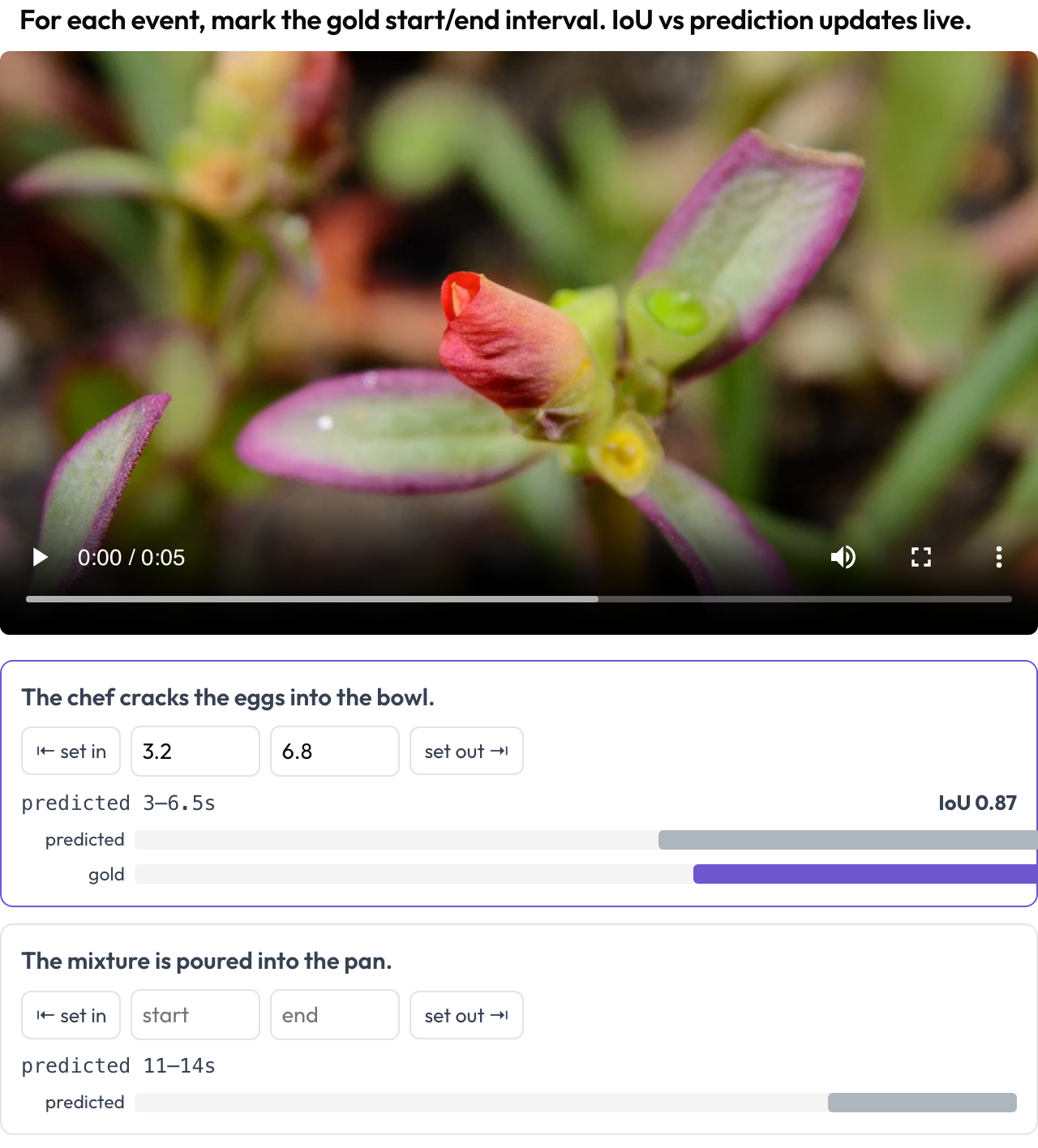 モデルの予測に対するライブ IoU とともに動画上にゴールドのイベント区間をマークする
annotation_schemes:
  - annotation_type: temporal_grounding
    name: grounding
    description: "Mark the gold start/end interval for each event. IoU vs prediction updates live."
    video_key: video           # per-instance video URL
    events_key: events         # list of {prompt, predicted: {start, end}} (predicted optional)
    # duration: 120            # optional fixed timeline scale (else inferred from the video)
{"events": {idx: {start, end}}} として保存されます。
アラインメント済みトランスクリプトの音声エラー (speech_transcript)
時間アラインメント済みの音声トランスクリプトを、ASR/TTS と音声品質のエラーについてセグメントごとにアノテーションします(Speak & Improve, 2025)。各セグメント {start, end, text, speaker?} は、そのタイムスタンプとテキストを表示するカードになります。アノテーターはエラー(ASR エラー/TTS アーティファクト/誤発音/非流暢性)をタグ付けし、修正済みトランスクリプトを入力できます。これは voice_interaction のターン取り合いビューに対する、セグメントレベルの補完です。
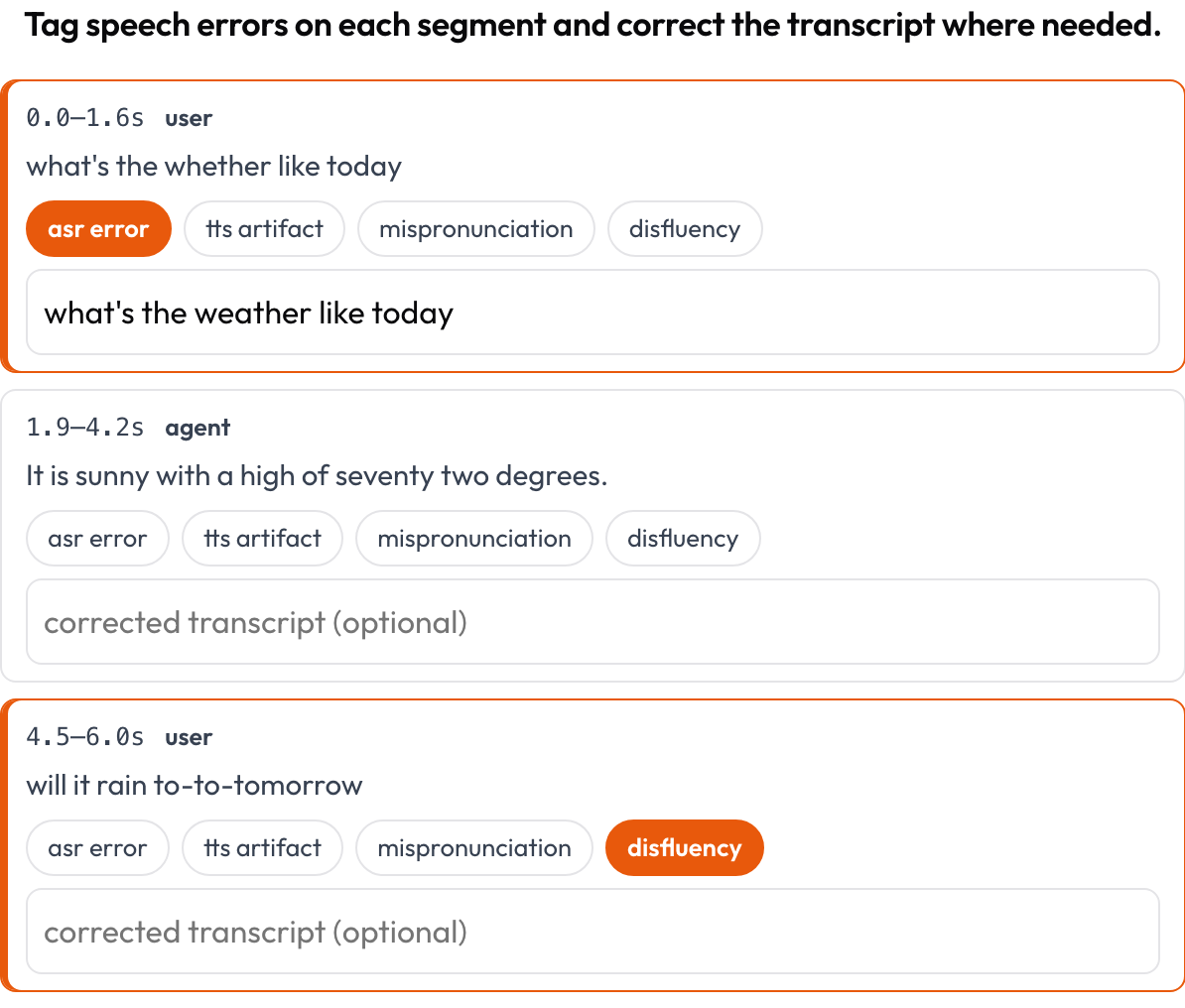 セグメントごとに ASR/TTS/発音のエラーをタグ付けし、トランスクリプトをインラインで修正する
annotation_schemes:
  - annotation_type: speech_transcript
    name: speech_errors
    description: "Tag speech errors on each segment and correct the transcript where needed."
    segments_key: segments       # list of {start, end, text, speaker?}
    error_types: [asr_error, tts_artifact, mispronunciation, disfluency]
    allow_correction: true
    # audio_key: audio           # optional per-item audio URL to enable the player
{index, start, end, errors, correction} のリストとして保存されます。
インターリーブされたマルチモーダル推論 (multimodal_reasoning)
インターリーブされたテキスト ↔ 画像 ↔ ツール ↔ アクションの推論トレースを、ステップごとに評価します(Multimodal RewardBench 2, 2025; Zebra-CoT)。各ステップは型付きのブロックであり、その型に応じてインラインでレンダリングされます。アノテーターは各ステップの一貫性を判断します。推論は画像と先行ステップから導かれているか、それとも視覚情報が幻覚されているか。
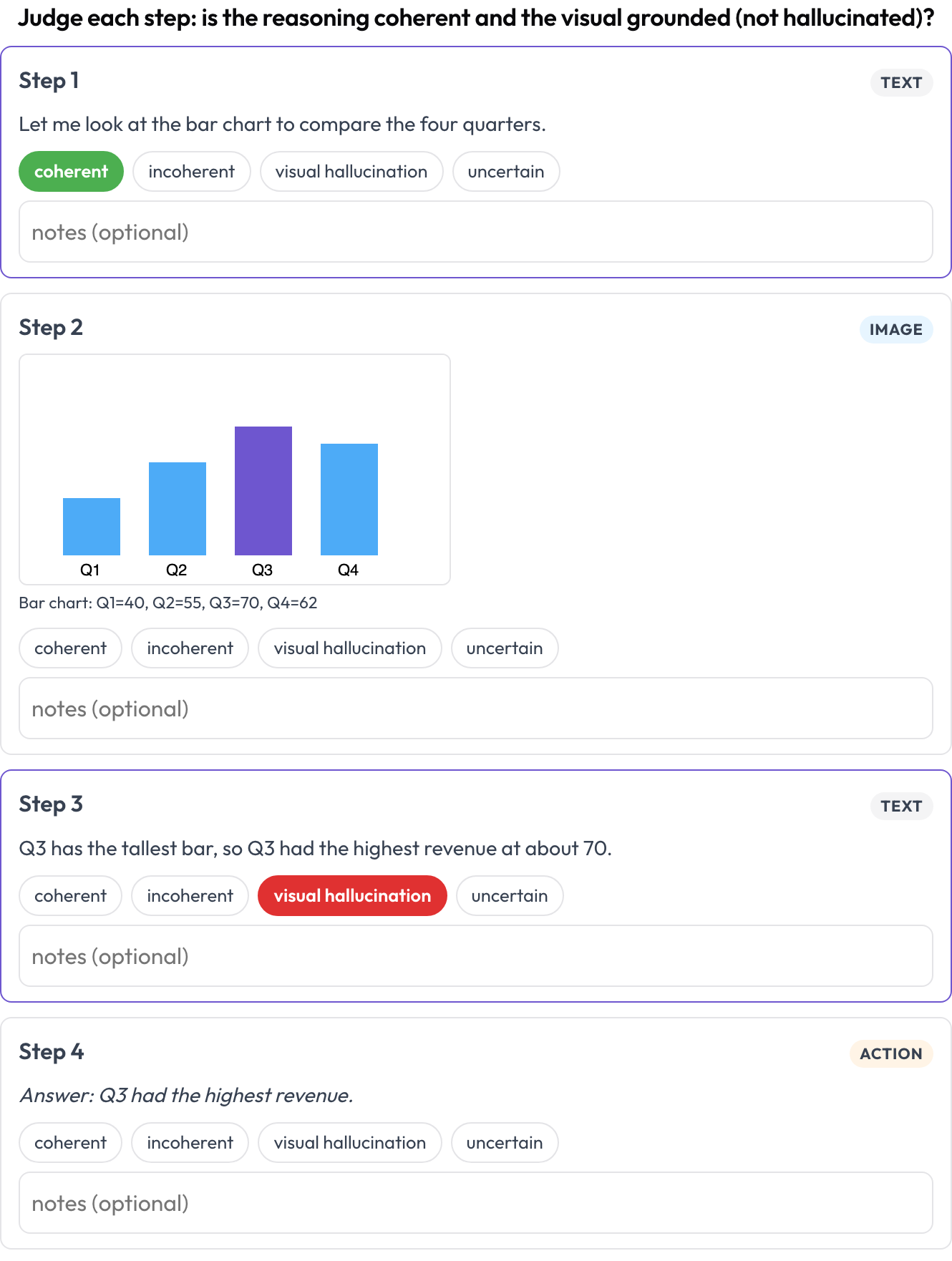 テキスト・画像・ツールの推論トレースの各ステップを一貫性と視覚的幻覚について評価する
annotation_schemes:
  - annotation_type: multimodal_reasoning
    name: reasoning_review
    description: "Judge each step: coherent reasoning and grounded visuals?"
    steps_key: steps
    type_key: type     # each step's 'type': text | image | tool | action (inferred if absent)
    verdict_options: [coherent, incoherent, visual_hallucination, uncertain]
各ステップは text/content、image/image_url(+caption)、または tool/args を持つことができます。{index, step, type, verdict, notes} のリストとして保存されます。
表グリッド構造 (table_grid)
表画像のセル構造をアノテーションします。これはプレーンなバウンディングボックスでは捉えられない、文書固有の要素です(OmniDocBench, CVPR 2025; RealHiTBench)。アノテーターはグリッドの寸法を設定し、セルをクリックしてその役割(データ/列ヘッダー/行ヘッダー/空)をマークします。ページごとの領域ボックスは、ページ単位で画像アノテーションを実行することですでにカバーされているため、このスキーマはそれらのボックスが表現できない構造に焦点を当てます。
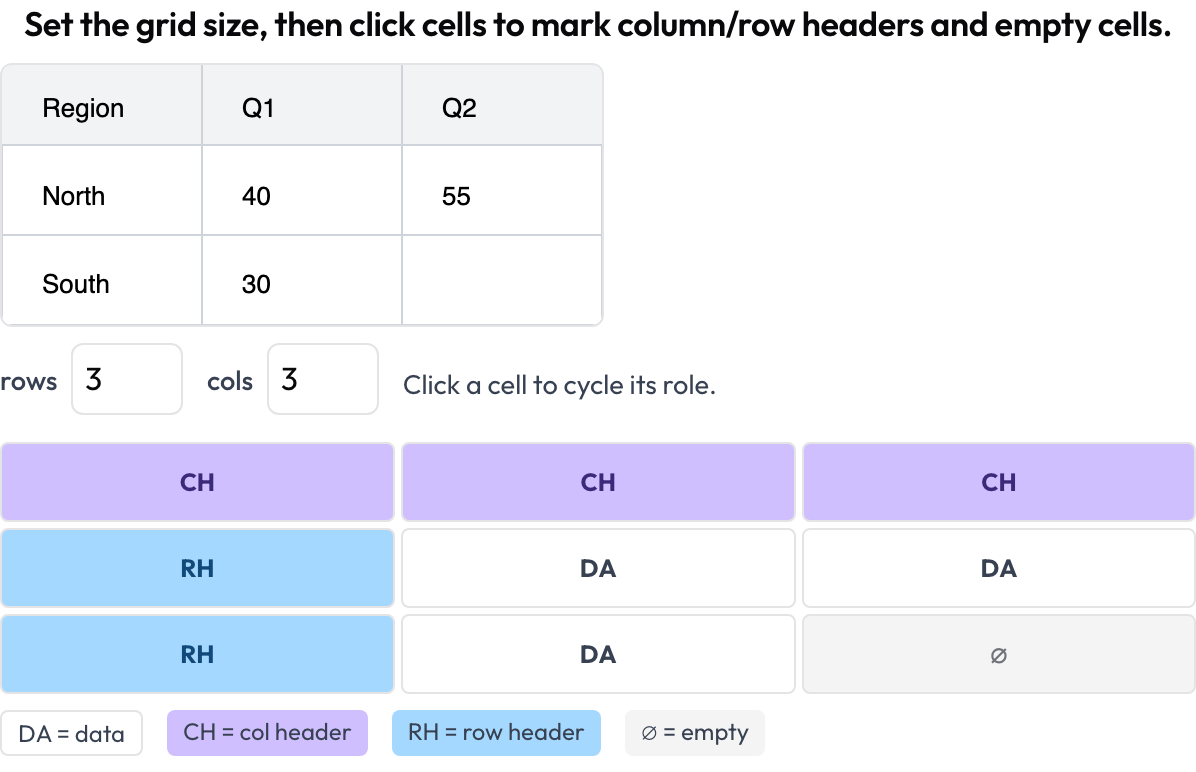 文書の表のセル構造をアノテーションする。列ヘッダーと行ヘッダー、データ、空セル
annotation_schemes:
  - annotation_type: table_grid
    name: structure
    description: "Set the grid size, then click cells to mark headers and empty cells."
    image_key: image           # per-instance table image URL / data-URI
    rows_key: rows             # optional initial dims from the data
    cols_key: cols
    roles: [data, col_header, row_header, empty]   # click cycles through these
{rows, cols, cells: {"r,c": role}} として保存され、data 以外のセルのみが残されます。
関連項目
- マルチエージェントチーム評価 — 相互作用グラフ、ハンドオフ、チームスコアカード
- Web エージェント評価 — スクリーンショットとアクションの Web エージェント
- AI エージェントの評価方法 — エージェント評価のレベル
- エージェント型アノテーション — トレース表示の設定と取り込み
実装の詳細は、ソースドキュメントを参照してください。