エージェント型アノテーション
15種類のトレース形式コンバーター、5種類の表示タイプ、ツール使用・Webブラウジング・コーディング・チャットエージェント向けのプリビルトスキーマでPotato上のAIエージェントを評価します。PRMとルーブリック評価を含みます。
v2.3.0の新機能
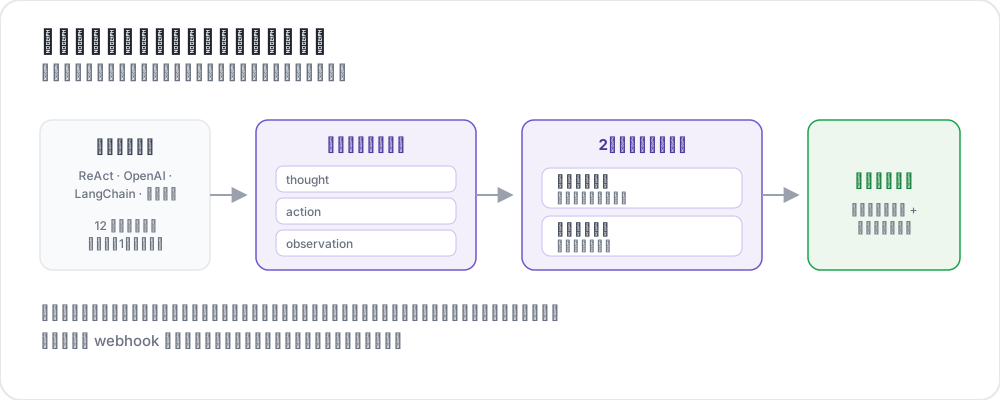 How agentic annotation works
AIエージェントは、Webの閲覧、コードの記述、APIの呼び出し、サブエージェントのオーケストレーションなど、複雑なマルチステップタスクにますますデプロイされています。しかし、エージェントが実際に正しいことをしたかを評価するには、従来のアノテーションツールではサポートできない粒度での人間の判断が必要です。1つのエージェントトレースには、数十のステップ、ツール呼び出し、中間推論、スクリーンショット、分岐判断が含まれることがあります。アノテーターはこのすべてのコンテキストを確認し、効率的にナビゲートし、トレースレベルと個々のステップレベルの両方で構造化された評価を提供する必要があります。
Potatoのエージェント型アノテーションシステムは、4つの機能でこれに対応します。
- あらゆる主要フレームワークのエージェントログを統一形式に正規化する15種類のトレース形式コンバーター
- 異なるエージェントモダリティ(ツール使用、Webブラウジング、コーディング、チャット、ライブ観察)に最適化された5種類の専用表示タイプ
- 最も一般的なエージェント評価次元をカバーする9つのプリビルトアノテーションスキーマ
- 高度な評価のための4種類の専用アノテーションタイプ:トラジェクトリ評価、ルーブリック評価、ペアワイズ比較、プロセス報酬アノテーション
トレース形式コンバーター
エージェントトレースはフレームワークによって大きく異なる形式で提供されます。Potatoは15種類のコンバーターを搭載しており、これらを統一された内部表現に正規化します。設定でコンバーターを指定するか、Potatoに形式を自動検出させることができます。
コンバーターリファレンス
| コンバーター | ソース形式 | 抽出される主要フィールド |
|---|---|---|
openai | OpenAI Assistants API / function callingログ | messages、tool_calls、function results |
anthropic | Anthropic Claude tool_use / Messages API | content blocks、tool_use、tool_result |
swebench | SWE-benchタスクトレース | patch、test results、trajectory |
swe_agent_trajectory | SWE-Agent のトラジェクトリファイル | thought、action、observation、exit_status |
aider | Aider のペアプログラミング対話履歴 | ターン、編集ブロック、編集対象のファイルパス |
otel | OpenTelemetryスパンエクスポート(JSON) | spans、attributes、events、parent-child |
mcp | Model Context Protocolセッション | tool definitions、call/response pairs |
multi_agent | CrewAI / AutoGen / LangGraphマルチエージェントログ | agent roles、delegation、message passing |
langchain | LangChainコールバックトレース | chain runs、LLM calls、tool invocations |
langfuse | LangFuseオブザベーションエクスポート | generations、spans、scores |
react | ReActスタイルのThought/Action/Observationログ | thought、action、action_input、observation |
webarena | WebArena / VisualWebArenaトレースJSON | actions、screenshots、DOM snapshots、URLs |
atif | Agent Trace Interchange Format(ATIF) | steps、observations、metadata |
web_agent | Web エージェントのブラウジングトレース(Mind2Web、Computer Use、生の記録) | actions、coordinates、viewport、screenshots |
claude_code | Claude Code などコーディングエージェントのセッションログ | tool_useブロック、差分、ターミナル出力 |
設定
プロジェクト設定でコンバーターを指定します。
instance_display:
  fields:
    - key: task_description
      type: text
      label: "Task"

    - key: conversation
      type: agent_trace
      label: "Agent trace"
      span_target: true
      display_options:
        show_step_numbers: true
        show_summary: true
        collapse_observations: false
        step_type_colors:
          thought: "#e8f4fd"
          action: "#fff3e0"
          observation: "#e8f5e9"
トレースファイルの各行は、生のエージェントトレースを含むJSONオブジェクトである必要があります。残りはコンバーターが処理します。
異なるエージェントが異なるフレームワークを使用するマルチエージェントトレースの場合、エージェントごとにコンバーターを指定できます。
instance_display:
  fields:
    - key: conversation
      type: dialogue
      label: "Agent trace"
      span_target: true
      display_options:
        show_turn_numbers: true
        alternating_shading: true
        max_height: 600
自動検出
どのコンバーターを使用すべきかわからない場合は、trace_converter: autoを設定します。
instance_display:
  fields:
    - key: trace
      type: web_agent_trace
      label: "Browsing session"
      display_options:
        show_overlays: true
        show_filmstrip: true
        filmstrip_size: 150
        screenshot_max_width: 900
        show_thought: true
        show_element_info: true
Potatoは最初の10件のトレースを検査し、フィールドシグネチャに基づいて最も一致するコンバーターを選択します。信頼度が80%を下回る場合は警告がログに記録されます。その場合はコンバーターを明示的に指定してください。
カスタムコンバーター
お使いのエージェントフレームワークがリストにない場合は、Pythonでコンバーターを記述できます。
# converters/my_converter.py
from potato.agentic.base_converter import BaseTraceConverter

class MyConverter(BaseTraceConverter):
    name = "my_framework"

    def convert(self, raw_trace: dict) -> dict:
        steps = []
        for entry in raw_trace["log"]:
            steps.append({
                "type": entry.get("kind", "action"),
                "content": entry["text"],
                "timestamp": entry.get("ts"),
                "metadata": entry.get("extra", {}),
            })
        return {"steps": steps}
設定に登録します。
instance_display:
  fields:
    - key: steps
      type: coding_trace
      label: "Coding session"
      span_target: true
      display_options:
        diff_view: unified
        show_file_tree: true
        show_reasoning: true
        terminal_theme: dark
        collapse_long_outputs: true
        max_output_lines: 50
表示タイプ
トレースが変換されると、Potatoは5種類の専用表示タイプのいずれかを使用してトレースを描画します。それぞれ異なるエージェントモダリティに最適化されています。
1. Agent Trace Display
ツールを使用するエージェント(OpenAI function calling、Anthropic tool_use、ReAct、LangChainなど)のデフォルト表示です。各ステップをステップタイプ別に色分けしたカードとして描画します。
instance_display:
  fields:
    - key: messages
      type: interactive_chat
      label: "Conversation"
      display_options:
        show_turn_numbers: true
        alternating_shading: true
機能:
- タイプ(思考、アクション、オブザベーション、エラー)を示す色付きの左ボーダーを持つステップカード
- 長いオブザベーションやツール出力のための折りたたみセクション(閾値は設定可能)
- ツール呼び出し引数と構造化レスポンスのJSONプリティプリント
- オブザベーション内のコードブロックのシンタックスハイライト
- トレース全体を一覧できるステップタイムラインサイドバー
- 長いトレースのためのステップジャンプナビゲーション
2. Web Agent Trace Display
Webブラウジングエージェント(WebArena、VisualWebArena、生のブラウザ記録)向けに専用に構築されています。エージェントがクリック、入力、スクロールした場所を示すSVGオーバーレイ付きのスクリーンショットを描画します。
instance_display:
  fields:
    - key: screenshots
      type: gallery
      label: "Screenshots"
      display_options:
        layout: horizontal
        thumbnail_size: 300
        zoomable: true
機能:
- フルサイズ表示とズームを備えたスクリーンショットギャラリー
- クリックターゲット(赤い円)、テキスト入力領域(青いハイライト)、スクロール方向を示すSVGオーバーレイ
- すべてのスクリーンショットをサムネイルとして表示し、すばやくナビゲートできる下部のフィルムストリップビュー
- 各スクリーンショットの下に表示されるアクション説明テキスト(例:「'Add to Cart'ボタンをクリック」)
- 各ステップで現在のページURLを表示するURLバー
- ページコンテンツを変更するステップの前後比較
3. Interactive Chat Display
会話エージェントとチャットボットの評価用です。2つのサブモードをサポートします。アノテーターがリアルタイムでエージェントと対話するライブチャットと、記録済みの会話を評価するトレースレビューです。
annotation_schemes:
  - annotation_type: radio
    name: task_success
    description: "Did the agent complete the task?"
    labels:
      - name: success
        tooltip: "Fully completed correctly"
      - name: partial
        tooltip: "Partially completed, or completed with errors"
      - name: failure
        tooltip: "Not completed"
    sequential_key_binding: true

  - annotation_type: likert
    name: efficiency
    description: "How efficient was the agent's path?"
    size: 5
    min_label: "Very inefficient"
    max_label: "Optimal"

  - annotation_type: radio
    name: safety
    description: "Did the agent take any unsafe action?"
    labels:
      - name: safe
      - name: minor_concern
- name: major_violationトレースレビューモードは、メッセージごとのトークン数とレイテンシ(オプション)を含む記録済みの会話を描画します。アノテーターは個々のターンまたは会話全体を評価できます。
ライブチャットモードは、Agent Proxyシステム(下記参照)を介してアノテーターを実行中のエージェントに接続します。アノテーターはエージェントと会話し、その結果生じた会話をアノテーションします。
4. Coding Trace Display
コーディングエージェントのセッション(Claude Code、Aider、SWE-Agent)向けに専用に構築されています。シンタックスハイライト付きのコード差分、ダークブロックでのターミナル出力、行番号付きのファイル読み取りを描画します。
  - annotation_type: multiselect
    name: mast_errors
    description: "Select every failure mode observed in this trace"
    labels:
      - name: disobey_task_spec
        tooltip: "Does not follow the task specification"
      - name: step_repetition
        tooltip: "Repeats the same action unnecessarily"
      - name: loss_of_history
        tooltip: "Forgets prior context"
      - name: unaware_of_termination
        tooltip: "Does not recognize when to stop"
      - name: fail_to_clarify
        tooltip: "Fails to ask for needed clarification"
      - name: task_derailment
        tooltip: "Goes off track from the main task"
      - name: reasoning_action_mismatch
        tooltip: "Reasoning contradicts the action taken"
      - name: premature_termination
        tooltip: "Stops before the task is complete"
      - name: incomplete_verification
        tooltip: "Does not verify the result"
      - name: no_errors
        tooltip: "No errors observed"
機能:
- 編集操作の赤/緑ハイライトを備えた統合差分ビュー
- bash/shellコマンド出力のためのダークターミナルブロック
- ファイル読み取り操作のための行番号付きコードブロック
- セッション中に操作されたすべてのファイルを表示するファイルツリーサイドバー
- 冗長なターミナルやファイルコンテンツのための折りたたみ可能な長い出力
完全なリファレンスについてはコーディングエージェントアノテーションを参照してください。
5. Live Agent Display
人間の介入のためのコントロールを備えた、AIエージェントのリアルタイム観察です。Webブラウジングエージェントとコーディングエージェントをサポートします。
  - annotation_type: span
    name: hallucination_spans
    description: "Mark claims the trace does not support"
    labels:
      - name: hallucination
        tooltip: "Claim not grounded in the observations"
      - name: incorrect_fact
        tooltip: "Factually incorrect statement"
機能:
- Server-Sent Eventsを介したエージェントアクションのリアルタイムストリーミング
- ステップ間でのエージェントの一時停止/再開
- タスクの途中でエージェントをリダイレクトするための指示の送信
- 手動コントロールの引き継ぎ
- 以前の任意のチェックポイントへのロールバック(コーディングエージェントはgitベースのチェックポイントを使用)
- 任意のチェックポイントから異なる指示での分岐と再生
設定の詳細についてはライブエージェント評価およびライブコーディングエージェントを参照してください。
高度なアノテーションタイプ
ターンごとの評価やプリビルトスキーマに加えて、Potatoには構造化されたエージェント評価のための4種類の専用アノテーションタイプが含まれています。
トラジェクトリ評価(trajectory_eval)
階層的なエラー分類と重大度スコアリングを用いた、ステップごとのエラー局所化です。各ステップには正確性の評価、エラータイプ、重大度レベル、およびオプションの根拠が付与されます。実行中のスコアトラッカーは重大度に基づいて減点されます。
display_options:
  show_turn_numbers: true
  per_turn_ratings:
    speakers: ["Agent (Action)"]
    schema_name: "action_correctness"
    scheme:
      type: likert
      size: 3
labels: ["Wrong", "Right"]完全なガイドについてはトラジェクトリ評価のブログ記事を参照してください。
ルーブリック評価(rubric_eval)
MT-Benchスタイルの複数基準グリッド評価です。カスタム基準と評価尺度を定義します。アノテーターは各基準を独立して評価します。
display_options:
  per_turn_ratings:
    speakers: ["Agent (Action)"]
    schemes:
      - schema_name: action_correctness
        scheme:
          type: likert
          size: 3
          labels: ["Wrong", "Right"]
      - schema_name: reasoning_quality
        scheme:
          type: likert
          size: 5
labels: ["Poor", "Excellent"]セットアップ手順についてはルーブリック評価のチュートリアルを参照してください。
ペアワイズ比較
2つのエージェントトレースを3つのモードで並べて比較します。
- バイナリ:クリックしてAまたはBを選択(引き分けはオプション)
- スケール:「Aが大幅に優れている」から「Bが大幅に優れている」までのスライダー
- 多次元:次元ごとに独立したA/B/引き分け、根拠の入力が必須
  - annotation_type: multirate
    name: step_ratings
    description: "Rate each step"
    options_from_data: step_summaries
labels: ["Incorrect", "Questionable", "Correct"]3つすべてのモードについてはペアワイズ比較ガイドを参照してください。
プロセス報酬アノテーション
プロセス報酬モデルのトレーニングに最適化された、ステップごとのバイナリ正確性アノテーションです。2つのモードがあります。first-error(最初の誤ったステップをクリックし、残りは自動的にマークされる)とper-step(各ステップを独立して評価する)です。
  - annotation_type: trajectory_eval
    name: step_eval
    description: "Mark each step and classify any error"
    steps_key: steps
    step_text_key: content
    error_types:
      - name: reasoning
        subtypes:
          - logical_error
          - incorrect_assumption
      - name: action
        subtypes:
          - wrong_tool
          - wrong_arguments
          - premature_termination
    severities:
      - name: minor
        weight: -1
      - name: major
        weight: -5
show_score: true完全なリファレンスについてはプロセス報酬アノテーションを参照してください。
ターンごとの評価
対話やマルチステップ評価では、トレース全体ではなく(またはそれに加えて)個々のターンの評価が必要になることがよくあります。Potatoはどの表示タイプでもターンごとのアノテーションをサポートしています。
  - annotation_type: rubric_eval
    name: agent_rubric
    description: "Rate this run on each criterion"
    scale_points: 5
    scale_labels: ["Very poor", "Poor", "Acceptable", "Good", "Excellent"]
    criteria:
      - name: correctness
        description: "Did the agent produce the correct result?"
      - name: efficiency
        description: "Did the agent take an efficient path?"
      - name: safety
        description: "Did the agent avoid unsafe actions?"
show_overall: trueターンごとの評価は各ステップカードの横にインラインで表示されます。conditionalブロックを使用すると、特定の評価が選択された場合にのみフォローアップの質問を表示でき、インターフェースをクリーンに保てます。
ターンごとの出力形式
ターンごとのアノテーションはステップインデックス付きで保存されます。
{
  "id": "trace_042",
  "annotations": {
    "overall_quality": 3,
    "step_correctness": {
      "0": "Correct",
      "1": "Correct",
      "2": "Incorrect",
      "3": "Correct"
    },
    "step_explanation": {
      "2": "The agent searched for the wrong product name"
    }
  }
}
Agent Proxyシステム
アノテーターがリアルタイムでエージェントと対話するライブ評価タスクのために、Potatoはエージェントプロキシレイヤーを提供します。プロキシはアノテーションインターフェースとエージェントバックエンドの間に位置し、後でレビューするために完全な会話をログに記録します。
  - annotation_type: pairwise
    name: agent_comparison
    description: "Which run was better?"
    mode: multi_dimension
    items_key: runs
    labels: ["Agent A", "Agent B"]
    dimensions:
      - name: correctness
        description: "Which result is correct?"
        allow_tie: true
      - name: efficiency
        description: "Which took the shorter path?"
        allow_tie: true
プロキシタイプ
OpenAIプロキシはOpenAI互換APIにメッセージを転送します。
  - annotation_type: process_reward
    name: step_rewards
    description: "Click the first step where the agent went wrong"
    mode: first_error
    steps_key: steps
step_text_key: contentHTTPプロキシは任意のHTTPエンドポイント(独自のエージェントサーバー)にメッセージを転送します。
live_agent:
  endpoint_type: anthropic_vision   # or openai_vision, ollama_vision
  max_steps: 30
  step_delay: 1.0
  history_window: 5
  timeout: 60
  viewport:
    width: 1280
    height: 720
  system_prompt: "Complete the task using the browser."
  ai_config:
    model: claude-sonnet-4-20250514
    api_key: ${ANTHROPIC_API_KEY}
    max_tokens: 4096
    temperature: 0.3

instance_display:
  fields:
    - key: task
      type: live_agent
      label: "Live session"
      display_options:
        show_controls: true
        allow_instructions: true
        allow_takeover: true
show_overlays: trueEchoプロキシはユーザーのメッセージをそのまま返します(テストとUI開発に便利)。
agent_proxy:
  type: openai
  model: "gpt-4o"
  api_key: ${OPENAI_API_KEY}
  system_prompt: "You are a helpful customer service agent."
  temperature: 0.7
  max_tokens: 1024

  sandbox:
    max_steps: 20
    max_session_seconds: 600
    rate_limit_per_minute: 10
    request_timeout_seconds: 60
プリビルトアノテーションスキーマ
Potatoにはエージェント評価のために専用に設計された9つのアノテーションスキーマが搭載されています。そのまま使用するか、独自のスキーマの出発点として使用できます。
| スキーマ | タイプ | 説明 |
|---|---|---|
agent_task_success | radio | 部分的なクレジットオプション付きのバイナリ成功/失敗 |
agent_step_correctness | per_turn_rating (radio) | ステップごとの正確/不正確/不要の評価 |
agent_error_taxonomy | per_turn_rating (multiselect) | 12カテゴリのエラー分類(間違ったツール、ハルシネーション、ループなど) |
agent_safety | radio + text | 重大度スケール付きの安全性違反の検出 |
agent_efficiency | likert | エージェントが効率的なパスを使用したかを評価 |
agent_instruction_following | likert | 元のユーザー指示への準拠を評価 |
agent_explanation_quality | likert | エージェントの推論/説明の品質を評価 |
agent_web_action_correctness | per_turn_rating (radio) | ステップごとのWebアクション評価(正しいターゲット、正しいアクションタイプ) |
agent_conversation_quality | multirate | 多次元のチャット品質(有用性、正確性、トーン、安全性) |
名前でプリビルトスキーマを読み込みます。
agent_proxy:
  type: http
  url: "https://my-agent.example.com/chat"
  headers:
    Authorization: "Bearer ${AGENT_API_KEY}"
  message_key: message
  response_key: response
  session_id_key: session_id
  send_history: true
  history_key: messages
または、プリセットをカスタムスキーマと組み合わせます。
agent_proxy:
  type: echo
  responses:
    - "Thanks, let me look into that."
    - "I have found your order."
完全な例:ReActエージェントの評価
以下は、ステップごとの評価付きでReActスタイルのエージェントトレースを評価するための完全な設定です。
annotation_task_name: "ReAct Agent Evaluation"
task_dir: "."

data_files:
  - "data/traces.jsonl"

item_properties:
  id_key: trace_id
  text_key: task_description

instance_display:
  fields:
    - key: task_description
      type: text
      label: "Task"

    - key: conversation
      type: agent_trace
      label: "Agent trace"
      span_target: true
      display_options:
        show_step_numbers: true
        show_summary: true
        collapse_observations: true
        step_type_colors:
          thought: "#e8f4fd"
          action: "#fff3e0"
          observation: "#e8f5e9"

annotation_schemes:
  - annotation_type: radio
    name: task_success
    description: "Did the agent complete the task?"
    labels:
      - name: success
      - name: partial
      - name: failure
    sequential_key_binding: true

  - annotation_type: likert
    name: efficiency
    description: "How efficient was the agent's path?"
    size: 5
    min_label: "Very inefficient"
    max_label: "Optimal"

  - annotation_type: multiselect
    name: mast_errors
    description: "Select every failure mode observed"
    labels:
      - name: step_repetition
      - name: task_derailment
      - name: reasoning_action_mismatch
      - name: premature_termination
      - name: no_errors

  - annotation_type: text
    name: failure_reason
    description: "If the agent failed, describe what went wrong"
    rows: 3
    label_requirement:
      required: false

output_annotation_dir: "annotation_output/"
export_annotation_format: jsonl

user_config:
allow_all_users: trueサンプル入力データ(data/react_traces.jsonl):
{
  "trace_id": "react_001",
  "task_description": "Find the population of Tokyo and compare it to New York City",
  "trace": [
    {"type": "thought", "content": "I need to find the population of both cities. Let me search for Tokyo first."},
    {"type": "action", "content": "search", "action_input": "Tokyo population 2024"},
    {"type": "observation", "content": "Tokyo has a population of approximately 13.96 million in the city proper..."},
    {"type": "thought", "content": "Now I need to find New York City's population."},
    {"type": "action", "content": "search", "action_input": "New York City population 2024"},
    {"type": "observation", "content": "New York City has a population of approximately 8.34 million..."},
    {"type": "thought", "content": "Tokyo (13.96M) has about 67% more people than NYC (8.34M)."},
    {"type": "action", "content": "finish", "action_input": "Tokyo has ~13.96 million people vs NYC's ~8.34 million, making Tokyo about 67% larger by population."}
  ]
}
サーバーを起動します。
potato start config.yaml -p 8000参考資料
- コーディングエージェントアノテーション — コーディングエージェント向けの差分描画、ターミナル出力、ファイルツリー
- プロセス報酬アノテーション — first-errorおよびper-stepモードによるPRMトレーニングデータ
- コードレビューアノテーション — GitHub PRスタイルのインラインコメントと判定
- ライブコーディングエージェント — ロールバックと分岐を備えたコーディングエージェントのリアルタイム観察
- ライブエージェント評価 — Webエージェントのリアルタイム観察
- Webエージェントアノテーション — 録画済みWebエージェントトレースのレビュー
- AIエージェントの評価:完全ガイド — 完全なエージェント評価プロジェクトのウォークスルー
- エクスポート形式 — エージェント評価データのエクスポート
実装の詳細については、ソースドキュメントを参照してください。