インスタンス表示
instance_display設定ブロックでコンテンツ表示とアノテーションを分離します。
v2.1.0で追加
インスタンス表示は、アノテーターに表示するコンテンツと収集するアノテーションを分離します。これにより、任意のコンテンツタイプ(画像、ビデオ、オーディオ、テキスト)を任意のアノテーションスキーム(ラジオボタン、チェックボックス、スパンなど)と組み合わせて表示できます。
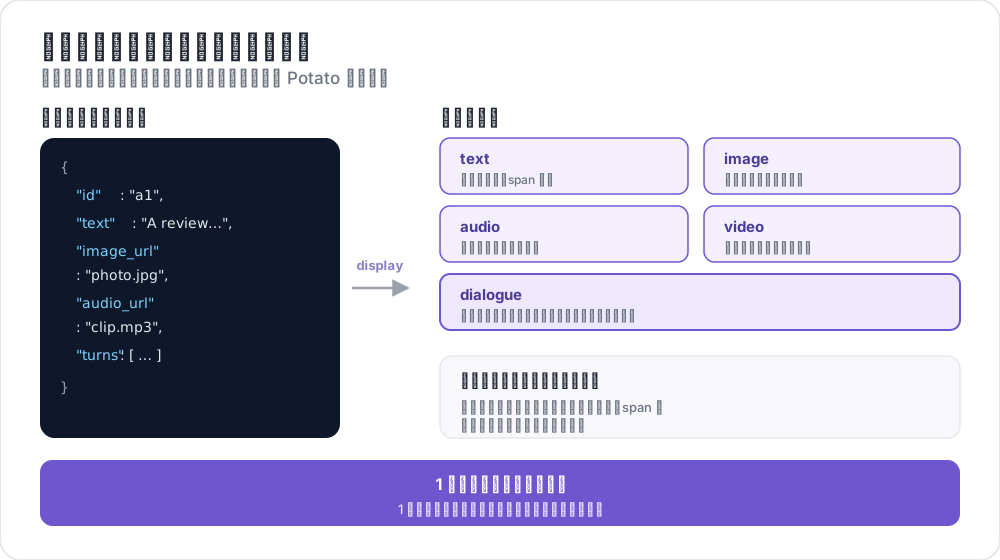 インスタンス表示のフィールド対応
インスタンス表示を使用する理由
以前は、画像をラジオボタンによる分類とともに表示したい場合、画像を表示するためだけにimage_annotationスキーマをmin_annotations: 0で追加する必要がありました。これは混乱を招き、意味的にも正しくありませんでした。
instance_displayを使用すると、表示するコンテンツを明示的に設定できます:
# OLD (deprecated workaround)
annotation_schemes:
  - annotation_type: image_annotation
    name: image_display
    min_annotations: 0  # Just to show the image
    tools: [bbox]
    labels: [unused]
  - annotation_type: radio
    name: category
    labels: [A, B, C]

# NEW (recommended)
instance_display:
  fields:
    - key: image_url
      type: image

annotation_schemes:
  - annotation_type: radio
    name: category
    labels: [A, B, C]
基本設定
YAML設定にinstance_displayセクションを追加します:
instance_display:
  fields:
    - key: "image_url"           # Field name in your data JSON
      type: "image"              # Content type
      label: "Image to classify" # Optional header
      display_options:
        max_width: 600
        zoomable: true

  layout:
    direction: "vertical"        # vertical or horizontal
    gap: "20px"
サポートされる表示タイプ
| タイプ | 説明 | スパンターゲット |
|---|---|---|
text | プレーンテキストコンテンツ | はい |
html | サニタイズされたHTMLコンテンツ | いいえ |
image | ズーム付き画像表示 | いいえ |
video | ビデオプレーヤー | いいえ |
audio | オーディオプレーヤー | いいえ |
dialogue | 会話のターン | はい |
pairwise | 横並び比較 | いいえ |
code | シンタックスハイライト付きソースコード | はい |
spreadsheet | 表形式データ(Excel/CSV) | はい(行/セル) |
document | リッチドキュメント(Word、Markdown、HTML) | はい |
pdf | ページコントロール付きPDFドキュメント | はい |
表示タイプオプション
テキスト表示
- key: "text"
  type: "text"
  label: "Document"
  display_options:
    collapsible: false        # Make content collapsible
    max_height: 400           # Max height in pixels before scrolling
    preserve_whitespace: true # Preserve line breaks and spacing
画像表示
- key: "image_url"
  type: "image"
  label: "Image"
  display_options:
    max_width: 800            # Max width (number or CSS string)
    max_height: 600           # Max height
    zoomable: true            # Enable zoom controls
    alt_text: "Description"   # Alt text for accessibility
    object_fit: "contain"     # CSS object-fit property
ビデオ表示
- key: "video_url"
  type: "video"
  label: "Video"
  display_options:
    max_width: 800
    max_height: 450
    controls: true            # Show video controls
    autoplay: false           # Auto-play on load
    loop: false               # Loop playback
    muted: false              # Start muted
オーディオ表示
- key: "audio_url"
  type: "audio"
  label: "Audio"
  display_options:
    controls: true            # Show audio controls
    autoplay: false
    loop: false
    show_waveform: false      # Show waveform visualization
対話表示
- key: "conversation"
  type: "dialogue"
  label: "Conversation"
  display_options:
    alternating_shading: true    # Alternate background colors
    speaker_extraction: true     # Extract "Speaker:" from text
    show_turn_numbers: false     # Show turn numbers
対話のデータ形式(JSONLファイルの各行):
{"id": "conv_001", "conversation": ["Speaker A: Hello there!", "Speaker B: Hi, how are you?"]}または構造化データ:
{"id": "conv_001", "conversation": [{"speaker": "Alice", "text": "Hello there!"}, {"speaker": "Bob", "text": "Hi, how are you?"}]}ペアワイズ表示
- key: "comparison"
  type: "pairwise"
  label: "Compare Options"
  display_options:
    cell_width: "50%"           # Width of each cell
    show_labels: true           # Show A/B labels
    labels: ["Option A", "Option B"]
    vertical_on_mobile: true    # Stack vertically on mobile
レイアウトオプション
複数フィールドの配置を制御:
instance_display:
  layout:
    direction: horizontal  # horizontal or vertical
    gap: 24px              # Space between fields
スパンアノテーションサポート
テキストベースの表示タイプ(text、dialogue)はスパンアノテーションのターゲットにできます:
instance_display:
  fields:
    - key: "document"
      type: "text"
      span_target: true  # Enable span annotation on this field

annotation_schemes:
  - annotation_type: span
    name: entities
    labels: [PERSON, LOCATION, ORG]
複数のスパンターゲット
スパンアノテーションをサポートする複数のテキストフィールドを持つことができます:
instance_display:
  fields:
    - key: "source_text"
      type: "text"
      label: "Source Document"
      span_target: true

    - key: "summary"
      type: "text"
      label: "Summary"
      span_target: true

annotation_schemes:
  - annotation_type: span
    name: factual_errors
    labels: [contradiction, unsupported, fabrication]
複数のスパンターゲットを使用する場合、アノテーションはフィールドの関連付けとともに保存されます:
{
  "factual_errors": {
    "source_text": [],
    "summary": [
      {"start": 45, "end": 67, "label": "unsupported"}
    ]
  }
}
アノテーションスキーマと表示フィールドのリンク
メディアアノテーションスキーマ(image_annotation、video_annotation、audio_annotation)の場合、source_fieldを使用して表示フィールドにリンクします:
instance_display:
  fields:
    - key: "image_url"
      type: "image"

annotation_schemes:
  - annotation_type: image_annotation
    source_field: "image_url"  # Links to display field
    tools: [bbox]
    labels: [person, car]
ターンごとの対話評価
個々の対話ターンにインライン評価ウィジェットを追加:
instance_display:
  fields:
    - key: conversation
      type: dialogue
      label: "Conversation"
      display_options:
        show_turn_numbers: true
        per_turn_ratings:
          speakers: ["Agent"]          # Only show ratings for these speakers
          schema_name: "turn_quality"  # Name for the stored annotation data
          scheme:
            type: likert
            size: 5
            labels: ["Poor", "Excellent"]
評価の丸印は、該当する話者のターンの下にインラインで表示されます。評価は選択された値まで塗りつぶされ、すべてのターン評価は単一のJSONオブジェクトとして保存されます:
{
  "turn_quality": "{\"0\": 4, \"2\": 5, \"4\": 3}"
}
例:画像分類
annotation_task_name: "Image Classification"

data_files:
  - data/images.json

item_properties:
  id_key: id
  text_key: image_url

task_dir: .
output_annotation_dir: annotation_output

instance_display:
  fields:
    - key: image_url
      type: image
      label: "Image to Classify"
      display_options:
        max_width: 600
        zoomable: true

    - key: context
      type: text
      label: "Additional Context"
      display_options:
        collapsible: true

annotation_schemes:
  - annotation_type: radio
    name: category
    description: "What category best describes this image?"
    labels:
      - nature
      - urban
      - people
      - objects

user_config:
allow_all_users: trueサンプルデータファイル(data/images.json)のJSONL形式:
{"id": "img_001", "image_url": "https://example.com/image1.jpg", "context": "Taken in summer 2023"}
{"id": "img_002", "image_url": "https://example.com/image2.jpg", "context": "Winter landscape"}
例:マルチモーダルアノテーション
スパンアノテーション付きのビデオとトランスクリプト:
annotation_task_name: "Video Analysis"

instance_display:
  layout:
    direction: horizontal
    gap: 24px

  fields:
    - key: video_url
      type: video
      label: "Video"
      display_options:
        max_width: "45%"

    - key: transcript
      type: text
      label: "Transcript"
      span_target: true

annotation_schemes:
  - annotation_type: radio
    name: sentiment
    labels: [positive, neutral, negative]

  - annotation_type: span
    name: highlights
    labels:
      - key_point
      - question
      - supporting_evidence
後方互換性
instance_displayなしの既存の設定は変更なく動作し続けますitem_propertiesのtext_keyは引き続きフォールバックとして使用されます- アノテーションスキーム経由のレガシーメディア検出も引き続き動作します
- 表示のみの古いパターンを使用している場合、ログに非推奨の警告が表示されます
表示のみパターンからの移行
コンテンツを表示するためだけにアノテーションスキーマを使用していた場合:
以前(非推奨):
annotation_schemes:
  - annotation_type: image_annotation
    name: image_display
    min_annotations: 0
    tools: [bbox]
    labels: [unused]
以後(推奨):
instance_display:
  fields:
    - key: image_url
      type: image
関連資料
- データ形式 - サポートされる入力データ形式
- UI設定 - インターフェースのカスタマイズ
- レイアウトカスタマイズ - カスタムHTMLテンプレート
- 画像アノテーション - 画像アノテーションツール
実装の詳細については、ソースドキュメントを参照してください。