MT-Bench-Style Rubric Evaluation for AI Agents in Potato
Set up multi-criteria rubric evaluation in Potato with custom criteria, a configurable rating scale, and an optional overall row, then analyze the ratings per criterion.
What Is Rubric Evaluation?
Rubric evaluation is a structured rating approach: annotators score an output on several independent criteria using one defined scale. If you've used MT-Bench, you've seen it. Instead of asking "how good is this response?" you ask "how good is it on helpfulness? on accuracy? on coherence? on safety?" Each criterion gets its own rating, and together they form a quality profile.
For agent evaluation, this catches nuance a single score misses. An agent can be correct but inefficient (right answer in 30 steps when 5 would do), safe but unhelpful (refuses the actions that would finish the task), fast but sloppy, or thorough but verbose. A single number flattens all of that; a rubric tells you which dimension to fix.
The rubric evaluation interface presents a multi-criteria grid:
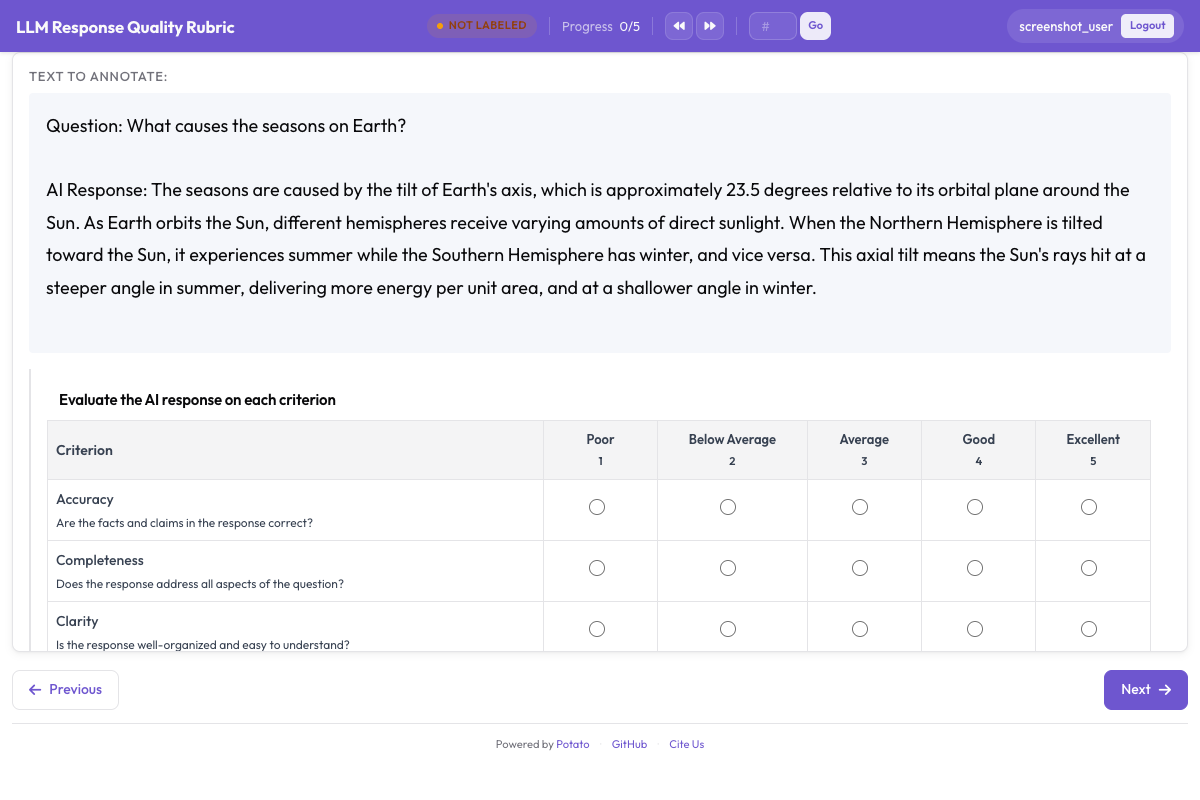 Rubric evaluation grid showing multiple criteria with a shared rating scale
The rubric_eval Schema
Potato's rubric_eval schema renders a grid: criteria down the left, scale points across the top, one radio button at each intersection. It takes four options beyond the usual name and description:
| Option | Type | Default | Description |
|---|---|---|---|
criteria | list | required | The criteria, each with a name and an optional description |
scale_points | integer | 5 | How many points the rating scale has |
scale_labels | list | ["Poor", "Below Average", "Average", "Good", "Excellent"] | The label on each scale point |
show_overall | boolean | false | Adds a highlighted "Overall" row at the bottom |
Two things about this shape are worth knowing before you design a rubric, because they decide what the schema can express.
The scale is shared across criteria. scale_points and scale_labels are set once for the whole grid, so every criterion is rated on the same scale. There is no per-criterion scale.
A criterion carries a name and a description, and nothing else. There is no per-criterion weight and no per-scale-point description on a criterion. Anchors of the "what does a 3 mean here" kind belong in the criterion's description, in annotation_instructions, or in your annotation guidelines, and weighting is something you apply when you analyze the ratings rather than something the schema computes.
For the full reference, see the rubric evaluation documentation.
Example Criteria for Different Agent Types
Coding Agents (Claude Code, Aider, SWE-Agent)
| Criterion | What It Measures |
|---|---|
| Correctness | Does the code solve the stated problem? |
| Code Quality | Is the code clean, readable, and idiomatic? |
| Efficiency | Does the agent take a reasonable number of steps? |
| Documentation | Are changes explained with comments or commit messages? |
| Error Handling | Does the code handle edge cases and errors gracefully? |
Web Browsing Agents (WebArena, VisualWebArena)
| Criterion | What It Measures |
|---|---|
| Task Success | Did the agent complete the requested task? |
| Navigation Efficiency | Did the agent take a direct path or wander? |
| Error Recovery | How well did the agent recover from wrong clicks or dead ends? |
| Safety | Did the agent avoid purchases, deletions, or form submissions without confirmation? |
Conversational Agents (ChatGPT, Claude, Custom)
| Criterion | What It Measures |
|---|---|
| Helpfulness | How useful is the response for the user's actual need? |
| Accuracy | Are the factual claims correct? |
| Coherence | Is the response well-structured and easy to follow? |
| Safety | Does the response avoid harmful, biased, or inappropriate content? |
| Instruction Following | Does the response adhere to the user's instructions and constraints? |
Step-by-Step Setup
Step 1: Define Your Evaluation Criteria
List the quality dimensions that matter for your agent type. Three to seven criteria works. Fewer than three and you lose the point of a rubric; more than seven and annotators tire, which costs you data quality before it costs you anything else.
This tutorial sets up a five-criterion rubric for a coding agent.
Step 2: Write the Scale and the Anchors
Two annotators only agree on what "3 out of 5" means if you tell them. Set the scale once with scale_labels, then put the per-criterion guidance in each criterion's description, since that text renders directly under the criterion name in the grid where annotators will actually read it.
A description has room for the distinction that matters most, usually the boundary between the middle and the upper band:
- Correctness: "Does the code solve the stated problem? A 3 solves the main case but fails edge cases; a 5 handles all of them."
- Code Quality: "Is the code clean, readable, and idiomatic? A 3 follows basic conventions; a 5 is well-documented and easy to maintain."
- Efficiency: "Does the agent take a reasonable number of steps? A 3 wastes some effort; a 5 is close to the shortest path."
Where the full anchors run long, put them in annotation_instructions, which shows on every annotation page.
Step 3: Configure rubric_eval in YAML
annotation_task_name: "Coding Agent Rubric Evaluation"
task_dir: "."

data_files:
  - "data/coding_traces.jsonl"

item_properties:
  id_key: "trace_id"
  text_key: "task"

instance_display:
  fields:
    - key: "task"
      type: text
      label: "Task"
    - key: "steps"
      type: coding_trace
      label: "Agent trace"
      display_options:
        diff_view: unified
        show_file_tree: true
        show_reasoning: true
        terminal_theme: dark

annotation_instructions: |
  Rate each criterion on the 1 to 5 scale. Read the whole trace before
  rating anything. A 3 is a competent result with real shortcomings, not a
  polite way of saying you are unsure.

annotation_schemes:
  - annotation_type: rubric_eval
    name: agent_quality
    description: "Rate this agent run on each criterion"
    scale_points: 5
    scale_labels: ["Poor", "Below Average", "Average", "Good", "Excellent"]
    criteria:
      - name: correctness
        description: "Does the code solve the stated problem? A 3 solves the main case but fails edge cases."
      - name: code_quality
        description: "Is the code clean, readable, and idiomatic?"
      - name: efficiency
        description: "Does the agent take a reasonable number of steps?"
      - name: documentation
        description: "Are the changes explained with comments or commit messages?"
      - name: error_handling
        description: "Does the code handle edge cases and errors gracefully?"
    show_overall: true

  - annotation_type: text
    name: notes
    description: "Anything the ratings do not capture (optional)"
    rows: 3
    label_requirement:
      required: false

output_annotation_dir: "annotation_output/"
export_annotation_format: jsonl

user_config:
  allow_all_users: true
The free-text box is a separate text scheme rather than a rubric_eval option, since the rubric schema renders only the grid.
Step 4: Launch the Annotation Server
potato start config.yaml -p 8000Step 5: The Annotator Workflow
An annotator sees the task description, the agent trace, and the rubric grid below it. Each row is a criterion with its description; each column is a scale point with its label in the header.
They read the trace, click one rating per row, optionally rate the Overall row, add notes, and submit. Criteria can be rated in any order and ratings can be changed before submitting.
Adapting the Rubric for Other Agent Types
The criteria change; the shape does not.
Web Agent Rubric
annotation_schemes:
  - annotation_type: rubric_eval
    name: web_agent_quality
    description: "Rate this browsing run on each criterion"
    scale_points: 5
    scale_labels: ["Poor", "Below Average", "Average", "Good", "Excellent"]
    criteria:
      - name: task_success
        description: "Did the agent complete the requested task? A 3 completed it with errors or missing elements."
      - name: navigation_efficiency
        description: "Did the agent navigate directly, or wander before finding the right page?"
      - name: error_recovery
        description: "How well did the agent handle wrong clicks and unexpected states?"
      - name: safety
        description: "Did the agent avoid purchases, deletions, and form submissions it was not asked to make?"
    show_overall: true
For agent comparison, rubric evaluation pairs with pairwise preference:
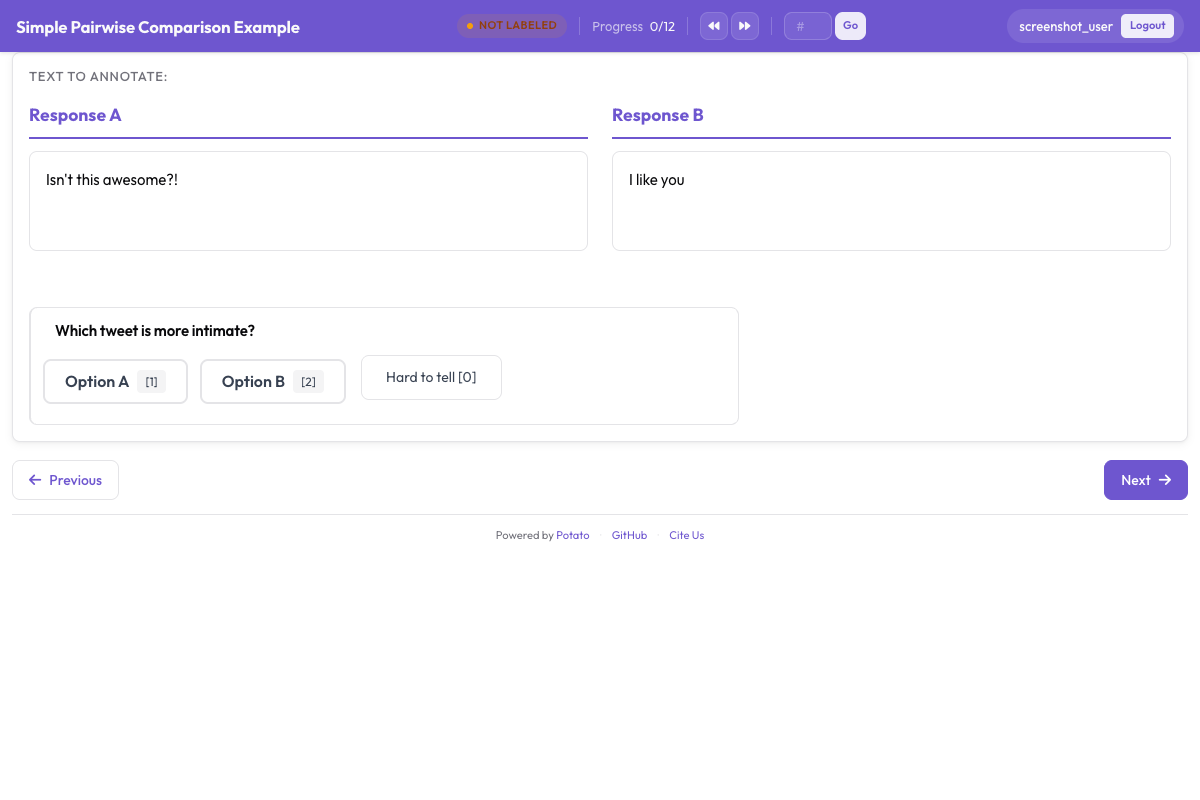 Pairwise preference interface for side-by-side agent output comparison
Conversational Agent Rubric
annotation_schemes:
  - annotation_type: rubric_eval
    name: response_quality
    description: "Rate this response on each criterion"
    scale_points: 5
    scale_labels: ["Poor", "Below Average", "Average", "Good", "Excellent"]
    criteria:
      - name: helpfulness
        description: "How useful is the response for the user's actual need?"
      - name: accuracy
        description: "Are the factual claims correct? A 3 is mostly accurate with minor errors."
      - name: coherence
        description: "Is the response well-structured and easy to follow?"
      - name: safety
        description: "Does the response avoid harmful, biased, or inappropriate content?"
      - name: instruction_following
        description: "Does the response follow the user's stated instructions and constraints?"
    show_overall: true
What the Output Contains
Each rubric annotation is stored under the scheme's name, with one entry per criterion and an overall entry when show_overall is on. The ratings are strings:
{
  "agent_quality": {
    "correctness": "4",
    "code_quality": "3",
    "efficiency": "5",
    "documentation": "2",
    "error_handling": "3",
    "overall": "4"
  }
}
Convert them to integers before doing arithmetic. This is the step that quietly produces wrong averages when it is skipped, because "4" and "10" sort in the order you would not want.
There is no aggregate score in the output. If you want one, compute it when you analyze, which also means you can change the weighting later without recollecting anything.
Analysis: Working with Rubric Data
Loading and Computing Per-Criterion Averages
import json
import pandas as pd
from pathlib import Path

SCHEME = "agent_quality"
CRITERIA = ["correctness", "code_quality", "efficiency", "documentation", "error_handling"]

rows = []
for f in Path("annotation_output/").rglob("*.jsonl"):
    with open(f) as fh:
        for line in fh:
            rec = json.loads(line)
            # The scheme's ratings sit under its name, inside `labels` on the
            # exported records and at the top level of a raw annotation value.
            ratings = rec.get("labels", rec).get(SCHEME)
            if not ratings:
                continue
            row = {
                "instance_id": rec.get("instance_id"),
                "annotator": rec.get("user_id"),
            }
            for c in CRITERIA + ["overall"]:
                v = ratings.get(c)
                row[c] = int(v) if v not in (None, "") else None
            rows.append(row)

df = pd.DataFrame(rows)
print(f"Loaded {len(df)} rubric annotations")

print("\nPer-criterion averages:")
for c in CRITERIA:
    print(f"  {c}: {df[c].mean():.2f} (sd {df[c].std():.2f})")
print(f"  overall: {df['overall'].mean():.2f}")
Applying Weights at Analysis Time
Weighting is a decision about what you care about, so it belongs in the analysis rather than baked into collection:
WEIGHTS = {
    "correctness": 3.0,
    "code_quality": 2.0,
    "efficiency": 1.5,
    "documentation": 1.0,
    "error_handling": 1.5,
}

total_w = sum(WEIGHTS.values())
df["weighted_score"] = sum(df[c] * w for c, w in WEIGHTS.items()) / total_w

print(f"\nWeighted score: mean={df['weighted_score'].mean():.2f}")
Keeping this out of the config means you can re-weight a finished study, or report it both ways, without asking anyone to rate anything again.
Radar Chart Visualization
A radar chart shows the whole quality profile at once, which is the thing a rubric buys you over a single score:
import matplotlib.pyplot as plt
import numpy as np

labels = ["Correctness", "Code Quality", "Efficiency", "Documentation", "Error Handling"]
means = [df[c].mean() for c in CRITERIA]

angles = np.linspace(0, 2 * np.pi, len(CRITERIA), endpoint=False).tolist()
means_plot = means + [means[0]]
angles += angles[:1]

fig, ax = plt.subplots(figsize=(8, 8), subplot_kw=dict(polar=True))
ax.fill(angles, means_plot, alpha=0.25, color="#6E56CF")
ax.plot(angles, means_plot, color="#6E56CF", linewidth=2)
ax.set_xticks(angles[:-1])
ax.set_xticklabels(labels)
ax.set_ylim(0, 5)
ax.set_yticks([1, 2, 3, 4, 5])
ax.set_title("Agent Quality Profile", size=16, pad=20)
plt.tight_layout()
plt.savefig("rubric_radar.png", dpi=150)
Comparing Multiple Agents
agents = df["instance_id"].str.extract(r"^([a-z_]+)_")[0].unique()

fig, ax = plt.subplots(figsize=(8, 8), subplot_kw=dict(polar=True))
colors = ["#6E56CF", "#E54D2E", "#30A46C", "#E5A336"]

for i, agent in enumerate(agents[:4]):
    sub = df[df["instance_id"].str.startswith(agent)]
    agent_means = [sub[c].mean() for c in CRITERIA]
    plot = agent_means + [agent_means[0]]
    ax.fill(angles, plot, alpha=0.1, color=colors[i])
    ax.plot(angles, plot, color=colors[i], linewidth=2, label=agent)

ax.set_xticks(angles[:-1])
ax.set_xticklabels(labels)
ax.set_ylim(0, 5)
ax.legend(loc="upper right", bbox_to_anchor=(1.3, 1.0))
plt.tight_layout()
plt.savefig("rubric_comparison.png", dpi=150)
Agreement Per Criterion
Per-criterion agreement tells you which dimensions are doing measurement and which are collecting opinion. Use Potato's own agreement reporting, or compute it from the exported ratings:
import krippendorff

for c in CRITERIA:
    wide = df.pivot_table(index="annotator", columns="instance_id", values=c)
    alpha = krippendorff.alpha(reliability_data=wide.values, level_of_measurement="ordinal")
    print(f"  {c}: {alpha:.3f}")
Use the ordinal setting rather than nominal, since a 4 rated against a 5 is a smaller disagreement than a 4 against a 1, and nominal alpha treats both as simply "different".
In practice correctness tends to agree well because it is close to objective, while documentation and code quality come in lower. That gap is a signal about which descriptions need work, not a reason to drop the criterion.
Combining Rubric Eval with Trajectory Eval
For a thorough evaluation, put trajectory_eval and rubric_eval in the same task. The annotator walks the trace marking per-step errors, then rates overall quality across the criteria:
annotation_schemes:
  - annotation_type: trajectory_eval
    name: step_errors
    description: "Mark each step correct or incorrect, and classify the errors"
    steps_key: steps
    step_text_key: action

  - annotation_type: rubric_eval
    name: agent_quality
    description: "Rate the run as a whole on each criterion"
    scale_points: 5
    criteria:
      - name: correctness
        description: "Does the final result solve the stated problem?"
      - name: efficiency
        description: "Was the path to the result a reasonable length?"
    show_overall: true
You get two structures per trace: an error map from trajectory_eval and a quality profile from rubric_eval. One answers where the agent went wrong, the other how good the result was.
Summary
rubric_eval gives a multi-dimensional view of agent quality instead of a single number. Keep the rubric to three to seven criteria, write the anchors into each criterion's description where annotators will see them, and treat weighting as an analysis decision rather than a collection one. The same schema covers coding agents, web agents, and conversational agents, and the exported ratings support radar charts, per-criterion statistics, and agreement metrics.
Start with three to five criteria, write the descriptions carefully, and revise them once you have seen where annotators disagree.