Evaluating AI Agents: Human Annotation of Agent Traces
How to set up human evaluation of AI agent output in Potato, from trace import through trace-level and per-step schema design to analyzing the exported results.
Convert agent traces with python -m potato.trace_converter, render them through an agent_trace display field, and collect a trace-level verdict alongside a per-step trajectory_eval judgment. The per-step judgment is the part that locates the step where the run went wrong.
A success rate tells you how often an agent finishes the task and nothing about why the failures failed. Two agents with the same 62% success rate can be failing for completely different reasons, one picking the wrong tool and the other reasoning correctly over a bad retrieval, and the fix is different in each case. Human evaluation at the step level separates them, because the annotator marks which step broke and what kind of break it was.
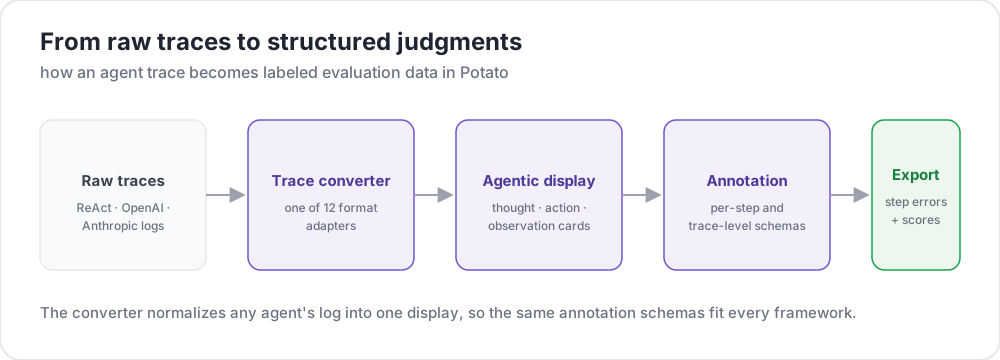 From raw traces to structured judgments
This guide builds the pipeline for a ReAct-style agent that answers questions by searching the web. The configs are checked against Potato 2.9.1:
pip install --upgrade potato-annotationStep 1: convert the traces
Potato registers 15 trace converters, and the CLI lists them with their descriptions:
python -m potato.trace_converter --list-formatsThe list covers react, openai, anthropic, langchain, langfuse, multi_agent, mcp, otel, atif, webarena, web_agent, swebench, swe_agent_trajectory, claude_code, and aider. LangSmith run exports go through langchain, and CrewAI, AutoGen and LangGraph logs go through multi_agent.
The react converter reads a trace whose steps carry thought, action, and observation keys:
{
  "id": "trace_001",
  "task": "What is the capital of Australia and what is its population?",
  "steps": [
    {"thought": "I need the capital of Australia and then its population.",
     "action": "search('capital of Australia')",
     "observation": "Canberra is the capital city of Australia."},
    {"thought": "Now I need Canberra's population.",
     "action": "search('Canberra population 2025')",
     "observation": "Canberra has a population of approximately 467,000 as of 2025."},
    {"thought": "I have both pieces of information.",
     "action": "finish('Canberra, approximately 467,000')"}
  ],
  "metadata": {"agent": "GPT-4", "tokens": 2340}
}
One command converts the file:
python -m potato.trace_converter \
  --input raw_traces.json \
  --input-format react \
  --output data/traces.jsonl
Pass --auto-detect instead of --input-format when you are not sure which converter fits, and the registry picks one from the field signatures. Name the format explicitly once you know it, because detection takes the first converter that matches and several formats overlap in the fields they carry.
Every converter writes the same canonical shape, which is what makes one config work across frameworks. Each line carries id, task_description, and conversation, a list of turns with a speaker and a text. A converter that has them also writes agent_name, metadata_table, and screenshots:
{
  "id": "trace_001",
  "task_description": "What is the capital of Australia and what is its population?",
  "agent_name": "GPT-4",
  "metadata_table": [{"Property": "Steps", "Value": "3"},
                     {"Property": "tokens", "Value": "2340"}],
  "conversation": [
    {"speaker": "Agent (Thought)", "text": "I need the capital of Australia and then its population."},
    {"speaker": "Agent (Action)", "text": "search('capital of Australia')"},
    {"speaker": "Environment", "text": "Canberra is the capital city of Australia."}
  ]
}
Step 2: render the trace
The agent_trace display renders each turn as a card, color-coded by step type, so the annotator reads the run rather than a JSON blob:
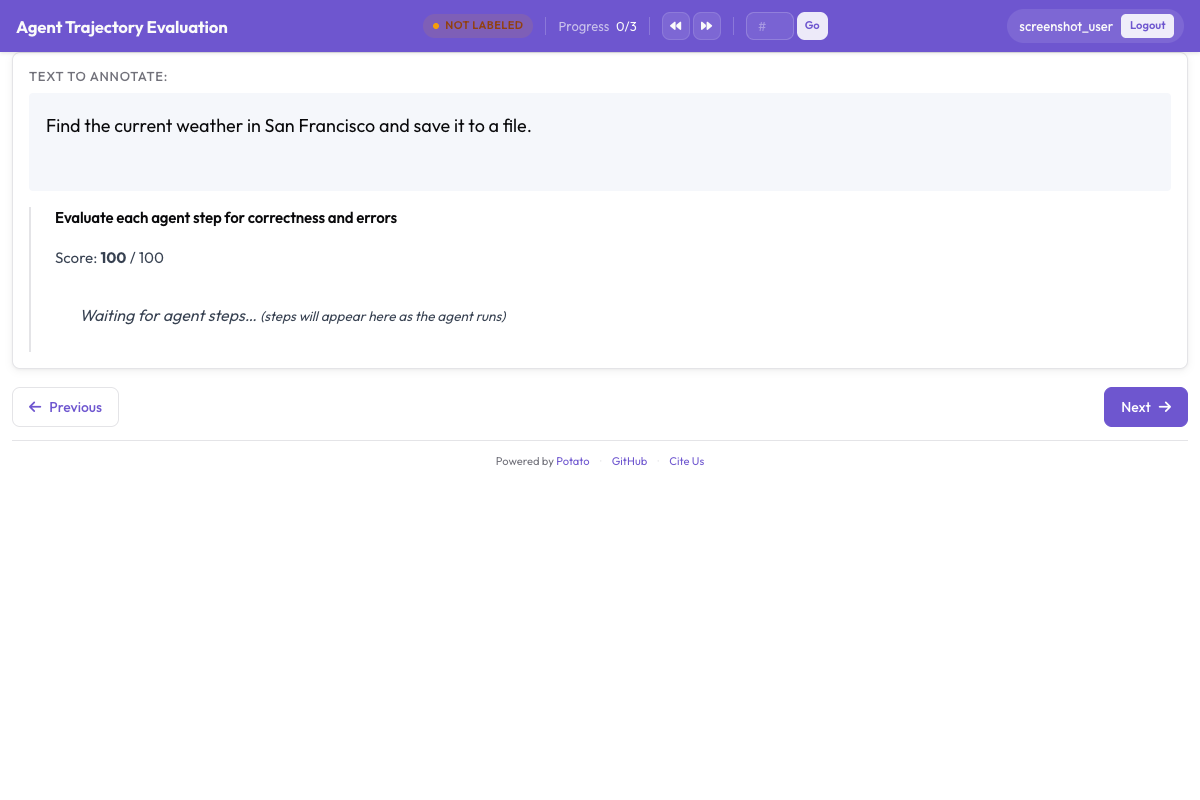
instance_display decides what goes on the page and in what order. The task description sits at the top because the annotator has to know what the agent was asked before any step means anything, and the metadata table sits under it in a compact spreadsheet field:
instance_display:
  layout:
    direction: vertical
    gap: 16px

  fields:
    - key: task_description
      type: text
      label: "Task"

    - key: metadata_table
      type: spreadsheet
      label: "Trace Info"
      display_options:
        compact: true
        max_height: 120

    - key: conversation
      type: agent_trace
      label: "Agent Trace"
      span_target: true
      display_options:
        show_step_numbers: true
        show_summary: true
        collapse_observations: true
        step_type_colors:
          thought: "#e8f4fd"
          action: "#fff3e0"
          observation: "#e8f5e9"
Collapsing observations keeps long search results from pushing the rest of the trace off the screen, since a trace carrying a dozen full search results is mostly scrolling and the annotator loses track of where they are in the run. Setting span_target: true on the same field lets a span schema mark the exact words of a hallucinated claim inside a turn, which is a finer record than marking the whole step wrong.
Step 3: the trace-level judgment
Three questions cover the trace as a whole. Task success is the headline number, answer correctness separates a right answer reached badly from a wrong answer, and efficiency is what distinguishes two agents that both succeed:
annotation_schemes:
  - annotation_type: radio
    name: task_success
    description: "Did the agent complete the task?"
    labels:
      - name: "Success"
        tooltip: "Fully completed correctly"
      - name: "Partial success"
        tooltip: "Completed with errors or omissions"
      - name: "Failure"
        tooltip: "Not completed"
    label_requirement:
      required: true
    sequential_key_binding: true

  - annotation_type: radio
    name: answer_correctness
    description: "Is the agent's final answer factually correct?"
    labels:
      - name: "Correct"
      - name: "Partially correct"
      - name: "Incorrect"
      - name: "Cannot determine"
    label_requirement:
      required: true

  - annotation_type: likert
    name: efficiency
    description: "Did the agent reach the answer without wasted steps?"
    size: 5
    min_label: "Many unnecessary steps"
    max_label: "No wasted steps"

  - annotation_type: text
    name: evaluator_notes
    description: "Anything the ratings above do not capture"
    multiline: true
    rows: 3
"Cannot determine" earns its place. Without it, an annotator who has no way to check the answer either guesses or marks it incorrect, and both choices put noise into the number you care most about.
Step 4: the per-step judgment
trajectory_eval renders each step as a card with its own controls, and it carries the correctness label, the error taxonomy, and the severity in one schema rather than three. Point steps_key at the field holding the steps, which for a converted trace is conversation, and step_text_key at the key inside each step that should be displayed:
annotation_schemes:
  - annotation_type: trajectory_eval
    name: step_evaluation
    description: "Mark each step and classify anything that went wrong"
    steps_key: conversation
    step_text_key: text
    correctness_options:
      - correct
      - partially_correct
      - incorrect
      - unnecessary
    error_types:
      - name: reasoning
        subtypes:
          - logical_error
          - factual_error
          - planning_error
      - name: execution
        subtypes:
          - wrong_tool
          - wrong_args
          - api_error
      - name: termination
        subtypes:
          - premature_stop
          - redundant_step
    severities:
      - name: minor
        weight: -1
      - name: major
        weight: -5
      - name: critical
        weight: -10
    show_score: true
    max_score: 100
The severity weights turn a list of marked steps into one comparable number per trace, and the defaults are worth changing rather than accepting. A weight says how much worse a critical error is than a minor one for your task, and on a safety evaluation that ratio is much steeper than it is on a search task.
Keeping unnecessary separate from incorrect is the other decision worth making deliberately. A wasted step costs tokens and time without introducing an error, and folding the two together hides the difference between an agent that wanders and one that is wrong.
Step 5: the complete configuration
Everything above, in one file:
annotation_task_name: "ReAct Agent Evaluation"
task_dir: "."
output_annotation_dir: "output/"

data_files:
  - "data/traces.jsonl"

item_properties:
  id_key: id
  text_key: task_description

instance_display:
  layout:
    direction: vertical
    gap: 16px
  fields:
    - key: task_description
      type: text
      label: "Task"
    - key: metadata_table
      type: spreadsheet
      label: "Trace Info"
      display_options:
        compact: true
        max_height: 120
    - key: conversation
      type: agent_trace
      label: "Agent Trace"
      span_target: true
      display_options:
        show_step_numbers: true
        show_summary: true
        collapse_observations: true

annotation_schemes:
  - annotation_type: radio
    name: task_success
    description: "Did the agent complete the task?"
    labels:
      - name: "Success"
      - name: "Partial success"
      - name: "Failure"
    label_requirement:
      required: true
    sequential_key_binding: true

  - annotation_type: radio
    name: answer_correctness
    description: "Is the agent's final answer factually correct?"
    labels:
      - name: "Correct"
      - name: "Partially correct"
      - name: "Incorrect"
      - name: "Cannot determine"
    label_requirement:
      required: true

  - annotation_type: likert
    name: efficiency
    description: "Did the agent reach the answer without wasted steps?"
    size: 5
    min_label: "Many unnecessary steps"
    max_label: "No wasted steps"

  - annotation_type: text
    name: evaluator_notes
    description: "Anything the ratings above do not capture"
    multiline: true
    rows: 3

  - annotation_type: trajectory_eval
    name: step_evaluation
    description: "Mark each step and classify anything that went wrong"
    steps_key: conversation
    step_text_key: text
    correctness_options: [correct, partially_correct, incorrect, unnecessary]
    error_types:
      - name: reasoning
        subtypes: [logical_error, factual_error, planning_error]
      - name: execution
        subtypes: [wrong_tool, wrong_args, api_error]
      - name: termination
        subtypes: [premature_stop, redundant_step]
    severities:
      - name: minor
        weight: -1
      - name: major
        weight: -5
      - name: critical
        weight: -10
    show_score: true
    max_score: 100

export_annotation_format: jsonl
Start the server and open http://localhost:8000:
potato start config.yaml -p 8000What the annotation session looks like
The page shows the task, the trace info table, and the step cards, with the per-step controls attached to each card and the trace-level schemas below the trace. The order annotators work in matters more than it looks. Rating the steps first and the trace second keeps the overall verdict anchored in what the run actually did, while rating success first tends to color every step judgment that follows it.
Three habits are worth writing into the annotator instructions. Expand the collapsed observations rather than trusting the summary line, since a misread search result is the most common source of a wrong answer that looks well reasoned. Check the final answer against the ground truth before rating task success, when the dataset has one. Use the step timeline to jump back to a step once a later step reveals that the earlier one was already wrong.
Step 6: export and analyze
The JSONL exporter writes annotations.jsonl, with one record per instance and annotator:
python -m potato.export --config config.yaml --format jsonl --output ./export/Each record carries instance_id, user_id, labels, spans, and links, and the schema answers live under labels keyed by schema name:
import json
import pandas as pd

records = [json.loads(line) for line in open("export/annotations.jsonl")]

df = pd.DataFrame([
    {"trace": r["instance_id"], "annotator": r["user_id"], **r["labels"]}
    for r in records
])

print(df["task_success"].value_counts())
For anything larger than a few hundred traces, export to Parquet instead and query it in place. The Parquet export writes annotations.parquet with instance_id, user_id, and one column per annotation schema, so the schema name is a column rather than a value:
python -m potato.export --config config.yaml --format parquet --output ./export/import duckdb
print(duckdb.sql("""
SELECT task_success, COUNT(*) AS n
FROM 'export/annotations.parquet'
GROUP BY task_success
ORDER BY n DESC
"""))The step-level judgments are the ones worth reading first. Counting error subtypes across traces tells you whether the agent has one systematic failure or a long tail of unrelated ones, and only the first of those is worth a targeted fix.
Step 7: more annotators, and a qualification phase
Agent evaluation is subjective enough that one rating per trace is a measurement with no error bar. Three annotators per trace gives you an agreement figure, and random assignment keeps the overlap from concentrating on the traces that happen to sit at the front of the file:
num_annotators_per_item: 3
assignment_strategy: random
A qualification phase catches the annotators who have not understood the error taxonomy, before they spend a day applying it inconsistently. The training block holds them on known-answer traces until they pass:
training:
  enabled: true
  data_file: "data/training_traces.jsonl"
  passing_criteria:
    min_correct: 4
  allow_retry: true
  failure_action: "repeat_training"
Other agent frameworks
The display and the schemas stay the same across frameworks, and only the converter changes. OpenAI Chat Completions traces and Anthropic messages with tool_use blocks each have their own converter, and multi-agent logs from CrewAI, AutoGen and LangGraph share one:
python -m potato.trace_converter --input runs.json --input-format openai --output data/traces.jsonl
python -m potato.trace_converter --input runs.json --input-format anthropic --output data/traces.jsonl
python -m potato.trace_converter --input runs.json --input-format multi_agent --output data/traces.jsonl
Coding agents need a different display, because a diff read as a JSON string is unreviewable. The coding_trace display renders unified diffs with a file tree and collapses long terminal output:
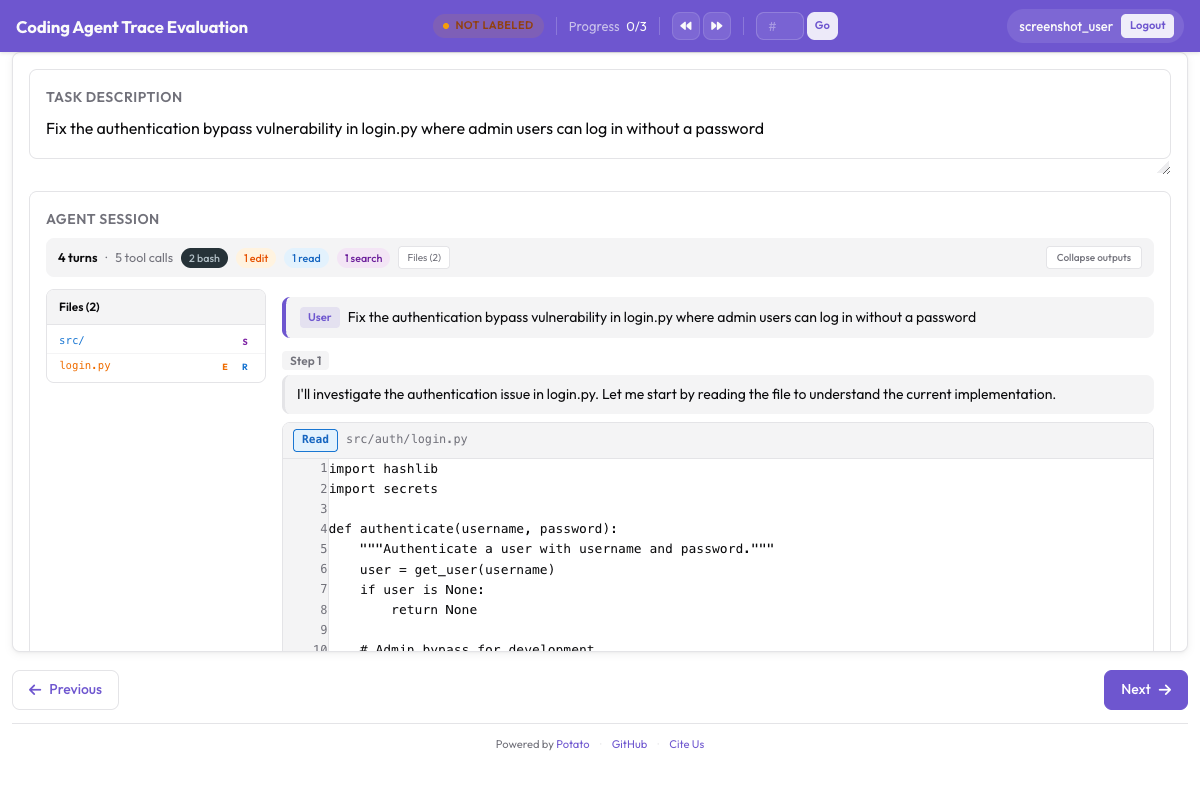
instance_display:
  fields:
    - key: structured_turns
      type: coding_trace
      label: "Agent Session"
      display_options:
        show_file_tree: true
        diff_view: unified
        collapse_long_outputs: true
        max_output_lines: 50
Web browsing agents need the screenshots, the action overlays, and a filmstrip to move through them:
instance_display:
  fields:
    - key: steps
      type: web_agent_trace
      label: "Agent Browsing Trace"
      display_options:
        show_overlays: true
        show_filmstrip: true
        show_thought: true
        screenshot_max_width: 900
Annotating Web Browsing Agents covers the overlay format and the creation mode that records new traces.
For the implementation details behind all of this, see the agent evaluation guide and the agent traces documentation. If you are setting up your first evaluation, convert ten traces, run the config above, and annotate them yourself before writing the guidelines, since the error taxonomy you need is usually not the one you would have written in advance.
Further reading
- Agentic Annotation Documentation
- Annotating Web Browsing Agents
- Solo Mode, for combining agentic annotation with human and LLM collaborative evaluation
- Best-Worst Scaling, for ranking agent outputs comparatively
- Parquet Export, for analysis at scale