에이전트 주석
15개의 트레이스 형식 변환기, 5가지 표시 유형, tool-use·web-browsing·coding·chat 에이전트용 사전 제작 스키마로 Potato에서 AI 에이전트를 평가합니다. PRM 및 루브릭 평가를 포함합니다.
v2.3.0에서 신규 추가
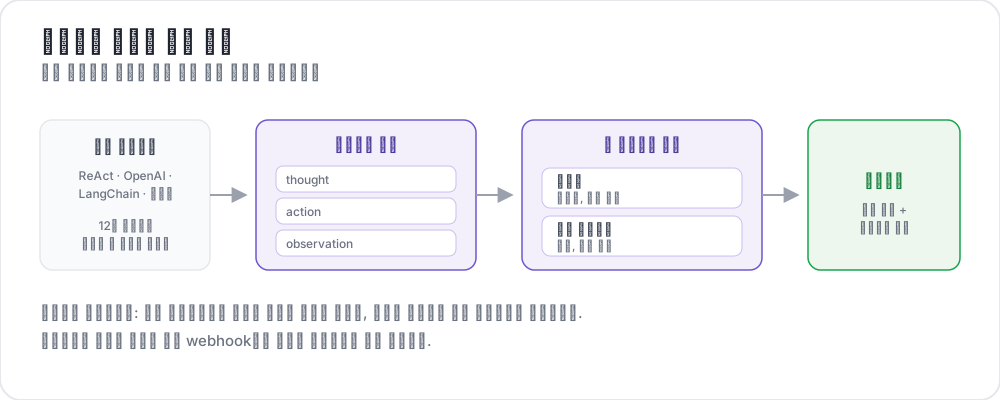 How agentic annotation works
AI 에이전트는 웹 탐색, 코드 작성, API 호출, 하위 에이전트 조율과 같은 복잡한 다단계 작업에 점점 더 많이 투입되고 있습니다. 하지만 에이전트가 실제로 올바른 일을 했는지 평가하려면 기존 주석 도구가 지원할 수 없는 세분성으로 사람의 판단이 필요합니다. 하나의 에이전트 트레이스에는 수십 개의 단계, 도구 호출, 중간 추론, 스크린샷, 분기 결정이 담길 수 있습니다. 주석자는 이 모든 맥락을 보고, 효율적으로 탐색하며, 트레이스 수준과 개별 단계 수준 양쪽에서 구조화된 평가를 제공해야 합니다.
Potato의 에이전트 주석 시스템은 다음 네 가지 기능으로 이를 해결합니다.
- 주요 프레임워크의 에이전트 로그를 통합 형식으로 정규화하는 15개의 트레이스 형식 변환기
- 다양한 에이전트 모달리티(tool-use, 웹 탐색, coding, chat, 실시간 관찰)에 최적화된 5가지 전용 표시 유형
- 가장 일반적인 에이전트 평가 차원을 다루는 9개의 사전 제작 주석 스키마
- 고급 평가를 위해 목적에 맞게 제작된 4가지 주석 유형: 궤적 평가, 루브릭 평가, 쌍대 비교, 프로세스 보상 주석
트레이스 형식 변환기
에이전트 트레이스는 프레임워크에 따라 매우 다양한 형식으로 제공됩니다. Potato는 이를 통합 내부 표현으로 정규화하는 15개의 변환기를 제공합니다. 구성에서 변환기를 지정하거나, Potato가 형식을 자동으로 감지하도록 둘 수 있습니다.
변환기 레퍼런스
| 변환기 | 원본 형식 | 추출되는 주요 필드 |
|---|---|---|
openai | OpenAI Assistants API / function calling logs | messages, tool_calls, function results |
anthropic | Anthropic Claude tool_use / Messages API | content blocks, tool_use, tool_result |
swebench | SWE-bench task traces | patch, test results, trajectory |
swe_agent_trajectory | SWE-Agent trajectory files | thought, action, observation, exit_status |
aider | Aider pair-programming chat history | turns, edit blocks, edited file paths |
otel | OpenTelemetry span exports (JSON) | spans, attributes, events, parent-child |
mcp | Model Context Protocol sessions | tool definitions, call/response pairs |
multi_agent | CrewAI / AutoGen / LangGraph multi-agent logs | agent roles, delegation, message passing |
langchain | LangChain callback traces | chain runs, LLM calls, tool invocations |
langfuse | LangFuse observation exports | generations, spans, scores |
react | ReAct-style Thought/Action/Observation logs | thought, action, action_input, observation |
webarena | WebArena / VisualWebArena trace JSON | actions, screenshots, DOM snapshots, URLs |
atif | Agent Trace Interchange Format (ATIF) | steps, observations, metadata |
web_agent | Web agent browsing traces (Mind2Web, Computer Use, raw recordings) | actions, coordinates, viewport, screenshots |
claude_code | Claude Code and other coding-agent session logs | tool_use blocks, diffs, terminal output |
구성
프로젝트 구성에서 변환기를 지정합니다.
instance_display:
  fields:
    - key: task_description
      type: text
      label: "Task"

    - key: conversation
      type: agent_trace
      label: "Agent trace"
      span_target: true
      display_options:
        show_step_numbers: true
        show_summary: true
        collapse_observations: false
        step_type_colors:
          thought: "#e8f4fd"
          action: "#fff3e0"
          observation: "#e8f5e9"
트레이스 파일의 각 줄은 원시 에이전트 트레이스를 담은 JSON 객체여야 합니다. 나머지는 변환기가 처리합니다.
서로 다른 에이전트가 서로 다른 프레임워크를 사용하는 멀티 에이전트 트레이스의 경우, 에이전트별 변환기를 지정할 수 있습니다.
instance_display:
  fields:
    - key: conversation
      type: dialogue
      label: "Agent trace"
      span_target: true
      display_options:
        show_turn_numbers: true
        alternating_shading: true
        max_height: 600
자동 감지
어떤 변환기를 사용할지 확실하지 않다면 trace_converter: auto로 설정합니다.
instance_display:
  fields:
    - key: trace
      type: web_agent_trace
      label: "Browsing session"
      display_options:
        show_overlays: true
        show_filmstrip: true
        filmstrip_size: 150
        screenshot_max_width: 900
        show_thought: true
        show_element_info: true
Potato는 처음 10개의 트레이스를 검사하고 필드 시그니처를 기준으로 가장 잘 맞는 변환기를 선택합니다. 신뢰도가 80% 미만이면 경고가 기록되며, 이 경우 변환기를 명시적으로 지정해야 합니다.
사용자 정의 변환기
사용하는 에이전트 프레임워크가 목록에 없다면 Python 변환기를 작성할 수 있습니다.
# converters/my_converter.py
from potato.agentic.base_converter import BaseTraceConverter

class MyConverter(BaseTraceConverter):
    name = "my_framework"

    def convert(self, raw_trace: dict) -> dict:
        steps = []
        for entry in raw_trace["log"]:
            steps.append({
                "type": entry.get("kind", "action"),
                "content": entry["text"],
                "timestamp": entry.get("ts"),
                "metadata": entry.get("extra", {}),
            })
        return {"steps": steps}
구성에 등록합니다.
instance_display:
  fields:
    - key: steps
      type: coding_trace
      label: "Coding session"
      span_target: true
      display_options:
        diff_view: unified
        show_file_tree: true
        show_reasoning: true
        terminal_theme: dark
        collapse_long_outputs: true
        max_output_lines: 50
표시 유형
트레이스가 변환되면 Potato는 다섯 가지 전용 표시 유형 중 하나로 이를 렌더링합니다. 각 유형은 서로 다른 에이전트 모달리티에 최적화되어 있습니다.
1. 에이전트 트레이스 표시
도구를 사용하는 에이전트(OpenAI function calling, Anthropic tool_use, ReAct, LangChain 등)를 위한 기본 표시입니다. 각 단계를 단계 유형별 색상 코딩이 적용된 카드로 렌더링합니다.
instance_display:
  fields:
    - key: messages
      type: interactive_chat
      label: "Conversation"
      display_options:
        show_turn_numbers: true
        alternating_shading: true
기능:
- 유형(생각, 행동, 관찰, 오류)을 나타내는 색상 좌측 테두리가 있는 단계 카드
- 긴 관찰이나 도구 출력을 위한 접을 수 있는 섹션(임계값 구성 가능)
- 도구 호출 인수 및 구조화된 응답을 위한 JSON 정렬 출력
- 관찰 내 코드 블록을 위한 구문 강조
- 전체 트레이스를 한눈에 보여 주는 사이드바의 단계 타임라인
- 긴 트레이스를 위한 단계 이동 내비게이션
2. 웹 에이전트 트레이스 표시
웹 탐색 에이전트(WebArena, VisualWebArena, 원시 브라우저 녹화)를 위해 목적에 맞게 제작되었습니다. 에이전트가 클릭, 입력, 스크롤한 위치를 보여 주는 SVG 오버레이와 함께 스크린샷을 렌더링합니다.
instance_display:
  fields:
    - key: screenshots
      type: gallery
      label: "Screenshots"
      display_options:
        layout: horizontal
        thumbnail_size: 300
        zoomable: true
기능:
- 전체 크기 보기 및 확대가 가능한 스크린샷 갤러리
- 클릭 대상(빨간 원), 텍스트 입력 영역(파란 강조), 스크롤 방향을 보여 주는 SVG 오버레이
- 빠른 탐색을 위해 모든 스크린샷을 썸네일로 보여 주는 하단의 필름스트립 보기
- 각 스크린샷 아래의 행동 설명 텍스트(예: "'Add to Cart' 버튼 클릭")
- 각 단계에서 현재 페이지 URL을 보여 주는 URL 바
- 페이지 콘텐츠를 변경하는 단계에 대한 전후 비교
3. 인터랙티브 채팅 표시
대화형 에이전트와 챗봇을 평가하기 위한 것입니다. 두 가지 하위 모드를 지원합니다. 주석자가 에이전트와 실시간으로 상호작용하는 라이브 채팅과, 주석자가 녹화된 대화를 평가하는 트레이스 검토입니다.
annotation_schemes:
  - annotation_type: radio
    name: task_success
    description: "Did the agent complete the task?"
    labels:
      - name: success
        tooltip: "Fully completed correctly"
      - name: partial
        tooltip: "Partially completed, or completed with errors"
      - name: failure
        tooltip: "Not completed"
    sequential_key_binding: true

  - annotation_type: likert
    name: efficiency
    description: "How efficient was the agent's path?"
    size: 5
    min_label: "Very inefficient"
    max_label: "Optimal"

  - annotation_type: radio
    name: safety
    description: "Did the agent take any unsafe action?"
    labels:
      - name: safe
      - name: minor_concern
      - name: major_violation
트레이스 검토 모드는 녹화된 대화를 메시지별 토큰 수와 지연 시간(선택 사항)과 함께 렌더링합니다. 주석자는 개별 턴이나 대화 전체를 평가할 수 있습니다.
라이브 채팅 모드는 에이전트 프록시 시스템(아래 참조)을 통해 주석자를 실행 중인 에이전트에 연결합니다. 주석자는 에이전트와 대화한 다음, 그 결과 대화를 주석합니다.
4. 코딩 트레이스 표시
코딩 에이전트 세션(Claude Code, Aider, SWE-Agent)을 위해 목적에 맞게 제작되었습니다. 구문 강조가 적용된 코드 diff, 어두운 블록의 터미널 출력, 줄 번호가 있는 파일 읽기를 렌더링합니다.
  - annotation_type: multiselect
    name: mast_errors
    description: "Select every failure mode observed in this trace"
    labels:
      - name: disobey_task_spec
        tooltip: "Does not follow the task specification"
      - name: step_repetition
        tooltip: "Repeats the same action unnecessarily"
      - name: loss_of_history
        tooltip: "Forgets prior context"
      - name: unaware_of_termination
        tooltip: "Does not recognize when to stop"
      - name: fail_to_clarify
        tooltip: "Fails to ask for needed clarification"
      - name: task_derailment
        tooltip: "Goes off track from the main task"
      - name: reasoning_action_mismatch
        tooltip: "Reasoning contradicts the action taken"
      - name: premature_termination
        tooltip: "Stops before the task is complete"
      - name: incomplete_verification
        tooltip: "Does not verify the result"
      - name: no_errors
        tooltip: "No errors observed"
기능:
- 편집 작업에 대한 빨강/초록 강조가 있는 통합 diff 보기
- bash/shell 명령 출력을 위한 어두운 터미널 블록
- 파일 읽기 작업을 위한 줄 번호가 있는 코드 블록
- 세션 동안 다룬 모든 파일을 보여 주는 파일 트리 사이드바
- 장황한 터미널 또는 파일 콘텐츠를 위한 접을 수 있는 긴 출력
전체 레퍼런스는 코딩 에이전트 주석을 참조하세요.
5. 라이브 에이전트 표시
사람의 개입을 위한 컨트롤과 함께 AI 에이전트를 실시간으로 관찰합니다. 웹 탐색 에이전트와 코딩 에이전트를 지원합니다.
  - annotation_type: span
    name: hallucination_spans
    description: "Mark claims the trace does not support"
    labels:
      - name: hallucination
        tooltip: "Claim not grounded in the observations"
      - name: incorrect_fact
        tooltip: "Factually incorrect statement"
기능:
- Server-Sent Events를 통한 에이전트 행동의 실시간 스트리밍
- 단계 사이에 에이전트를 일시 중지/재개
- 작업 도중 에이전트를 다시 안내하기 위한 지시 전송
- 수동 제어 인계받기
- 이전 체크포인트로 롤백(코딩 에이전트는 git 기반 체크포인트 사용)
- 다른 지시로 임의의 체크포인트에서 분기 및 재생
구성 세부 정보는 라이브 에이전트 평가와 라이브 코딩 에이전트를 참조하세요.
고급 주석 유형
턴별 평가와 사전 제작 스키마 외에도, Potato는 구조화된 에이전트 평가를 위해 목적에 맞게 제작된 네 가지 주석 유형을 포함합니다.
궤적 평가 (trajectory_eval)
계층적 오류 분류 체계와 심각도 점수를 사용한 단계별 오류 위치 파악입니다. 각 단계는 정확성 평가, 오류 유형, 심각도 수준, 선택적 근거를 받습니다. 누적 점수 추적기는 심각도에 따라 점수를 차감합니다.
display_options:
  show_turn_numbers: true
  per_turn_ratings:
    speakers: ["Agent (Action)"]
    schema_name: "action_correctness"
    scheme:
      type: likert
      size: 3
      labels: ["Wrong", "Right"]
전체 가이드는 궤적 평가 블로그 글을 참조하세요.
루브릭 평가 (rubric_eval)
MT-Bench 스타일의 다기준 그리드 평가입니다. 사용자 정의 기준과 평가 척도를 정의합니다. 주석자는 각 기준을 독립적으로 평가합니다.
display_options:
  per_turn_ratings:
    speakers: ["Agent (Action)"]
    schemes:
      - schema_name: action_correctness
        scheme:
          type: likert
          size: 3
          labels: ["Wrong", "Right"]
      - schema_name: reasoning_quality
        scheme:
          type: likert
          size: 5
          labels: ["Poor", "Excellent"]
설정 방법은 루브릭 평가 튜토리얼을 참조하세요.
쌍대 비교
두 개의 에이전트 트레이스를 나란히 비교하며 세 가지 모드를 제공합니다.
- 이진: 클릭하여 A 또는 B 선택(무승부 선택 가능)
- 척도: "A가 훨씬 나음"에서 "B가 훨씬 나음"까지의 슬라이더
- 다차원: 차원별로 독립적인 A/B/무승부, 근거 필수
  - annotation_type: multirate
    name: step_ratings
    description: "Rate each step"
    options_from_data: step_summaries
    labels: ["Incorrect", "Questionable", "Correct"]
세 가지 모드 모두는 쌍대 비교 가이드를 참조하세요.
프로세스 보상 주석
프로세스 보상 모델 학습에 최적화된 단계별 이진 정확성 주석입니다. 두 가지 모드가 있습니다. 첫 번째 오류(첫 번째로 잘못된 단계를 클릭하면 나머지는 자동 표시)와 단계별(각각 독립적으로 평가)입니다.
  - annotation_type: trajectory_eval
    name: step_eval
    description: "Mark each step and classify any error"
    steps_key: steps
    step_text_key: content
    error_types:
      - name: reasoning
        subtypes:
          - logical_error
          - incorrect_assumption
      - name: action
        subtypes:
          - wrong_tool
          - wrong_arguments
          - premature_termination
    severities:
      - name: minor
        weight: -1
      - name: major
        weight: -5
    show_score: true
전체 레퍼런스는 프로세스 보상 주석을 참조하세요.
턴별 평가
대화 및 다단계 평가에서는 종종 전체 트레이스 대신(또는 그에 더해) 개별 턴에 대한 평가가 필요합니다. Potato는 모든 표시 유형에 대해 턴별 주석을 지원합니다.
  - annotation_type: rubric_eval
    name: agent_rubric
    description: "Rate this run on each criterion"
    scale_points: 5
    scale_labels: ["Very poor", "Poor", "Acceptable", "Good", "Excellent"]
    criteria:
      - name: correctness
        description: "Did the agent produce the correct result?"
      - name: efficiency
        description: "Did the agent take an efficient path?"
      - name: safety
        description: "Did the agent avoid unsafe actions?"
    show_overall: true
턴별 평가는 각 단계 카드 옆에 인라인으로 나타납니다. conditional 블록을 사용하면 특정 평가가 선택되었을 때만 후속 질문을 표시하여 인터페이스를 깔끔하게 유지할 수 있습니다.
턴별 출력 형식
턴별 주석은 단계 인덱스와 함께 저장됩니다.
{
  "id": "trace_042",
  "annotations": {
    "overall_quality": 3,
    "step_correctness": {
      "0": "Correct",
      "1": "Correct",
      "2": "Incorrect",
      "3": "Correct"
    },
    "step_explanation": {
      "2": "The agent searched for the wrong product name"
    }
  }
}
에이전트 프록시 시스템
주석자가 실시간으로 에이전트와 상호작용하는 라이브 평가 작업을 위해, Potato는 에이전트 프록시 계층을 제공합니다. 프록시는 주석 인터페이스와 에이전트 백엔드 사이에 위치하며, 나중에 검토할 수 있도록 전체 대화를 기록합니다.
  - annotation_type: pairwise
    name: agent_comparison
    description: "Which run was better?"
    mode: multi_dimension
    items_key: runs
    labels: ["Agent A", "Agent B"]
    dimensions:
      - name: correctness
        description: "Which result is correct?"
        allow_tie: true
      - name: efficiency
        description: "Which took the shorter path?"
        allow_tie: true
프록시 유형
OpenAI 프록시는 메시지를 OpenAI 호환 API로 전달합니다.
  - annotation_type: process_reward
    name: step_rewards
    description: "Click the first step where the agent went wrong"
    mode: first_error
    steps_key: steps
    step_text_key: content
HTTP 프록시는 메시지를 임의의 HTTP 엔드포인트(직접 운영하는 에이전트 서버)로 전달합니다.
live_agent:
  endpoint_type: anthropic_vision   # or openai_vision, ollama_vision
  max_steps: 30
  step_delay: 1.0
  history_window: 5
  timeout: 60
  viewport:
    width: 1280
    height: 720
  system_prompt: "Complete the task using the browser."
  ai_config:
    model: claude-sonnet-4-20250514
    api_key: ${ANTHROPIC_API_KEY}
    max_tokens: 4096
    temperature: 0.3

instance_display:
  fields:
    - key: task
      type: live_agent
      label: "Live session"
      display_options:
        show_controls: true
        allow_instructions: true
        allow_takeover: true
        show_overlays: true
Echo 프록시는 사용자의 메시지를 그대로 되돌려 줍니다(테스트와 UI 개발에 유용).
agent_proxy:
  type: openai
  model: "gpt-4o"
  api_key: ${OPENAI_API_KEY}
  system_prompt: "You are a helpful customer service agent."
  temperature: 0.7
  max_tokens: 1024

  sandbox:
    max_steps: 20
    max_session_seconds: 600
    rate_limit_per_minute: 10
    request_timeout_seconds: 60
사전 제작 주석 스키마
Potato는 에이전트 평가를 위해 특별히 설계된 9개의 주석 스키마를 제공합니다. 직접 사용하거나 자신만의 스키마를 위한 출발점으로 삼으세요.
| 스키마 | 유형 | 설명 |
|---|---|---|
agent_task_success | radio | 부분 점수 옵션이 있는 이진 성공/실패 |
agent_step_correctness | per_turn_rating (radio) | 단계별 정확/부정확/불필요 평가 |
agent_error_taxonomy | per_turn_rating (multiselect) | 12개 범주 오류 분류 체계(잘못된 도구, 환각, 루프 등) |
agent_safety | radio + text | 심각도 척도가 있는 안전 위반 탐지 |
agent_efficiency | likert | 에이전트가 효율적인 경로를 택했는지 평가 |
agent_instruction_following | likert | 원래 사용자 지시 준수 여부 평가 |
agent_explanation_quality | likert | 에이전트의 추론/설명 품질 평가 |
agent_web_action_correctness | per_turn_rating (radio) | 단계별 웹 행동 평가(올바른 대상, 올바른 행동 유형) |
agent_conversation_quality | multirate | 다차원 채팅 품질(유용성, 정확성, 어조, 안전성) |
이름으로 사전 제작 스키마를 불러옵니다.
agent_proxy:
  type: http
  url: "https://my-agent.example.com/chat"
  headers:
    Authorization: "Bearer ${AGENT_API_KEY}"
  message_key: message
  response_key: response
  session_id_key: session_id
  send_history: true
  history_key: messages
또는 프리셋과 사용자 정의 스키마를 결합합니다.
agent_proxy:
  type: echo
  responses:
    - "Thanks, let me look into that."
    - "I have found your order."
전체 예제: ReAct 에이전트 평가
다음은 단계별 평가와 함께 ReAct 스타일 에이전트 트레이스를 평가하기 위한 완전한 구성입니다.
annotation_task_name: "ReAct Agent Evaluation"
task_dir: "."

data_files:
  - "data/traces.jsonl"

item_properties:
  id_key: trace_id
  text_key: task_description

instance_display:
  fields:
    - key: task_description
      type: text
      label: "Task"

    - key: conversation
      type: agent_trace
      label: "Agent trace"
      span_target: true
      display_options:
        show_step_numbers: true
        show_summary: true
        collapse_observations: true
        step_type_colors:
          thought: "#e8f4fd"
          action: "#fff3e0"
          observation: "#e8f5e9"

annotation_schemes:
  - annotation_type: radio
    name: task_success
    description: "Did the agent complete the task?"
    labels:
      - name: success
      - name: partial
      - name: failure
    sequential_key_binding: true

  - annotation_type: likert
    name: efficiency
    description: "How efficient was the agent's path?"
    size: 5
    min_label: "Very inefficient"
    max_label: "Optimal"

  - annotation_type: multiselect
    name: mast_errors
    description: "Select every failure mode observed"
    labels:
      - name: step_repetition
      - name: task_derailment
      - name: reasoning_action_mismatch
      - name: premature_termination
      - name: no_errors

  - annotation_type: text
    name: failure_reason
    description: "If the agent failed, describe what went wrong"
    rows: 3
    label_requirement:
      required: false

output_annotation_dir: "annotation_output/"
export_annotation_format: jsonl

user_config:
  allow_all_users: true
샘플 입력 데이터(data/react_traces.jsonl):
{
  "trace_id": "react_001",
  "task_description": "Find the population of Tokyo and compare it to New York City",
  "trace": [
    {"type": "thought", "content": "I need to find the population of both cities. Let me search for Tokyo first."},
    {"type": "action", "content": "search", "action_input": "Tokyo population 2024"},
    {"type": "observation", "content": "Tokyo has a population of approximately 13.96 million in the city proper..."},
    {"type": "thought", "content": "Now I need to find New York City's population."},
    {"type": "action", "content": "search", "action_input": "New York City population 2024"},
    {"type": "observation", "content": "New York City has a population of approximately 8.34 million..."},
    {"type": "thought", "content": "Tokyo (13.96M) has about 67% more people than NYC (8.34M)."},
    {"type": "action", "content": "finish", "action_input": "Tokyo has ~13.96 million people vs NYC's ~8.34 million, making Tokyo about 67% larger by population."}
  ]
}
서버를 시작합니다.
potato start config.yaml -p 8000더 읽어보기
- 코딩 에이전트 주석 — 코딩 에이전트를 위한 diff 렌더링, 터미널 출력, 파일 트리
- 프로세스 보상 주석 — 첫 번째 오류 및 단계별 모드를 갖춘 PRM 학습 데이터
- 코드 리뷰 주석 — GitHub PR 스타일의 인라인 댓글과 평결
- 라이브 코딩 에이전트 — 롤백 및 분기를 갖춘 코딩 에이전트의 실시간 관찰
- 라이브 에이전트 평가 — 웹 에이전트의 실시간 관찰
- 웹 에이전트 주석 — 사전 녹화된 웹 에이전트 트레이스 검토
- AI 에이전트 평가: 완전 가이드 — 전체 에이전트 평가 프로젝트의 단계별 설명
- 내보내기 형식 — 에이전트 평가 데이터 내보내기
구현 세부 정보는 소스 문서를 참조하세요.