분류 작업(Triage)
빠른 데이터 선별, 품질 필터링, 코퍼스 정리를 위한 신속한 수락/거부/건너뛰기 분류 인터페이스를 Potato에서 구축합니다 — 속도를 높이는 키보드 단축키도 제공합니다.
분류(triage) 어노테이션 스키마는 빠른 데이터 큐레이션 작업에 최적화된 Prodigy 스타일의 이진 수락/거부/건너뛰기 인터페이스를 제공합니다. 이 스키마는 대규모 데이터셋 필터링, 데이터 품질 점검, 또는 빠른 이진 판단이 필요한 모든 작업에 적합합니다.
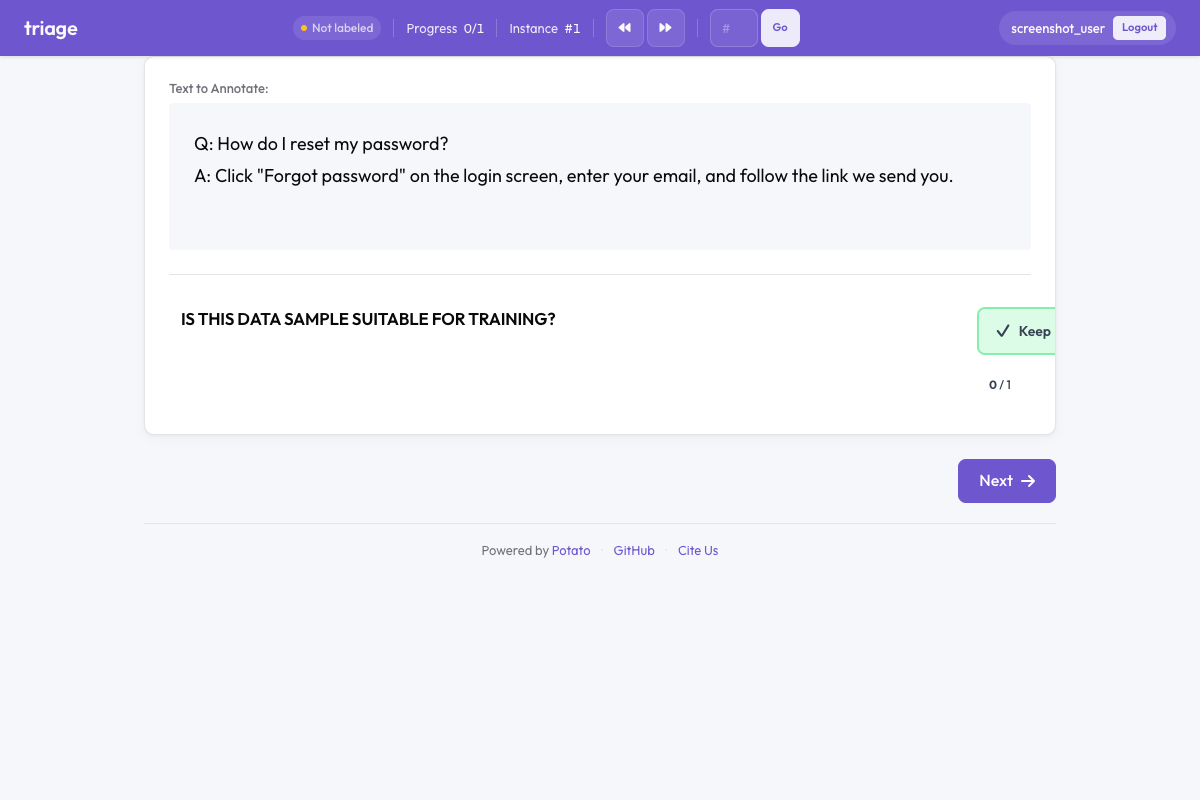 Potato의 트리아지
개요
분류 스키마는 시각적으로 뚜렷이 구분되는 세 개의 큰 버튼을 표시합니다:
- 유지(Keep) (녹색) - 항목을 포함 대상으로 수락합니다
- 폐기(Discard) (빨간색) - 항목을 거부합니다
- 불확실(Unsure) (회색) - 확신이 서지 않을 때 건너뜁니다
자동 진행이 활성화되면(기본값), 어노테이터는 키보드 단축키만으로 시간당 수백 개의 항목을 처리할 수 있습니다.
빠른 시작
yaml
annotation_schemes:
  - annotation_type: triage
    name: data_quality
    description: Is this data sample suitable for training?
    auto_advance: true
    show_progress: true
구성 옵션
| 필드 | 유형 | 기본값 | 설명 |
|---|---|---|---|
annotation_type | string | 필수 | 반드시 "triage" |
name | string | 필수 | 이 스키마의 고유 식별자 |
description | string | 필수 | 어노테이터에게 표시되는 지침 |
accept_label | string | "Keep" | 수락 버튼에 표시할 텍스트 레이블 |
reject_label | string | "Discard" | 거부 버튼에 표시할 텍스트 레이블 |
skip_label | string | "Unsure" | 건너뛰기 버튼에 표시할 텍스트 레이블 |
auto_advance | boolean | true | 선택 후 다음 항목으로 자동 이동 |
show_progress | boolean | true | 분류 위젯에 진행률 표시줄 표시 |
accept_key | string | "1" | 수락 키보드 단축키 |
reject_key | string | "2" | 거부 키보드 단축키 |
skip_key | string | "3" | 건너뛰기 키보드 단축키 |
예시
데이터 품질 필터링
yaml
annotation_schemes:
  - annotation_type: triage
    name: quality_filter
    description: Is this text high quality and suitable for training?
    auto_advance: true
콘텐츠 모더레이션
yaml
annotation_schemes:
  - annotation_type: triage
    name: content_moderation
    description: Does this content violate community guidelines?
    accept_label: "Safe"
    reject_label: "Violates"
    skip_label: "Review Later"
    auto_advance: true
관련성 필터링
yaml
annotation_schemes:
  - annotation_type: triage
    name: relevance
    description: Is this document relevant to the query?
    accept_label: "Relevant"
    reject_label: "Not Relevant"
    skip_label: "Partially Relevant"
다른 스키마와의 결합
분류는 필터링과 상세 어노테이션을 함께 수행하기 위해 다른 어노테이션 유형과 결합할 수 있습니다:
yaml
annotation_schemes:
  - annotation_type: triage
    name: include_item
    description: Should this item be included in the dataset?
    auto_advance: false  # Don't auto-advance when combined

  - annotation_type: radio
    name: category
    description: What category does this belong to?
    labels: ["News", "Opinion", "Review", "Other"]
키보드 단축키
| 키 | 동작 |
|---|---|
1 | 유지(수락) |
2 | 폐기(거부) |
3 | 불확실(건너뛰기) |
1, 2, 3 키는 키보드에서 서로 인접해 있어 키보드를 보지 않고도 빠르게 어노테이션할 수 있습니다.
출력 형식
json
{
  "data_quality": {
    "labels": {
      "decision": "accept"
    }
  }
}
가능한 값: "accept", "reject", "skip".
모범 사례
- 처리량이 많은 작업에는 자동 진행을 사용하세요 - 단순한 판단에서 처리량을 크게 높여 줍니다
- 복잡한 판단에는 자동 진행을 비활성화하세요 - 어노테이터가 생각할 시간이 필요하거나 추가 어노테이션을 해야 할 때
- 명확한 설명을 제공하세요 - 일관된 어노테이션을 위해 분류 기준을 모호하지 않게 만드세요
- 의미 있는 레이블을 사용하세요 - 구체적인 사용 사례에 맞게 레이블을 맞춤 설정하세요
- 주의력 점검과 결합하세요 - 크라우드소싱에서는 알려진 항목을 삽입해 품질을 검증하세요
더 읽어보기
구현 세부 사항은 원본 문서를 참조하세요.