단계별 오류 위치 파악: 트래젝토리 평가로 에이전트가 실패하는 지점 찾기
Potato의 trajectory_eval 스키마를 사용해 계층적 오류 분류 체계, 심각도 점수, 에이전트 트레이스 전반의 누적 점수 추적으로 단계별 오류 위치를 파악합니다.
문제: 에이전트가 실패했다는 사실만으로는 충분하지 않습니다
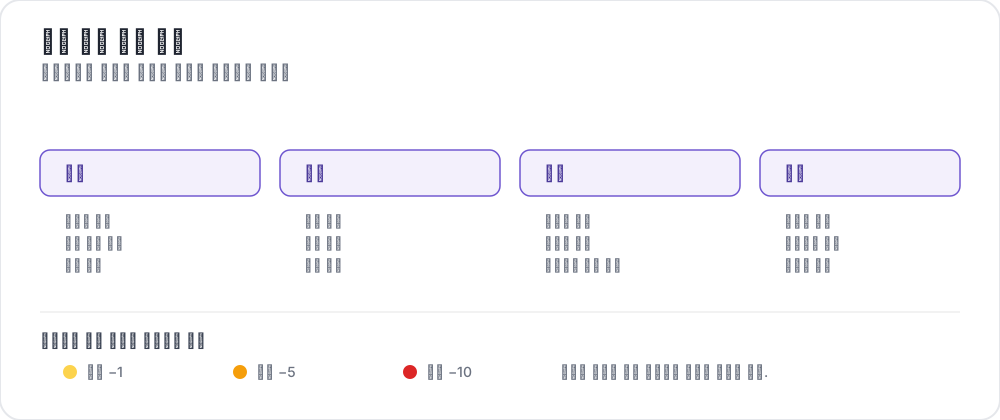 A trajectory error taxonomy
벤치마크에서 에이전트를 실행합니다. 작업 완료율 63%를 기록합니다. 이제 어떻게 하시겠습니까?
성공/실패 숫자는 에이전트가 작업의 37%에서 실패했다는 것 외에는 아무것도 알려주지 않습니다. 트레이스의 어디서 문제가 생겼는지, 에이전트가 어떤 유형의 오류를 범했는지, 얼마나 심각했는지는 말해주지 않습니다. 2단계에서 단 한 번의 치명적 실수였습니까, 아니면 사소한 추론 오류 열다섯 단계가 쌓인 것이었습니까? 에이전트가 도구를 잘못 사용했습니까, 아니면 거짓 전제에서 추론했습니까?
단계별 오류 위치 파악이 없으면 실패 양상을 진단하거나, 무엇을 먼저 고칠지 결정하거나, 프로세스 보상 모델을 위한 학습 데이터를 구축할 수 없습니다. 어둠 속에서 하이퍼파라미터를 조정하는 셈입니다.
Potato의 trajectory_eval 주석 스키마가 이를 해결합니다. 주석자는 트레이스의 각 단계를 따라가며 다음을 기록합니다.
- 정확성: 이 단계가 올바른가, 잘못되었는가?
- 오류 유형: 직접 정의한 계층적 분류 체계에서 선택
- 심각도 수준: 경미, 중대, 치명으로 나뉘며 점수 가중치를 설정 가능
- 근거: 오류에 대한 자유 서술 설명(선택 사항)
- 누적 점수: 심각도에 따라 감소하는 누적 점수로, 트레이스별 품질 곡선을 제공
이 가이드는 오류 분류 체계 정의, 주석 실행, 수집된 데이터 분석까지 전체 설정 과정을 다룹니다. 스키마의 구성 참조는 원본 문서를 확인하십시오.
트래젝토리 평가 스키마 개요
trajectory_eval 스키마는 다단계 에이전트 트레이스를 순차적으로 평가하기 위해 만들어졌습니다. 하나의 전체 품질 등급 대신, 모든 단계마다 구조화된 오류 주석을 생성하므로, 에이전트가 어디서 왜 실패했는지에 대한 상세한 지도를 얻게 됩니다.
각 단계에서 주석 인터페이스가 하는 일은 다음과 같습니다.
- 주석자는 현재 단계의 내용(사고, 행동, 관찰, 코드 등)을 봅니다
- 단계를 올바름 또는 잘못됨으로 표시합니다
- 잘못되었다면, 계층적 분류 체계에서 오류 유형을 선택합니다
- 심각도 수준(경미, 중대, 치명)을 지정합니다
- 선택적으로 오류를 설명하는 근거를 작성합니다
- 인터페이스 상단의 누적 점수가 자동으로 갱신됩니다
주석자는 트레이스를 한 단계씩 따라가며 완전한 오류 프로필을 쌓아 올립니다.
트래젝토리 평가 인터페이스는 각 단계를 점수와 함께 보여줍니다.
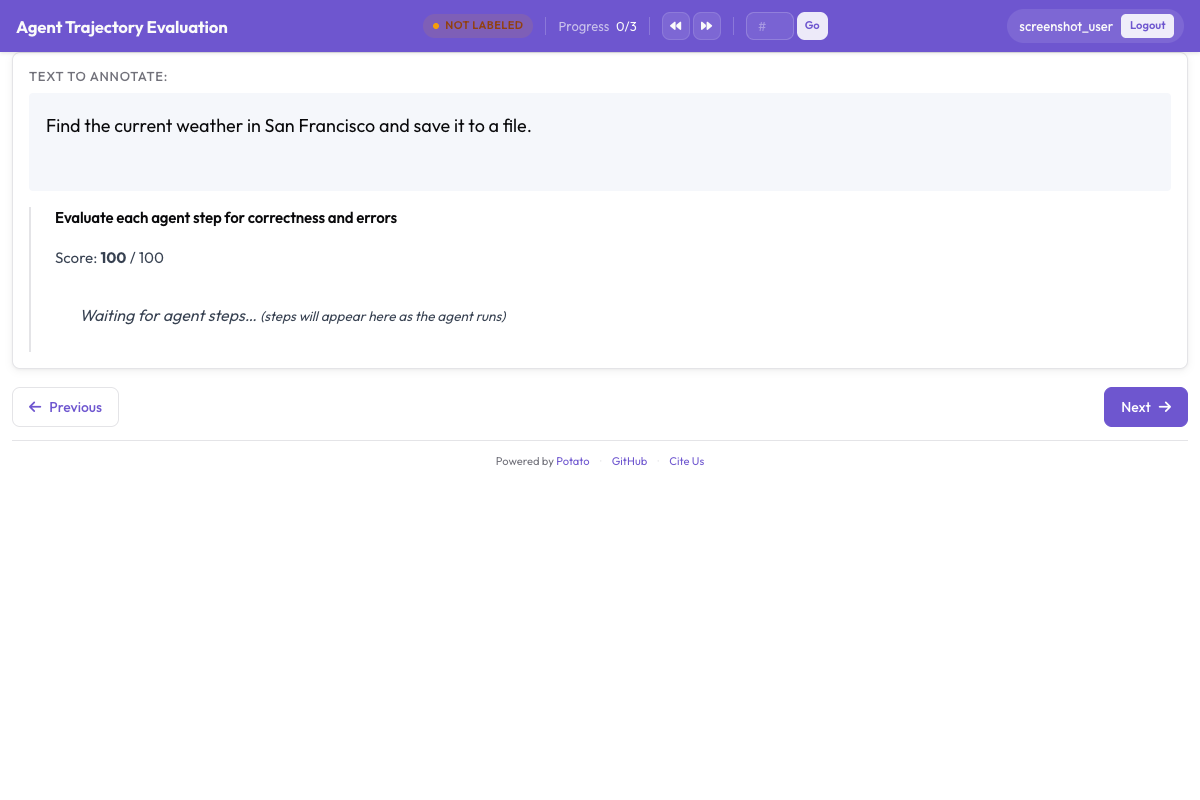 각 단계는 정확성 등급, 오류 유형, 심각도 수준을 받으며, 심각도에 따라 감소하는 누적 점수가 함께 표시됩니다
계층적 오류 분류 체계 설계하기
분류 체계는 트래젝토리 평가를 가치 있게 만드는 핵심입니다. 제대로 만들면 트레이스 전반에 걸쳐 오류를 집계하고 체계적인 실패 패턴을 발견할 수 있지만, 잘못 만들면 레이블이 아무런 의미로도 합쳐지지 않습니다. 다음은 제가 출발점으로 삼을 분류 체계로, 네 개의 상위 범주로 구성됩니다.
추론 오류
에이전트가 보고 행하는 것은 그 외에는 괜찮더라도, 에이전트의 추론이 잘못되었을 때 발생합니다.
| 오류 유형 | 설명 | 예시 |
|---|---|---|
logical_error | 잘못된 논리적 추론 | "A가 B를 함의하고 B가 참이므로 A는 반드시 참이다"(후건 긍정의 오류) |
incorrect_assumption | 증거로 뒷받침되지 않는 것을 가정 | 확인 없이 파일이 존재한다고 가정 |
over_generalization | 제한된 증거에서 지나치게 넓은 결론을 도출 | "이 함수가 한 번 실패했으니 API 전체가 망가졌다" |
circular_reasoning | 결론을 전제로 사용 | "답이 X인 이유는 X가 맞기 때문이다" |
incorrect_calculation | 수학적 또는 논리적 계산 오류 | 루프 경계 추론에서의 off-by-one 오류 |
인식 오류
에이전트가 관찰 내용을 잘못 읽거나, 잘못 해석하거나, 놓칠 때 발생합니다.
| 오류 유형 | 설명 | 예시 |
|---|---|---|
missed_element | 관련 정보를 알아채지 못함 | 터미널 출력의 오류 메시지를 간과 |
misidentified_element | 본 것을 잘못 해석 | 404 오류를 성공 응답으로 읽음 |
hallucinated_element | 존재하지 않는 것을 언급 | 존재하지 않는 함수 매개변수를 참조 |
outdated_reference | 이전 단계의 낡은 정보를 사용 | 덮어쓰인 변수 값을 사용 |
행동 오류
에이전트가 잘못된 행동을 취하거나, 올바른 행동을 잘못된 방식으로 취할 때 발생합니다.
| 오류 유형 | 설명 | 예시 |
|---|---|---|
wrong_tool | 작업에 부적절한 도구를 선택 | find가 필요할 때 grep을 사용 |
wrong_arguments | 올바른 도구지만 잘못된 매개변수 | 편집 명령에 잘못된 파일 경로를 전달 |
premature_termination | 작업이 완료되기 전에 중단 | 부분 정보만 찾은 뒤 답을 반환 |
unnecessary_action | 가치를 더하지 않는 행동을 취함 | 방금 읽은 파일을 다시 읽음 |
destructive_action | 해를 끼치는 행동을 취함 | 백업 없이 파일을 삭제 |
의사소통 오류
에이전트가 사용자에게 보내는 응답이나, 자기 작업을 서술하는 방식에서 나타납니다.
| 오류 유형 | 설명 | 예시 |
|---|---|---|
unclear_explanation | 설명이 혼란스럽거나 모호함 | 무엇이 고장났는지 말하지 않고 수정을 설명 |
missing_context | 응답에서 핵심 맥락을 누락 | 단서를 언급하지 않고 성공을 보고 |
incorrect_summary | 요약이 실제 행동과 일치하지 않음 | 파일 2개만 변경했는데 3개를 편집했다고 주장 |
overconfident_claim | 불확실한 것을 확실하게 진술 | 테스트하지 않은 변경에 대해 "이렇게 하면 분명히 문제가 해결됩니다" |
심각도 수준과 점수 가중치
각 오류는 심각도 수준을 받습니다. 기본 가중치는 다음과 같습니다.
| 심각도 | 가중치 | 설명 |
|---|---|---|
minor | -1 | 트레이스를 탈선시키지 않는 작은 문제(예: 불필요한 행동, 불명확한 설명) |
major | -5 | 노력을 낭비하거나 부분적으로 잘못된 결과를 내는 중대한 오류(예: 잘못된 도구, 잘못된 가정) |
critical | -10 | 트레이스를 근본적으로 망가뜨리는 오류(예: 파괴적 행동, 잘못된 답을 동반한 조기 종료) |
누적 점수는 100에서 시작해 오류마다 심각도 가중치만큼 떨어집니다. 85에서 끝난 트레이스는 사소한 문제가 몇 개 있었고, 40에서 끝난 트레이스는 중대한 실패가 여러 번 있었습니다.
구성에서 이 가중치를 변경할 수 있습니다.
severities:
  - name: minor
    weight: -1
  - name: major
    weight: -5
  - name: critical
    weight: -10
전체 YAML 구성
다음은 전체 분류 체계를 갖춘 트래젝토리 평가용 완전한 config.yaml입니다.
annotation_task_name: "Agent Trajectory Error Localization"
task_dir: "."

data_files:
  - "data/traces.jsonl"

item_properties:
  id_key: "trace_id"
  text_key: "task"

instance_display:
  fields:
    - key: "task"
      type: text
      label: "Task"
    - key: "trace"
      type: agent_trace
      label: "Agent trace"
      display_options:
        show_step_numbers: true
        show_timestamps: false
        step_type_colors:
          thought: "#E8F0FE"
          action: "#FFF3E0"
          observation: "#F1F8E9"
          code: "#F3E5F5"

annotation_instructions: |
  Walk the trace one step at a time. Mark a step incorrect only when it is
  wrong on the information available at that step, not with hindsight. When
  several categories apply, choose the most specific one.

annotation_schemes:
  - annotation_type: trajectory_eval
    name: step_errors
    description: "Mark each step and classify any error"
    steps_key: trace
    step_text_key: content
    correctness_options:
      - correct
      - incorrect
      - partially_correct
    error_types:
      - name: reasoning
        subtypes:
          - logical_error
          - incorrect_assumption
          - over_generalization
          - circular_reasoning
          - incorrect_calculation
      - name: perception
        subtypes:
          - missed_element
          - misidentified_element
          - hallucinated_element
          - outdated_reference
      - name: action
        subtypes:
          - wrong_tool
          - wrong_arguments
          - premature_termination
          - unnecessary_action
          - destructive_action
      - name: communication
        subtypes:
          - unclear_explanation
          - missing_context
          - incorrect_summary
          - overconfident_claim
    severities:
      - name: minor
        weight: -1
      - name: major
        weight: -5
      - name: critical
        weight: -10
    show_score: true
    max_score: 100

  - annotation_type: radio
    name: overall_success
    description: "Did the run succeed overall?"
    labels:
      - success
      - partial
      - failure
    sequential_key_binding: true

output_annotation_dir: "annotation_output/"
export_annotation_format: jsonl

user_config:
  allow_all_users: true
단계별 설정
1. 에이전트 트레이스 준비하기
트레이스 데이터는 JSONL 형식으로, 한 줄에 트레이스 하나씩 들어갑니다. 각 트레이스에는 ID, 작업 설명, 그리고 단계 목록이 필요합니다.
{
  "trace_id": "trace_042",
  "task": "Find the bug in the calculate_discount function and fix it",
  "trace": [
    {
      "type": "thought",
      "content": "I need to look at the calculate_discount function to find the bug. Let me search for it."
    },
    {
      "type": "action",
      "content": "search",
      "action_input": "def calculate_discount"
    },
    {
      "type": "observation",
      "content": "Found in pricing.py line 45:\ndef calculate_discount(price, discount_pct):\n    return price * discount_pct / 100"
    },
    {
      "type": "thought",
      "content": "The function calculates the discount amount but doesn't subtract it from the price. It should return price - (price * discount_pct / 100)."
    },
    {
      "type": "action",
      "content": "edit_file",
      "action_input": "pricing.py:45: return price - (price * discount_pct / 100)"
    },
    {
      "type": "observation",
      "content": "File edited successfully."
    },
    {
      "type": "action",
      "content": "finish",
      "action_input": "Fixed the calculate_discount function. It was returning the discount amount instead of the discounted price."
    }
  ]
}
트레이스가 다른 형식(OpenAI 메시지, LangChain 실행, Claude 대화 로그)으로 되어 있다면 Potato 트레이스 변환기를 사용하십시오.
python -m potato.trace_converter \
  --input raw_traces/ \
  --output data/traces.jsonl \
  --input-format react
2. 분류 체계 구성하기
위의 전체 분류 체계로 시작한 다음, 에이전트에 맞게 줄이거나 확장하십시오. 예를 들어 코딩 에이전트의 경우 code_quality 범주를 추가할 수 있습니다.
error_types:
  - name: code_quality
    subtypes:
      - syntax_error
      - runtime_error
      - logic_bug
      - style_violation
코딩 에이전트 트레이스의 경우, 평가는 점수 매기기와 나란히 diff와 터미널 출력을 렌더링합니다.
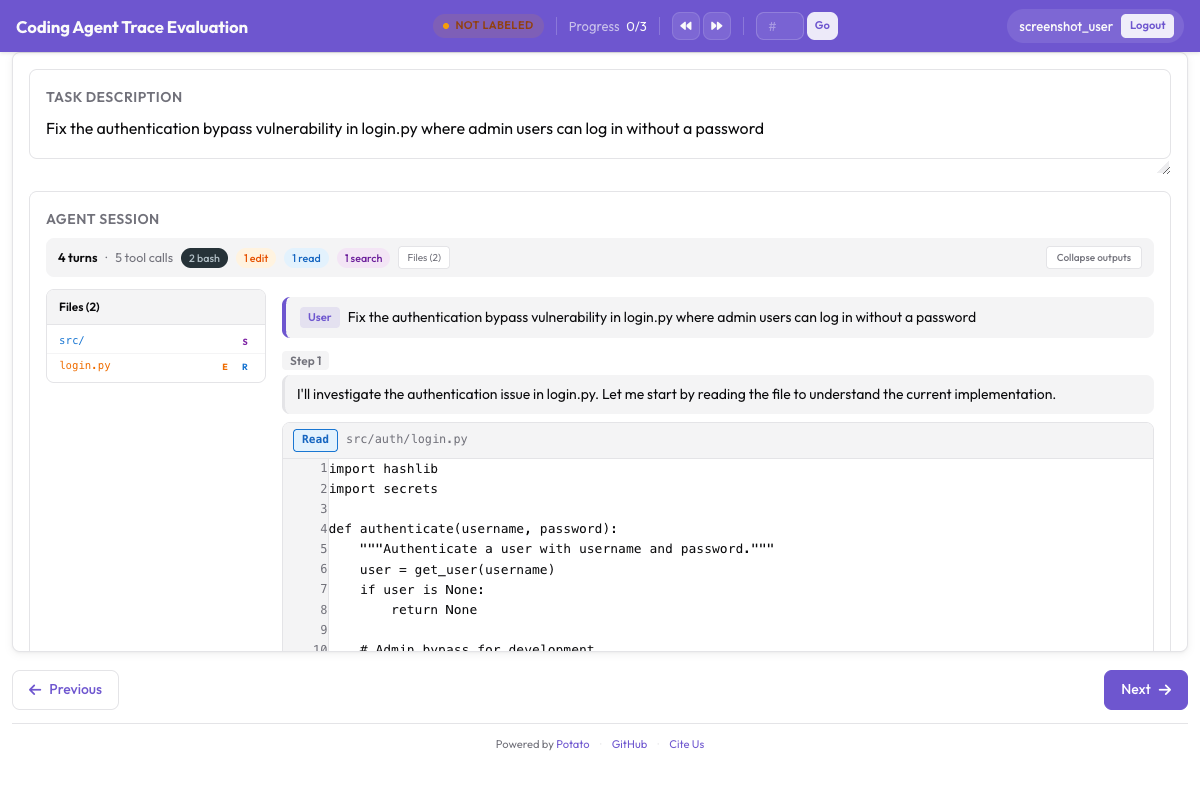 CodingTraceDisplay는 트래젝토리 평가 컨트롤과 나란히 diff, 터미널 블록, 파일 읽기를 렌더링합니다
3. 주석 서버 실행하기
potato start config.yaml -p 8000브라우저에서 http://localhost:8000을 엽니다. 단계별 표시와 함께 첫 번째 트레이스가 보입니다.
4. 주석 지침 작성하기
주석자에게 명확한 지침을 제공하십시오. 최소한 다음을 문서화하십시오.
- 어떤 경우에 단계를 잘못됨으로 표시하고, 어떤 경우에 올바르지만-차선책으로 표시할지
- 여러 범주가 적용될 때 오류 범주 중 무엇을 선택할지(가장 구체적인 것을 사용)
- 각 심각도 수준을 언제 부여할지, 구체적인 예시와 함께
- 단계를 해당 단계에서 이용 가능한 정보를 기준으로 평가할지, 아니면 사후 관점으로 평가할지
주석 작업 흐름
주석자가 트레이스를 열면 작업 설명이 상단에 있고 그 아래에 첫 번째 단계가 있습니다. 누적 점수는 오른쪽 상단에 100으로 표시됩니다.
각 단계에서 주석자는 다음을 합니다.
- 이전 단계들의 맥락 속에서 단계 내용을 읽습니다
- "Correct" 또는 "Incorrect"를 클릭해 정확성을 표시합니다
- 잘못되었다면, 오류 범주(예: "Reasoning Error")를 선택한 다음 구체적 유형(예: "Incorrect Assumption")을 선택합니다
- 심각도를 부여합니다: 경미, 중대, 치명
- (활성화된 경우) 근거를 작성합니다: "에이전트가 확인 없이 파일이 현재 디렉터리에 있다고 가정하지만, 검색 결과는 그 파일이 src/utils/에 있음을 보여주었습니다"
- "Next Step"을 클릭하거나 오른쪽 화살표 키를 눌러 다음 단계로 진행합니다
누적 점수는 오류마다 갱신됩니다. 3단계를 중대 오류(-5)로 표시하면 점수가 100에서 95로 떨어집니다. 7단계를 치명(-10)으로 표시하면 85로 떨어집니다.
트레이스 끝에서 주석자는 전체 성공/부분/실패 등급을 매기고 제출합니다.
결과 분석하기
주석 데이터 불러오기
import json
import pandas as pd
from collections import Counter
from pathlib import Path

# Load all annotation files
annotations = []
output_dir = Path("output/")
for f in output_dir.glob("*.jsonl"):
    with open(f) as fh:
        for line in fh:
            annotations.append(json.loads(line))

print(f"Loaded {len(annotations)} annotated traces")
오류 분포 분석
# Extract all errors across all traces
errors = []
for ann in annotations:
    for step_ann in ann.get("error_localization", []):
        if step_ann["correctness"] == "incorrect":
            errors.append({
                "trace_id": ann["trace_id"],
                "step_index": step_ann["step_index"],
                "category": step_ann["error_category"],
                "error_type": step_ann["error_type"],
                "severity": step_ann["severity"],
                "rationale": step_ann.get("rationale", ""),
            })

error_df = pd.DataFrame(errors)
print(f"Total errors found: {len(error_df)}")
print()

# Error distribution by category
print("Errors by category:")
print(error_df["category"].value_counts())
print()

# Most common specific error types
print("Top 10 error types:")
print(error_df["error_type"].value_counts().head(10))
print()

# Severity distribution
print("Severity distribution:")
print(error_df["severity"].value_counts())
오류 위치 분석
트레이스의 어디서 오류가 발생하는 경향이 있는지 보는 것은 종종 체계적인 패턴을 드러냅니다.
import matplotlib.pyplot as plt
import numpy as np

# Normalize step positions to [0, 1] range
for ann in annotations:
    trace_length = len(ann.get("error_localization", []))
    for step_ann in ann["error_localization"]:
        if step_ann["correctness"] == "incorrect":
            step_ann["normalized_position"] = step_ann["step_index"] / max(trace_length - 1, 1)

# Collect normalized positions
positions = [
    step_ann["normalized_position"]
    for ann in annotations
    for step_ann in ann.get("error_localization", [])
    if step_ann["correctness"] == "incorrect"
    and "normalized_position" in step_ann
]

plt.figure(figsize=(10, 4))
plt.hist(positions, bins=20, edgecolor="black", alpha=0.7)
plt.xlabel("Normalized Position in Trace (0 = start, 1 = end)")
plt.ylabel("Error Count")
plt.title("Where Do Agent Errors Occur?")
plt.tight_layout()
plt.savefig("error_position_distribution.png", dpi=150)
print("Saved error_position_distribution.png")
누적 점수 분포
# Extract final running scores
final_scores = []
for ann in annotations:
    score = 100
    severity_weights = {"minor": -1, "major": -5, "critical": -10}
    for step_ann in ann.get("error_localization", []):
        if step_ann["correctness"] == "incorrect":
            score += severity_weights.get(step_ann["severity"], 0)
    score = max(score, 0)
    final_scores.append({
        "trace_id": ann["trace_id"],
        "final_score": score,
        "overall_success": ann.get("overall_success", "unknown"),
    })

score_df = pd.DataFrame(final_scores)

print("Score statistics:")
print(score_df["final_score"].describe())
print()

# Score distribution by overall success
for label in ["success", "partial", "failure"]:
    subset = score_df[score_df["overall_success"] == label]
    if len(subset) > 0:
        print(f"{label}: mean={subset['final_score'].mean():.1f}, "
              f"median={subset['final_score'].median():.1f}, "
              f"n={len(subset)}")
가장 흔한 실패 양상
# Group errors by category + type for a failure mode analysis
failure_modes = (
    error_df.groupby(["category", "error_type"])
    .agg(
        count=("severity", "size"),
        avg_severity_weight=("severity", lambda x: x.map(
            {"minor": 1, "major": 5, "critical": 10}
        ).mean()),
    )
    .sort_values("count", ascending=False)
)

print("Top failure modes (by frequency):")
print(failure_modes.head(15).to_string())
print()

# Impact-weighted failure modes (frequency x average severity)
failure_modes["impact"] = failure_modes["count"] * failure_modes["avg_severity_weight"]
print("Top failure modes (by impact):")
print(failure_modes.sort_values("impact", ascending=False).head(10).to_string())
연구 맥락
단계별 오류 위치 파악은 에이전트 평가에서 최근의 몇 가지 흐름과 맞닿아 있습니다.
TRAIL(Patronus AI, 2025)은 GAIA와 SWE-bench Lite에서 가져온 148개의 에이전트 트레이스를 20종이 넘는 오류 유형 분류 체계로 주석했고, 오류는 모두 841건이었습니다. 눈여겨볼 결과는 위치 특정이 얼마나 어려웠는가입니다. 이들이 시험한 최고의 롱컨텍스트 추론 모델도 오류 범주와 위치를 함께 맞춘 정확도가 11%에 그쳤습니다. 그것이 바로 trajectory_eval이 사람 주석자에게 맡기는 일이며, 그 레이블에 비용을 들일 이유입니다.
AgentRewardBench(McGill NLP, 2025)는 대신 심판 쪽을 파고들었습니다. 다섯 개 벤치마크에 걸친 1,302개의 웹 에이전트 궤적을 모으고, 전문가가 각각을 성공·부작용·반복 측면에서 검토한 뒤, 그 검토를 기준으로 열두 개의 LLM 심판을 채점합니다. 모든 벤치마크에서 앞선 심판은 없었고, 벤치마크에 딸려 오는 규칙 기반 평가는 에이전트가 실제로 성공한 횟수를 과소 보고했습니다. 이 분류 체계의 일부를 모델로 자동화할 생각이라면, 필요한 검증은 이런 형태입니다.
trajectory_eval에서 나오는 단계별 정확성·심각도 레이블은 프로세스 보상 모델 학습에도 바로 들어갑니다. 주석된 각 단계가 정답 품질 신호를 가진 학습 예제가 됩니다.
Anthropic의 Demystifying evals for AI agents는 같은 주장의 실무판을 제시합니다. 결과만이 아니라 전체 기록을 채점하고, 에이전트가 도구를 어떻게 호출했고 사용자와 어떻게 대화했는지에 대해서는 명시적 루브릭을 갖춘 모델 기반 채점자를 쓰라는 것입니다. 동시에 미리 정해 둔 단계 순서에 맞춰 점수를 매기는 방식을 경계하라고 합니다. 에이전트는 평가 설계자가 예상하지 못한 유효한 경로를 계속 찾아내기 때문입니다. 이 분류 체계를 적용할 때 그 점을 붙들어 두십시오. 어떤 단계가 오류인 것은 틀렸기 때문이지, 예상 밖이었기 때문이 아닙니다.
심각도 가중 누적 점수는 RLHF에서 사용되는 보상 신호에도 대응됩니다. 20단계 트레이스의 5단계에서 급격히 떨어지는 점수 곡선은 에이전트가 어디에 손을 봐야 하는지 정확히 알려주며, 이는 트레이스 끝의 단일 보상보다 훨씬 실행 가능합니다.
요약
trajectory_eval 스키마는 에이전트 평가를 성공/실패 점검에서 진단으로 바꿔놓습니다. 계층적 분류 체계, 심각도 점수, 누적 점수를 통해 어느 단계가 잘못되었는지, 어떤 종류의 오류였는지, 얼마나 심각했는지, 그리고 트레이스 전반에서 오류가 어디에 몰리는 경향이 있는지 볼 수 있습니다. 단계 수준 레이블은 프로세스 보상 모델 학습 데이터로 바로 사용할 수 있도록 준비되어 있기도 합니다.
이 가이드의 전체 분류 체계로 시작한 다음, 여러분의 에이전트와 실제로 관찰되는 오류 패턴에 맞게 다듬으십시오. 가장 좋은 분류 체계는 여러분이 실제로 할 수 있는 수정을 가리키는 것입니다.