교육 단계
연습 항목, 골드 스탠다드 정답, 합격/불합격 기준을 사용하여 Potato에서 교육 및 자격 단계를 만들어 본 작업 전에 주석자를 인증합니다.
Potato 2.0에는 주석자가 본 주석 작업을 시작하기 전에 자격을 갖추도록 돕는 선택적 교육 단계가 포함되어 있습니다. 주석자는 알려진 정답이 있는 연습 질문에 답하고 자신의 수행에 대한 피드백을 받습니다.
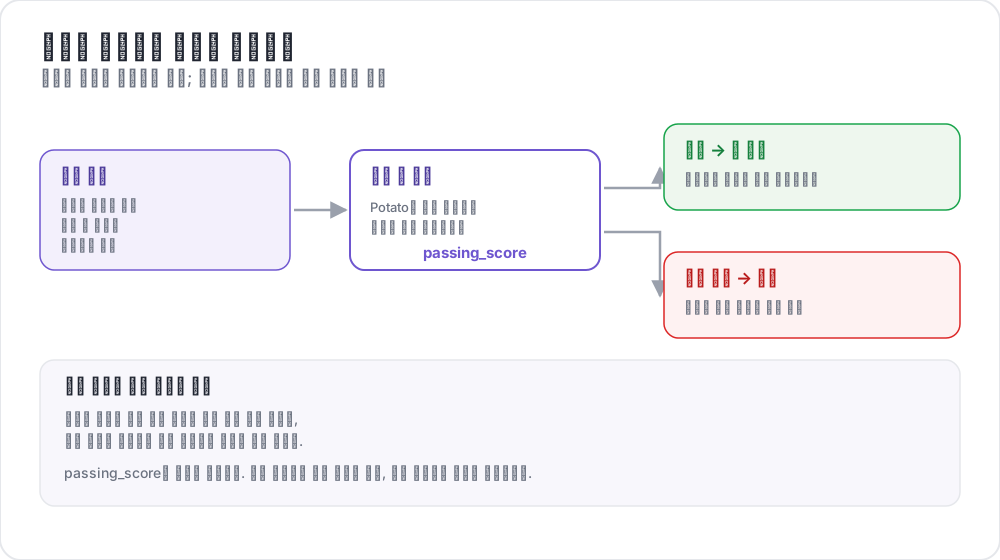 교육이 주석자를 어떻게 거르는가
사용 사례
- 주석자가 작업을 이해하도록 보장
- 품질이 낮은 주석자 걸러내기
- 실제 주석 전에 안내된 연습 제공
- 기준 품질 지표 수집
- 예시를 통해 주석 지침 교육
작동 방식
- 주석자가 일련의 교육 질문을 완료합니다
- 각 답변에 대해 즉각적인 피드백을 받습니다
- 합격 기준에 대비하여 진행 상황이 추적됩니다
- 합격한 주석자만 본 작업으로 진행할 수 있습니다
구성
기본 설정
yaml
training:
  enabled: true
  data_file: "data/training_data.json"
  annotation_schemes: ["sentiment"]
  passing_criteria:
    min_correct: 3
    require_all_correct: false
  allow_retry: true
  failure_action: "repeat_training"
전체 구성
yaml
phases:
  order: [consent, instructions, training, annotation]

  consent:
    type: consent
    file: surveyflow/consent.json

  instructions:
    type: instructions
    file: surveyflow/instructions.html

  training:
    type: training
    file: data/training_data.json
합격 기준
교육 단계를 통과하기 위한 다양한 기준을 설정할 수 있습니다:
최소 정답 수
yaml
passing_criteria:
  min_correct: 3
주석자는 10개 질문 중 최소 8개를 맞혀야 합니다.
모두 정답 요구
yaml
passing_criteria:
  require_all_correct: true
주석자는 합격하려면 모든 질문에 정확히 답해야 합니다.
최대 오답 수
yaml
passing_criteria:
  max_mistakes: 5
주석자는 총 3회 오답 후 자격을 상실합니다.
질문당 최대 오답 수
yaml
passing_criteria:
  max_mistakes_per_question: 2
주석자는 한 질문에서 2회 오답 후 자격을 상실합니다.
결합 기준
yaml
passing_criteria:
  min_correct: 3
  max_mistakes: 5
  max_mistakes_per_question: 2
8개를 맞히면서 어떤 단일 질문도 3회를 초과하여 틀리지 않아야 합니다.
교육 데이터 형식
교육 데이터에는 정답과 선택적 설명이 포함되어야 합니다:
json
[
  {
    "id": "train_1",
    "text": "I absolutely love this product! Best purchase ever!",
    "correct_answers": {
      "sentiment": "Positive"
    },
    "explanation": "This text expresses strong positive sentiment with words like 'love' and 'best'."
  },
  {
    "id": "train_2",
    "text": "This is the worst service I've ever experienced.",
    "correct_answers": {
      "sentiment": "Negative"
    },
    "explanation": "The words 'worst' and the overall complaint indicate negative sentiment."
  },
  {
    "id": "train_3",
    "text": "The package arrived on time.",
    "correct_answers": {
      "sentiment": "Neutral"
    },
    "explanation": "This is a factual statement without emotional indicators."
  }
]
다중 스키마 교육
여러 주석 스키마가 있는 작업의 경우:
json
{
  "id": "train_1",
  "text": "Apple announced new iPhone features yesterday.",
  "correct_answers": {
    "sentiment": "Neutral",
    "topic": "Technology"
  },
  "explanation": {
    "sentiment": "This is a factual news statement.",
    "topic": "The text discusses Apple and iPhone, which are tech topics."
  }
}
사용자 경험
교육 흐름
- 사용자가 "Training Phase" 표시를 봅니다
- 주석 양식과 함께 질문이 표시됩니다
- 사용자가 답변을 제출합니다
- 피드백이 즉시 표시됩니다:
- 정답: 녹색 체크 표시, 다음으로 진행
- 오답: 빨간색 X, 설명 표시, 재시도 옵션
피드백 표시
주석자가 잘못 답하면:
- 정답이 강조 표시됩니다
- 제공된 설명이 표시됩니다
- 재시도 버튼이 나타납니다 (재시도가 활성화된 경우)
- 합격 기준에 대한 진행 상황이 표시됩니다
관리자 모니터링
관리자 대시보드에서 교육 성과를 추적합니다:
- 완료율
- 평균 정답 수
- 합격/불합격 비율
- 교육에 소요된 시간
- 질문별 정확도
/admin API 엔드포인트를 통해 접근합니다:
text
GET /api/admin/training/stats
GET /api/admin/training/user/{user_id}
예시: 감정 분석 교육
yaml
annotation_task_name: "Sentiment Analysis"
task_dir: "."
port: 8000

data_files:
  - "data/reviews.json"

item_properties:
  id_key: id
  text_key: text

annotation_schemes:
  - annotation_type: radio
    name: sentiment
    description: "What is the sentiment of this review?"
    labels:
      - Positive
      - Negative
      - Neutral
    sequential_key_binding: true

training:
  enabled: true
  data_file: "data/training_data.json"
  annotation_schemes: ["sentiment"]
  passing_criteria:
    min_correct: 3
    require_all_correct: false
  allow_retry: true
  failure_action: "repeat_training"

phases:
  order: [training, annotation]
  training:
    type: training
    file: "data/training_data.json"

output_annotation_dir: "output/"
export_annotation_format: "jsonl"

user_config:
  allow_all_users: true
예시: NER 교육
yaml
annotation_schemes:
  - annotation_type: span
    name: entities
    description: "Highlight named entities"
    labels:
      - Person
      - Organization
      - Location
      - Date

training:
  enabled: true
  data_file: "data/ner_training.json"
  annotation_schemes: ["entities"]
  passing_criteria:
    min_correct: 2
  allow_retry: true
스팬 주석을 위한 교육 데이터:
json
{
  "id": "train_1",
  "text": "Tim Cook announced that Apple will open a new store in New York on March 15.",
  "correct_answers": {
    "entities": [
      {"start": 0, "end": 8, "label": "Person"},
      {"start": 24, "end": 29, "label": "Organization"},
      {"start": 54, "end": 62, "label": "Location"},
      {"start": 66, "end": 74, "label": "Date"}
    ]
  },
  "explanation": "Tim Cook is a Person, Apple is an Organization, New York is a Location, and March 15 is a Date."
}
모범 사례
1. 간단하게 시작하기
엣지 케이스를 도입하기 전에 직관적인 예시로 시작합니다:
json
[
  {"text": "I love this!", "correct_answers": {"sentiment": "Positive"}},
  {"text": "I hate this!", "correct_answers": {"sentiment": "Negative"}},
  {"text": "It arrived yesterday.", "correct_answers": {"sentiment": "Neutral"}}
]
2. 모든 레이블 다루기
교육에 가능한 모든 레이블의 예시가 포함되도록 보장합니다:
json
[
  {"correct_answers": {"sentiment": "Positive"}},
  {"correct_answers": {"sentiment": "Negative"}},
  {"correct_answers": {"sentiment": "Neutral"}}
]
3. 명확한 설명 작성하기
설명은 주석 지침을 가르쳐야 합니다:
json
{
  "explanation": "While this text mentions a problem, the overall tone is constructive and the reviewer expresses satisfaction with the resolution. This makes it Positive rather than Negative."
}
4. 합리적인 기준 설정하기
불필요하게 완벽함을 요구하지 마십시오:
yaml
passing_criteria:
  require_all_correct: true
5. 엣지 케이스 포함하기
주석자를 준비시키기 위해 까다로운 예시를 추가합니다:
json
{
  "text": "Not bad at all, I guess it could be worse.",
  "correct_answers": {"sentiment": "Neutral"},
  "explanation": "Despite negative words like 'not bad' and 'worse', this is actually a lukewarm endorsement - neutral rather than positive or negative."
}
워크플로와의 통합
교육은 다중 단계 워크플로와 통합됩니다:
yaml
passing_criteria:
  min_correct: 3
  max_mistakes_per_question: 2
성능 고려 사항
- 교육 데이터는 시작 시 로드됩니다
- 진행 상황은 세션별로 메모리에 저장됩니다
- 본 주석 작업에 미치는 성능 영향이 최소화됩니다
- 복잡한 교육은 여러 단계로 나누는 것을 고려하십시오
추가 자료
- 품질 관리 - 주의력 확인 및 골드 스탠다드
- 카테고리 할당 - 주석자 전문성에 따라 항목 라우팅
- 다중 단계 워크플로 - 복잡한 주석 워크플로
구현 세부 사항은 원본 문서를 참고하십시오.