다단계 워크플로
Potato에서 동의, 사전 선별, 안내, 훈련, 사후 설문을 갖춘 다단계 주석 워크플로를 구축합니다. 조건부 설문 문항도 사용할 수 있습니다.
Potato는 주석 작업을 더 긴 워크플로 안의 한 단계로 실행합니다. 그래서 동의, 선별 문항, 안내, 훈련, 종료 설문을 별도의 설문 도구 없이 작업 앞뒤에 배치할 수 있습니다.
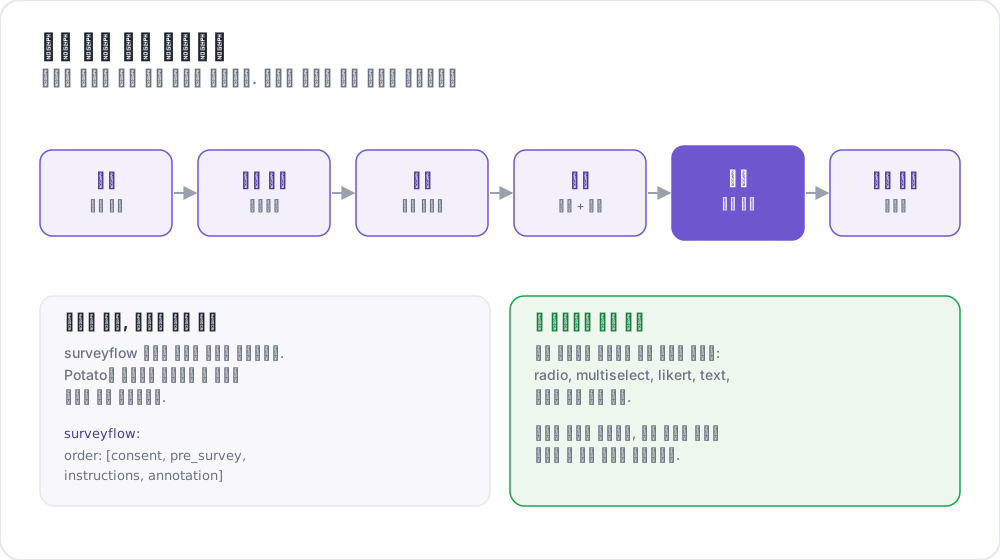 설문 흐름 주석 워크플로
사용 가능한 단계
| 단계 | 목적 | 필수 여부 |
|---|---|---|
consent | 사전 동의 수집 | 선택 |
prestudy | 사전 선별 문항과 인구통계 | 선택 |
instructions | 작업 안내와 지침 | 선택 |
training | 피드백이 있는 자격 검증 | 선택 |
annotation | 주요 주석 작업 | 필수 |
poststudy | 사후 설문과 피드백 | 선택 |
주석자는 활성화된 단계를 선언한 순서대로 진행합니다.
기본 구성
phases 블록은 순서를 나열하고 각 단계가 사용할 파일을 지정합니다.
phases:
  order: [consent, prestudy, instructions, annotation, poststudy]

  consent:
    type: consent
    file: surveyflow/consent.json

  prestudy:
    type: prestudy
    file: surveyflow/prescreening.json

  instructions:
    type: instructions
    file: surveyflow/instructions.html

  poststudy:
    type: poststudy
    file: surveyflow/demographics.json
annotation 단계에는 file이 필요 없습니다. 프로젝트의 최상위 annotation_schemes를 사용하기 때문입니다.
단계 유형
파일을 사용하는 각 단계는 워크플로의 어느 단계인지를 나타내는 type을 선언합니다. 유효한 값은 consent, prestudy, instructions, training, annotation, poststudy입니다.
type은 명시적으로 설정하세요. Potato는 단계 이름 자체가 이 단어 중 하나일 때만 유형을 추론하므로, 사용자 지정 이름을 가진 단계는 유형을 선언해야 합니다.
phases:
  order: [intro, consent, instructions, annotation, feedback]

  intro:
    type: prestudy          # custom name, so type is required
    file: surveyflow/intro.json

  consent:
    type: consent
    file: surveyflow/consent.json

  feedback:
    type: poststudy         # custom name, so type is required
    file: surveyflow/feedback.json
뒤로 이동
이전 페이지가 없으면 Back 버튼이 숨겨지며, 첫 번째 주석 인스턴스도 여기에 해당합니다. 주석자가 단계 경계를 넘어 뒤로 이동할 수 있게 하려면 다음과 같이 설정합니다.
allow_phase_back_navigation: true이 설정이 꺼져 있어도 주석자는 주석 인스턴스 사이처럼 한 단계 안에서는 뒤로 이동할 수 있습니다.
설문 문항 형식
설문 단계는 JSON 배열을 읽습니다. 각 문항에는 id, 주석자에게 표시되는 text, 위젯을 지정하는 schema, 그리고 choices가 있습니다.
[
  {
    "id": "consent_1",
    "text": "I certify that I am at least 18 years of age.",
    "schema": "radio",
    "choices": ["I agree", "I disagree"],
    "label_requirement": {"right_label": ["I agree"]}
  },
  {
    "id": "consent_2",
    "text": "I have read and understood the information above.",
    "schema": "radio",
    "choices": ["Yes", "No"],
    "label_requirement": {"right_label": ["Yes"]}
  }
]
지원되는 스키마 유형
단일 선택에는 radio, 복수 선택에는 checkbox 또는 multiselect, 자유 텍스트에는 text, 숫자 입력에는 number, 평가 척도에는 likert, 드롭다운에는 select를 사용합니다.
라벨 요구 사항
label_requirement는 어떤 답변이어야 주석자가 계속 진행할 수 있는지를 정합니다.
{
  "id": "age_check",
  "text": "Are you at least 18 years old?",
  "schema": "radio",
  "choices": ["Yes", "No"],
  "label_requirement": {
    "right_label": ["Yes"],
    "required": true
  }
}right_label은 허용되는 답변을 나열하고, required는 문항에 반드시 답해야 하는지를 나타냅니다. 아무도 탈락하지 않는 동의 문항은 아무것도 기록하지 않는 동의 문항입니다. 그러니 문구에 의존하지 말고 허용되는 답변을 right_label에 넣으세요.
사전 선별 문항
사전 선별은 주요 작업 전에 실행되며, 자격 요건과 배경에 관한 문항은 여기에 둡니다.
phases:
  order: [prestudy, annotation]
  prestudy:
    type: prestudy
file: surveyflow/prescreening.json[
{
"id": "1",
"text": "What is your native language?",
"schema": "select",
"use_predefined_labels": "language",
"label_requirement": {"required": true}
},
{
"id": "2",
"text": "How familiar are you with this topic?",
"schema": "likert",
"choices": ["Not at all", "Slightly", "Moderately", "Very", "Extremely"],
"label_requirement": {"required": true}
}
]사후 설문
phases:
  order: [annotation, poststudy]
  poststudy:
    type: poststudy
file: surveyflow/demographics.json[
{
"id": "gender",
"text": "What gender do you most closely identify with?",
"schema": "radio",
"choices": ["Male", "Female", "Non-binary", "Prefer not to say"],
"label_requirement": {"required": true}
},
{
"id": "feedback",
"text": "Please share any feedback about this study (optional)",
"schema": "text"
}
]내장 라벨 세트
Potato에는 대부분의 연구에서 반복되는 문항을 위한 라벨 세트가 포함되어 있어, 국가 목록을 구성에 붙여 넣을 필요가 없습니다.
{"id": "country", "text": "Select your country", "schema": "select", "use_predefined_labels": "country"}사용 가능한 세트는 country, language, ethnicity, religion입니다.
자유 응답 필드
has_free_response로 어떤 문항에든 선택적 텍스트 상자를 추가할 수 있습니다. "Other" 선택지를 제공할 가치가 있으려면 이것이 필요합니다.
{
  "id": "gender",
  "text": "What is your gender?",
  "schema": "radio",
  "choices": ["Woman", "Man", "Non-binary", "Prefer not to disclose", "Prefer to self-describe"],
  "has_free_response": {"instruction": "Please specify:"},
  "label_requirement": {"required": true}
}
페이지 헤더
설문 페이지의 헤더는 문항 파일이 아니라 단계에서 설정합니다.
phases:
  prestudy:
    type: prestudy
    file: surveyflow/consent.json
    header: "Please answer all consent questions"
조건부 문항
설문 문항은 이전 답변에 따라 표시될 수 있으므로, 후속 문항을 해당하는 경우에만 물을 수 있습니다. 설문 문항은 주석 스킴과 같은 파이프라인을 거치기 때문에, 조건은 다른 문항을 그 name으로 참조합니다.
[
  {
    "name": "prior_experience",
    "annotation_type": "radio",
    "description": "Have you previously worked on a text-annotation task?",
    "labels": ["Yes", "No"],
    "label_requirement": {"required": true}
  },
  {
    "name": "experience_details",
    "annotation_type": "text",
    "description": "Please briefly describe your previous annotation experience.",
    "label_requirement": {"required": true},
    "display_logic": {
      "show_when": [
        {"schema": "prior_experience", "operator": "equals", "value": "Yes"}
      ]
    }
  }
]
숨겨진 문항은 필수 항목 검증에서 제외되므로, 표시되지 않는 동안에는 Continue 버튼을 막지 않습니다.
알아 둘 만한 동작이 세 가지 있습니다. 조건은 어느 단계의 문항이든 참조할 수 있으므로, 사후 설문 문항이 사전 설문 답변에 따라 달라지게 할 수 있습니다. 알 수 없는 연산자나 어디에도 없는 문항에 대한 참조처럼 잘못된 display_logic은 실행 중이 아니라 서버 시작 시점에 실패합니다. 그리고 원시 .html 파일을 가리키는 instructions 단계는 스킴 파이프라인을 거치지 않으므로 조건이 적용되지 않습니다.
export_include_phase_data: true를 설정하면 Potato는 각 참가자의 답변을 서버 측에서 다시 평가하고, 참가자가 보지 않은 문항에 대한 답변을 제외합니다. 전체 연산자 참조는 조건부 로직을 참조하세요.
전체 예시
annotation_task_name: "Sentiment Analysis Study"
task_dir: "."
port: 8000

data_files:
  - "data/reviews.json"

item_properties:
  id_key: id
  text_key: text

annotation_schemes:
  - annotation_type: radio
    name: sentiment
    description: "What is the sentiment of this review?"
    labels:
      - Positive
      - Negative
      - Neutral
    sequential_key_binding: true

phases:
  order: [consent, prestudy, instructions, training, annotation, poststudy]

  consent:
    type: consent
    file: phases/consent.json

  prestudy:
    type: prestudy
    file: phases/demographics.json

  instructions:
    type: instructions
    file: phases/instructions.html

  training:
    type: training
    file: phases/training_questions.json

  poststudy:
    type: poststudy
    file: phases/exit_survey.json

training:
  enabled: true
  data_file: phases/training_questions.json
  passing_criteria:
    min_correct: 3
  allow_retry: true

allow_phase_back_navigation: false

output_annotation_dir: "output/"
export_annotation_format: "jsonl"

user_config:
  allow_all_users: true
훈련 단계는 설정을 최상위 training 블록에서 가져오며, phases 항목은 순서 안에서의 위치만 정합니다. 통과 기준과 데이터 형식은 훈련 단계를 참조하세요.
레거시 구성
이전의 surveyflow 블록도 계속 작동하며, 설문 페이지를 .jsonl 파일 목록으로 읽습니다.
surveyflow:
  on: true
  order:
    - pre_annotation
    - post_annotation
  pre_annotation:
    - surveyflow/consent.jsonl
    - surveyflow/demographics.jsonl
  post_annotation:
    - surveyflow/exit_survey.jsonl
마이그레이션
| 레거시 | 현행 |
|---|---|
surveyflow.on: true | phases 블록 |
surveyflow.pre_annotation | phases.consent 또는 phases.prestudy |
surveyflow.post_annotation | phases.poststudy |
surveyflow.testing | training.data_file |
.jsonl 파일 | 배열을 담은 .json 파일 |
모범 사례
설문을 짧게 유지하세요
문항이 하나 늘 때마다 완료율이 떨어집니다. 분석에 쓰이지 않는 인구통계 문항은 얻는 것 없이 완료율만 떨어뜨립니다.
전체 흐름을 테스트하세요
링크를 어디에든 보내기 전에, 세션이 없는 브라우저에서 워크플로를 직접 끝까지 완료해 보세요. 동의와 로그인은 망가진 워크플로가 가장 먼저, 그리고 가장 조용히 실패하는 두 곳입니다.
필수 필드는 신중하게 표시하세요
선택이어도 되었을 문항을 필수로 만들면, 사람들이 페이지를 넘기기 위해 지어낸 답변이 모입니다.
크라우드소싱
완료 코드는 사후 설문 단계가 아니라 최상위 completion_code 키로 구성합니다.
completion_code: "POTATO2024"
auto_redirect_on_completion: true
auto_redirect_delay: 5000
플랫폼 설정은 크라우드소싱을 참조하세요.
추가 자료
구현 세부 정보는 소스 문서를 참조하세요.