데이터 형식
Potato의 입력 형식은 텍스트, JSON, JSONL, CSV, 이미지, 오디오, 비디오입니다. 출력은 CoNLL, HuggingFace Datasets, COCO, YOLO, Parquet 등으로 내보낼 수 있습니다.
Potato는 JSON, JSON Lines, CSV, TSV 파일에서 어노테이션 입력을 읽습니다. 이 가이드에서는 데이터를 어떻게 구성하는지, Potato가 각 레코드에서 어떤 필드를 필요로 하는지, 어노테이션이 어디에 저장되는지 설명합니다.
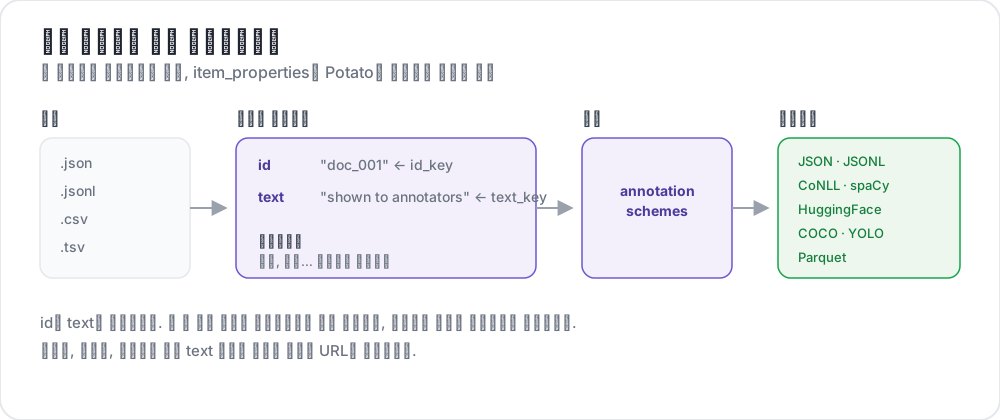 입력 파일에서 내보낸 레이블까지
지원 형식
| 형식 | 확장자 | 설명 |
|---|---|---|
| JSON | .json | 객체 배열 |
| JSON Lines | .jsonl | 한 줄에 하나의 JSON 객체 |
| CSV | .csv | 쉼표로 구분된 값 |
| TSV | .tsv | 탭으로 구분된 값 |
JSON 형식
가장 일반적인 형식입니다. 데이터는 객체 배열이어야 합니다.
[
  {
    "id": "doc_001",
    "text": "This is the first document to annotate.",
    "source": "twitter",
    "date": "2024-01-15"
  },
  {
    "id": "doc_002",
    "text": "This is the second document.",
    "source": "reddit",
    "date": "2024-01-16"
  }
]
JSON Lines 형식
각 줄이 별개의 JSON 객체입니다. 대규모 데이터셋에 유용합니다.
{"id": "doc_001", "text": "First document"}
{"id": "doc_002", "text": "Second document"}
{"id": "doc_003", "text": "Third document"}
CSV/TSV 형식
헤더가 있는 표 형식 데이터입니다.
id,text,source
doc_001,"This is the first document",twitter
doc_002,"This is the second document",reddit
구성
기본 설정
YAML에서 데이터 파일과 필드 매핑을 구성합니다.
data_files:
  - "data/documents.json"

item_properties:
  id_key: id      # Field name for unique ID
  text_key: text  # Field name for content to annotate
여러 데이터 파일
여러 데이터 소스를 결합합니다.
data_files:
  - "data/batch_1.json"
  - "data/batch_2.json"
  - "data/batch_3.jsonl"
파일은 순서대로 처리되어 결합됩니다.
데이터 유형
일반 텍스트
단순한 텍스트 내용입니다.
{
  "id": "1",
  "text": "The product arrived quickly and works great!"
}
미디어 파일
이미지, 비디오, 오디오를 참조합니다.
{
  "id": "1",
  "image_path": "images/photo_001.jpg"
}item_properties:
id_key: id
image_key: image_path대화/목록
JSON 목록이 담긴 text 필드는 한 줄에 항목 하나씩 배치됩니다. 대화는 세로로 읽는 편이 자연스럽기 때문입니다. 쌍별 비교를 위해 항목을 나란히 놓으려면 list_as_text.horizontal을 설정합니다.
{
  "id": "1",
  "text": ["Option A", "Option B", "Option C"]
}
텍스트 쌍
JSON 객체가 담긴 text 필드는 구성에서 선언한 표시 유형(conversation_tree, web_agent_trace 등)이 렌더링합니다. 표시 유형을 선언하지 않으면 서식이 적용된 JSON으로 표시되므로, 비교 작업에서는 표시 유형을 선언하십시오.
{
  "id": "pair_001",
  "text": {
    "A": "Response from Model A",
    "B": "Response from Model B"
  }
}
HTML 파일
.html 파일은 task_dir 아래 폴더에 두고 일반 text 필드에서 가리키십시오. Potato에는 HTML 전용 항목 속성이 없기 때문입니다. 함께 제공되는 examples/advanced/html-annotation 작업은 각 파일을 임베드합니다.
{
  "id": "1",
  "text": "<embed width=\"1020\" height=\"440\" src=\"data/html_data/1.html\" type=\"text/html\">"
}
맥락 기반 어노테이션
주요 텍스트와 함께 맥락 정보를 포함합니다.
{
  "id": "1",
  "text": "This is great!",
  "context": "Previous message: How do you like the new feature?"
}
id와 text 이외의 필드는 kwargs를 통해 페이지에 전달됩니다. kwargs에는 각 항목에서 가져올 추가 키의 이름을 적습니다.
item_properties:
  id_key: id
  text_key: text
  kwargs:
    - context
표시 구성
목록 표시 옵션
목록 값을 가진 필드의 배치 방식을 제어합니다. 이 키는 하위 키 세 개를 받으며, list_as_text: true로 쓰면 기본값으로 켜집니다.
list_as_text:
  # Prefix each item so an annotator can refer to one by name.
  text_list_prefix_type: alphabet   # alphabet, number, bullet, or none

  # Side-by-side suits a pairwise comparison. The default is vertical.
  horizontal: true

  # Shade alternate turns, which keeps a long dialogue readable.
  alternating_shading: true
HTML 콘텐츠
text 필드의 마크업은 별도의 구성 키 없이 렌더링됩니다. Potato는 마크업을 이스케이프하지 않고 새니타이즈하므로, 허용 목록에 있는 태그(<b>, <i>, <span> 등)는 서식으로 표시되고 <script>를 비롯해 목록에 없는 것은 모두 이스케이프되어 동작하지 않습니다. 스팬 하이라이트가 마크업 형태로 항목에 삽입되기 때문에 필드 전체를 이스케이프할 수는 없습니다.
{
  "id": "1",
  "text": "<p>This is <strong>formatted</strong> text.</p>"
}
출력 구성
출력 디렉터리
어노테이션이 저장될 위치를 지정합니다.
output_annotation_dir: "output/"출력 형식
어노테이션은 항상 사용자별 user_state.json 파일에 보관됩니다. export_annotation_format을 지정하면 여기에 더해 <output_annotation_dir>/exports/<format>/에 평면 내보내기 파일이 주기적으로 기록되며, 분석에는 이 형식을 쓰는 것이 좋습니다. json이라는 이름의 내보내기 형식은 없습니다.
export_annotation_format: "jsonl" # or csv, tsv, parquet, coco, conll_2003, ...전체 레지스트리는 python -m potato.export --list-formats를 실행해 확인하십시오.
출력 구조
각 user_state.json에는 해당 어노테이터의 레이블이 인스턴스별로 저장되며, 스팬은 따로 기록됩니다.
{
  "user_id": "annotator_1",
  "instance_id_to_label_to_value": {
    "doc_001": {
      "sentiment": {"labels": {"positive": true}}
    }
  },
  "instance_id_to_span_to_value": {
    "doc_001": {
      "ner": [
        {"start": 0, "end": 5, "label": "PERSON", "text": "Alice"}
      ]
    }
  }
}
특수 데이터 유형
Best-Worst 스케일링
순위 매기기 작업에는 쉼표로 구분된 항목을 사용합니다.
{
  "id": "1",
  "text": "Item A,Item B,Item C,Item D"
}
사용자 정의 인자
표시나 필터링을 위해 추가 필드를 포함합니다.
{
  "id": "1",
  "text": "Document content",
  "category": "news",
  "priority": "high",
  "custom_field": "any value"
}
데이터베이스 백엔드
대규모 데이터셋에는 MySQL을 사용합니다.
database:
  type: mysql
  host: localhost
  port: 3306
  database: potato_db
  username: ${DB_USER}
  password: ${DB_PASSWORD}
Potato는 첫 시작 시 필요한 테이블을 자동으로 생성합니다.
데이터 검증
Potato는 시작 시 데이터를 검증합니다.
- ID 필드 누락: 모든 항목에는 고유 식별자가 필요합니다
- 텍스트 필드 누락: 항목에는 어노테이션할 내용이 필요합니다
- 중복 ID: 모든 ID는 고유해야 합니다
- 파일을 찾을 수 없음: 데이터 파일 경로를 확인하십시오
전체 예시
annotation_task_name: "Document Classification"
task_dir: "."
port: 8000

# Data configuration
data_files:
  - "data/documents.json"

item_properties:
  id_key: id
  text_key: text

# Display settings
list_as_text:
  text_list_prefix_type: number
  horizontal: false

# Output
output_annotation_dir: "output/"
export_annotation_format: "jsonl"

# Annotation scheme
annotation_schemes:
  - annotation_type: radio
    name: category
    description: "Select the document category"
    labels:
      - News
      - Opinion
      - Tutorial
      - Other

user_config:
  allow_all_users: true
  users: []
모범 사례
1. 의미 있는 ID 사용
추적과 디버깅이 쉬워집니다.
{"id": "twitter_2024_001", "text": "..."}2. 텍스트를 간결하게 유지
긴 텍스트는 어노테이션 속도를 늦춥니다. 다음을 고려하십시오.
- 핵심 부분만 잘라내기
- 요약 제공하기
- 스크롤 컨테이너 사용하기
3. 메타데이터 포함
필터링과 분석에 도움이 됩니다.
{
  "id": "1",
  "text": "Content",
  "source": "twitter",
  "date": "2024-01-15",
  "language": "en"
}
4. 불러오기 전에 검증
데이터를 오프라인에서 확인하십시오.
import json

with open('data.json') as f:
    data = json.load(f)

# Check for required fields
for item in data:
    assert 'id' in item, f"Missing id: {item}"
    assert 'text' in item, f"Missing text: {item}"

# Check for duplicates
ids = [item['id'] for item in data]
assert len(ids) == len(set(ids)), "Duplicate IDs found"

print(f"Validated {len(data)} items")
5. 원본 데이터 백업
재현성을 위해 원시 데이터를 어노테이션과 별도로 보관하십시오.
6. 큰 파일에는 JSON Lines 사용
JSON 배열보다 메모리 효율이 높습니다.
# Convert JSON array to JSON Lines
cat data.json | jq -c '.[]' > data.jsonl
더 읽어보기
- 데이터 디렉터리 로딩: 실시간 감시 기능과 함께 디렉터리에서 로드
- 대화 어노테이션: 여러 항목 데이터 표시
- 내보내기 형식: 출력 형식 옵션
구현 세부 사항은 원본 문서를 참고하십시오.