추출형 QA
스팬 기반 답변 추출, 독해 작업, 지문 강조 주석을 위한 SQuAD 스타일 질의응답 인터페이스를 Potato에서 구축합니다.
추출형 QA 주석 스키마는 주석자가 텍스트 지문에서 답변 스팬을 직접 강조하는 질의응답 인터페이스를 제공합니다. 이 스키마는 독해 데이터셋 생성, SQuAD 스타일 QA 주석, 사실 검증, 그리고 원본 텍스트에서 답변을 그대로 추출하는 모든 작업에 적합합니다.
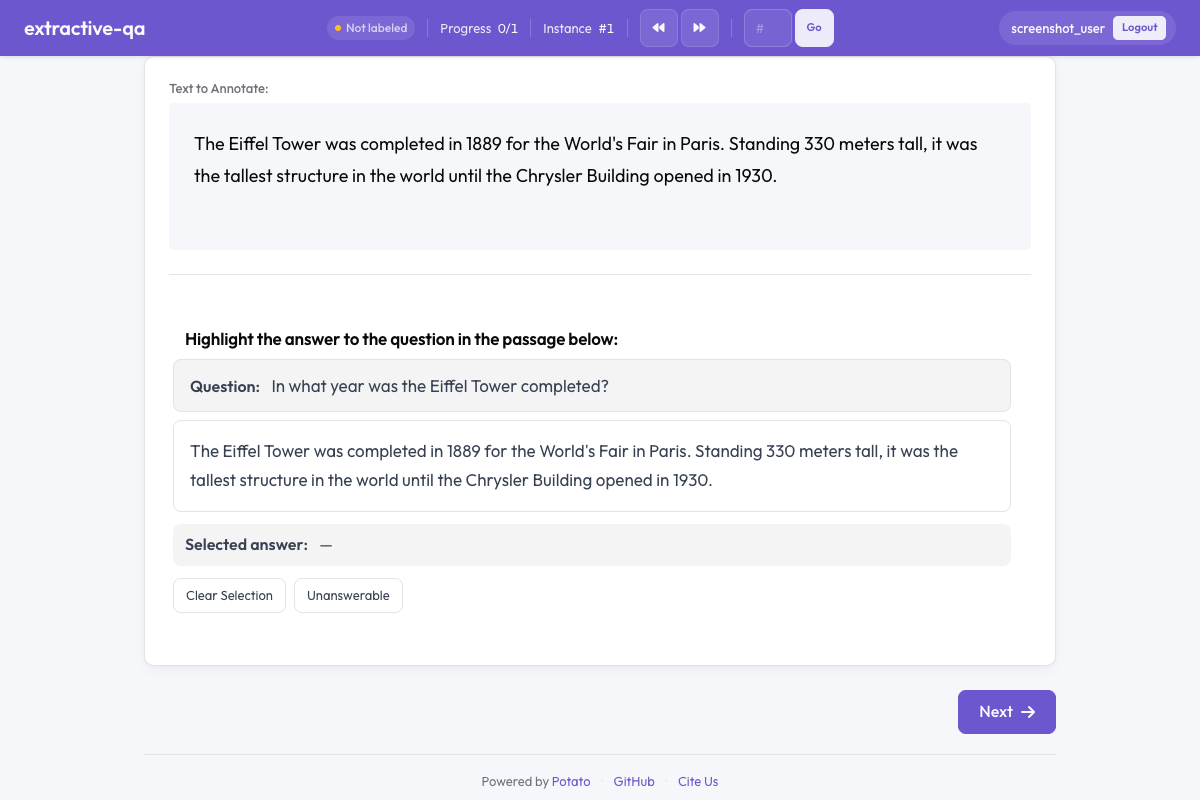 Potato의 추출형 질의응답
개요
추출형 QA 스키마는 다음을 제시합니다.
- 지문 위에 두드러지게 표시되는 질문
- 주석자가 강조하여 답변 스팬을 선택하는 텍스트 지문
- 선택한 답변 텍스트를 표시하는 색상 코드 강조
- 지문에서 답변할 수 없는 질문을 위한 답변 불가 옵션
빠른 시작
yaml
annotation_schemes:
  - annotation_type: extractive_qa
    name: answer_span
    description: Highlight the answer to the question in the passage below.
    question_field: question
    passage_field: passage
    allow_unanswerable: true
설정 옵션
| 필드 | 유형 | 기본값 | 설명 |
|---|---|---|---|
annotation_type | string | 필수 | "extractive_qa"여야 합니다 |
name | string | 필수 | 이 스키마의 고유 식별자 |
description | string | 필수 | 주석자에게 표시되는 지침 |
question_field | string | "question" | 질문 텍스트가 들어 있는 데이터 JSON의 필드 |
passage_field | string | "" | 지문 텍스트가 들어 있는 데이터 JSON의 필드(빈 문자열은 기본 텍스트 필드를 사용) |
allow_unanswerable | boolean | true | 질문을 답변 불가로 표시하는 체크박스를 표시 |
highlight_color | string | "#FFEB3B" | 답변 강조에 사용할 CSS 색상 |
예시
SQuAD 스타일 QA
yaml
annotation_schemes:
  - annotation_type: extractive_qa
    name: squad_answer
    description: >
      Select the shortest span in the passage that answers the question.
      If the question cannot be answered from the passage, mark it as unanswerable.
    question_field: question
    passage_field: context
    allow_unanswerable: true
    highlight_color: "#FFEB3B"
샘플 데이터:
json
{
  "id": "q001",
  "question": "When was the university founded?",
  "context": "The University of Michigan was founded in 1817 in Detroit and moved to Ann Arbor in 1837. It is one of the oldest public universities in the United States."
}
사실 검증
yaml
annotation_schemes:
  - annotation_type: extractive_qa
    name: evidence_span
    description: >
      Highlight the evidence in the passage that supports or refutes the claim.
      Mark as unanswerable if the passage contains no relevant evidence.
    question_field: claim
    passage_field: document
    allow_unanswerable: true
    highlight_color: "#81C784"
답변 불가 없는 답변 추출
yaml
annotation_schemes:
  - annotation_type: extractive_qa
    name: definition_extraction
    description: >
      Highlight the definition of the term in the passage.
      Every passage contains a definition — select the most precise span.
    question_field: term
    passage_field: text
    allow_unanswerable: false
    highlight_color: "#64B5F6"
출력 형식
json
{
  "answer_span": {
    "labels": {
      "answer_start": 45,
      "answer_end": 49,
      "answer_text": "1817",
      "unanswerable": false
    }
  }
}
주석자가 질문을 답변 불가로 표시한 경우:
json
{
  "answer_span": {
    "labels": {
      "unanswerable": true
    }
  }
}
모범 사례
- 주석자에게 최소 스팬을 선택하도록 안내 - 질문에 완전히 답하는 가장 짧은 텍스트는 더 깔끔한 학습 데이터를 만듭니다
- 현실적인 작업에는 allow_unanswerable 사용 - 실제 QA에는 답변할 수 없는 질문이 자주 포함되며, 이 옵션을 비활성화하면 주석자가 추측하게 됩니다
- 읽기 쉬운 강조 색상 선택 - 강조 색상이 텍스트와 충분한 대비를 이루어 읽기 편하도록 합니다
- 지문을 적절한 길이로 유지 - 지문당 100~500단어가 잘 맞으며, 너무 긴 지문은 스팬 선택을 번거롭게 만듭니다
- 명확한 질문 형식 제공 - 질문이 잘 구성되고 모호하지 않도록 하여 주석자의 혼란을 줄입니다
더 읽어보기
- 스팬 주석 - 일반적인 스팬 레이블링
- 텍스트 및 숫자 입력 - 자유 텍스트 답변 입력
- AI 지원 - AI 보조 주석 힌트
구현 세부 사항은 원본 문서를 참조하세요.