리커트 척도
Potato에서 리커트 척도를 구성하여 5점, 7점 또는 사용자 지정 점수 척도로 태도, 의견, 품질 평가를 측정합니다. 양 끝점 레이블과 필수 검증을 지원합니다.
리커트 척도는 어노테이터가 항목을 숫자 척도로 평가할 수 있게 하며, 감정 강도, 동의 수준, 품질 평가에 흔히 사용됩니다.
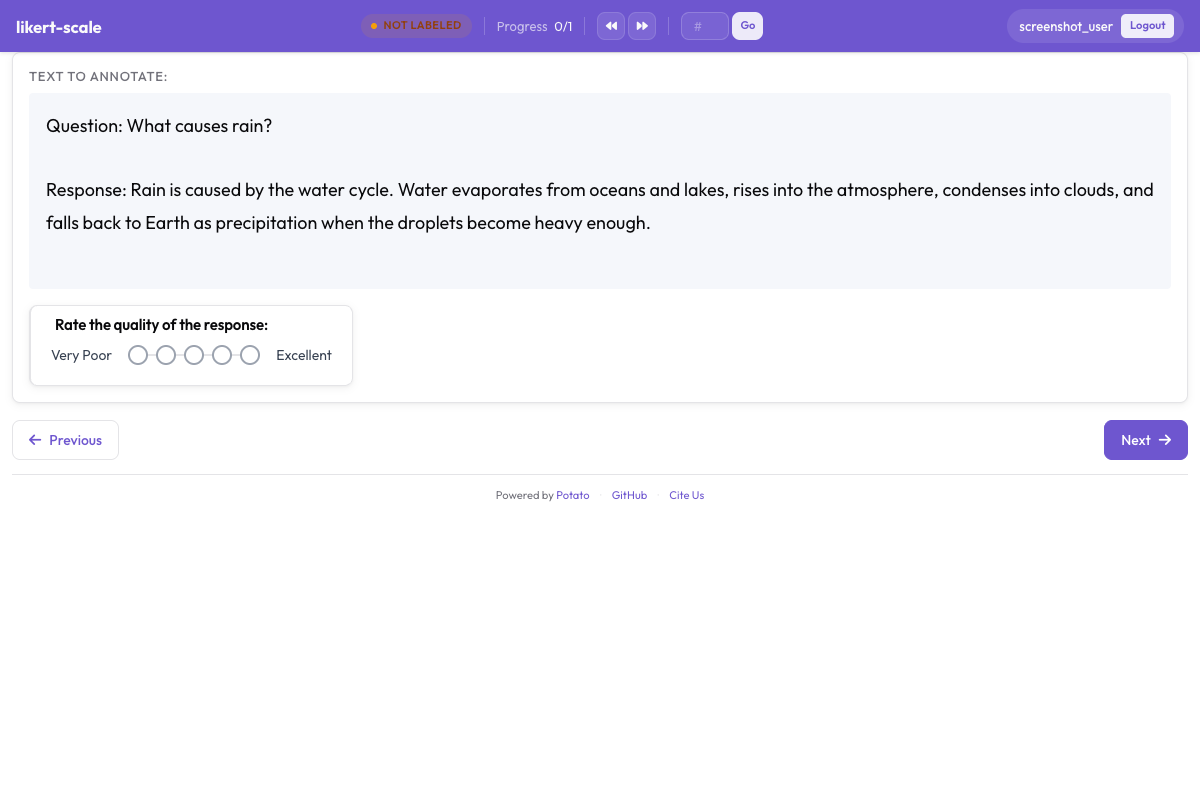 Likert scale with labeled endpoints for rating tasks in Potato
기본 설정
yaml
annotation_schemes:
  - annotation_type: likert
    name: agreement
    description: "How much do you agree with this statement?"
    size: 5
    min_label: "Strongly Disagree"
    max_label: "Strongly Agree"
설정 옵션
척도 크기
점수의 개수를 정의합니다.
yaml
size: 5  # 5-point scale (1-5)
size: 7  # 7-point scale (1-7)
size: 10 # 10-point scale (1-10)
끝점 레이블
척도의 양 끝점에 레이블을 지정합니다.
yaml
min_label: "Not at all"
max_label: "Extremely"
중간 레이블
홀수 척도의 경우 중간 지점에 레이블을 지정합니다.
yaml
size: 5
min_label: "Strongly Disagree"
max_label: "Strongly Agree"
mid_label: "Neutral"  # Shown at position 3
모든 레이블
척도의 모든 점에 레이블을 지정합니다.
yaml
size: 5
labels:
  1: "Strongly Disagree"
  2: "Disagree"
  3: "Neutral"
  4: "Agree"
  5: "Strongly Agree"
일반적인 척도 유형
동의 척도 (5점)
yaml
- annotation_type: likert
  name: agreement
  size: 5
  min_label: "Strongly Disagree"
  max_label: "Strongly Agree"
빈도 척도
yaml
- annotation_type: likert
  name: frequency
  size: 5
  labels:
    1: "Never"
    2: "Rarely"
    3: "Sometimes"
    4: "Often"
    5: "Always"
품질 척도
yaml
- annotation_type: likert
  name: quality
  size: 5
  min_label: "Very Poor"
  max_label: "Excellent"
중요도 척도
yaml
- annotation_type: likert
  name: importance
  size: 5
  min_label: "Not Important"
  max_label: "Extremely Important"
만족도 척도
yaml
- annotation_type: likert
  name: satisfaction
  size: 5
  min_label: "Very Dissatisfied"
  max_label: "Very Satisfied"
키보드 단축키
숫자 키 단축키를 활성화합니다.
yaml
- annotation_type: likert
  name: rating
  size: 5
표시 옵션
가로 레이아웃 (기본값)
yaml
- annotation_type: likert
  name: rating
  size: 5
숫자 표시
숫자 값을 표시합니다.
yaml
- annotation_type: likert
  name: rating
  size: 5
여러 개의 리커트 척도
여러 측면을 평가합니다.
yaml
annotation_schemes:
  - annotation_type: likert
    name: clarity
    description: "How clear is this text?"
    size: 5
    min_label: "Very Unclear"
    max_label: "Very Clear"

  - annotation_type: likert
    name: relevance
    description: "How relevant is this text?"
    size: 5
    min_label: "Not Relevant"
    max_label: "Highly Relevant"

  - annotation_type: likert
    name: quality
    description: "Overall quality rating"
    size: 5
    min_label: "Poor"
    max_label: "Excellent"
Multirate (행렬 평가)
여러 항목을 동일한 척도로 평가할 때 사용합니다.
yaml
- annotation_type: multirate
  name: aspect_ratings
  description: "Rate each aspect"
각 행이 항목이고 열이 척도 점인 행렬 형태로 표시됩니다.
의미 변별 척도
서로 반대되는 두 개념 사이에서 평가합니다.
yaml
- annotation_type: likert
  name: tone
  size: 7
  min_label: "Formal"
  max_label: "Informal"

- annotation_type: likert
  name: sentiment
  size: 7
  min_label: "Negative"
  max_label: "Positive"
필수 vs. 선택
평가를 필수로 만듭니다.
yaml
- annotation_type: likert
  name: rating
  size: 5
  label_requirement:
    required: true
기본값
미리 선택된 값을 설정합니다.
yaml
- annotation_type: likert
  name: rating
  size: 5
전체 예시: 설문 작업
yaml
annotation_task_name: "Content Quality Survey"

annotation_schemes:
  - annotation_type: likert
    name: clarity
    description: "How clear and understandable is this content?"
    size: 5
    min_label: "Very Unclear"
    max_label: "Very Clear"

  - annotation_type: likert
    name: accuracy
    description: "How accurate is the information?"
    size: 5
    min_label: "Very Inaccurate"
    max_label: "Very Accurate"

  - annotation_type: likert
    name: usefulness
    description: "How useful would this be for the target audience?"
    size: 5
    min_label: "Not Useful"
    max_label: "Very Useful"

  - annotation_type: text
    name: feedback
    description: "Any additional feedback? (Optional)"
    label_requirement:
      required: false
모범 사례
- 홀수를 사용하세요 - 중립적인 중간 지점이 있는 척도에 적합합니다
- 짝수를 사용하세요 - 방향을 강제하려는 경우(중립 옵션 없음)에 적합합니다
- 5점 또는 7점 척도가 대부분의 용도에 가장 적합합니다
- 끝점에 명확하게 레이블을 지정하세요 - 척도를 고정하는 데 도움이 됩니다
- 일관성을 유지하세요 - 프로젝트 전반에 걸쳐 척도 방향을 통일합니다
- 키보드 단축키를 고려하세요 - 더 빠른 어노테이션에 도움이 됩니다