신뢰도 어노테이션
Likert 척도나 슬라이더를 사용하여 Potato에서 다른 어노테이션과 함께 신뢰도 평가를 추가해 어노테이터의 확신 정도를 포착합니다.
신뢰도 어노테이션 스키마는 어노테이터가 자신이 만든 다른 어노테이션에 대한 신뢰도를 평가할 수 있게 해 줍니다. 신뢰도 척도(Likert 또는 슬라이더)를 대상 어노테이션 스키마와 결합하여, 연구자가 어노테이터가 무엇을 선택했는지뿐만 아니라 그 선택에 얼마나 확신했는지까지 측정할 수 있게 합니다.
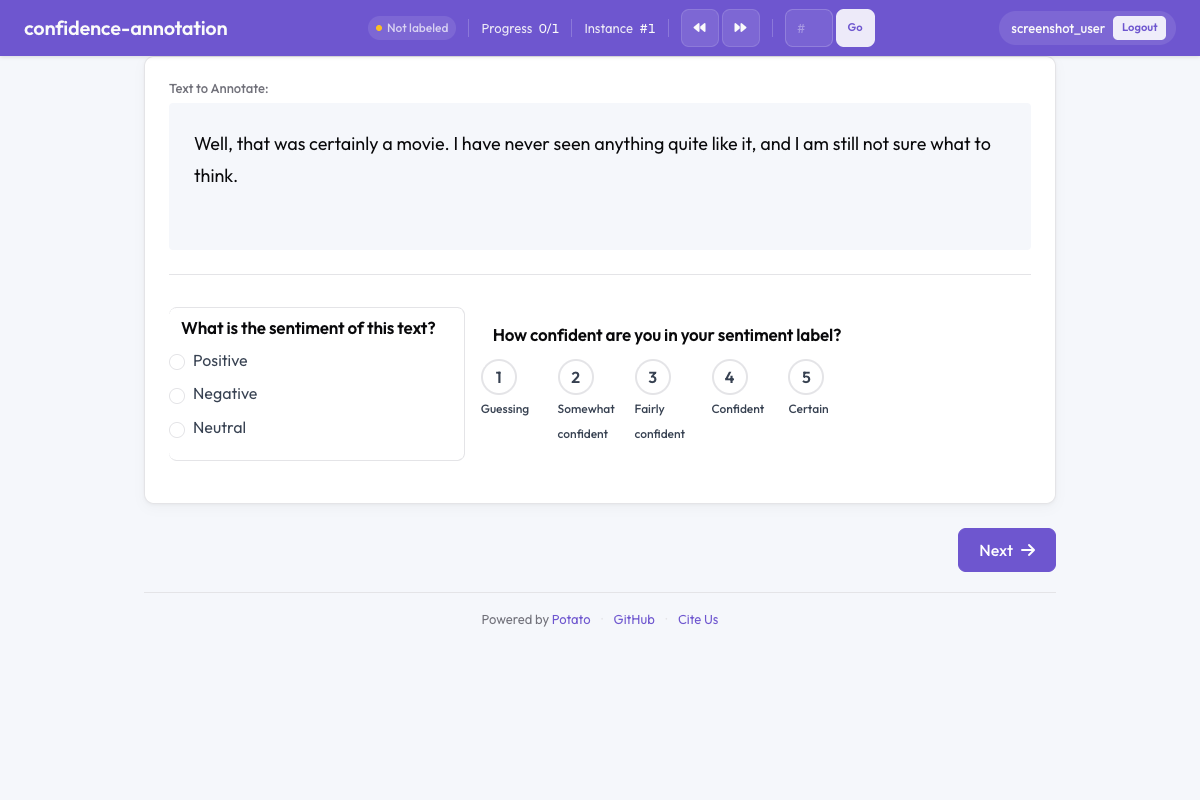 Potato의 확신도 주석
개요
신뢰도 어노테이션은 어노테이션 품질을 연구하고, 모호한 항목을 식별하며, 집계 과정에서 레이블에 가중치를 부여하는 데 필수적입니다. 구성되면 신뢰도 평가 위젯이 대상 어노테이션 옆에 나타나, 어노테이터가 자신의 결정에 얼마나 확신하는지 표시하도록 안내합니다.
빠른 시작
yaml
annotation_schemes:
  - annotation_type: radio
    name: sentiment
    description: What is the sentiment of this text?
    labels: ["Positive", "Negative", "Neutral"]

  - annotation_type: confidence
    name: sentiment_confidence
    description: How confident are you in your sentiment label?
    target_schema: sentiment
    scale_type: likert
    scale_points: 5
구성 옵션
| 필드 | 유형 | 기본값 | 설명 |
|---|---|---|---|
annotation_type | string | 필수 | "confidence"이어야 합니다 |
name | string | 필수 | 이 스키마의 고유 식별자 |
description | string | 필수 | 어노테이터에게 표시되는 안내문 |
target_schema | string | 선택 | 이 신뢰도 평가가 적용되는 어노테이션 스키마의 이름 |
scale_type | string | "likert" | 척도 유형: 이산 점수에는 "likert", 연속 척도에는 "slider" |
scale_points | integer | 5 | Likert 척도의 점 개수(슬라이더에서는 무시됨) |
labels | array | 선택 | 척도 점에 대한 사용자 지정 레이블(예: ["Not confident", "Very confident"]) |
slider_min | integer | — | 슬라이더의 최솟값(scale_type이 "slider"일 때만 사용됨) |
slider_max | integer | — | 슬라이더의 최댓값(scale_type이 "slider"일 때만 사용됨) |
label_requirement.required | boolean | false | 다음으로 넘어가기 전에 신뢰도 평가를 완료해야 하는지 여부 |
예시
Likert 신뢰도 척도
yaml
annotation_schemes:
  - annotation_type: radio
    name: toxicity
    description: Is this comment toxic?
    labels: ["Toxic", "Not Toxic"]

  - annotation_type: confidence
    name: toxicity_confidence
    description: How confident are you in your toxicity judgment?
    target_schema: toxicity
    scale_type: likert
    scale_points: 5
    labels: ["Not at all confident", "Slightly confident", "Moderately confident", "Very confident", "Extremely confident"]
슬라이더 신뢰도 척도
yaml
annotation_schemes:
  - annotation_type: radio
    name: stance
    description: What stance does the author take?
    labels: ["Support", "Oppose", "Neutral"]

  - annotation_type: confidence
    name: stance_confidence
    description: Rate your confidence from 0 (guessing) to 100 (certain).
    target_schema: stance
    scale_type: slider
필수 신뢰도 평가
yaml
annotation_schemes:
  - annotation_type: multiselect
    name: topics
    description: Select all topics that apply.
    labels: ["Politics", "Economy", "Health", "Education"]

  - annotation_type: confidence
    name: topics_confidence
    description: How confident are you in your topic selections?
    target_schema: topics
    scale_type: likert
    scale_points: 3
    labels: ["Low", "Medium", "High"]
독립형 신뢰도(대상 없음)
신뢰도 어노테이션은 일반적인 자기 평가를 위해 대상 스키마 없이도 사용할 수 있습니다:
yaml
annotation_schemes:
  - annotation_type: confidence
    name: task_familiarity
    description: How familiar are you with this topic area?
    scale_type: likert
    scale_points: 5
    labels: ["Not familiar", "Slightly familiar", "Somewhat familiar", "Very familiar", "Expert"]
출력 형식
json
{
  "toxicity_confidence": {
    "labels": {
      "confidence": 4
    }
  }
}
Likert 척도에서는 값이 1부터 scale_points까지의 범위를 가집니다. 슬라이더에서는 값이 slider_min부터 slider_max까지의 범위를 가집니다.
모범 사례
- 항상 대상 스키마와 결합하세요 - 신뢰도 평가는 특정 어노테이션 결정과 연결될 때 가장 유용합니다
- 단순함을 위해 Likert를 사용하세요 - 이산 척도는 어노테이터가 더 빠르고 쉽게 사용할 수 있습니다
- 세밀한 측정을 위해 슬라이더를 사용하세요 - 후속 분석을 위해 정밀한 신뢰도 값이 필요할 때 적합합니다
- 신뢰도를 필수로 설정하세요 - 선택적 신뢰도 평가는 자주 건너뛰게 되어 데이터의 유용성이 떨어집니다
- 신뢰도 패턴을 분석하세요 - 낮은 신뢰도 항목은 판정이나 추가 어노테이션의 좋은 후보입니다
더 읽어보기
구현 세부 사항은 원본 문서를 참조하세요.