품질 관리
주의 확인 항목, 골드 스탠다드 검증, 설정 가능한 주석자 중복, Krippendorff 알파 보고를 통해 Potato에서 주석 품질을 보장합니다.
Potato는 고품질 주석을 보장하기 위한 포괄적인 품질 관리 기능을 제공합니다. 여기에는 주의 확인, 골드 스탠다드, 사전 주석 지원, 실시간 일치도 지표가 포함됩니다.
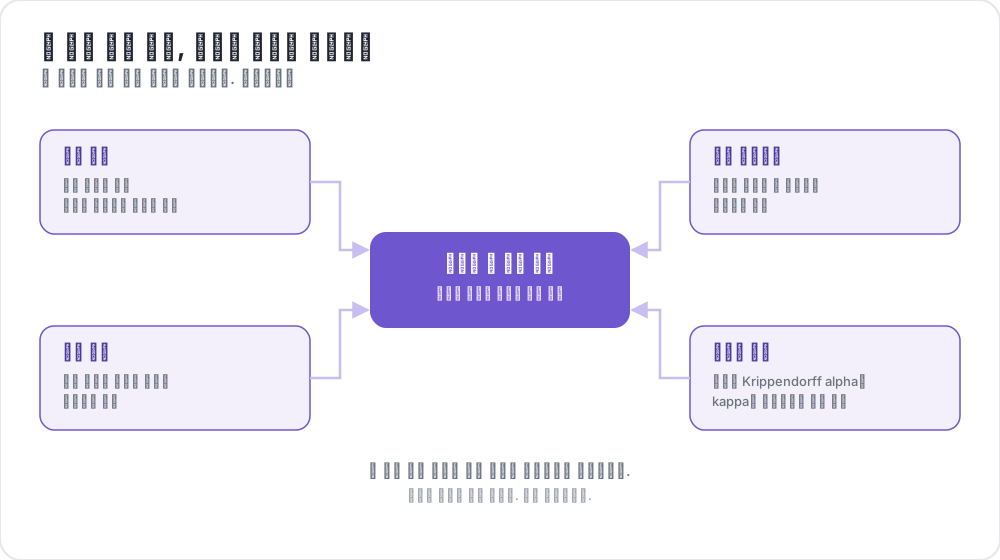 네 가지 품질 관리, 하나의 신뢰할 데이터셋
개요
Potato의 품질 관리는 네 가지 핵심 기능으로 구성됩니다.
- 주의 확인 - 정답이 알려진 항목으로 주석자의 참여를 검증합니다
- 골드 스탠다드 - 전문가가 레이블을 지정한 항목과 비교하여 정확도를 추적합니다
- 사전 주석 지원 - 모델 예측으로 양식을 미리 채웁니다
- 일치도 지표 - 주석자 간 일치도를 실시간으로 계산합니다
주의 확인
주의 확인은 정답이 알려진 항목으로, 주석자가 주의를 기울이고 있으며 무작위로 클릭하지 않는지를 검증합니다.
설정
attention_checks:
  enabled: true
  items_file: "attention_checks.json"

  # How often to inject attention checks
  frequency: 10              # Insert one every 10 items
  # OR
  probability: 0.1           # 10% chance per item

  # Optional: flag suspiciously fast responses
  min_response_time: 3.0     # Flag if answered in < 3 seconds

  # Failure handling
  failure_handling:
    warn_threshold: 2        # Show warning after 2 failures
    warn_message: "Please read items carefully before answering."
    block_threshold: 5       # Block user after 5 failures
    block_message: "You have been blocked due to too many incorrect responses."
주의 확인 항목 파일
[
  {
    "id": "attn_001",
    "text": "Please select 'Positive' for this item to verify you are reading carefully.",
    "expected_answer": {
      "sentiment": "positive"
    }
  }
]
골드 스탠다드
골드 스탠다드는 주석자의 정확도를 측정하는 데 사용되는, 전문가가 레이블을 지정한 항목입니다. 기본적으로 골드 스탠다드는 조용히 동작합니다 — 결과는 관리자 검토를 위해 기록되지만 주석자는 피드백을 보지 않습니다.
설정
gold_standards:
  enabled: true
  items_file: "gold_standards.json"

  # How to use gold standards
  mode: "mixed"              # Options: training, mixed, separate
  frequency: 20              # Insert one every 20 items

  # Accuracy requirements
  accuracy:
    min_threshold: 0.7       # Minimum required accuracy (70%)
    evaluation_count: 10     # Evaluate after this many gold items

  # Feedback settings (disabled by default)
  feedback:
    show_correct_answer: false
    show_explanation: false

  # Auto-promotion from high-agreement items
  auto_promote:
    enabled: true
    min_annotators: 3
    agreement_threshold: 1.0   # 1.0 = unanimous
골드 스탠다드 항목 파일
[
  {
    "id": "gold_001",
    "text": "The service was absolutely terrible and I will never return.",
    "gold_label": {
      "sentiment": "negative"
    },
    "explanation": "Strong negative language clearly indicates negative sentiment.",
    "difficulty": "easy"
  }
]
자동 승격
여러 주석자가 일치할 때 항목은 자동으로 골드 스탠다드가 될 수 있습니다.
gold_standards:
  auto_promote:
    enabled: true
    min_annotators: 3          # Wait for at least 3 annotators
    agreement_threshold: 1.0   # 100% must agree (unanimous)
사전 주석 지원
사전 주석을 사용하면 모델 예측으로 주석 양식을 미리 채울 수 있어, 능동 학습 및 교정 워크플로에 유용합니다.
설정
pre_annotation:
  enabled: true
  field: "predictions"        # Field in data containing predictions
  allow_modification: true    # Can annotators change pre-filled values?
  show_confidence: true
  highlight_low_confidence: 0.7
데이터 형식
데이터 항목에 예측을 포함합니다.
{
  "id": "item_001",
  "text": "I love this product!",
  "predictions": {
    "sentiment": "positive",
    "confidence": 0.92
  }
}
일치도 지표
Krippendorff 알파를 사용한 실시간 주석자 간 일치도 지표를 관리자 대시보드에서 확인할 수 있습니다.
설정
agreement_metrics:
  enabled: true
  min_overlap: 2             # Minimum annotators per item
  refresh_interval: 60       # Seconds between updates
Krippendorff 알파 해석
| 알파 값 | 해석 |
|---|---|
| α ≥ 0.8 | 좋은 일치 - 대부분의 목적에 신뢰할 수 있음 |
| 0.67 ≤ α ≤ 0.8 | 잠정적 일치 - 잠정적인 결론 도출 |
| 0.33 ≤ α ≤ 0.67 | 낮은 일치 - 지침 검토 필요 |
| α ≤ 0.33 | 부족한 일치 - 중대한 문제 |
관리자 대시보드 통합
/admin의 관리자 대시보드에서 품질 관리 지표를 확인합니다.
- 주의 확인: 전체 합격/불합격 비율, 주석자별 통계
- 골드 스탠다드: 주석자별 정확도, 항목별 난이도 분석
- 일치도: 스키마별 Krippendorff 알파와 해석
- 자동 승격된 항목: 높은 일치도로 승격된 항목 목록
API 엔드포인트
품질 관리 지표
GET /admin/api/quality_control주의 확인 및 골드 스탠다드 통계를 반환합니다.
일치도 지표
GET /admin/api/agreement스키마별 Krippendorff 알파와 해석을 반환합니다.
전체 예시
annotation_task_name: "Sentiment Analysis with Quality Control"

annotation_schemes:
  - name: sentiment
    annotation_type: radio
    labels: [positive, negative, neutral]
    description: "Select the sentiment of the text"

attention_checks:
  enabled: true
  items_file: "data/attention_checks.json"
  frequency: 15
  failure_handling:

gold_standards:
  enabled: true
  items_file: "data/gold_standards.json"
  mode: mixed
  frequency: 25
  accuracy:

agreement_metrics:
  enabled: true
  min_overlap: 2
  refresh_interval: 60
문제 해결
주의 확인이 나타나지 않음
items_file경로가 올바른지 확인합니다(작업 디렉터리 기준 상대 경로)- 항목에 필수 필드(
id,expected_answer)가 있는지 확인합니다 frequency또는probability가 설정되어 있는지 확인합니다
일치도 지표에 "No items with N+ annotators"가 표시됨
- 항목이 여러 사용자에 의해 주석되었는지 확인합니다
- 필요하면
min_overlap을 줄입니다 - 주석이 올바르게 저장되고 있는지 확인합니다
자주 묻는 질문
아래 질문은 품질 관리(QA) 프로세스를 구성하는 방법과, 골드 스탠다드가 세션 동안 주석자의 정확도를 어떻게 추적하는지를 다룹니다.
주석 작업의 품질 관리 프로세스는 어떻게 구성하나요?
정답이 알려진 항목을 대기열에 섞어 넣고, 여러 주석자가 함께 작업하는 항목에서 일치도를 측정합니다. Potato에서는 주의 확인이 제대로 읽지 않는 주석자를 표시하고, 골드 스탠다드가 각 주석자의 정확도를 전문가 레이블과 비교해 측정하며, 일치도 지표가 주석자들의 의견이 갈리는 질문을 보여 줍니다. 각각은 작업 YAML 설정에서 별도의 블록입니다.
골드 스탠다드는 시간이 지나며 떨어지는 주석자의 정확도를 어떻게 잡아내나요?
골드 스탠다드 항목은 20개 항목마다 하나처럼 정해진 빈도로 계속 나타나므로, 전문가 레이블 대비 정확도는 학습 단계에서 한 번만이 아니라 주석자가 작업하는 동안 내내 측정됩니다. Potato는 기본적으로 응답을 조용히 기록하고, 최소 evaluation_count개의 골드 스탠다드 항목에 대한 주석자의 정확도가 accuracy.min_threshold 아래로 떨어지면 관리자 대시보드에 해당 주석자를 표시합니다. 이 정확도는 주석자의 모든 골드 스탠다드 응답에 걸친 누적값이므로, 긴 세션의 후반에 생긴 하락은 이 값을 느리게 움직입니다. 반면 주의 확인 실패는 평균을 내지 않고 횟수로 세므로, 갑자기 실패가 이어지면 주석자가 이전에 주의 확인을 몇 번 통과했는지와 관계없이 경고 임계값에 도달합니다.
추가 자료
구현 세부 사항은 원본 문서를 참조하십시오.