AI 에이전트 평가: 에이전트 트레이스의 인간 어노테이션
Potato에서 AI 에이전트 출력의 인간 평가를 설정하는 방법을 트레이스 가져오기부터 트레이스 수준과 단계별 스키마 설계를 거쳐 내보낸 결과의 분석까지 다룹니다.
에이전트 트레이스를 python -m potato.trace_converter로 변환하고, agent_trace 표시 필드로 렌더링한 다음, 트레이스 수준의 판정과 함께 단계별 trajectory_eval 판정을 수집하세요. 실행이 어느 단계에서 잘못되었는지 짚어내는 것은 단계별 판정입니다.
성공률은 에이전트가 작업을 얼마나 자주 끝내는지 알려 주지만, 실패가 왜 실패했는지에 대해서는 아무것도 알려 주지 않습니다. 성공률이 똑같이 62%인 두 에이전트도 전혀 다른 이유로 실패할 수 있습니다. 하나는 잘못된 도구를 고르고 다른 하나는 질 나쁜 검색 결과를 두고 올바르게 추론하는 식이며, 고치는 방법도 각각 다릅니다. 단계 수준의 인간 평가는 이 둘을 구분합니다. 어노테이터가 어느 단계가 깨졌고 어떤 종류의 문제였는지를 표시하기 때문입니다.
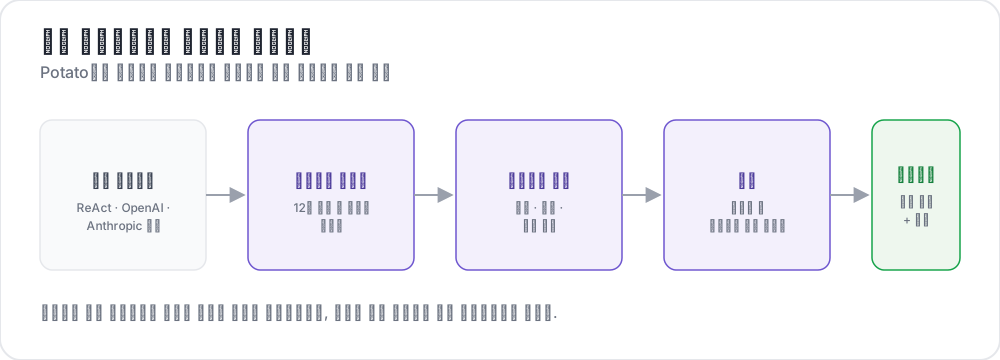 원시 트레이스에서 구조화된 판정까지
이 가이드는 웹을 검색해 질문에 답하는 ReAct 스타일 에이전트를 위한 파이프라인을 구축합니다. 구성은 Potato 2.9.1 기준으로 확인했습니다.
pip install --upgrade potato-annotation1단계: 트레이스 변환
Potato에는 15개의 트레이스 변환기가 등록되어 있으며, CLI로 설명과 함께 목록을 볼 수 있습니다.
python -m potato.trace_converter --list-formats목록에는 react, openai, anthropic, langchain, langfuse, multi_agent, mcp, otel, atif, webarena, web_agent, swebench, swe_agent_trajectory, claude_code, aider가 있습니다. LangSmith 실행 내보내기는 langchain을, CrewAI, AutoGen, LangGraph 로그는 multi_agent를 거칩니다.
react 변환기는 각 단계에 thought, action, observation 키가 있는 트레이스를 읽습니다.
{
  "id": "trace_001",
  "task": "What is the capital of Australia and what is its population?",
  "steps": [
    {"thought": "I need the capital of Australia and then its population.",
     "action": "search('capital of Australia')",
     "observation": "Canberra is the capital city of Australia."},
    {"thought": "Now I need Canberra's population.",
     "action": "search('Canberra population 2025')",
     "observation": "Canberra has a population of approximately 467,000 as of 2025."},
    {"thought": "I have both pieces of information.",
     "action": "finish('Canberra, approximately 467,000')"}
  ],
  "metadata": {"agent": "GPT-4", "tokens": 2340}
}
파일 변환은 명령 하나로 끝납니다.
python -m potato.trace_converter \
  --input raw_traces.json \
  --input-format react \
  --output data/traces.jsonl
어떤 변환기가 맞는지 확실하지 않으면 --input-format 대신 --auto-detect를 넘기세요. 레지스트리가 필드 시그니처를 보고 하나를 고릅니다. 형식을 알게 되면 명시적으로 지정하세요. 감지는 처음 일치하는 변환기를 택하고, 여러 형식이 가진 필드는 서로 겹치기 때문입니다.
모든 변환기는 같은 정규 형태로 출력하며, 그래서 하나의 구성이 여러 프레임워크에서 작동합니다. 각 줄에는 id, task_description, conversation이 들어가고, conversation은 speaker와 text를 가진 턴의 목록입니다. agent_name, metadata_table, screenshots를 가진 변환기는 이것들도 출력합니다.
{
  "id": "trace_001",
  "task_description": "What is the capital of Australia and what is its population?",
  "agent_name": "GPT-4",
  "metadata_table": [{"Property": "Steps", "Value": "3"},
                     {"Property": "tokens", "Value": "2340"}],
  "conversation": [
    {"speaker": "Agent (Thought)", "text": "I need the capital of Australia and then its population."},
    {"speaker": "Agent (Action)", "text": "search('capital of Australia')"},
    {"speaker": "Environment", "text": "Canberra is the capital city of Australia."}
  ]
}
2단계: 트레이스 렌더링
agent_trace 표시는 각 턴을 단계 유형별로 색상을 구분한 카드로 렌더링하므로, 어노테이터는 JSON 덩어리가 아니라 실행 과정을 읽게 됩니다.
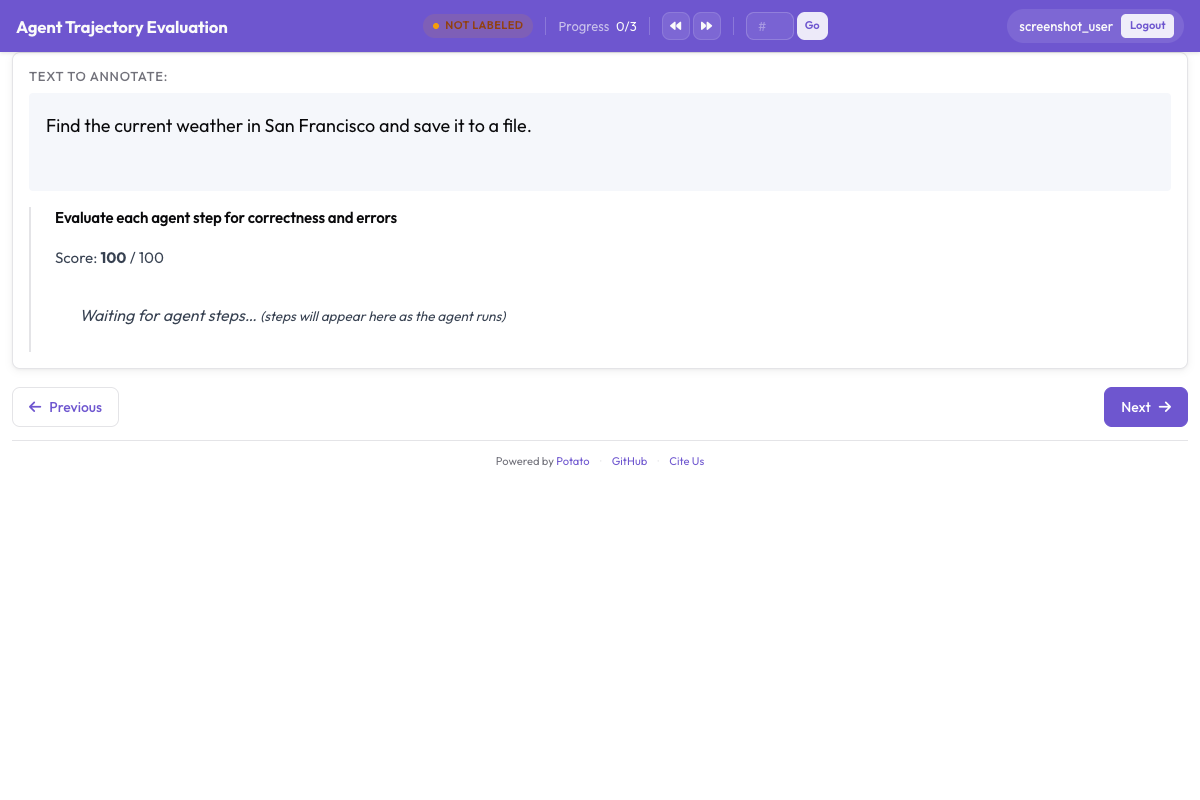
instance_display는 페이지에 무엇을 어떤 순서로 보여 줄지 정합니다. 작업 설명을 맨 위에 두는 이유는, 에이전트가 무엇을 요청받았는지 알아야 어떤 단계든 의미가 생기기 때문입니다. 메타데이터 표는 그 아래 간결한 스프레드시트 필드에 둡니다.
instance_display:
  layout:
    direction: vertical
    gap: 16px

  fields:
    - key: task_description
      type: text
      label: "Task"

    - key: metadata_table
      type: spreadsheet
      label: "Trace Info"
      display_options:
        compact: true
        max_height: 120

    - key: conversation
      type: agent_trace
      label: "Agent Trace"
      span_target: true
      display_options:
        show_step_numbers: true
        show_summary: true
        collapse_observations: true
        step_type_colors:
          thought: "#e8f4fd"
          action: "#fff3e0"
          observation: "#e8f5e9"
관찰을 접어 두면 긴 검색 결과가 트레이스의 나머지를 화면 밖으로 밀어내지 않습니다. 전체 검색 결과가 열두 개쯤 들어 있는 트레이스는 대부분 스크롤이 되고, 어노테이터는 실행의 어디쯤을 보고 있는지 놓치게 됩니다. 같은 필드에 span_target: true를 설정하면 스팬 스키마로 턴 안에서 환각된 주장의 정확한 단어를 표시할 수 있는데, 이는 단계 전체를 틀렸다고 표시하는 것보다 더 세밀한 기록입니다.
3단계: 트레이스 수준 판정
트레이스 전체는 세 가지 질문으로 다룹니다. 작업 성공은 핵심 수치이고, 답변 정확성은 나쁜 방식으로 도달한 정답을 오답과 구분하며, 효율성은 둘 다 성공한 두 에이전트를 가려내는 기준입니다.
annotation_schemes:
  - annotation_type: radio
    name: task_success
    description: "Did the agent complete the task?"
    labels:
      - name: "Success"
        tooltip: "Fully completed correctly"
      - name: "Partial success"
        tooltip: "Completed with errors or omissions"
      - name: "Failure"
        tooltip: "Not completed"
    label_requirement:
      required: true
    sequential_key_binding: true

  - annotation_type: radio
    name: answer_correctness
    description: "Is the agent's final answer factually correct?"
    labels:
      - name: "Correct"
      - name: "Partially correct"
      - name: "Incorrect"
      - name: "Cannot determine"
    label_requirement:
      required: true

  - annotation_type: likert
    name: efficiency
    description: "Did the agent reach the answer without wasted steps?"
    size: 5
    min_label: "Many unnecessary steps"
    max_label: "No wasted steps"

  - annotation_type: text
    name: evaluator_notes
    description: "Anything the ratings above do not capture"
    multiline: true
    rows: 3
"Cannot determine"은 있어야 할 이유가 있습니다. 이 선택지가 없으면 답을 확인할 방법이 없는 어노테이터는 추측하거나 틀렸다고 표시하게 되고, 어느 쪽이든 가장 중요하게 여기는 수치에 노이즈를 넣습니다.
4단계: 단계별 판정
trajectory_eval은 각 단계를 자체 컨트롤이 달린 카드로 렌더링하며, 정확성 레이블, 오류 분류 체계, 심각도를 세 개가 아닌 하나의 스키마에 담습니다. steps_key는 단계를 담고 있는 필드(변환된 트레이스라면 conversation)를 가리키고, step_text_key는 각 단계 안에서 표시할 키를 가리키게 하세요.
annotation_schemes:
  - annotation_type: trajectory_eval
    name: step_evaluation
    description: "Mark each step and classify anything that went wrong"
    steps_key: conversation
    step_text_key: text
    correctness_options:
      - correct
      - partially_correct
      - incorrect
      - unnecessary
    error_types:
      - name: reasoning
        subtypes:
          - logical_error
          - factual_error
          - planning_error
      - name: execution
        subtypes:
          - wrong_tool
          - wrong_args
          - api_error
      - name: termination
        subtypes:
          - premature_stop
          - redundant_step
    severities:
      - name: minor
        weight: -1
      - name: major
        weight: -5
      - name: critical
        weight: -10
    show_score: true
    max_score: 100
심각도 가중치는 표시된 단계 목록을 트레이스마다 비교 가능한 하나의 숫자로 바꿉니다. 기본값은 그대로 받아들이기보다 바꿀 만합니다. 가중치는 해당 작업에서 치명적 오류가 경미한 오류보다 얼마나 더 나쁜지를 나타내며, 안전성 평가에서는 이 비율이 검색 작업보다 훨씬 가파릅니다.
unnecessary를 incorrect와 분리해 두는 것도 신중하게 내려야 할 또 하나의 결정입니다. 낭비된 단계는 오류를 들여오지 않으면서 토큰과 시간을 소모합니다. 둘을 합쳐 버리면 헤매는 에이전트와 틀린 에이전트의 차이가 가려집니다.
5단계: 전체 구성
위의 내용을 모두 한 파일에 담으면 다음과 같습니다.
annotation_task_name: "ReAct Agent Evaluation"
task_dir: "."
output_annotation_dir: "output/"

data_files:
  - "data/traces.jsonl"

item_properties:
  id_key: id
  text_key: task_description

instance_display:
  layout:
    direction: vertical
    gap: 16px
  fields:
    - key: task_description
      type: text
      label: "Task"
    - key: metadata_table
      type: spreadsheet
      label: "Trace Info"
      display_options:
        compact: true
        max_height: 120
    - key: conversation
      type: agent_trace
      label: "Agent Trace"
      span_target: true
      display_options:
        show_step_numbers: true
        show_summary: true
        collapse_observations: true

annotation_schemes:
  - annotation_type: radio
    name: task_success
    description: "Did the agent complete the task?"
    labels:
      - name: "Success"
      - name: "Partial success"
      - name: "Failure"
    label_requirement:
      required: true
    sequential_key_binding: true

  - annotation_type: radio
    name: answer_correctness
    description: "Is the agent's final answer factually correct?"
    labels:
      - name: "Correct"
      - name: "Partially correct"
      - name: "Incorrect"
      - name: "Cannot determine"
    label_requirement:
      required: true

  - annotation_type: likert
    name: efficiency
    description: "Did the agent reach the answer without wasted steps?"
    size: 5
    min_label: "Many unnecessary steps"
    max_label: "No wasted steps"

  - annotation_type: text
    name: evaluator_notes
    description: "Anything the ratings above do not capture"
    multiline: true
    rows: 3

  - annotation_type: trajectory_eval
    name: step_evaluation
    description: "Mark each step and classify anything that went wrong"
    steps_key: conversation
    step_text_key: text
    correctness_options: [correct, partially_correct, incorrect, unnecessary]
    error_types:
      - name: reasoning
        subtypes: [logical_error, factual_error, planning_error]
      - name: execution
        subtypes: [wrong_tool, wrong_args, api_error]
      - name: termination
        subtypes: [premature_stop, redundant_step]
    severities:
      - name: minor
        weight: -1
      - name: major
        weight: -5
      - name: critical
        weight: -10
    show_score: true
    max_score: 100

export_annotation_format: jsonl
서버를 시작하고 http://localhost:8000을 여세요.
potato start config.yaml -p 8000어노테이션 세션의 모습
페이지에는 작업, 트레이스 정보 표, 단계 카드가 표시됩니다. 단계별 컨트롤은 각 카드에 붙어 있고, 트레이스 수준 스키마는 트레이스 아래에 있습니다. 어노테이터가 작업하는 순서는 보기보다 중요합니다. 단계를 먼저 평가하고 트레이스를 나중에 평가하면 전체 판정이 실행이 실제로 한 일에 근거하게 됩니다. 반면 성공을 먼저 평가하면 그 뒤에 오는 모든 단계 판정이 그 인상에 물드는 경향이 있습니다.
어노테이터 지침에 적어 둘 만한 습관이 세 가지 있습니다. 요약 줄을 믿지 말고 접힌 관찰을 펼쳐 보세요. 검색 결과를 잘못 읽는 것이 그럴듯하게 추론된 오답의 가장 흔한 원인입니다. 데이터셋에 정답이 있다면 작업 성공을 평가하기 전에 최종 답변을 정답과 대조하세요. 뒤의 단계를 보고 앞 단계가 이미 틀렸다는 것이 드러나면 단계 타임라인으로 그 단계로 돌아가세요.
6단계: 내보내기와 분석
JSONL 내보내기 도구는 인스턴스와 어노테이터 조합마다 레코드 하나씩을 담은 annotations.jsonl을 씁니다.
python -m potato.export --config config.yaml --format jsonl --output ./export/각 레코드에는 instance_id, user_id, labels, spans, links가 있으며, 스키마 응답은 labels 아래에 스키마 이름을 키로 하여 들어 있습니다.
import json
import pandas as pd

records = [json.loads(line) for line in open("export/annotations.jsonl")]

df = pd.DataFrame([
    {"trace": r["instance_id"], "annotator": r["user_id"], **r["labels"]}
    for r in records
])

print(df["task_success"].value_counts())
트레이스가 수백 개를 넘는다면 대신 Parquet으로 내보내고 파일을 그 자리에서 쿼리하세요. Parquet 내보내기는 instance_id, user_id, 그리고 어노테이션 스키마마다 열 하나를 가진 annotations.parquet을 쓰므로, 스키마 이름은 값이 아니라 열이 됩니다.
python -m potato.export --config config.yaml --format parquet --output ./export/import duckdb
print(duckdb.sql("""
SELECT task_success, COUNT(*) AS n
FROM 'export/annotations.parquet'
GROUP BY task_success
ORDER BY n DESC
"""))먼저 읽어 볼 것은 단계 수준 판정입니다. 트레이스 전반에서 오류 하위 유형을 세어 보면 에이전트에 체계적인 실패가 하나 있는지, 서로 무관한 실패가 길게 이어지는지 알 수 있으며, 표적 수정의 가치가 있는 것은 앞의 경우뿐입니다.
7단계: 어노테이터 추가와 자격 검증 단계
에이전트 평가는 주관적인 부분이 커서, 트레이스당 평가 하나는 오차 막대 없는 측정과 같습니다. 트레이스당 어노테이터를 세 명 두면 일치도 수치를 얻을 수 있고, 무작위 배정은 겹치는 부분이 우연히 파일 앞쪽에 있는 트레이스에 몰리지 않게 합니다.
num_annotators_per_item: 3
assignment_strategy: random
자격 검증 단계는 오류 분류 체계를 이해하지 못한 어노테이터를, 그들이 하루 동안 그것을 일관성 없이 적용하기 전에 걸러냅니다. 훈련 블록은 통과할 때까지 정답이 알려진 트레이스로 그들을 붙잡아 둡니다.
training:
  enabled: true
  data_file: "data/training_traces.jsonl"
  passing_criteria:
    min_correct: 4
  allow_retry: true
  failure_action: "repeat_training"
다른 에이전트 프레임워크
표시와 스키마는 프레임워크가 달라도 그대로이고, 바뀌는 것은 변환기뿐입니다. OpenAI Chat Completions 트레이스와 tool_use 블록이 있는 Anthropic 메시지는 각각 전용 변환기가 있고, CrewAI, AutoGen, LangGraph의 다중 에이전트 로그는 하나를 공유합니다.
python -m potato.trace_converter --input runs.json --input-format openai --output data/traces.jsonl
python -m potato.trace_converter --input runs.json --input-format anthropic --output data/traces.jsonl
python -m potato.trace_converter --input runs.json --input-format multi_agent --output data/traces.jsonl
코딩 에이전트에는 다른 표시가 필요합니다. JSON 문자열로 읽는 diff는 검토할 수가 없기 때문입니다. coding_trace 표시는 unified diff를 파일 트리와 함께 렌더링하고 긴 터미널 출력을 접습니다.
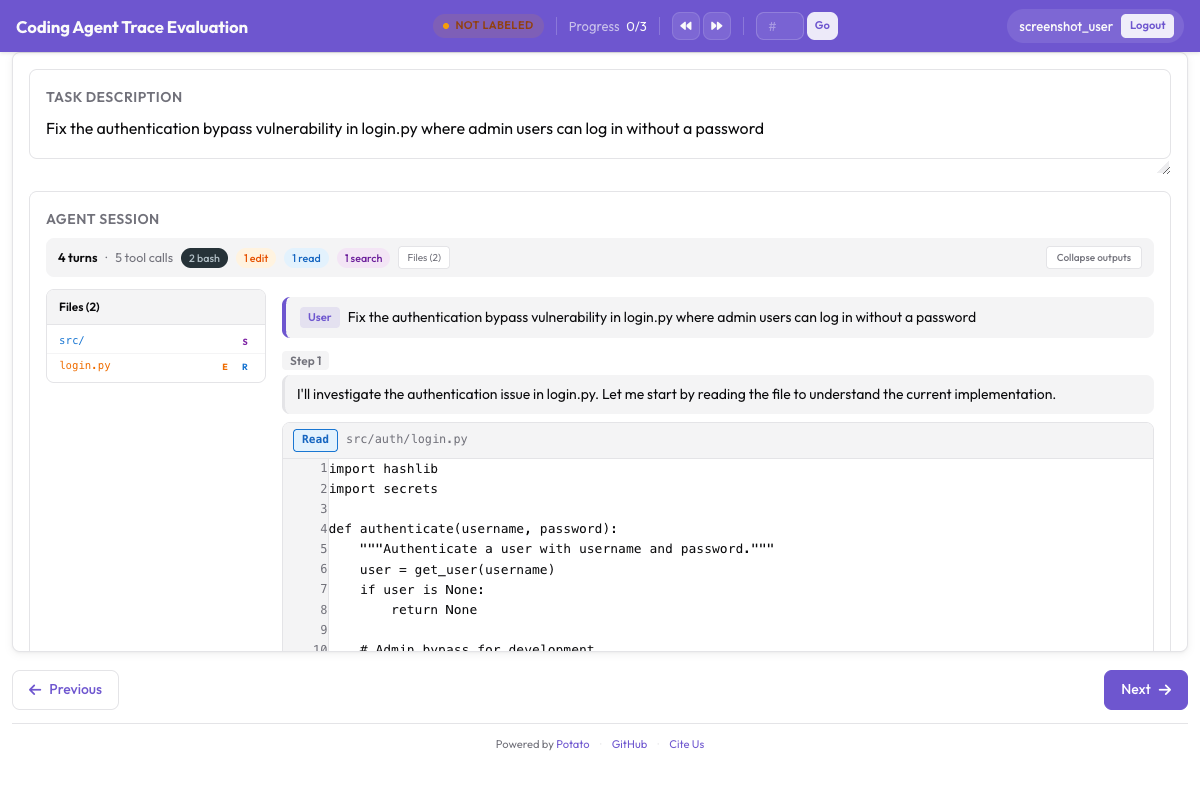
instance_display:
  fields:
    - key: structured_turns
      type: coding_trace
      label: "Agent Session"
      display_options:
        show_file_tree: true
        diff_view: unified
        collapse_long_outputs: true
        max_output_lines: 50
웹 브라우징 에이전트에는 스크린샷, 행동 오버레이, 그리고 이들 사이를 오갈 필름스트립이 필요합니다.
instance_display:
  fields:
    - key: steps
      type: web_agent_trace
      label: "Agent Browsing Trace"
      display_options:
        show_overlays: true
        show_filmstrip: true
        show_thought: true
        screenshot_max_width: 900
웹 브라우징 에이전트 어노테이션에서 오버레이 형식과 새 트레이스를 기록하는 생성 모드를 다룹니다.
이 모든 것의 구현 세부 사항은 에이전트 평가 가이드와 에이전트 트레이스 문서를 참고하세요. 첫 평가를 설정하는 중이라면 트레이스 열 개를 변환하고, 위의 구성을 실행하고, 지침을 쓰기 전에 직접 어노테이션해 보세요. 필요한 오류 분류 체계는 대개 미리 썼을 법한 것과 다르기 때문입니다.
더 읽을거리
- 에이전틱 어노테이션 문서
- 웹 브라우징 에이전트 어노테이션
- Solo Mode, 에이전틱 어노테이션을 인간과 LLM의 협업 평가와 결합할 때
- Best-Worst Scaling, 에이전트 출력을 비교해 순위를 매길 때
- Parquet 내보내기, 대규모 분석을 위해